As Amazon Associates, we earn from qualifying purchases. This means we may receive a small commission at no extra cost to you if you click through and make a purchase.
Product Dimensions
20.87"D x 12.8"W x 11.61"H
Product Weight
6.6 kg
Chassis Materials
ABS, Aluminum, Polycarbonate
Overheat Protection
Automatic Halt and Alarm at LED Temperatures Over 80℃
Full spec sheet 6 more rows from the listing
| Brand | ELEGOO |
| Model Number | EL-3D-M5 |
| LCD Panel Type | 4K Monochrome LCD |
| Light Source | Advanced COB Light Source |
| Leveling Technology | One-Click Automatic Leveling |
| Diagnostic Sensors | Smart Mechanical Sensor (Residue, Shortage, Leveling) |
If you have spent significant time operating the classic elegoo mars 3, you are likely familiar with the primary anxiety points of desktop photopolymer printing. A single support fragment breaking off and sinking into the resin vat can crack the display during the subsequent downward plunge of the build platform, while minor leveling shifts can turn an entire print into a pancake of cured polymer on the release film. For hobbyists seeking an elegoo mars 3 replacement that eliminates these mechanical headaches, the Elegoo Mars 5 enters the market with dedicated hardware safeguards designed to prevent user error from turning into damaging component replacements.
Rather than relying on manual paper-gap leveling and visual vat checks, this generation introduces active mechanical sensing, automated build plate alignment, and comprehensive thermal monitoring. In this guide, we examine the elegoo mars 3 vs mars 5 design changes, inspect the official elegoo mars 5 specs, analyze the real-world utility of elegoo mars 5 screen protection and auto leveling, and determine whether elegoo mars 5 reliability makes it a dependable addition to your workshop.
What You Get With the Elegoo Mars 5
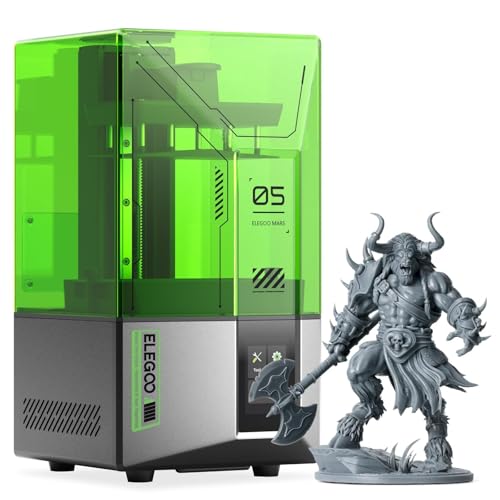

The Elegoo Mars 5 package provides a modern resin printing platform focused on automated diagnostics and physical component protection, delivering the following core hardware features and inclusions based on official product data:
- One-click automatic leveling system designed to eliminate manual paper adjustments
- Smart mechanical sensor providing residue detection to safeguard the optical panel
- Automated real-time alert system for resin shortages and leveling failures
- One-click self-check diagnostic routine to test core hardware components prior to printing
- 4K monochrome LCD screen engineered for sharp detail reproduction
- Advanced COB light source designed for uniform UV exposure across the exposure area
- Automated thermal overheat protection that halts printing and triggers an alarm when LED temperatures exceed 80℃
- Integrated cooling system engineered to extend internal LED service life
- Multi-material chassis manufactured from ABS, aluminum, and polycarbonate
- Protective UV-blocking top cover in the signature green colorway
Mechanical Sensors and Screen Protection Safeguards
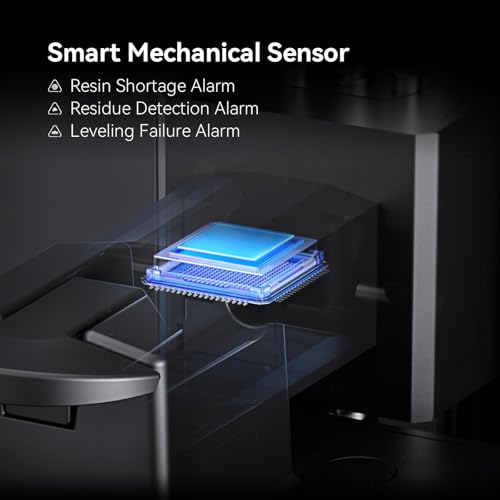
The most vulnerable component on earlier resin units like the elegoo mars 3 has always been the optical LCD panel. In conventional vat printing, if a print fails and leaves a cured chunk of polymer adhered to the film or floating in the vat, the downward force of the Z-axis drive presses that rigid block directly against the glass LCD. Without any feedback mechanism, the motor forces the build plate down, puncturing the release film, spilling liquid into the chassis, and crushing the delicate glass beneath. The Elegoo Mars 5 addresses this vulnerability by implementing a smart mechanical sensor configured for residue detection, which identifies obstructions before downward compression causes permanent glass fractures.
In addition to debris detection, the sensor array monitors the vat for material shortages and leveling alignment issues. When liquid photopolymer drops below the volume required to complete an active job, the system triggers an audible alert rather than cycling dry air and ruining the model. While these automated safeguards reduce common user errors, mechanical switches also represent potential elegoo mars 5 failure points if liquid resin is spilled onto moving sensor contacts during vat filling or model scraping. Keeping the mechanical triggers clean of sticky residue is essential for maintaining long-term elegoo mars 5 reliability across heavy print queues.
For makers comparing different approaches to automated hardware monitoring across the brand, looking at higher-tier alternatives like the elegoo mars 5 ultra resin 3d printer shows how telemetry is reshaping modern resin printing. On the Mars 5, the mechanical residue detection acts as a vital safety buffer, allowing users to initiate prints with significantly less anxiety over stray support remnants.
Automatic Bed Leveling and Daily Workflow
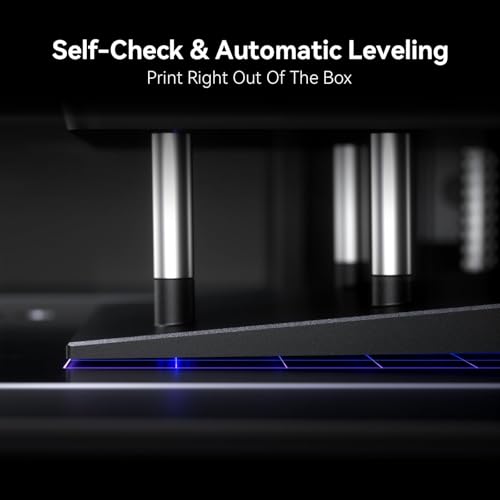
Manual bed calibration has traditionally been a major setup hurdle for resin printer operators. On older generation hardware such as the elegoo mars 3, leveling required loosening retention screws, positioning a sheet of paper over the screen, applying manual pressure, and tightening fasteners in a strict alternating order. Any uneven torque while tightening could cant the plate slightly, causing base layers to detach mid-print. The elegoo mars 5 auto leveling system bypasses this manual calibration completely through an automated alignment sequence that levels the plate with a single click.
Complementing the hands-off leveling is an automated one-click self-check routine that tests the primary mechanical and optical modules before curing begins. By verifying motor travel, optical array responsiveness, and sensor readiness prior to starting a job, the Mars 5 catches component issues while the vat is still clean. For makers who also maintain filament systems like the elegoo neptune 3 pro, having an automated diagnostic routine brings a welcome standard of consistency to the resin printing workflow.
Automation does not entirely eliminate physical cleaning responsibilities. While the machine handles plane calibration and component verification automatically, the build plate surface must still be cleaned thoroughly after each run to prevent uncured resin from accumulating around mechanical joints. Relying on automated leveling does not replace good studio habits, but it removes the recurring frustration of manual realignment after removing stubborn prints.
Print Fidelity and Resolution for Tabletop Miniatures
Tabletop hobbyists and miniature sculptors require sharp edge definition, smooth surface transitions, and crisp ornamental details without visible stepping. The Mars 5 incorporates a 4K monochrome LCD paired with an advanced Chip-on-Board (COB) light source to deliver detailed prints across the build area. The COB optical arrangement utilizes closely grouped LED emitters underneath refractive lenses to project uniform, perpendicular UV light upward through the monochrome panel. This collimated light path minimizes light bleed, helping delicate features such as weapon blades, facial expressions, and fine chainmail retain sharp boundaries.
When assessing the elegoo mars 5 for miniatures, the stability of the Z-axis and the rigidity of the chassis are just as important as optical resolution. The printer features an aluminum and polycarbonate structural frame anchored by an ABS base, providing a sturdy foundation that dampens vibrations during mechanical peel cycles. Because 4K monochrome panels deliver rapid light transmission, individual layer exposure times remain low, preventing the over-curing that can soften micro-textures on small-scale tabletop models.
While newer market entries sometimes push higher raw pixel numbers, 4K resolution on a compact desktop display produces high pixel density that renders layer lines virtually undetectable under typical primers and miniature paints. Although the listing does not specify exact XY micron pixel size or physical build dimensions, the combination of 4K masking and uniform COB lighting produces reliable detail across both central and outer areas of the build area.
Thermal Management and Long-Term Reliability
Heat dissipation plays a critical role in the lifespan of desktop resin hardware. High-output UV LED arrays generate considerable thermal energy during multi-hour printing sessions. Excessive operating heat accelerates LCD panel degradation, weakens light polarization efficiency, and introduces thermal shifts in mechanical components. The Mars 5 addresses thermal build-up directly by pairing an efficient internal cooling system with an advanced overheat protection protocol that constantly monitors LED temperatures. If the light source exceeds 80℃, the firmware automatically halts the print job and triggers an audible alarm, protecting the internal optics from heat damage.
This automated thermal threshold provides peace of mind during long print cycles that run unattended overnight. In unconditioned workshops where ambient temperatures fluctuate, high internal operating temperatures can rapidly degrade optical adhesives and cause premature LED failure. The inclusion of an active cutoff mechanism prevents catastrophic optical burn-in, making the platform considerably more durable for heavy-duty hobbyist production. Similar thermal and structural considerations can be found across advanced digital fabrication tools, such as the century carbon 2, where temperature regulation directly dictates component longevity.
From a structural standpoint, the machine weighs 6.6 kg and features footprint measurements of 20.87 inches deep, 12.8 inches wide, and 11.61 inches high. The balanced weight and wide stance keep the unit planted securely on the bench during rapid Z-axis retracts, mitigating the resonance that often causes layer shifting on lighter, all-plastic desktop units. The green enclosure blocks ambient UV light, protecting liquid resin in the vat from premature photopolymerization caused by room lighting or sunlight.
Elegoo Mars 5 Pros and Cons
Pros
- One-click automatic bed leveling eliminates manual calibration
- Smart mechanical sensor with active residue detection
- Automatic alarms for resin shortages and leveling failures
- One-click hardware self-check before each print job
- Automated thermal overheat protection halting prints above 80℃
- 4K monochrome LCD paired with uniform COB lighting
Cons
- Physical build volume not specified in the listing
- Mechanical sensors require cleaning to prevent resin buildup
- Green UV hood may limit viewing under bright lighting
Is the Elegoo Mars 5 Worth It
Determining whether the Mars 5 is the right addition to your workshop depends largely on what machine you are currently operating and how much value you place on hardware automation. For current owners of an aging elegoo mars 3, upgrading to the Mars 5 represents a substantial quality-of-life leap. The transition from manual paper calibration to one-click automatic leveling, combined with the mechanical residue detection and resin shortage alarms, directly eliminates the most frequent causes of failed prints, torn films, and broken screens that plague older-generation machines.
For complete newcomers entering photopolymer printing, the safety protections provide an essential safety net. The combination of pre-print component self-checks and 80℃ thermal cutoff guards against rookie mistakes and equipment-damaging oversights. While seasoned makers comfortable with manual vat filtering and mechanical alignment may not view these sensors as mandatory, the time saved on troubleshooting and the reduction in wasted resin make the machine an exceptionally practical workstation tool.
On the other hand, users who already operate recent automated printers or those requiring industrial build dimensions might find the standard Mars 5 feature set familiar. Because the listing does not specify the precise vat capacity or build volume dimensions, buyers who specialize in large-scale single-piece cosplay props or massive terrain sets should verify build dimensions against their specific production needs before purchasing. However, for tabletop hobbyists, miniature painters, and makers seeking a dependable, sensor-protected workhorse, the Mars 5 delivers outstanding reliability and modern hardware convenience.
FAQ
How does the Elegoo Mars 5 residue detection protect the LCD screen?
The printer utilizes a smart mechanical sensor that detects physical resistance in the resin vat prior to the build plate completing its downward stroke. If a detached cured support or cured debris is present between the build plate and the release film, the sensor triggers an alarm and stops the motion, preventing the machine from crushing the cured plastic into the glass LCD panel.
Can the Elegoo Mars 5 replace the Elegoo Mars 3 for tabletop miniatures?
Yes, the Mars 5 serves as an ideal elegoo mars 3 replacement for printing tabletop miniatures. Its 4K monochrome LCD and uniform COB light source deliver fine detail on miniature armor, faces, and weaponry, while automated leveling and screen protection solve the mechanical frustrations commonly encountered on older Mars models.
What happens if the LED temperature exceeds 80 degrees Celsius?
The Mars 5 features an advanced overheat protection protocol. If the internal optical LED array reaches a operating temperature exceeding 80℃, the system automatically halts the ongoing print cycle and triggers an alarm, protecting the light source and internal electronics from heat damage.
Does the Elegoo Mars 5 require manual paper leveling?
No, the Elegoo Mars 5 eliminates manual paper-sheet leveling through its one-click automatic leveling system. The build surface aligns automatically without requiring users to loosen fasteners, insert leveling cards, or apply manual downward pressure.
What materials are used to construct the Elegoo Mars 5?
The Mars 5 is manufactured using a combination of ABS plastic, aluminum, and polycarbonate materials. This hybrid multi-material build delivers structural rigidity to dampen Z-axis vibrations while maintaining a manageable overall weight of 6.6 kg.
Does the Elegoo Mars 5 perform hardware diagnostic checks before printing?
Yes, the printer includes a one-click self-check feature that evaluates the functionality of key mechanical and electrical components before a print begins, alerting the operator to issues before resin is cured.