As Amazon Associates, we earn from qualifying purchases. This means we may receive a small commission at no extra cost to you if you click through and make a purchase.
Wireless Interfaces
Bluetooth and Wi-Fi Connectivity
Chassis Form Factor
Standard Double-DIN (2-DIN)
Physical Dimensions
4.9 inches Deep x 7.0 inches Wide x 3.9 inches High
Display Type
6.8-inch WVGA Capacitive Touchscreen
Reviewing the Pioneer DMH-1800NEX specs helps verify dashboard fitment, audio architecture, and media container support prior to starting an installation project.
Full spec sheet 7 more rows from the listing
| Mobile Operating Systems | iOS and Android Controller Support |
| Smartphone Mirroring | Wired Apple CarPlay and Wired Android Auto |
| Audio Processing | 13-Band Equalizer with Presets, Stereo Output Mode |
| Surround Architecture | 5.1 Channel Configuration |
| Physical Inputs | USB Type-A, 3.5mm Auxiliary Jack, RCA Terminals |
| Camera Input | Single Rear-View Camera Input with Parking Guides |
| Video Decoding Support | .avi, .mpg/.mpeg, .mp4, .3gp, .mkv, .mov, .flv, .wmv/.asf, .m4v, .ts, .m2ts, .mts |
Upgrading an aging dashboard sound system often leads drivers directly to double-DIN replacement stereos, where the Pioneer DMH-1800NEX stands out as a focused digital media receiver built to modernize older vehicles. If your primary goal is gaining responsive touchscreen navigation, seamless mobile audio streaming, and hands-free voice control without buying a brand-new automobile, this unit provides a reliable platform built around wired smartphone platforms. Choosing this receiver means replacing sluggish factory buttons with a clean capacitive display, though it also requires accepting a physical cable connection for advanced mirroring and preparing for standard automotive wiring steps during installation.
Before pulling off your dashboard trim, you must understand how this head unit behaves in everyday driving, what parts are required for a clean fit, and where its technical boundaries lie. In this guide, we evaluate the Pioneer DMH-1800NEX across every critical ownership dimension, from physical chassis dimensions and harness wiring demands to audio tuning capabilities, mobile operating system quirks, and long-term maintenance. By looking closely at practical hardware traits rather than surface marketing claims, you can determine whether this double-DIN media center is the right hardware upgrade for your vehicle.
What You Get With the Pioneer DMH-1800NEX
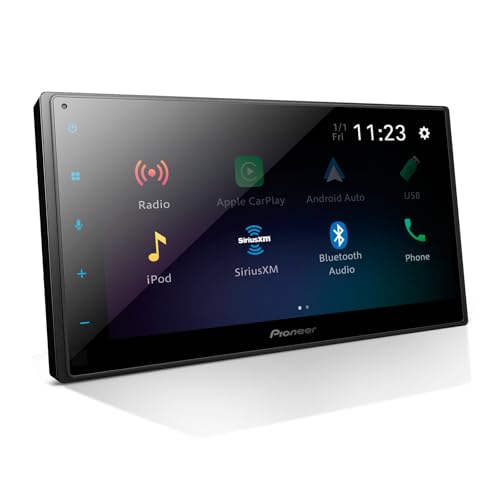


Unboxing the Pioneer DMH-1800NEX reveals a streamlined digital media receiver engineered to fit standard double-DIN dashboard openings while providing modern mobile connectivity and media playback tools.
- Pioneer DMH-1800NEX digital multimedia receiver with a 6.8-inch WVGA capacitive touchscreen display
- Wired Apple CarPlay integration for map navigation, messaging, calling, and mobile music streaming
- Wired Android Auto compatibility providing safe voice-assisted interface access on the road
- Built-in Bluetooth module for hands-free telephone conversations and wireless audio streaming
- External wired microphone designed for targeted in-cabin voice pickup and clearer calls
- Comprehensive 13-band graphic equalizer featuring customizable sound curves and factory presets
- Dedicated single backup camera RCA input supporting customizable parking guide overlays
- Rear connection suite including USB Type-A, standard 3.5mm auxiliary input, and RCA audio connectors
- Multi-format digital media playback covering popular video formats such as MP4, MKV, AVI, and MOV
- Compact double-DIN chassis profile measuring 4.9 inches deep for easier behind-dash cable clearance
Installation Realities and Vehicle Wiring Demands
Taking on a pioneer dmh 1800nex installation requires realistic expectations regarding vehicle electrical architecture and mechanical dash space. Because this unit uses a standard double-DIN face measuring 7 inches wide by 3.9 inches high, it fits into most modern aftermarket dash kits designed for standard openings. A notable structural advantage is its shallow 4.9-inch mounting depth. Because the unit lacks a mechanical CD or DVD transport mechanism, the abbreviated rear chassis leaves generous clearance behind the stereo for bulky wiring harnesses, steering wheel control interfaces, antenna adapters, and RCA patch cords that often crowd vehicle dash cavities.
Wiring execution remains the most common hurdle for home mechanics. The product listing explicitly recommends professional installation unless you possess foundational knowledge of car wiring, and this advisory should not be overlooked. You must splice the receiver harness to a vehicle-specific harness adapter, route the included external microphone cleanly to the headliner or steering column, and correctly tap into the reverse trigger lead if you plan to install a rear-view camera. When soldering or crimping wiring assemblies in an unpowered detached garage, running heat guns or soldering stations from a stable power source like a westinghouse 14500 generator ensures your connections are mechanically sound before securing the radio in the dash cage.
Another critical wiring detail involves the parking brake safety lockout lead. The receiver uses this safety circuit to restrict specific settings, video playback, and configuration options while the vehicle is in motion. Grounding errors or incorrect wire splicing will lock out system menus or display warning prompts. Taking the time to solder connections, insulate exposed wiring with marine-grade heat shrink, and secure heavy harness bundles prevents intermittent power drops, ground-loop buzzing, and dashboard rattles over rough road surfaces.
Smartphone Integration and Troubleshooting Common Connection Faults
The core daily appeal of the Pioneer DMH-1800NEX lies in its smartphone integration, powered by wired Apple CarPlay and wired Android Auto. Connecting your phone through the rear USB Type-A port offloads map navigation, streaming music apps, podcasts, and messaging tasks directly to the 6.8-inch capacitive touchscreen. Because capacitive glass registers light electrical contact rather than physical pressure, swiping through playlists and panning across map routes feels significantly more fluid and responsive than older resistive screens found on budget head units.
Despite the inherent stability of a physical connection, owners occasionally encounter pioneer dmh 1800nex apple carplay issues that disrupt daily driving. The vast majority of CarPlay drops, black-screen freezes, or recognition failures trace back to inferior USB data cables or worn-out phone ports. The receiver requires high-speed data transmission; basic charging-only cables or excessively long extension cables introduce electrical resistance that drops the CarPlay handshake. If the stereo fails to recognize an iPhone, inspect the device Lightning or USB-C port for pocket lint, verify that CarPlay permissions are enabled under iOS screen-time settings, and use a certified high-speed data cable connected directly to the receiver USB port.
Similarly, running into pioneer dmh 1800nex android auto troubleshooting scenarios usually stems from aggressive mobile operating system settings rather than hardware defects inside the receiver. Modern Android builds employ strict battery-saver policies that can kill background processes required to maintain the head unit projection protocol. If Android Auto disconnects mid-drive or displays communication errors, clear the cache inside the Android Auto app, turn off aggressive battery optimization for Google Play Services, and ensure your smartphone operating system is updated to the latest stable release. Sticking to robust, short data cables prevents dropped connections during road vibrations.
Audio Customization and Acoustic Calibration Capabilities
Upgrading to an aftermarket receiver is often motivated by sound enhancement, and assessing the pioneer dmh 1800nex sound quality reveals significant flexibility over standard factory radios. The unit features a 13-band graphic equalizer that lets you target specific frequency bands across the audio spectrum, compensating for interior acoustic reflections, harsh glass bounce, or inadequate factory door speakers. For drivers who prefer quick adjustments, multiple pre-configured EQ curves offer instant bass, vocal, or acoustic boosts without requiring manual frequency shaping.
Beyond standard stereo playback, the receiver specifications highlight a 5.1 surround sound channel configuration alongside standard stereo output modes and RCA preouts. This internal flexibility makes the head unit an adaptable foundation whether you are driving four standard replacement speakers directly off the internal amplifier or building an expanded multi-channel setup with dedicated outboard amplifiers and subwoofers. Physical connectivity remains versatile, pairing the primary rear USB Type-A port with a traditional 3.5mm auxiliary jack to support legacy portable media players that lack wireless functionality.
Hands-free voice clarity also plays a central role in overall audio performance. Pioneer includes an external microphone rather than relying on an integrated faceplate mic, which substantially reduces hollow echo and road rumble. Placing the microphone along the driver-side sun visor or upper A-pillar directs the acoustic pickup toward your mouth while staying clear of direct heater and air conditioning vents. Similar to how careful sensor placement improves the daily run of automated equipment like a eufy – x10 pro omni wi-fi connected robot vacuum & mop with self washing and self drying auto empty, positioning your audio microphone properly ensures clear telephone conversations at highway speeds.
Rear Camera Integration and System Maintenance
Modern driving safety relies heavily on visibility, making the pioneer dmh 1800nex backup camera setup a valuable addition during a stereo overhaul. The receiver features a dedicated composite video input for a single rear-view camera. When wired into the vehicle reverse light circuit, shifting into reverse automatically switches the 6.8-inch display to a full-screen camera feed. Pioneer includes customizable parking guide lines within the firmware, allowing you to calibrate distance markers to match the physical width and bumper height of your specific vehicle on the screen.
Maintaining operating reliability requires keeping the receiver internal code current. Executing a pioneer dmh 1800nex firmware update helps resolve intermittent software glitches, improves mobile device handshakes, and preserves compatibility with evolving phone operating systems. Pioneer delivers firmware updates through a flash drive connected to the USB Type-A port. Updating requires formatting a thumb drive to FAT32, transferring the official update file, and initiating the update process through the system settings menu with the vehicle running or connected to steady shop power.
If you encounter pioneer dmh 1800nex bluetooth pairing problems, the issue is typically linked to clogged device caches or network stack corruption on the mobile phone. The receiver stores paired devices in internal memory; when multiple phones fight for primary connection priority, pairing handshakes can stall. Clearing the saved device list in the Pioneer Bluetooth settings, forgetting the receiver profile on your smartphone, and power-cycling the ignition clears stored pairing conflicts. When carrying out extended electronic testing or firmware flashing in a driveway workshop, using a steady battery maintainer or an anker solix c1000 gen 2 portable power station ensures vehicle voltage does not drop mid-flash and corrupt the receiver internal memory.
Pioneer DMH-1800NEX Pros and Cons
Pros
- Responsive 6.8-inch capacitive touchscreen display
- Shallow 4.9-inch chassis simplifies dash fitment
- 13-band graphic equalizer with preset modes
- Included external microphone for clear calling
- Extensive digital video format playback support
Cons
- Requires physical USB cable for smartphone projection
- Single camera input prevents multi-angle monitoring
- Complex wiring requires professional install or expertise
Is the Pioneer DMH-1800NEX Worth It
Evaluating whether is pioneer dmh 1800nex worth it depends heavily on your daily commute requirements, technical preferences, and willingness to plug in your smartphone. If you own an older vehicle with an obsolete factory stereo, this receiver offers an immediate leap forward in daily convenience. The combination of a responsive 6.8-inch capacitive glass touchscreen, wired Apple CarPlay, wired Android Auto, and a 13-band graphic equalizer modernizes your dashboard interface while delivering noticeable sound quality improvements over dated OEM electronics.
However, this receiver is not built for every buyer profile. If you insist on wireless smartphone projection where your phone stays in your pocket, the DMH-1800NEX requires you to purchase separate wireless dongles or step up to a higher hardware tier. The reliance on a single camera input also limits off-roaders or commercial drivers who need front, side, or cargo bed monitoring cameras. Furthermore, the absence of an integrated optical CD/DVD drive means physical disc collections must be digitized onto a USB drive or streamed through mobile applications.
For shoppers who prioritize reliable, low-latency wired connectivity, robust audio equalisation, and a reputable brand ecosystem, the Pioneer DMH-1800NEX hits a practical sweet spot. Its shallow 4.9-inch chassis greatly simplifies tight dashboard retrofits, while the capacitive touchscreen ensures smooth touch control without the spongy feel of budget resistive displays. As long as you respect the wiring requirements during installation, it serves as a durable, dependable multimedia core for years of driving.
FAQ
Does the Pioneer DMH-1800NEX support wireless Apple CarPlay and Android Auto?
No. The Pioneer DMH-1800NEX supports Apple CarPlay and Android Auto exclusively through a physical wired USB connection. While the unit features built-in Bluetooth and Wi-Fi connectivity protocols, smartphone app projection requires plugging your phone into the rear USB Type-A port using a certified high-speed data cable.
What should I check if my Pioneer DMH-1800NEX has Bluetooth pairing problems?
If you experience Bluetooth pairing difficulties, begin by deleting the receiver from your phone Bluetooth memory and clearing all saved devices from the Pioneer Bluetooth menu. Ensure no other paired devices in the vehicle are attempting an automatic handshake. Resetting network settings on your mobile device and performing a complete ignition power cycle usually resolves handshake stalls.
How do I update the firmware on the Pioneer DMH-1800NEX?
To perform a firmware update, download the official firmware file to a clean USB thumb drive formatted in FAT32. Plug the drive into the receiver USB port, navigate to the system settings menu, and select the firmware update option. Keep the vehicle running throughout the procedure to prevent power interruption, which can permanently damage internal receiver software.
Can I retain my vehicle steering wheel audio controls with this stereo?
Yes, but doing so requires an optional aftermarket steering wheel control interface adapter. The receiver does not directly decode factory CAN bus signals from your vehicle steering wheel buttons. Splicing a third-party steering wheel interface module between your factory harness and the receiver harness allows full button retention.
What video formats can the Pioneer DMH-1800NEX play back from a USB drive?
The receiver supports a broad range of digital video encoding formats, including .avi, .mpg/.mpeg, .mp4, .3gp, .mkv, .mov, .flv, .wmv/.asf, .m4v, .ts, .m2ts, and .mts. To comply with safety regulations, video playback on the front display is only accessible when the vehicle parking brake safety wire is correctly engaged.


