As Amazon Associates, we earn from qualifying purchases. This means we may receive a small commission at no extra cost to you if you click through and make a purchase.
Suction Power Profiles
4 selectable power levels (including Eco Mode)
Maximum Battery Runtime
Up to 120 minutes per full charge
Filtration System
Internal Cartridge Filter
Cleaning Mechanism
3-Stage Cleaning System with Multi-Surface Bristle Brush
Full spec sheet 6 more rows from the listing
| Model Configuration | Roomba 2 Essential with AutoEmpty Dock (Style Name: Q052) |
| Battery Cell Chemistry | Rechargeable Lithium-Ion |
| Base Station Evacuation | Enclosed AutoEmpty dock bag holding up to 60 days of dirt |
| Movement Navigation Style | Methodical neat-row coverage with anti-fall cliff detection sensors |
| Wireless Connectivity | 2.4 GHz Wi-Fi network band required for setup and device operation |
| Locational Spot Cleaning | 2-minute targeted localized spiral cleaning mode |
Buyers considering the Roomba 2 Essential with the AutoEmpty dock generally want to know whether an automated debris evacuation system at an entry tier can withstand daily wear without frequent mechanical jams or premature hardware failure. Known broadly under the configuration named the roomba combo 2 essential robot + autoempty dock series, this system merges a compact robotic vacuum chassis with an external evacuation dock that pulls debris directly out of the robot dustbin into an enclosed collection bag. Opting for this specific bundle eliminates the daily chore of manually emptying a small onboard bin, but adding high-velocity transfer seals and evacuation motors introduces distinct mechanical failure points that require regular oversight from the owner.
In this reliability assessment, we break down what long-term ownership actually looks like based on verified hardware specifications and component architectures. We analyze the evacuation dock structural seals, the upkeep demands of the multi-surface bristle brush roller, how the neat-row navigation logic handles cluttered residential floors, and what level of carpet agitation the four suction modes deliver. By examining component wear, battery cycling, and the realities of manufacturer warranty support, this guide outlines the common failure modes so you can make an informed, practical purchasing decision before bringing this automated cleaner into your living space.
What You Get With the Roomba 2 Essential

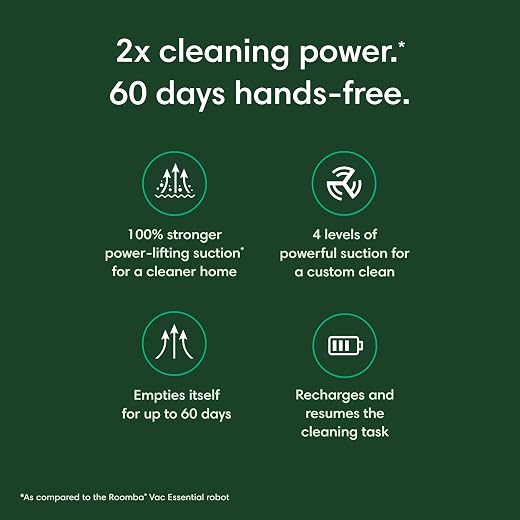


The Roomba 2 Essential package delivers a self-sufficient floor cleaning bundle designed for scheduled, daily floor care straight out of the box. Identified under style configuration Roomba Q052 Auto Empty Amazon Exclusive, the package contains the core robotic cleaner alongside its specialized charging and evacuation base station.
- Roomba 2 Essential robotic vacuum cleaner chassis
- AutoEmpty dock base station with high-suction internal evacuation channel
- Enclosed disposable AutoEmpty dock bag capable of holding up to 60 days of collected debris
- Multi-surface bristle brush roller assembly with edge-sweeping side brush
- Cartridge filter unit designed for onboard dustbin installation
- Integrated lithium-ion rechargeable battery pack providing up to 120 minutes of runtime
- Access to the iRobot Home App for scheduling, remote triggering, Clean Map reporting, and Amazon Echo voice control integration
Dock Evacuation Mechanics and AutoEmpty Durability
Examining the roomba 2 essential autoempty specs reveals an automated evacuation cycle engineered to pull waste through a sealed port on the robot into an enclosed base station bag. When the robot docks, a secondary high-draw motor inside the tower runs briefly to purge the onboard dustbin, claiming capacity for up to 60 days of trapped dirt and debris before requiring manual bag swaps. While this reduces hands-on intervention, the longevity of this docking mechanism hinges heavily on structural air seals. If the rubberized gasket between the base port and the vacuum bin degrades, dries out, or collects compacted grit, suction loss prevents full bin purging, forcing owners to manually unclog the internal ductwork.
Routine roomba autoempty dock bag replacement is critical to preventing motor strain within the evacuation tower. Running an overfilled bag restricts exhaust airflow, causing the dock suction motor to operate at elevated temperatures. Homeowners managing homes with multiple long-haired pets must also realize that heavy fur clumps can occasionally bridge across the evacuation opening rather than pulling through cleanly into the bag. Comparing basic evacuation towers with higher-tier designs like the roomba® max 705 vac robot + autoempty™ dock illustrates how airflow path geometry directly impacts long-term clogging potential when processing high-volume daily debris.
Electrical charging contacts positioned along the base plate represent another physical wear zone requiring vigilance. During repeated automated docking cycles, the robot drive wheels push against the dock platform, gradually depositing micro-scratches and electrostatic dust film onto the metallic contact plates. If these contacts become oxidized or coated in floor film, the base station fails to detect the docked unit, which halts both charging and the AutoEmpty cycle entirely. Monthly cleaning of the electrical pads with a dry microfiber cloth is mandatory to maintain dependable mechanical communication between the robot and dock.
Roller Brush Maintenance and Carpet Performance
Deploying the Roomba 2 Essential for carpet maintenance exposes distinct operational challenges tied directly to its physical agitation mechanism. Unlike high-end robotic cleaners that utilize dual counter-rotating rubber rollers, this model relies on a traditional multi-surface bristle brush paired with an edge-sweeping brush. Bristle assemblies excel at flicking fine grit out of carpet fibers across low-to-medium pile rugs, delivering 2x cleaning power compared to the base Roomba Essential robot across its four adjustable suction levels. However, dense carpet pile introduces continuous friction against bristle tufts, placing mechanical resistance on the brush gearbox that increases electrical current draw from the battery pack.
This bristle design creates specific roomba 2 essential maintenance issues that careful buyers cannot ignore. Hair, synthetic threads, and fibrous floor debris rapidly wrap around the center core and side bearings of the bristle roller. If left unaddressed, tightly wound hair cuts into the soft end-caps and creates thermal friction that can warp the plastic drive assembly. While flagship models such as the irobot roomba j9 combo utilize tangle-resistant solid rubber rollers to minimize hair accumulation, the Roomba 2 Essential requires weekly physical untangling with scissors or cleaning combs to preserve roller speed and motor health.
The single edge-sweeping side brush also experiences continuous mechanical fatigue along baseboards and rug borders. Because the edge brush rotates against baseboard trim and carpet edges at fixed speeds, the individual nylon arms gradually bend or splay outward over months of heavy cleaning cycles. Replacing this modular assembly periodically is necessary to prevent diminished debris capture along wall edges, making consumable parts replacement a predictable factor in total cost of ownership over several years.
Row Navigation Logic and Obstacle Vulnerabilities
The navigational architecture of this platform relies on systematic row cleaning rather than random bounce patterns, cleaning floor spaces methodically back and forth. Integrated downward-facing cliff sensors prevent the chassis from tumbling down staircases, while front physical bumper switches and proximity sensors decelerate the unit before it impacts hard furniture. The iRobot Home App tracks these cleaning paths and produces Clean Map reports, allowing users to verify where the robot traveled during scheduled runs while away from home.
Despite these logical rows, owners occasionally report roomba 2 essential navigation problems in living areas with low-profile obstacles and variable ground surfaces. The listing specifies no front-facing optical AI camera for small-object identification, which means loose phone charging cables, misplaced socks, and pet toys will not be actively recognized as bypass hazards. If the robot rolls over a rogue USB cord or lightweight fabric, the bristle brush pulls the object into the housing, triggering an emergency stop error that stalls the cleaning session until someone physically frees the roller.
Thick transition strips between different flooring materials present another physical hurdle for the dual-wheel suspension system. While standard low-profile thresholds pose little resistance, tall beveled thresholds or dense shag rugs can trap the drive wheels, causing the unit to spin in place until its traction timeout activates. Modern multi-functional cleaning setups like the irobot roomba 415x robot vacuum & mop combo, 20,000pa suction, 3 months autoempty, multifunction doc balance specialized traction control against heavy thresholds, whereas the Roomba 2 Essential requires a relatively tidy, hazard-free floor plan to execute its row-by-row sweeps without human intervention.
Battery Longevity and System Maintenance Overhead
Overall operational reliability is anchored by the Roomba 2 Essential battery life, which is rated for up to 120 minutes of runtime on a single charge under optimal operating conditions. The platform incorporates a recharge and resume function, meaning that if a sprawling floor plan exhausts the lithium-ion cell mid-cycle, the robot automatically returns to its AutoEmpty station, recharges its cells, and navigates back to resume where it stopped. Running the machine on its highest of four power levels or executing repeated 2-minute spot cleaning routines reduces this per-cycle duration, causing the robot to dock more frequently to maintain charge stability.
As with all lithium-ion chemistries, the internal battery pack faces natural capacity degradation over repeated recharge cycles. Operating the vacuum exclusively on Eco Mode reduces thermal stress across the internal cells, which can extend the operational life of the pack before runtime drops noticeably below the 120-minute ceiling. When battery degradation inevitably occurs after several seasons of daily scheduled cleaning, the robot will require multiple recharge intervals to finish the same square footage that it once completed in a single pass.
System upkeep extends beyond battery management to include regular cartridge filter maintenance and network reliability checks. The pleated cartridge filter situated inside the dustbin must be tapped clean over a trash can weekly to remove trapped fine dust that bypasses the AutoEmpty suction stream; rinsing it with water without allowing full drying can ruin the filter medium and choke vacuum suction. Furthermore, the vacuum requires an active 2.4 GHz Wi-Fi network connection for setup and remote commands. If your home network router switches bands dynamically or experiences wireless interference, app-based scheduling and Clean Map syncing can disconnect unexpectedly, necessitating a manual Wi-Fi reset.
Roomba 2 Essential Pros and Cons
Pros
- Up to 60 days of enclosed dock debris storage
- Recharge and resume automation for large floor plans
- Four adjustable suction power cleaning levels
- Methodical neat-row navigation pattern logic
- Targeted two-minute localized spot cleaning mode
Cons
- Bristle brush roller demands frequent hair removal
- Strictly restricted to 2.4 GHz network bands
- Lacks optical camera obstacle avoidance technology
Is the Roomba 2 Essential Worth It
Determining whether the Roomba 2 Essential is the right automated floor care investment depends largely on your home layout and your willingness to handle mechanical upkeep. For owners of small-to-medium single-level homes dominated by hard floors, tile, and low-pile area rugs, this configuration provides dependable row-by-row maintenance. The inclusion of the 60-day AutoEmpty dock successfully removes the messiest part of daily robot operation, provided you vacuum clear paths free of loose wiring and floor clutter prior to scheduled cleanings.
Conversely, this model is poorly suited for multi-pet environments with heavy shedding, high-pile plush carpeting, or homes littered with small obstacles. The multi-surface bristle brush roller rapidly binds with pet fur, demanding weekly manual de-tangling that negates much of the convenience promised by an automated cleaner. Buyers dealing with thick carpets and constant shedding are far better served by spending more on advanced platforms equipped with dual tangle-free rubber rollers and active optical obstacle avoidance.
Ultimately, answering is roomba 2 essential worth it comes down to balancing realistic expectations against mechanical limitations. If you view this machine as an entry-level automated maintenance tool that requires weekly brush clearing and periodic dock bag changes, it offers solid baseline cleaning performance. However, if you expect an entirely hands-off appliance that maneuvers around dropped clothing and never clogs on long carpet fibers, the mechanical design of this budget-tier system will inevitably lead to frustration.
FAQ
How often do you need to perform Roomba AutoEmpty dock bag replacement?
The enclosed AutoEmpty dock bag is rated to hold up to 60 days of dirt and debris under standard operating conditions. However, homes with multiple shedding pets or significant tracked-in dirt may fill the bag within three to four weeks. Replacing the bag promptly when full prevents airflow restriction and protects the evacuation motor from unnecessary thermal strain.
What causes Roomba 2 Essential navigation problems around furniture?
The Roomba 2 Essential relies on mechanical bumper sensors, proximity detectors, and cliff sensors to navigate in straight rows rather than an advanced optical camera or laser mapping system. Dark rugs can occasionally fool the anti-fall cliff sensors into thinking the robot is at a stair drop-off, causing it to back away or stall, while low furniture legs can trap the bumper switch.
Is the Roomba 2 Essential for carpet cleaning effective on deep pile?
The Roomba 2 Essential is recommended for carpet, but its mechanical agitation system is optimized for low-to-medium pile carpeting. High-pile and thick shag rugs create excessive friction against the multi-surface bristle brush roller, which can trigger motor stalls, accelerate battery drain, and result in incomplete debris pickup compared to low-pile floor surfaces.
What does Roomba 2 Essential warranty coverage protect?
While the listing does not specify the exact legal warranty term length, iRobot standard manufacturer warranties traditionally cover mechanical and electrical defects in materials and workmanship under normal household use. Consumable wear parts, including the multi-surface bristle brush, edge-sweeping brush, cartridge filter, and AutoEmpty dock bags, are explicitly excluded from warranty claims and must be purchased as maintenance replacements.
How does the Roomba 2 Essential battery life hold up in large floor plans?
The lithium-ion battery provides up to 120 minutes of continuous runtime on lower power settings before requiring a charge. For homes that exceed this single-charge cleaning limit, the robot utilizes recharge and resume functionality, returning to the AutoEmpty dock to top off its battery cells before automatically navigating back to complete the remaining rows.