As Amazon Associates, we earn from qualifying purchases. This means we may receive a small commission at no extra cost to you if you click through and make a purchase.
Active Surface Area
95.94 sq in
Warranty Coverage
1-year Manufacturer Warranty
Item Weight
250 g (as listed in product specification data)
Material Compatibility
50+ materials including vinyl, iron-on HTV, cardstock, and printable stickers
Understanding the hardware measurements and operational limitations helps determine whether this unit fits your current workspace and project requirements. The data table below presents the verified technical specifications provided by the manufacturer.
Full spec sheet 6 more rows from the listing
| Brand and Manufacturer | Cricut |
| Model and Part Number | 8002490 |
| Item Type Name | Die Cutting Machine |
| Operation Mode | Automatic |
| Core Functions | Cuts, writes, draws, and foils |
| Compatible Connected Devices | Inkjet printers, Computers, Tablets, Smartphones |
Selecting the right compact crafting tool requires looking past marketing promises and examining whether a machine can handle daily production without constant alignment errors. The Cricut Joy Xtra enters the craft cutting space as a mid-tier bridge between small handheld companions and bulky commercial units. Designed to handle full-sheet projects while maintaining a portable footprint, this automatic die cutting machine targets home crafters who want to make custom stickers, vinyl decals, heat transfers, and cardstock projects without surrendering an entire desk. If you are weighing whether this machine delivers consistent results or introduces software headaches, you need an unfiltered evaluation of its capabilities.
In this review, we examine the Cricut Joy Xtra machine specs, its real-world cutting tolerances, and the reliability of its optical sensors during print-then-cut jobs. We also analyze the proprietary software ecosystem, common mechanical failure points, and the terms of the manufacturer warranty so you can decide if it represents a safe investment for your workshop.
What You Get With the Cricut Joy Xtra
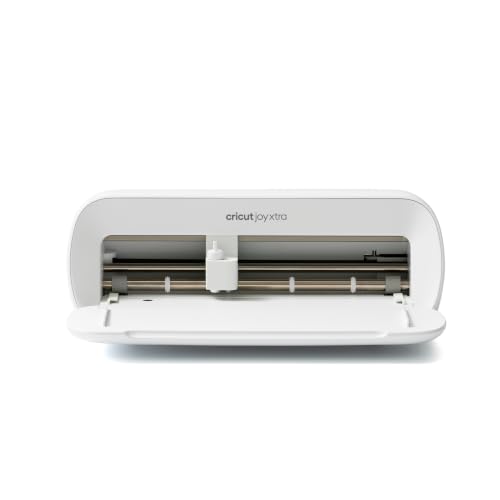
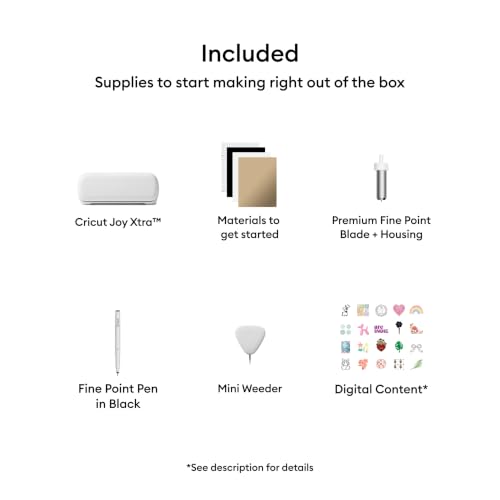


The Cricut Joy Xtra ships with the core essentials required to power up the machine and execute initial test cuts right out of the packaging. In addition to the hardware, the bundle supplies basic manual tools and digital assets intended to help new owners familiarize themselves with the cutting interface before purchasing dedicated materials.
- Cricut Joy Xtra smart cutting machine
- Fine-Point Blade with protective housing
- Fine Point Pen for drawing and writing
- Mini Weeder tool for handling intricate vinyl and iron-on cutouts
- Welcome card with quick-start setup guidance
- USB cable for direct computer connection
- Power adapter and accompanying power cord
- Materials packet designed specifically for a practice cut
- Free trial subscription to Cricut Access for eligible new subscribers
- 30 bonus digital images credited within the Design Space app upon registration
Print-Then-Cut Accuracy for Custom Stickers
For many hobbyists and small-batch crafters, the primary appeal of this specific model is using the Cricut Joy Xtra for stickers. Unlike earlier miniature cutters, this hardware integrates an optical sensor capable of reading printed registration marks from your standard home inkjet printer. This setup allows the machine to scan the exact position of printed artwork on a sticker sheet and cut precise borders around each graphic. When working with printable vinyl or sticker paper, achieving a uniform white border depends entirely on how well that internal sensor reads the registration lines under various ambient light conditions.
In practice, optical sensor reading introduces potential Cricut Joy Xtra problems if your work area has harsh direct sunlight or deep overhead shadows. If the optical reader misinterprets the black registration box, cuts can drift noticeably to one side, ruining an entire printed sheet of graphics. Maintaining clean cuts also demands frequent sensor calibration inside the software, particularly if you switch between glossy, matte, or laminated sticker sheets. Crafters who need industrial-level sheet handling and high-speed multi-page batching often investigate larger, dedicated workhorses like the cricut venture machine, but for casual desktop sticker creation, the Joy Xtra provides acceptable accuracy when lighting is kept consistent.
Print quality itself is not handled by the cutter; the listing specifies compatibility with most standard inkjet printers rather than having internal ink components. This division of labor means cut fidelity depends heavily on the feeding mechanism of your chosen printer. If your printer feeds cardstock or sticker paper at a slight angle, the printed image will skew relative to the cut file, forcing the Cricut Joy Xtra print then cut system to compensate. Careful loading and sticking to matte materials generally yields the cleanest sticker edges without tearing or off-center borders.
Software Dependency and Design Space Friction
Hardware operation relies exclusively on the proprietary Cricut Design Space software. This application runs across computers, tablets, and smartphones, acting as the mandatory bridge for sending any cut, draw, or foil command to the machine. Understanding the Cricut Joy Xtra design space requirements is essential because the machine has zero manual control dials or standalone screen prompts on the physical chassis. If the software encounters a server error or fails to recognize your machine profile, the hardware remains completely idle until connectivity is restored.
The software package provides access to a free library containing over 3,000 images and 100 fonts, along with 30 bonus images included directly with this bundle. However, the software continuously showcases content from the paid Cricut Access subscription, which houses more than 1.5 million images, 1,000 fonts, and 100,000 projects. For risk-averse buyers who prefer purchasing hardware without continuous monthly fees, navigating the user interface requires extra diligence to filter out paid assets in favor of free shapes or custom SVG files uploaded from your computer.
Offline functionality remains another critical consideration. While Design Space allows users to download select projects and fonts for offline execution, initial machine activation, firmware maintenance, and access to cloud-stored project files require an active internet connection. Crafters working in areas with intermittent internet service may experience frustrating delays when saving projects or waiting for the cloud platform to render complex cut paths.
Mechanical Durability and Common Cutting Flaws
When assessing long-term Cricut Joy Xtra reliability, the machine build uses an automated roller and motor system configured to manage over 50 compatible materials. The housing accommodates the included Fine-Point Blade for cutting vinyl and iron-on HTV, as well as the Fine Point Pen for writing and drawing tasks. Because the active surface area measures 95.94 square inches, the unit processes standard letter-sized crafting sheets without requiring the large physical footprint of older legacy die-cutters.
Mechanical wear and tear typically concentrates on the pinch rollers, the blade clamp mechanism, and the drive belt. Users processing denser cardstocks or repeated runs of heavy heat transfer vinyl may observe roller slippage if material debris or adhesive residue accumulates on the feed tracks. Unlike larger alternatives such as the circuit maker 4 bundle, which feature heavy-duty commercial carriage assemblies, the Joy Xtra uses lightweight internal components designed for moderate residential use. Pushing the machine beyond its intended lightweight craft material specifications will accelerate gear fatigue and blade dulling.
Blade maintenance is another recurring operational requirement. While the bundled Fine-Point Blade handles standard vinyl out of the box, cutting abrasive cardstock or thick sticker laminates quickly degrades the cutting edge. Once the blade dulls, the machine tends to snag thin materials, bunch up adhesive backing, or leave incomplete cuts that tear during weeding. Buyers should plan on keeping replacement blades on hand and regularly checking the blade housing for trapped vinyl shavings to preserve clean cuts.
Setup Difficulties and Connection Dropouts
Connecting the hardware to your workstation is straightforward on paper, but Cricut Joy Xtra setup issues can arise during the initial handshake process. The machine includes a USB cable for direct computer tethering alongside wireless functionality for mobile devices. Users connecting via desktop often find the wired USB route more stable, as wireless connections can occasionally drop during mid-project data transfers if other Bluetooth devices cause interference.
Initial configuration requires unboxing the machine, connecting power, plugging into a computer or pairing with a smartphone, and completing mandatory registration through the Design Space application. Firmware updates routinely trigger immediately upon first connection. If a firmware update stalls due to a interrupted network connection or device sleep mode, restarting the machine and re-initiating the pairing sequence is often necessary before the cutter will accept input.
Comparing the form factor to the ultra-compact cricut joy portable cutting machine reveals that the Joy Xtra is slightly larger to accommodate standard A4 and letter-sized materials. This added width makes physical alignment of the cut mat or smart materials slightly more demanding. If you feed the material into the rollers slightly crooked, the automated feed rollers will pull the sheet unevenly, resulting in misaligned cut borders toward the end of long designs.
Cricut Joy Xtra Pros and Cons
Pros
- Supports over 50 materials including vinyl and HTV
- Print-Then-Cut works with home inkjet printers
- Generous 95.94 square inch cutting surface area
- Includes blade, pen, weeder, and practice materials
- Bundled with 30 bonus Design Space digital images
Cons
- Requires mandatory Cricut Design Space software
- Optical sensor sensitive to harsh ambient lighting
- Single-tool carriage requires manual blade and pen swaps
- Limited to a 1-year manufacturer warranty
Is the Cricut Joy Xtra Worth It
Deciding if the Cricut Joy Xtra is worth it comes down to project scale, workspace limits, and patience with proprietary software ecosystems. For hobbyists, cardmakers, and individuals looking to produce custom stickers at home without clearing dedicated counter space, this model hits a practical sweet spot. Its 95.94 square inch cutting surface handles standard letter-sized sticker sheets effortlessly, eliminating the material-trimming compromises required by smaller, first-generation compact units.
On the other hand, small business owners who plan to run continuous, all-day sticker production or cut heavy materials like balsa wood, leather, or thick chipboard will quickly outgrow this machine. The plastic drive components, reliance on a single tool carriage, and domestic 1-year manufacturer warranty are tailored for light-to-moderate hobbyist crafting rather than commercial output. If your goal is high-volume manufacturing, investing in a heavy-duty production cutter will save substantial time and material waste.
Regarding Cricut Joy Xtra warranty support, the included 1-year limited warranty protects against manufacturer defects in materials and workmanship under normal household use. It does not cover normal wear on blades, damage caused by non-approved third-party accessories, or accidental drops. If you value a compact form factor, print-then-cut functionality for personalized gifts, and an accessible entry point into die cutting, the Cricut Joy Xtra provides solid utility within its defined operating boundaries.
FAQ
What are the primary Cricut Joy Xtra machine specs and cutting limits?
The Cricut Joy Xtra features an active surface area of 95.94 square inches, an automatic operating mode, and compatibility with over 50 lightweight craft materials including vinyl, iron-on HTV, cardstock, and printable sticker sheets. It cuts, writes, draws, and foils using interchangeable tools, connecting via USB cable or wireless interfaces to computers, tablets, and smartphones.
Does using the Cricut Joy Xtra require a paid monthly subscription?
No, the machine does not require a paid ongoing subscription to function. You can use the free version of Cricut Design Space, which includes basic layout tools, 3,000 free images, 100 free fonts, and the 30 bonus digital images bundled with your purchase. The optional Cricut Access subscription unlocks an expanded catalog of over 1.5 million images and additional fonts, but you can upload your own custom artwork files without paying a monthly fee.
How do you resolve Cricut Joy Xtra print then cut calibration errors?
If print-then-cut projects display off-center borders, navigate to the machine settings menu within Cricut Design Space and run the dedicated calibration routine. Ensure the machine sits in an area with indirect, even room lighting, as harsh overhead lamps or direct sunlight can blind the optical sensor. Using clean, flat print media without curled edges also ensures the sensor accurately detects registration lines.
What does the Cricut Joy Xtra warranty support cover?
The machine includes a 1-year manufacturer warranty that covers hardware defects and component failures resulting from normal household use. Consumable parts such as cutting blades, writing pens, cutting mats, and wear caused by using unapproved materials or third-party modifications are excluded from standard warranty coverage.
What causes the most common Cricut Joy Xtra setup issues?
Setup friction is most frequently caused by unstable wireless connections during initial firmware updates or attempting to pair the device while multiple active Bluetooth devices are nearby. Using the included USB cable for the initial desktop registration and ensuring your operating system meets the latest software requirements resolves most initial communication problems.