As Amazon Associates, we earn from qualifying purchases. This means we may receive a small commission at no extra cost to you if you click through and make a purchase.
As an Amazon Associate we earn from qualifying purchases. Links on this page are affiliate links.
The AVerMedia vs elgato capture card debate centers on two distinct internal PCIe solutions. Both brands offer zero-lag pass-through for console gaming and support major streaming software like OBS. The main difference lies in their target resolution. AVerMedia focuses on dual 1080p60 capture with high-refresh pass-through. Elgato prioritizes higher capture resolution up to 4K60 with advanced HDMI 2.1 features. You need to decide which performance tier matches your setup.
Capture Resolution
1080p60
4K60
Passthrough Resolution
4K60 HDR, FHD 240fps
8K60 HDR
Video Interface
HDMI
HDMI 2.1
Inputs
Dual HDMI
Single HDMI
Weight
7.37 ounces
4 ounces
Choose the first if
- You need to record two sources simultaneously for multi-camera productions
- You prefer high frame rate pass-through at 240fps for competitive gaming
- You want onboard processing for HDR to SDR tone mapping
Choose the second if
- You require 4K60 capture resolution for higher quality recordings
- You need HDMI 2.1 support for VRR and ALLM passthrough
- You want a lighter internal card with 8K60 passthrough capability
Verdict
Choose the AVerMedia Live Gamer Duo if you need dual inputs and high-refresh pass-through for competitive play. Select the Elgato 4K Pro if your priority is 4K60 capture resolution and modern HDMI 2.1 features like VRR. Your choice depends on whether you value simultaneous recording or higher single-stream quality.
Resolution, Ports, and Weight Compared
Capture Resolution
Edge: Elgato 4K Pro Internal Capture Card
You need to decide if 1080p is enough or if you require higher fidelity. The AVerMedia Live Gamer Duo captures at 1080p60. This is standard for most streaming workflows. The Elgato 4K Pro captures up to 4K60. This allows you to record higher detail for future-proofing or high-end playback. If your monitor or target audience requires 4K content, the Elgato is the clear choice. If you only stream in Full HD, the AVerMedia meets that need perfectly.
Pass-Through Resolution
Edge: Elgato 4K Pro Internal Capture Card
Pass-through resolution determines the quality you see while gaming. The AVerMedia supports 4K60 HDR and FHD 240fps pass-through. This is excellent for high-refresh-rate gaming. The Elgato supports up to 8K60 and 4K144 HDR pass-through. It also includes HDMI 2.1 support. This means you can use the latest consoles at their maximum potential without bottlenecking your display. For future console generations, the Elgato offers significantly higher bandwidth and refresh rates.
Input Channels
Edge: AVerMedia Live Gamer Duo Dual HDMI Capture Card
Your setup dictates how many inputs you need. The AVerMedia Live Gamer Duo features dual HDMI inputs. You can capture two sources simultaneously, such as a console and a camera. This is unique for a single PCIe card. The Elgato 4K Pro has a single HDMI input. It captures one source at a time. If you need to record gameplay and a webcam feed from two different HDMI devices at once, the AVerMedia is the only option here. The Elgato requires external switching for multiple sources.
Physical Dimensions
Edge: Elgato 4K Pro Internal Capture Card
Size matters for your PC case and portability. The AVerMedia is larger, measuring 8 inches wide, 3 inches high, and 9 inches long. It weighs 7.37 ounces. The Elgato is much more compact. It measures 2 inches wide, 1 inch high, and 5 inches long. It weighs only 4 ounces. The smaller form factor of the Elgato makes it easier to install in tight cases. The larger AVerMedia may require more clearance for nearby components or airflow.
Special Features
Edge: Elgato 4K Pro Internal Capture Card
Advanced features can impact your streaming quality. The Elgato supports VRR and ALLM passthrough. This ensures smooth gameplay on PS5 and Xbox Series X without screen tearing. It also supports HDR10. The AVerMedia supports HDR and includes onboard video processing. It can downscale 4K to 1080p and convert frame rates. This helps with compatibility. However, the Elgato’s VRR support is critical for modern console gaming. If you play on next-gen consoles, this feature is vital.
Which Capture Card Suits Your Setup
Dual camera streaming creators
Our pick: AVerMedia Live Gamer Duo Dual HDMI Capture Card
The AVerMedia Live Gamer Duo features dual HDMI inputs. You can record from two sources simultaneously in uncompressed 1080p60. This allows you to switch between camera angles or game feeds easily. It supports zero-lag pass-through up to 4K HDR. You can use RECentral 4 or OBS. This dual-input design is ideal for multi-source productions.
High-resolution 4K streamers
Our pick: Elgato 4K Pro Internal Capture Card
The Elgato 4K Pro captures video at 4K60 resolution. It supports HDR10 for better color depth. You get HDMI 2.1 connectivity for future-proofing. The card handles 8K60 passthrough. This ensures your gameplay looks crisp on high-end monitors. It works with Elgato Studio and OBS. Choose this if you need maximum capture fidelity.
Low-latency competitive gamers
Our pick: AVerMedia Live Gamer Duo Dual HDMI Capture Card
The AVerMedia card offers zero-lag pass-through at Full HD 240fps. This keeps your gameplay responsive while you stream. You can play at high refresh rates without input delay. The onboard processing handles tone mapping and downscaling. This balance of performance and streaming quality suits competitive players who need instant visual feedback during intense sessions.
Next-gen console users
Our pick: Elgato 4K Pro Internal Capture Card
The Elgato 4K Pro supports VRR and ALLM passthrough. This is compatible with PS5 and Xbox Series X/S. You get smooth gameplay without screen tearing. The HDMI 2.1 interface handles high bandwidth. It also supports 1440p144 capture. This makes it a strong choice for players using modern consoles that benefit from variable refresh rates.
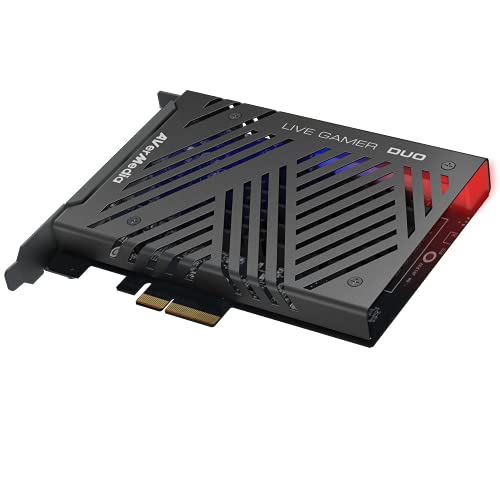
AVerMedia Live Gamer Duo Dual HDMI Capture Card
Best for: multi-camera 1080p60 streaming setups
- Capture Resolution
- 1080p60
- Passthrough Resolution
- 4K60 HDR, FHD 240fps
- Host Interface
- PCIe
- Video Interface
- HDMI
- Platform
- Xbox, PS5, Xbox Series X/S
- Compatible Platform
- PlayStation 5, Nintendo Switch
The AVerMedia Live Gamer Duo is a dual HDMI PCIe capture card for Windows 11. It records uncompressed 1080p60 video from two sources simultaneously. You can pass through 4K60 HDR or FHD 240fps signals with zero lag. Onboard processing handles tone mapping and downscaling. This card suits creators who need multiple camera angles for live streaming on platforms like Twitch.
- Dual HDMI inputs for simultaneous 1080p60 capture
- Zero lag pass-through supports 4K60 HDR
- Onboard video processing for tone mapping
- Compatible with OBS, Streamlabs, and vMix
- Capture resolution limited to 1080p60
- Heavier build at 7.37 ounces
- Larger dimensions of 10 by 9 by 3 inches
- You need two simultaneous 1080p60 video sources
- You want zero lag pass-through for 4K HDR
- You use professional streaming software like vMix
- You require 4K capture resolution
- You prefer a more compact PCIe card
- You need support for macOS systems
Verdict: AVerMedia Live Gamer Duo Dual HDMI is ideal for streamers who need two 1080p60 inputs and high-quality pass-through. It fits those who value onboard processing for multi-camera setups.

Elgato 4K Pro Internal Capture Card
Best for: Windows desktops needing 4K60 HDR capture
- Capture Resolution
- 4K60
- Passthrough Resolution
- 8K60
- Host Interface
- PCIe x4
- Video Interface
- HDMI 2.1
- HDR Support
- HDR10
- Features
- HDR, HDR10, VRR
The Elgato 4K Pro is a PCIe x4 internal capture card for Windows desktops. It supports 4K60 capture with HDR10. Passthrough reaches 8K60 over HDMI 2.1. It handles VRR and ALLM for consoles. You get Studio, 4K Capture Utility, and OBS support. It fits users needing high-resolution internal capture.
- Captures up to 4K60 with HDR10
- Passthrough up to 8K60 via HDMI 2.1
- Supports VRR and ALLM passthrough
- Internal PCIe x4 design
- Limited to PCIe x4 host interface
- Weighs 4 ounces
- You use a Windows desktop PC
- You need 4K60 capture with HDR10
- You want VRR passthrough for consoles
- You use a laptop or console only
- You need external USB connectivity
- You require 8K capture resolution
Verdict: Elgato 4K Pro PCIe Capture Card fits Windows desktop users who need 4K60 HDR capture. It is ideal for those prioritizing high passthrough resolution over portability.
Specifications side by side
| Spec | AVerMedia Live Gamer Duo Dual HDMI Capture Card | Elgato 4K Pro Internal Capture Card |
|---|---|---|
| Capture Resolution | 1080p60 | 4K60 |
| Passthrough Resolution | 4K60 HDR, FHD 240fps | 8K60 |
| Host Interface | PCIe | PCIe x4 |
| Video Interface | HDMI | HDMI 2.1 |
| HDR Support | – | HDR10 |
| Features | HDR | HDR, HDR10, VRR |
| Color | – | Black |
| Resolution | 1080p FHD | – |
| Platform | Xbox, PS5, Xbox Series X/S | PC, Xbox, PS5, Xbox Series X/S |
| Compatible Platform | PlayStation 5, Nintendo Switch | PlayStation 5, Nintendo Switch |
| Operating System | Windows 11 | – |
| Dimensions | 9 × 8 × 3 inches | 5 × 2 × 1 inches |
| Weight | 7.37 ounces | 4 ounces |
| Size | 1080p60 – GC570D Live Gamer DUO | – |
| Model | GC570D | 10GBK9901 |
Frequently asked questions
Can I use these capture cards with Xbox Series X?
Yes, both cards support Xbox Series X. The AVerMedia Live Gamer Duo lists Xbox as a compatible platform. The Elgato 4K Pro also includes Xbox Series X in its supported list. You can connect your console directly to either card for capture.
Do these cards support HDR content?
Both brands offer HDR support on specific models. The AVerMedia Live Gamer Duo includes HDR features. The Elgato 4K Pro supports HDR and HDR10. This allows you to capture high dynamic range video from your console without losing color depth.
Is PCIe the only connection type available?
Yes, both listed models use PCIe connections. The AVerMedia Live Gamer Duo connects via PCIe. The Elgato 4K Pro also uses a PCIe host interface. These internal cards slot directly into your desktop motherboard rather than using USB ports.
Which card is better for dual camera setups?
The AVerMedia Live Gamer Duo is designed for dual inputs. It features dual HDMI capture capabilities. This allows you to record from two sources simultaneously. The Elgato 4K Pro focuses on single high-resolution capture rather than multi-input flexibility.
Do these cards work with Windows 11?
Yes, both cards are compatible with Windows 11. The AVerMedia Live Gamer Duo explicitly lists Windows 11 as its operating system. The Elgato 4K Pro is intended for PC users, which includes Windows 11. You can install them on modern systems.
Can I capture 4K video from my console?
Only the Elgato 4K Pro supports 4K capture. It captures up to 4K60 resolution. The AVerMedia Live Gamer Duo is limited to 1080p60 capture. If you need higher fidelity, the Elgato model is the correct choice for your setup.

