As Amazon Associates, we earn from qualifying purchases. This means we may receive a small commission at no extra cost to you if you click through and make a purchase.
As an Amazon Associate we earn from qualifying purchases. Links on this page are affiliate links.
When comparing the AVerMedia vs AVMATRIX capture card options, you face two distinct hardware paths. Both devices capture uncompressed 1080p60 video, ensuring high-quality streams for gaming or broadcasting. The primary difference lies in connectivity and input versatility. AVerMedia offers a PCIe internal solution with dual HDMI inputs and advanced pass-through features. AVMATRIX provides a portable USB-C device supporting both SDI and HDMI inputs for broader professional compatibility.
Host Interface
PCIe
USB 3.1 Gen 1 Type-C
Video Inputs
Dual HDMI
SDI and HDMI
Passthrough Resolution
4K60 HDR, FHD 240fps
Not listed
Dimensions
8 x 3 x 9 inches
2.28 x 0.75 x 3.62 inches
Weight
7.37 ounces
7.23 ounces
Operating Systems
Windows 11
Windows 7/8/10, Linux, macOS
Choose the first if
- You need dual HDMI inputs to connect both a console and a camera simultaneously.
- You want zero-lag pass-through for 4K HDR or 240fps gameplay while capturing 1080p.
- You prefer an internal PCIe card that handles onboard video processing like tone mapping.
Choose the second if
- You require SDI inputs for professional broadcast equipment alongside standard HDMI.
- You need a portable, driver-free device that works across Windows, macOS, and Linux.
- You want a compact unit that plugs directly into a laptop or desktop via USB-C.
Verdict
Choose the AVerMedia Live Gamer Duo if you need dual HDMI inputs and high-end pass-through features for a stationary PC setup. Select the AVMATRIX UC2018 if you need SDI connectivity, cross-platform compatibility, and a portable form factor for flexible streaming locations.
AVerMedia vs AVMATRIX: Key Differences
Connectivity type
Edge: Tie
You need to decide between internal and external hardware. The AVerMedia Live Gamer Duo uses a PCIe slot inside your PC. This requires opening your case and installing the card. It connects directly to the motherboard for stable data transfer. The AVMATRIX UC2018 is an external device. It uses a USB 3.0 Type-C cable. You plug it into any available USB port on your computer or laptop. This makes it portable and easy to move between machines. You do not need to open your case. Choose PCIe for permanent setups, or USB for flexibility.
Input versatility
Edge: AVerMedia Live Gamer Duo Dual HDMI Capture Card
Your source devices determine which card fits your workflow. AVerMedia offers dual HDMI inputs on a single card. You can connect two separate devices at once, like a console and a camera. Both inputs capture 1080p60 simultaneously. AVMATRIX provides both SDI and HDMI inputs. This allows you to connect professional broadcast gear via SDI or standard consoles via HDMI. You cannot use both inputs simultaneously on the UC2018. It detects the signal automatically. If you need two video sources for multi-angle streaming, AVerMedia is the better choice. For mixed professional and consumer inputs, AVMATRIX offers more variety.
Pass-through performance
Edge: AVerMedia Live Gamer Duo Dual HDMI Capture Card
Gamers care about lag-free viewing while recording. AVerMedia supports zero lag pass-through. You can play in 4K HDR at 60fps or Full HD at 240fps. This ensures you see your gameplay exactly as it happens, even while the card captures 1080p60. The AVMATRIX UC2018 data does not list pass-through capabilities. It focuses on capturing video for streaming and recording. It lacks the high-refresh-rate pass-through needed for competitive gaming. If you need to monitor high-frame-rate gameplay without delay, AVerMedia is superior. For simple recording without high-end monitoring, this matters less.
Platform compatibility
Edge: AVMATRIX UC2018 SDI&HDMI Capture Card
Both cards support major streaming software like OBS. AVerMedia lists compatibility with Windows 11 and specific consoles like PlayStation 5 and Nintendo Switch. It also works with Xbox Series X/S. The AVMATRIX UC2018 supports Windows 7, 8, 10, Linux, and macOS. This broader OS support makes it suitable for Mac users. AVerMedia is Windows-only. If you use a Mac or Linux machine, AVMATRIX is the only option. For PC gamers using Windows 11, both work well. Check your operating system before buying. AVMATRIX wins for cross-platform users.
Physical size
Edge: AVMATRIX UC2018 SDI&HDMI Capture Card
Space constraints matter for small desks or laptops. The AVerMedia Live Gamer Duo is an internal PCIe card. It measures 8 inches wide and 3 inches high. It takes up a slot inside your computer case. The AVMATRIX UC2018 is tiny. It measures 3.62 inches long, 2.28 inches wide, and 0.75 inches high. It weighs 7.23 ounces. You can place it on your desk or mount it nearby. Its small form factor is ideal for portable setups or cramped workspaces. If you value a low profile and portability, AVMATRIX is the clear winner. Internal cards require more space inside the chassis.
Which capture card fits your setup
Dual-input streamers with PCIe slot
Our pick: AVerMedia Live Gamer Duo Dual HDMI Capture Card
The AVerMedia Live Gamer Duo features dual HDMI inputs, allowing you to capture from two sources simultaneously in uncompressed 1080p60. It installs internally via PCIe, ensuring a direct motherboard connection. The card supports zero-lag pass-through at 4K HDR or 1080p 240fps, letting you play without delay while recording high-quality video for professional multi-camera productions.
SDI users seeking portable hardware
Our pick: AVMATRIX UC2018 SDI&HDMI Capture Card
The AVMATRIX UC2018 accepts both SDI and HDMI signals, making it ideal for professional video feeds. It connects via USB 3.0 Type-C for easy portability. The device captures uncompressed YUY2 video at 1080p60 with a compact footprint. Its driver-free design ensures compatibility with Windows, macOS, and Linux, fitting seamlessly into existing broadcast or conferencing workflows without internal installation.
Mac users needing plug-and-play simplicity
Our pick: AVMATRIX UC2018 SDI&HDMI Capture Card
The AVMATRIX UC2018 works directly with macOS 10.8 and above without requiring additional drivers. Its USB 3.0 Type-C connection offers high-speed data transfer up to 200MB/s, reducing latency during live streaming. The card supports automatic input signal detection and includes audio capture capabilities. This makes it a straightforward choice for Mac users who want reliable performance with minimal setup complexity.
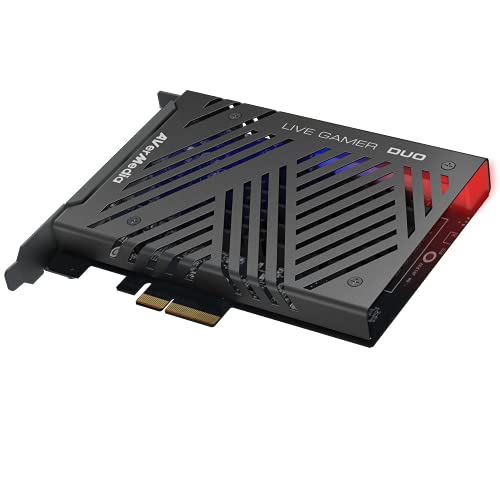
AVerMedia Live Gamer Duo Dual HDMI Capture Card
Best for: multi-source streaming and dual camera setups
- Capture Resolution
- 1080p60
- Passthrough Resolution
- 4K60 HDR, FHD 240fps
- Host Interface
- PCIe
- Video Interface
- HDMI
- Platform
- Xbox, PS5, Xbox Series X/S
- Compatible Platform
- PlayStation 5, Nintendo Switch
The AVerMedia Live Gamer Duo is a PCIe capture card with dual HDMI inputs. It records uncompressed 1080p60 video while passing through 4K60 HDR or FHD 240fps signals. Onboard processing handles tone mapping and downscaling. This setup suits creators who need multiple camera angles or simultaneous console and PC capture for streaming on platforms like Twitch or YouTube.
- Dual HDMI inputs for simultaneous capture
- Zero lag pass-through up to 4K60 HDR
- Supports FHD 240fps pass-through
- Onboard video processing for tone mapping
- Compatible with RECentral 4 and OBS
- Capture resolution limited to 1080p60
- Requires PCIe slot in your PC
- Weighs 7.37 ounces
- You need dual HDMI inputs for multiple sources
- You want zero lag pass-through for high refresh rates
- You use professional streaming software like OBS
- You need 4K capture resolution
- You prefer USB connectivity over PCIe
- You want a portable external device
Verdict: AVerMedia Dual HDMI 1080p PCIe Card offers dual inputs and high-quality pass-through for creators needing multi-source setups. It fits users who prioritize simultaneous capture and onboard processing over 4K recording.

AVMATRIX UC2018 SDI&HDMI Capture Card
Best for: SDI and HDMI 1080p60 streaming
- Capture Resolution
- 1080p60
- Host Interface
- USB 3.1 Gen 1 Type-C
- Video Interface
- SDI, HDMI
- Platform
- PC, Mac
- Dimensions
- 3.62 × 2.28 × 0.75 inches
- Weight
- 7.23 ounces
The AVMATRIX UC2018 is a compact capture card supporting SDI and HDMI inputs. It delivers uncompressed YUY2 video at 1080p60 over USB 3.0. This device works with Windows, macOS, and Linux. It fits users needing low-latency streaming or recording. The small form factor allows easy portability. You get stable performance across various operating systems without installing drivers.
- Supports uncompressed YUY2 video capture
- Accepts both SDI and HDMI inputs
- USB 3.0 Type-C interface for fast transfer
- Driver-free plug-and-play compatibility
- Compact dimensions of 3.62 by 2.28 inches
- Limited to USB 3.1 Gen 1 speeds
- Heavier at 7.23 ounces compared to lighter cards
- Max resolution capped at 1080p60
- You need SDI input for professional gear
- You want uncompressed video quality
- You stream on Windows or Mac
- You require 4K capture resolution
- You prefer PCIe internal cards
- You need HDMI only without SDI
Verdict: AVMATRIX UC2018 USB 3.0 Capture Card suits creators needing SDI inputs and uncompressed 1080p60 video. It is ideal for users who value portability and driver-free operation on desktop or laptop systems.
Specifications side by side
| Spec | AVerMedia Live Gamer Duo Dual HDMI Capture Card | AVMATRIX UC2018 SDI&HDMI Capture Card |
|---|---|---|
| Capture Resolution | 1080p60 | 1080p60 |
| Passthrough Resolution | 4K60 HDR, FHD 240fps | – |
| Host Interface | PCIe | USB 3.1 Gen 1 Type-C |
| Video Interface | HDMI | SDI, HDMI |
| Features | HDR | – |
| Resolution | 1080p FHD | – |
| Platform | Xbox, PS5, Xbox Series X/S | PC, Mac |
| Compatible Platform | PlayStation 5, Nintendo Switch | – |
| Connectivity | – | USB |
| Operating System | Windows 11 | – |
| Dimensions | 9 × 8 × 3 inches | 3.62 × 2.28 × 0.75 inches |
| Weight | 7.37 ounces | 7.23 ounces |
| Size | 1080p60 – GC570D Live Gamer DUO | SDI&HDMI |
| Model | GC570D | UC2018 |
| Color | – | SDI&HDMI input |
Frequently asked questions
Does the AVerMedia GC570D support 4K passthrough?
No. The AVerMedia Live Gamer Duo captures up to 1080p60 video. Its specifications list 1080p FHD resolution as the maximum capture output. It does not list 4K support in its attributes. You should check other models if 4K recording is required.
Can I use the AVMATRIX UC2018 on a Mac?
Yes. The AVMATRIX UC2018 lists Mac as a compatible platform in its attributes. It connects via USB 3.0, which allows for use on desktop or laptop systems. This makes it suitable for creators who need driver-free operation across different computer types.
What is the weight difference between these two cards?
The AVerMedia GC570D weighs 7.37 ounces. The AVMATRIX UC2018 weighs 7.23 ounces. The difference is 0.14 ounces. The AVerMedia card is slightly heavier, likely due to its internal PCIe design. The AVMATRIX unit is a compact external device.
Does the AVerMedia card require a USB connection?
No. The AVerMedia Live Gamer Duo uses a PCIe host interface. It installs directly into your motherboard slot. It does not rely on USB for data transfer. This internal connection provides a stable link for simultaneous capture from dual HDMI sources.
Can the AVMATRIX UC2018 handle SDI inputs?
Yes. The AVMATRIX UC2018 model name includes SDI&HDMI. Its specifications confirm it supports SDI input alongside HDMI. This dual interface option suits creators who need professional SDI connections for their streaming or broadcasting workflow without additional adapters.
Is HDR supported on the AVerMedia GC570D?
Yes. The features attribute for the AVerMedia Live Gamer Duo lists HDR. This allows you to capture high dynamic range video content. It works alongside its 1080p60 capture resolution. This feature is useful for modern consoles like the PS5 and Xbox Series X/S.
How big is the AVMATRIX UC2018?
The AVMATRIX UC2018 measures 3.62 inches in length, 2.28 inches in width, and 0.75 inches in height. It is a small, portable external device. Its compact size makes it easy to transport. You can connect it to laptops or desktops via USB.
Does the AVerMedia GC570D work with the Nintendo Switch?
Yes. The compatible platform attribute for the AVerMedia Live Gamer Duo includes the Nintendo Switch. It also supports PlayStation 5 and Xbox Series X/S. You can use this PCIe card to capture gameplay from these consoles in 1080p60.

