As Amazon Associates, we earn from qualifying purchases. This means we may receive a small commission at no extra cost to you if you click through and make a purchase.
As an Amazon Associate we earn from qualifying purchases. Links on this page are affiliate links.
This capture card buying guide helps you select the right hardware for your streaming or recording setup. You will decide between internal PCIe cards and external USB devices based on your computer’s available slots and connectivity options. We compare 8 products strictly by their published specifications, focusing on capture resolution, host interface, and supported video standards like HDR or VRR. Understanding these technical details ensures you choose a card that matches your console or PC’s output capabilities without unnecessary compromises. You will also determine whether you need single-input simplicity or multi-channel capture for professional workflows. Each recommendation is derived from measurable data points such as maximum frame rates, input types, and physical dimensions. This approach removes guesswork and highlights the practical differences between models like the Elgato 4K Pro and the Magewell Pro Capture Quad. By the end, you will know exactly which specification matters most for your specific use case, whether that is 4K60 passthrough or low-latency 1080p streaming. The goal is to match your technical requirements with the correct hardware interface.
Key Specs for Choosing Capture Cards
Capture resolution and frame rate
The maximum resolution and frame rate determine how smooth and detailed your recorded footage appears. Most internal cards like the Elgato 4K Pro handle 4K60, which is ideal for high-end recording. If you only need 1080p, the ASUS TUF Gaming CU4K30 captures 1080p120, offering higher frame rates for smoother gameplay. Higher specs often require more processing power. Check if the card supports the specific resolution and refresh rate your console or PC can output. Lower resolutions like 1080p60 are sufficient for many streamers and save system resources.
Look for
- Maximum capture resolution
- Supported frame rates
- Passthrough resolution
Host interface type
Capture cards use either PCIe or USB interfaces. PCIe cards, such as the Magewell Pro Capture Quad, connect directly to the motherboard. They offer higher bandwidth and lower latency, making them better for professional multi-channel setups. USB cards like the ASUS TUF Gaming CU4K30 plug into a USB port. They are easier to install and move between computers. However, they may have higher latency. Choose PCIe for desktops with available slots. Choose USB for laptops or desktops without free PCIe slots.
Look for
- PCIe or USB connection
- Available slot or port
- Bandwidth requirements
Number of inputs
The number of inputs determines how many sources you can capture simultaneously. Most cards have one input. The Blackmagic Design DeckLink Quad HDMI 4K60 offers four HDMI inputs for multi-source production. The AVerMedia Live Gamer Duo provides dual inputs for streaming two consoles. More inputs allow you to record multiple devices at once. This is useful for professional studios or gamers with multiple consoles. If you only record one device, a single-input card is sufficient and often cheaper.
Look for
- Count of HDMI inputs
- Simultaneous capture channels
- Input switching method
HDR and VRR support
HDR (High Dynamic Range) and VRR (Variable Refresh Rate) support ensure your capture matches your display’s output. The Elgato 4K Pro supports HDR10 and VRR, preserving color accuracy and smooth motion. The AVerMedia Live Gamer Duo also supports HDR. Without these features, your capture may look washed out or have screen tearing. Check if your console and monitor support HDR. If you do not use HDR, standard HDMI capture is sufficient. VRR is critical for competitive gaming recordings to avoid stutter.
Look for
- HDR10 or HDR10+ support
- VRR compatibility
- HDMI 2.1 specification
Video interface standard
The HDMI version affects bandwidth and feature support. HDMI 2.1 cards like the Elgato 4K Pro support higher resolutions and refresh rates. Standard HDMI 2.0 cards, such as the ASUS TUF Gaming CU4K30, may limit 4K capture to 60fps. Check the HDMI version listed in the specs. Higher versions are future-proof for next-gen consoles. Older HDMI versions may not support 4K120 or advanced HDR formats. Ensure the card’s interface matches your source device’s output capabilities.
Look for
- HDMI 2.0 or 2.1
- Bandwidth capacity
- Source device compatibility
Platform compatibility
Ensure the card works with your console and PC. The Elgato 4K Pro supports Windows, Xbox, and PS5. The ASUS TUF Gaming CU4K30 supports PC, Xbox, and PS5. Some cards, like the Blackmagic Design DeckLink Duo 2, are designed for professional SDI workflows and may lack consumer console support. Check the compatible platform list. Some cards require specific drivers or software. Verify that your operating system is supported. Incompatibility can lead to no signal or limited functionality.
Look for
- Supported consoles
- Operating system support
- Driver availability
Internal PCIe Capture Card Types
Single-channel 4K cards
These cards focus on high-resolution capture for one source. The Elgato 4K Pro Internal Capture Card supports 4K60 HDR10 with VRR. It requires a PCIe x4 slot. You get clean passthrough and detailed recording. This suits Windows desktop users with space inside the case. The trade-off is limited input count. You cannot connect multiple consoles simultaneously. It is best for single-system streaming where resolution matters most.
Multi-channel HDMI cards
Multi-channel cards handle several video inputs at once. The Magewell Pro Capture Quad HDMI offers four HDMI ports. The Blackmagic Design DeckLink Quad HDMI 4K60 also provides four inputs for 4K60 capture. The ACASIS 4-Channel PCIe HDMI card manages multiple 1080p60 streams. These fit production teams or streamers with multiple consoles. You gain flexibility in switching sources. The trade-off is higher complexity. You need more PCIe slots and careful driver configuration for stable performance.
Professional SDI and HDMI cards
These cards target broadcast and studio environments. The Blackmagic Design DeckLink Duo 2 delivers four-channel SDI capture. The Mini Recorder 4K supports SDI and HDMI with multi-channel audio. They offer genlock sync for professional timing. You get reliable performance for live production. This suits studios over casual gamers. The trade-off is cost and specialized needs. You need SDI cables and professional software. These are not plug-and-play solutions for standard home streaming setups.
Common Capture Card Mistakes
Ignoring passthrough resolution limits
Your console may drop frames or lower resolution if the card cannot pass the signal through. Check the maximum passthrough spec. Ensure it matches your display output. This prevents input lag during gameplay while recording separately.
Assuming all USB cards work instantly
USB capture devices require sufficient bandwidth. A USB 3.0 port is often necessary for high frame rates. Using a USB 2.0 port may cause dropped frames. Verify your computer ports match the card’s minimum requirements.
Overlooking HDR compatibility
High Dynamic Range content needs specific support. Not all cards handle HDR passthrough or capture. If your console outputs HDR, the card must support it. Otherwise, colors may appear washed out or black levels may be incorrect.
Choosing PCIe without checking slot space
Internal cards need an open PCIe slot. Some cases lack space for full-length cards. Check your motherboard’s available slots. Ensure the card fits physically and connects electrically. This avoids hardware conflicts or installation failures.
Neglecting software system requirements
Capture software needs specific CPU or GPU power. Weak systems may struggle with encoding. Check the minimum specs for the included software. This ensures smooth recording without stuttering. Verify your computer meets these baseline performance thresholds.
| # | Product | Best for | Price |
|---|---|---|---|
| 1 | Elgato 4K Pro Internal Capture Card | Windows desktops needing 4K60 HDR10 capture | |
| 2 | Magewell Pro Capture Quad HDMI | multi-channel professional video capture | |
| 3 | Blackmagic Design DeckLink Duo 2 | professional multi-camera SDI workflows | |
| 4 | Blackmagic Design DeckLink Mini Recorder 4K | Professional SDI and HDMI workflows | |
| 5 | Blackmagic DeckLink Quad HDMI 4K60 | multi-source 4K60 production workflows | |
| 6 | AVerMedia Live Gamer Duo Dual HDMI Capture Card | Dual-input streaming with high-refresh pass-through | |
| 7 | ACASIS 4-Channel HDMI PCIe Capture Card | Multi-input 1080p60 streaming setups | |
| 8 | ASUS TUF Gaming CU4K30 Capture Card | 1080p120 capture and 4K60 HDR passthrough |

Elgato 4K Pro Internal Capture Card
Best for: Windows desktops needing 4K60 HDR10 capture
- Capture Resolution
- 4K60
- Passthrough Resolution
- 8K60
- Host Interface
- PCIe x4
- Video Interface
- HDMI 2.1
- HDR Support
- HDR10
- Features
- HDR, HDR10, VRR
This Elgato card captures 4K at 60 fps with HDR10 support. It passes through 8K60 video via HDMI 2.1. VRR and ALLM help reduce lag on consoles. You need a Windows desktop with a free PCIe x4 slot. The compact internal design fits standard towers. It works with Elgato Studio and OBS.
- Captures 4K60 with HDR10
- Passes through 8K60 video
- Supports VRR and ALLM
- HDMI 2.1 interface
- Limited to 4K60 capture resolution
- Requires internal PCIe x4 slot
- You want 4K60 HDR10 capture
- You use a Windows desktop PC
- You need VRR passthrough for consoles
- You need external USB connectivity
- You require 4K120 capture speeds
- You use a laptop without PCIe slots
Verdict: Elgato 4K Pro PCIe Capture Card suits Windows desktop users who need 4K60 HDR10 capture with VRR support. It fits those with available PCIe x4 slots who prioritize high-resolution passthrough.

Magewell Pro Capture Quad HDMI
Best for: multi-channel professional video capture
- Capture Resolution
- Up to 2048×2160, 144 fps
- Host Interface
- PCIe Gen2 x4
- Video Interface
- HDMI
- Channel Count
- 4
- Features
- Ultra-Low Latency
- Dimensions
- 7.8 × 8.65 × 1.65 inches
The Magewell Pro Capture Quad HDMI 11100 is a PCIe capture card featuring four independent HDMI inputs. It supports resolutions up to 2048×2160 and frame rates up to 144 fps. An onboard FPGA processor handles video tasks like scaling and de-interlacing to reduce host CPU load. This card suits professionals needing multi-channel capture for broadcast or AV environments. It offers low latency and robust design for 24/7 operation across Windows, macOS, and Linux.
- Four independent HDMI inputs for simultaneous capture
- Supports up to 2048×2160 resolution at 144 fps
- Onboard FPGA processing reduces host CPU load
- Ultra-low latency down to 64 video lines
- Heavier build at 10.1 ounces compared to lighter alternatives
- Lower maximum resolution than 8K pass-through competitors
- Requires PCIe Gen2 x4 slot which may limit future upgrades
- You need to capture four simultaneous HDMI sources
- You require onboard video processing to save CPU resources
- You operate in a professional broadcast or AV environment
- You only need a single HDMI input
- You require 8K resolution support
- You are using a system without a PCIe Gen2 x4 slot
Verdict: Magewell Pro Capture Quad HDMI 11100 is ideal for professionals managing multi-camera setups. It delivers reliable multi-channel capture with efficient onboard processing for broadcast and AV workflows.

Blackmagic Design DeckLink Duo 2
Best for: professional multi-camera SDI workflows
- Capture Resolution
- Up to 1080p60
- Host Interface
- PCI Express 4 lane generation 2
- Video Interface
- 3G-SDI
- Channel Count
- 4
- Color
- Black
- Dimensions
- 6 × 6 × 6 inches
This Blackmagic Design capture card handles four independent 3G-SDI streams simultaneously. It supports resolutions up to 1080p60 via a PCIe Gen 2 interface. The unit includes a reference input for external genlock synchronization, which helps maintain precise timing in multi-camera setups. It fits into standard 4, 8, or 16-lane slots. This hardware suits professional studios that rely on SDI connections rather than HDMI.
- Four independent 3G-SDI connections for simultaneous capture and playback
- Reference input for external genlock synchronization
- PCIe Gen 2 interface for reliable low-latency data transfer
- Compatible with standard 4, 8, and 16-lane PCI Express slots
- Maximum capture resolution is limited to 1080p60
- Uses only 3G-SDI video interfaces instead of HDMI
- Requires a PCIe Gen 2 slot minimum
- You need to capture four separate SDI sources at once
- You require genlock synchronization for multi-camera precision
- Your studio workflow relies on SDI connections
- You need to capture 4K or higher resolutions
- You only have HDMI sources and no SDI equipment
- You want a compact USB solution instead of a PCIe card
Verdict: Blackmagic Design DeckLink Duo 2 delivers four-channel SDI capture for professional multi-camera environments. It fits production teams that need genlock sync and SDI inputs over HDMI convenience.
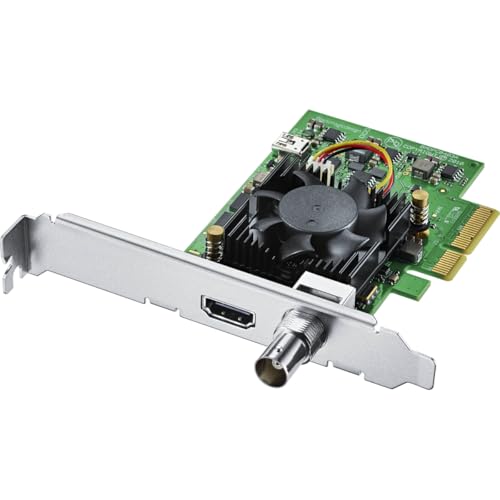
Blackmagic Design DeckLink Mini Recorder 4K
Best for: Professional SDI and HDMI workflows
- Host Interface
- Gen 2 PCIe Express 4 lane
- Video Interface
- HDMI 2.0a, SDI
- Color
- Black
- Resolution
- 4K UHD
- Dimensions
- 6 × 6 × 6 inches
- Weight
- 5.64 ounces
This Blackmagic Design capture card connects via a Gen 2 PCIe Express 4-lane slot. It accepts video through one HDMI 2.0a port and one SDI input. The device supports 10-bit SD, HD, and Ultra HD signals. You get 16 channels of embedded SDI audio. It captures 4K UHD resolution. This card suits professionals needing SDI connectivity alongside HDMI.
- Supports 10-bit SD, HD, and Ultra HD video inputs
- Includes both HDMI 2.0a and SDI video connectors
- Provides 16 channels of embedded SDI audio
- Compatible with 4, 8, and 16 lane PCIe slots
- Supports only a single HDMI input compared to multi-channel competitors
- Includes only one SDI input while other options offer more channels
- Weighs 5.64 ounces which is heavier than some lightweight alternatives
- You require SDI connectivity for professional broadcast workflows
- You need 16 channels of embedded audio for complex mixes
- You want a card that supports both HDMI and SDI inputs
- You need multiple HDMI inputs for simultaneous sources
- You prefer a lighter and more compact form factor
- You only use HDMI and do not need SDI support
Verdict: Blackmagic Design Mini Recorder 4K fits users who need SDI connectivity and multi-channel audio. It is a specialized tool for professional environments rather than casual streamers.
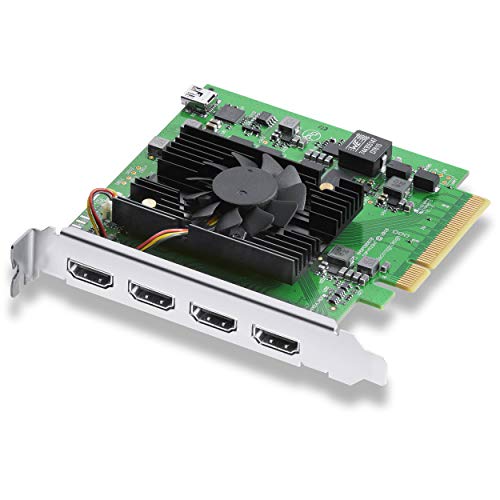
Blackmagic DeckLink Quad HDMI 4K60
Best for: multi-source 4K60 production workflows
- Capture Resolution
- Up to 4K60
- Host Interface
- PCI Express 8 lane generation 3
- Video Interface
- HDMI 2.0b
- Channel Count
- 4
- Dimensions
- 6 × 6 × 1 inches
- Weight
- 4.52 ounces
This capture card offers four HDMI 2.0b inputs for simultaneous recording. It supports up to 4K60 resolution over a PCIe 8-lane Gen 3 interface. You can capture 8, 10, or 12-bit RGB and YUV data. The device handles HDR and multiple color spaces. It suits studios needing multi-source capture for production or streaming workflows.
- Four HDMI 2.0b inputs for simultaneous capture
- Supports up to 4K60 resolution
- Compatible with PCIe 8-lane Gen 3 slots
- Handles 8, 10, and 12-bit RGB 4:4:4 data
- Captures only up to 4K60, lower than the 8K60 pass of the top item
- Inputs cannot capture from copy-protected HDMI sources
- Requires a PCIe 8-lane Gen 3 slot
- You need to record from four separate HDMI sources at once
- You require 4K60 capture with HDR support
- You use professional software like vMix or Wirecast
- You need to capture from protected HDMI content
- You only need a single HDMI input
- You want 8K resolution support
Verdict: Blackmagic Design DeckLink Quad HDMI 4K60 delivers multi-channel capture for professional setups. It fits users who need four simultaneous HDMI inputs for complex production environments.
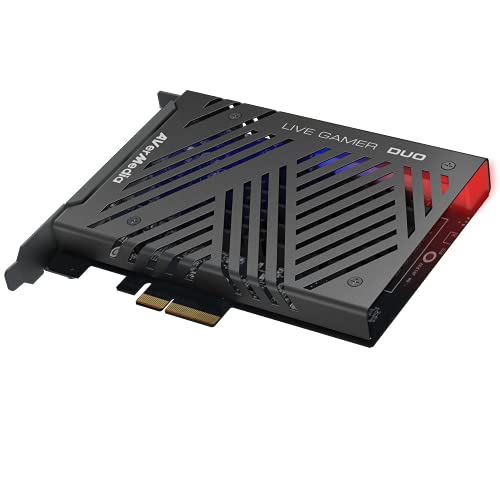
AVerMedia Live Gamer Duo Dual HDMI Capture Card
Best for: Dual-input streaming with high-refresh pass-through
- Capture Resolution
- 1080p60
- Passthrough Resolution
- 4K60 HDR, FHD 240fps
- Host Interface
- PCIe
- Video Interface
- HDMI
- Platform
- Xbox, PS5, Xbox Series X/S
- Compatible Platform
- PlayStation 5, Nintendo Switch
The AVerMedia Live Gamer Duo is a dual HDMI PCIe capture card designed for simultaneous recording. It captures uncompressed 1080p60 video from two inputs while passing through 4K60 HDR or 1080p240fps signals. Onboard processing handles tone mapping and downscaling without affecting the pass-through. This setup suits creators who need multiple camera angles for production value while maintaining high-quality streaming output on Windows 11.
- Dual HDMI inputs allow simultaneous 1080p60 capture
- Zero lag pass-through supports 4K60 HDR and 1080p240fps
- Onboard video processing for HDR to SDR tone mapping
- Compatible with RECentral 4, OBS, and Streamlabs
- Capture resolution is limited to 1080p60, lower than 4K options
- Pass-through maxes out at 4K60, below 8K capabilities
- Physical dimensions are 8x3x9 inches, bulkier than compact cards
- You need to record from two HDMI sources simultaneously
- You require zero lag pass-through for high refresh rate gaming
- You want onboard processing for HDR to SDR conversion
- You need to capture 4K video resolution
- You require 8K pass-through support
- You are using a console without HDMI passthrough
Verdict: AVerMedia Dual HDMI 1080p PCIe Capture Card is ideal for streamers who need dual inputs and high-quality pass-through. It fits those prioritizing multi-camera production over 4K capture resolution.

ACASIS 4-Channel HDMI PCIe Capture Card
Best for: Multi-input 1080p60 streaming setups
- Capture Resolution
- 1080p60
- Host Interface
- PCIe x4
- Video Interface
- HDMI
- Channel Count
- 4
- Features
- Ultra-Low Latency
- Platform
- PC
This internal PCIe card captures four HDMI sources simultaneously at 1080p60. It features a built-in turbo fan for heat dissipation and supports ultra-low latency recording. The device fits PCIe x4, x8, or x16 slots and works with major streaming software. You get four separate capture channels in one compact unit, ideal for multi-input setups.
- Four simultaneous HDMI capture channels
- Built-in turbo fan for cooling
- Ultra-low latency performance
- Compatible with Windows and Linux
- Maximum capture resolution limited to 1080p60
- Requires internal PCIe slot installation
- Heavier build at 5.29 ounces
- You need to record four HDMI inputs at once
- You want a compact internal solution for your PC
- You require low latency for live streaming
- You need 4K or higher resolution capture
- You prefer a portable external USB device
- You want to capture HDR content
Verdict: ACASIS 4-Channel PCIe HDMI Capture Card suits users who need to manage multiple HDMI sources simultaneously without external hardware. It is a solid choice for multi-input streaming rigs that prioritize channel count over maximum resolution.

ASUS TUF Gaming CU4K30 Capture Card
Best for: 1080p120 capture and 4K60 HDR passthrough
- Capture Resolution
- 4K30, 2K60, 1080p120
- Passthrough Resolution
- 4K60 HDR
- Host Interface
- USB 3.2 Type-C
- Video Interface
- HDMI 2.0
- HDR Support
- Supported
- Platform
- PC, Xbox, PS5
The ASUS TUF Gaming CU4K30 is a USB 3.2 Type-C capture card designed for plug-and-play streaming. It supports 4K passthrough at 60 Hz with HDR, while capturing video up to 4K at 30 Hz, 2K at 60 Hz, or 1080p at 120 Hz. The device features certified OBS Studio compatibility and a durable alloy shell. It suits gamers who need high frame rates at lower resolutions or HDR passthrough for their broadcast setup.
- Passthrough resolution reaches 4K60 HDR
- Capture resolution supports 1080p120
- Certified OBS Studio compatibility
- Plug-and-play USB 3.2 Type-C connection
- Capture resolution caps at 4K30, which is lower than the 8K60 or 4K60 passthrough of other cards on the list
- Weight is 14.9 ounces, making it bulkier than typical internal PCIe cards
- You need 4K60 HDR passthrough for your display
- You want to capture 1080p video at 120 fps
- You prefer a plug-and-play USB connection without drivers
- You require capture resolution higher than 4K30
- You need a compact internal PCIe form factor
- You want to capture 4K video at 60 fps or higher
Verdict: ASUS TUF Gaming CU4K30 Capture Card is a solid choice for streamers who prioritize high frame rates at 1080p or need HDR passthrough. It fits users who value plug-and-play simplicity over maximum capture resolution.
Specifications side by side
| Spec | Elgato 4K Pro Internal Capture Card | Magewell Pro Capture Quad HDMI | Blackmagic Design DeckLink Duo 2 | Blackmagic Design DeckLink Mini Recorder 4K | Blackmagic DeckLink Quad HDMI 4K60 | AVerMedia Live Gamer Duo Dual HDMI Capture Card | ACASIS 4-Channel HDMI PCIe Capture Card | ASUS TUF Gaming CU4K30 Capture Card |
|---|---|---|---|---|---|---|---|---|
| Capture Resolution | 4K60 | Up to 2048×2160, 144 fps | Up to 1080p60 | – | Up to 4K60 | 1080p60 | 1080p60 | 4K30, 2K60, 1080p120 |
| Passthrough Resolution | 8K60 | – | – | – | – | 4K60 HDR, FHD 240fps | – | 4K60 HDR |
| Host Interface | PCIe x4 | PCIe Gen2 x4 | PCI Express 4 lane generation 2 | Gen 2 PCIe Express 4 lane | PCI Express 8 lane generation 3 | PCIe | PCIe x4 | USB 3.2 Type-C |
| Video Interface | HDMI 2.1 | HDMI | 3G-SDI | HDMI 2.0a, SDI | HDMI 2.0b | HDMI | HDMI | HDMI 2.0 |
| Channel Count | – | 4 | 4 | – | 4 | – | 4 | – |
| HDR Support | HDR10 | – | – | – | – | – | – | Supported |
| Features | HDR, HDR10, VRR | Ultra-Low Latency | – | – | – | HDR | Ultra-Low Latency | HDR |
| Color | Black | – | Black | Black | ブラック | – | – | CU4K30|HDMI 2.0|2160p60 |
| Resolution | – | – | – | 4K UHD | – | 1080p FHD | 4K UHD | 1080p FHD |
| Platform | PC, Xbox, PS5, Xbox Series X/S | – | – | – | – | Xbox, PS5, Xbox Series X/S | PC | PC, Xbox, PS5 |
| Compatible Platform | PlayStation 5, Nintendo Switch | – | – | – | – | PlayStation 5, Nintendo Switch | – | PlayStation 5, Nintendo Switch |
| Use | – | – | – | – | – | – | Streaming | Gaming |
| Connectivity | – | – | – | – | – | – | – | USB |
| Application | – | – | – | – | – | – | Recording | Recording |
| Operating System | – | – | – | – | – | Windows 11 | – | – |
| Dimensions | 5 × 2 × 1 inches | 7.8 × 8.65 × 1.65 inches | 6 × 6 × 6 inches | 6 × 6 × 6 inches | 6 × 6 × 1 inches | 9 × 8 × 3 inches | 3.94 × 3.94 × 1.18 inches | 6.4 × 5.5 × 2.5 inches |
| Weight | 4 ounces | 10.1 ounces | 5.3 ounces | 5.64 ounces | 4.52 ounces | 7.37 ounces | 5.29 ounces | 14.9 ounces |
| Model | 10GBK9901 | 11100 | BDLKDUO2 | BDLKMINIREC4K | BM-BDLKDVQDHDMI4K | GC570D | AC-4HDMI | TUF GAMING CAPTURE BOX-CU4K30 |
| Size | – | Quad HDMI | – | – | – | 1080p60 – GC570D Live Gamer DUO | 4HDMI | – |
Frequently asked questions
Do I need a PCIe slot for a capture card?
Yes, if you choose an internal card. Internal models like the Elgato 4K Pro and Magewell Pro Capture Quad require a PCIe x4 slot. You must have an available slot on your motherboard. External USB cards, such as the ASUS TUF Gaming CU4K30, do not need a PCIe slot. They connect via USB 3.2 ports instead. Check your computer’s specifications before buying an internal card.
Can I capture from multiple sources at once?
Some cards support multiple inputs. The Magewell Pro Capture Quad HDMI and Blackmagic DeckLink Quad HDMI 4K60 offer four simultaneous HDMI channels. The AVerMedia Live Gamer Duo provides dual HDMI inputs. The ACASIS 4-Channel HDMI PCIe card also handles four HDMI sources. These options suit multi-camera setups. Single-channel cards like the Elgato 4K Pro only capture one source at a time.
Is 4K capture better than 1080p for streaming?
4K capture provides higher detail but requires more processing power. The Elgato 4K Pro and Blackmagic Mini Recorder 4K support 4K UHD capture. The AVerMedia Live Gamer Duo and ASUS TUF Gaming CU4K30 capture at 1080p60 or 1080p120. High frame rates like 1080p120 offer smoother motion. Choose 4K for archival or high-end production. Choose 1080p for smoother streaming with lower system impact.
Do I need HDMI 2.1 for a capture card?
HDMI 2.1 is necessary for 4K120 or high-bandwidth HDR passthrough. The Elgato 4K Pro uses HDMI 2.1 for 4K60 HDR10 and VRR support. Other cards like the ASUS TUF Gaming CU4K30 use HDMI 2.0. Standard HDMI ports work for 1080p60 capture. Check your console’s output settings. If you play at 4K60, ensure the card and cable support the required bandwidth for clean passthrough.
What is the difference between SDI and HDMI inputs?
HDMI is standard for consumer gaming consoles. SDI is used in professional broadcast environments. The Blackmagic Design DeckLink Duo 2 and Mini Recorder 4K feature SDI inputs. They support genlock sync for multi-camera precision. HDMI cards like the Elgato 4K Pro and AVerMedia Live Gamer Duo connect directly to consoles. Use SDI for studio setups. Use HDMI for home gaming and streaming.
Are internal cards better than external USB cards?
Internal PCIe cards offer higher bandwidth and lower latency. The Elgato 4K Pro and Magewell Pro Capture Quad use PCIe for direct motherboard connection. External USB cards like the ASUS TUF Gaming CU4K30 are plug-and-play. They suit laptops or desktops without free PCIe slots. Internal cards often support higher resolutions like 4K60. External cards are convenient but may have lower max capture resolutions.

