As Amazon Associates, we earn from qualifying purchases. This means we may receive a small commission at no extra cost to you if you click through and make a purchase.
Power Input Specification
PoE+ / PoE++ via RJ45 Ethernet
Physical Dimensions
5.9 x 2.5 x 1.5 inches
Product Weight
16 ounces (1.0 pound)
Network Connectivity
Wired Ethernet protocol
A detailed inspection of the manufacturer specifications highlights the operating boundaries and physical profile of the appliance. The listing outlines the following technical attributes:
Full spec sheet 8 more rows from the listing
| Brand and Model | Ubiquiti Networks UP-AI-Port |
| Enclosure Material | Polycarbonate (PC) |
| Intended Operating Environment | Indoor usage only |
| Mounting Configuration | Wall Mount bracket included |
| Power Output Capability | PoE / PoE+ passthrough via RJ45 Ethernet |
| Supported Capture Resolutions | 4K and HD Resolution |
| Video Compression Standard | MPEG-4 |
| Control and Management | Smartphone integration (Android controller support) |
Upgrading an existing video surveillance deployment to include high-end telemetry often presents a difficult choice between replacing operational cameras or accepting blind spots in automated detection. The UniFi AI Port is designed to resolve this dilemma by acting as an inline or networked edge-computing accessory that injects automated computer vision into existing infrastructure. Rather than forcing administrators to purchase entirely new optical assemblies, this compact hardware bridge processes incoming video streams to classify targets and log critical forensic metadata without requiring full camera overhauls.
In this Ubiquiti AI Port review, we examine the practical engineering behind the hardware, its underlying power architecture, and its real-world implementation boundaries. Deploying edge intelligence involves severe hardware dependencies, ranging from switch power budgets to packet latency across local networks. The following analysis breaks down what is included in the package, how the published specifications translate into installation requirements, and how the unit behaves under continuous thermal and network loads.
What You Get With the UniFi AI Port

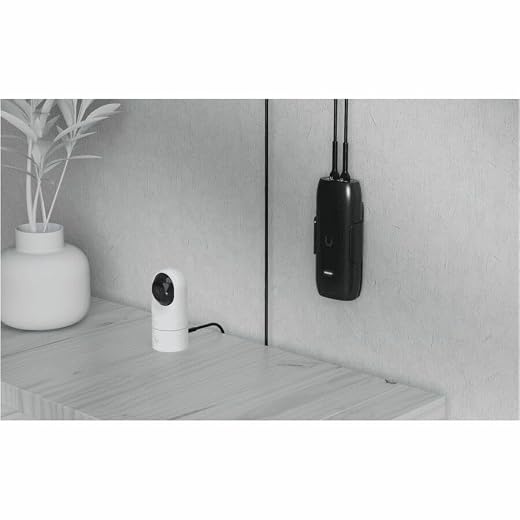

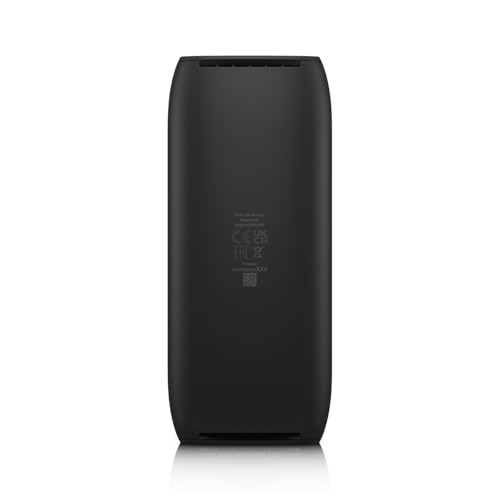
The product packaging provides the essential components necessary to mount and connect the device within an indoor network closet or structured wiring enclosure. Because this appliance operates strictly as a wired intermediate processing module, the hardware contents focus on physical mounting and physical inline connectivity.
- Ubiquiti AI Port (Model: UP-AI-Port) edge processing hardware
- Dedicated wall mounting bracket for flat vertical or horizontal surfaces
- Mounting screw set for bracket installation
- Integrated polycarbonate housing with dual Ethernet access points
- Hardware documentation and regulatory insert
Power Delivery Demands and PoE Passthrough Stability
Analyzing the electrical infrastructure behind this appliance reveals immediate operational caveats that network administrators must calculate before deployment. The device incorporates a single PoE+ or PoE++ input port alongside a secondary PoE or PoE+ passthrough output port. This passthrough design allows the unit to sit directly in line between an upstream network switch and a connected camera, eliminating the need to pull an extra category cable to the installation location. However, chaining high-draw hardware through an inline processor reduces the total power budget available at the terminal end, making switch choice paramount.
If an installation relies on standard PoE input, attempting to power both the internal AI processing chip and an external motorized or high-draw camera will cause severe instability. Supplying the device with PoE++ is the most reliable method for ensuring that downstream hardware receives sufficient wattage during high-demand periods, such as when infrared night vision rings activate. Installers integrating this module into networks powered by ubiquiti unifi poe switches must verify that the upstream switch port profile supplies adequate power margins to prevent brownouts under continuous algorithmic processing.
Understanding the strict UniFi AI Port PoE requirements is critical for preventing unexpected device reboots. If the upstream port negotiation fails or switches down to a lower power state due to line loss over extended copper runs, the processing unit may prioritize its own operational logic while dropping the downstream camera connection entirely. Ensuring clean, high-grade copper cabling and verified switch power allocations protects against video feed drops during peak surveillance activity.
Third-Party Integration and ONVIF Processing Constraints
The primary appeal of this hardware lies in its ability to modernize non-analytical optical sensors. Deploying the UniFi AI Port for ONVIF cameras allows administrators to introduce machine-learning classifications into third-party video feeds that previously lacked integrated neural computing engines. By decoding incoming MPEG-4 and 4K video feeds, the hardware parses scene dynamics to log distinct event types without requiring proprietary end-to-end camera ecosystems.
Forensic capture capabilities represent a significant leap forward for legacy systems, particularly when leveraging the UniFi AI Port license plate recognition engine along entry ways or perimeter choke points. The onboard vision processors scan high-resolution video streams in real time, pulling alphanumeric patterns from moving vehicles and registering them in the system event index. In high-traffic scenarios, having an edge device handle this compute load prevents centralized network video recorders from bogging down under heavy frame-analysis demands.
Similarly, enabling UniFi AI Port face recognition across older hardware converts basic security streams into detailed personnel tracking logs. While standard sensors such as the unifi g5 turret ultra feature integrated processing within their native hardware, older optical hardware lacks the silicon required for biometric parsing. The AI Port bridges that technological gap, though performance remains fundamentally tethered to the optical clarity, angle, and illumination quality of the paired camera.
Enclosure Engineering and Indoor Operational Limits
Thermal management is an essential factor when evaluating edge computing devices, especially those packed into small form factors. The appliance measures 5.9 by 2.5 by 1.5 inches and weighs 16 ounces, housing its computing components within a sealed polycarbonate enclosure. Polycarbonate is an exceptional electrical insulator and offers robust structural rigidity, but it does not conduct heat away from internal components as rapidly as cast aluminum. As the internal processing engine churns through continuous 4K video streams, ambient internal temperatures will naturally rise.
Because the listing explicitly states this unit is intended for indoor usage, attempting to mount it inside exterior junction boxes or damp locations introduces substantial failure risks. High external temperatures combined with intense computational loads will degrade electronic components over time, compromising long-term UP AI Port reliability in environments lacking active climate control. Network closets, equipment racks, and interior wall spaces represent the only viable deployment zones for this hardware.
Careful consideration must also be given to nearby networking hardware to avoid creating concentrated heat pockets. In compact utility areas containing equipment like the unifi express 7, adequate physical spacing between chassis is necessary to facilitate natural convective cooling. Without sufficient airflow across the surface of the polycarbonate chassis, thermal throttling could manifest as dropped frame rates, delayed detection alerts, or unexpected system watchdog resets.
Network Architecture and Setup Complications
The physical installation topology dictates both the efficiency of video analysis and the potential points of network failure. The hardware supports two primary deployment methods: direct inline connection or network pairing. In a direct inline configuration, the camera connects straight into the device output port, ensuring that the raw video feed travels directly into the onboard processor without traversing local switching backplanes. In network-paired mode, the device sits elsewhere on the local area network and ingests streams routed to it across the subnet.
When reviewing the official UniFi AI Port specs, network pairing offers physical installation flexibility but introduces greater vulnerability to network congestion. If bandwidth fluctuates or broadcast storms occur on unmanaged subnets, the processing node will experience packet loss, leading to corrupted video analysis or missed forensic events. Preventing common Ubiquiti AI Port setup issues during network adoption requires a dedicated, low-latency VLAN structure with sufficient bandwidth reserves to handle continuous high-bitrate video traffic.
Initial configuration is streamlined through Android-compatible controller interfaces and smartphone provisioning workflows, but commissioning must be executed carefully. When binding third-party ONVIF streams to the device, network parameters such as authentication credentials, RTSP stream paths, and fixed IP assignments must be validated prior to mounting. Mismatched credentials or fluctuating DHCP allocations will break the analytical pipeline, requiring physical access to the device to diagnose communication faults.
UniFi AI Port Pros and Cons
Pros
- Adds face and license plate recognition
- Supports third-party ONVIF video streams
- Pass-through PoE simplifies cable runs
- Processes video feeds up to 4K
- Direct-connect and network pairing modes
Cons
- Indoor operation only without weatherproofing
- Requires PoE++ for demanding downstream hardware
- Polycarbonate chassis depends on ambient cooling
Is the UniFi AI Port Worth It
Deciding whether the UniFi AI Port is worth it depends entirely on the composition and scale of your existing surveillance hardware. For organizations operating an established fleet of legacy high-resolution cameras that lack edge intelligence, this bridge provides a cost-effective pathway to advanced forensic logging. By offloading computational tasks such as vehicle indexing and face identification onto a dedicated edge node, security teams gain modern software capabilities without the labor, logistical expense, and environmental waste of rewiring physical camera locations.
Conversely, for small deployments or greenfield installations where new security hardware is being specified from scratch, purchasing standalone smart cameras like the unifi g5 turret often makes more practical sense. Native smart cameras integrate sensing and computing inside a single, weather-sealed enclosure, eliminating the supplementary power budgets, extra patch cables, and separate failure points inherent to an inline processing bridge.
Ultimately, this accessory serves as a specialized problem-solver rather than a mandatory upgrade for every installation. When integrated into an environment supported by adequate PoE switch reserves and stable indoor mounting points, it reliably unlocks advanced machine vision on third-party and legacy infrastructure. Buyers should approach deployment with a clear understanding of its indoor thermal parameters and power input dependencies to achieve dependable, round-the-clock forensic logging.
FAQ
Can the UniFi AI Port be installed in outdoor enclosures?
No, the product specifications strictly designate the device for indoor usage only. The polycarbonate chassis lacks weatherproofing, moisture seals, and ingress protection ratings required to survive exposure to exterior elements or high-humidity environments.
What upstream power source is required to run the device and a camera simultaneously?
The unit supports PoE+ and PoE++ power input. If you are utilizing the PoE passthrough port to operate a secondary high-draw camera, supplying the unit with a PoE++ input is strongly advised to maintain electrical stability and prevent hardware brownouts.
Does the appliance process third-party ONVIF camera streams?
Yes, the hardware is engineered to ingest and analyze video streams from compatible third-party ONVIF cameras, enabling license plate classification and face recognition on systems outside the proprietary camera ecosystem.
What mounting accessories come inside the retail package?
The package contains the UP-AI-Port appliance itself, a dedicated wall mounting bracket, and the necessary mounting screws to secure the bracket to a flat vertical or horizontal surface.
Can the device process 4K video streams?
Yes, according to the manufacturer specifications, the processing hardware supports up to 4K capture resolutions using standard MPEG-4 video compression streams.


