As Amazon Associates, we earn from qualifying purchases. This means we may receive a small commission at no extra cost to you if you click through and make a purchase.
Maximum B&W Copy Speed
10 pages per minute
Dimensions (D x W x H)
17.11 x 6.19 x 14.23 inches
Unit Weight
14.2 pounds
Connectivity & Control
App, Touch, Amazon Alexa, Android, iOS
Reviewing the published technical data provides clear insight into the operational boundaries, physical footprint, and processing power built into this multifunction machine.
Full spec sheet 9 more rows from the listing
| Print Technology | HP Thermal Inkjet |
| Device Functions | Print, Scan, Copy |
| Bundled Ink Capacity | Up to 6,000 black or color pages (up to 2 years) |
| Scanner Type | Flatbed |
| Maximum Copy Run | Up to 99 copies per session |
| Supported Print Media | Plain paper, Envelopes, Glossy photo paper, Glossy film |
| Paper Trays | 1 input tray |
| Processor Count | 1 processor |
| Warranty & Spare Parts | Limited warranty with 2-year EU spare part availability |
Investing in a continuous-ink tank printer represents a shift away from the endless cycle of replacing expensive cartridges, but long-term mechanical reliability remains a critical concern for careful shoppers. The HP Smart Tank 5000 enters the market promising up to two years of ink in the box, simplified replenishment, and seamless mobile integration. For home office workers and busy households producing hundreds of pages every month, the primary consideration is not merely whether the printer creates crisp documents out of the box, but how the fluid lines, printheads, and wireless modules hold up over years of regular use without requiring constant troubleshooting.
This comprehensive durability assessment explores the practical reality of operating this all-in-one printer over an extended service life. We examine the engineering behind the mess-free refill mechanism, evaluate printhead reliability and routine maintenance requirements, break down the official technical specifications, and scrutinize the limited warranty parameters. By examining every operational facet from scan performance to network reliability, this guide outlines whether this tank system delivers dependable long-term value or introduces unexpected maintenance demands into your home workspace.
What You Get With the HP Smart Tank 5000
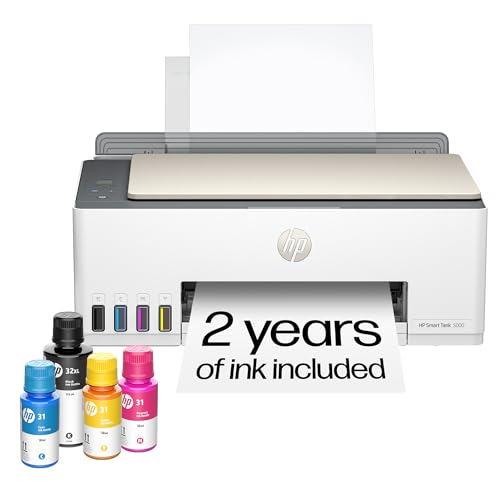


The retail package of this all-in-one printer is designed to get users up and running with a complete multi-year printing supply without requiring immediate secondary purchases of fluids or accessories.
- HP Smart Tank 5000 Wireless All-in-One Ink Tank Printer unit
- Original HP ink bottles supplying up to 6,000 pages of black or color output
- Built-in refillable ink reservoirs for Black, Cyan, Magenta, and Yellow inks
- Integrated flatbed scanner and standalone copier mechanism
- Single adjustable paper input tray
- HP Thermal Inkjet print system with borderless photo printing support
- HP AI print formatting integration for clean web and document layout processing
- Power cord and setup documentation (the listing does not specify inclusion of a USB interface cable)
Durability and the Spill-Free Refill System
The central engineering highlight of the HP Smart Tank 5000 is its high-capacity internal fluid reservoirs, which replace the traditional plastic disposable cartridges that have historically driven up the lifetime expense of home printing. Evaluating the smart tank 5000 vs cartridge printers reveals substantial mechanical differences in how liquid is handled inside the chassis. Instead of moving an entire ink reservoir back and forth on a print carriage, this system keeps high-volume tanks seated firmly within the outer frame, feeding the imaging assembly through dedicated internal tubing. This static tank design minimizes carriage weight, which reduces physical wear on the internal drive belts, guide rods, and stepper motors during high-volume print runs.
Refill safety is paramount whenever dealing with hundreds of milliliters of concentrated dye and pigment. The hp smart tank 5000 refill system relies on a keyed, gravity-fed dock design where bottles plug directly into the corresponding tank mouths without requiring manual squeezing. Fluid transfers automatically and ceases flowing as soon as the reservoir reaches capacity, preventing overflow accidents and pressurized splatters. Much like maintaining specialized cleaning equipment such as the tineco floor one s5 smart cordless wet dry vacuum cleaner, keeping fluid contact points clear of dried residue and dust is essential for preserving vacuum seals. If users keep the rubber tank stoppers properly closed between servicing intervals, the internal seals remain supple and resist drying out over years of operation.
From a volume perspective, the included supply of up to 6,000 pages allows users to run the printer for extended periods before ever needing to uncork a fresh set of bottles. This long service gap is a double-edged sword for durability. While it eliminates the mechanical wear associated with constantly opening the carriage bay to snap in new cartridges, it means that tank seals and air vents sit in place for months at a time. The physical materials used in the tank reservoir walls feel sturdy and transparent, allowing rapid visual checks of ink levels without opening any internal panels or relying solely on software approximations.
Long-Term Maintenance and Printhead Reliability
Any deep evaluation of inkjet longevity must focus on the microscopic thermal nozzles responsible for laying down droplets. The smart tank 5000 printhead reliability depends heavily on consistent usage patterns and the printer’s internal cleaning cycles. Because HP utilizes thermal inkjet technology, tiny resistors rapidly heat ink to create vapor bubbles that propel droplets onto the page. If the printer sits disconnected from power or idle for several weeks in a dry room, microscopic ink residue inside the nozzles can dehydrate, resulting in banding, missing color lines, or stubborn printhead clogs that demand aggressive maintenance cycles.
Understanding hp smart tank 5000 maintenance is critical for buyers who plan to print intermittently rather than daily. The machine features an Auto Power On function designed to keep the unit in a low-power ready state so it can execute automated maintenance routines. These periodic background flushes keep ink moving through the delivery tubes and across the nozzle plates, safeguarding the thermal elements against stagnation. Interrupting these cycles by cutting master power strips can inadvertently leave the printhead uncapped, which significantly accelerates nozzle drying. Users operating dedicated backup stations with hardware like the ugreen 300w 48000mah power bank with smart digital display appreciate the value of continuous power continuity when maintaining sensitive micro-electronics in home workspaces.
When clogs do manifest, the built-in diagnostic tools allow users to initiate automated printhead cleaning routines directly from the device controls or companion software. However, routine flushing consumes a portion of the reservoir fluid to purge the micro-channels. Over years of regular operation, continuous-ink printheads experience thermal fatigue from repeatedly heating and cooling. The listing notes that the printer provides easy, reliable printing with no complicated maintenance, but prudent users should still establish a habit of running at least one full-color diagnostic page every two weeks to verify nozzle health before unprinted ink has the opportunity to cure inside the delivery line.
Wireless Stability and Software Usability
Hardware durability is only half the battle in modern printing; network stability and software integration determine daily usability. The HP Smart Tank 5000 is engineered as a network-ready, wireless all-in-one that pairs with laptops, desktop personal computers, tablets, and smartphones running iOS or Android. It also includes Amazon Alexa controller compatibility for voice-activated output tasks. However, navigating smart tank 5000 wireless setup issues frequently comes down to local network configuration. Because the machine operates without an Ethernet port, initial pairing relies entirely on the wireless signal and the proprietary mobile setup app.
In mixed-frequency home networks where 2.4 GHz and 5 GHz bands share an identical network name, mobile setup applications can sometimes struggle to complete the initial handshake. Once the handshake is established, the printer maintains an active cloud connection to handle over-the-air firmware updates and security patches. These automated updates are designed to keep the device functioning securely across diverse operating systems, though buyers must be comfortable with the printer communicating regularly with manufacturer servers for security features and mobile print processing.
Software functionality extends into document management through the integration of HP AI features. The listing highlights AI-enabled formatting tools designed to scan incoming web pages and emails, stripping out extraneous elements like sidebars, advertisements, and broken layout fields to prevent paper waste. When using the hp smart tank 5000 for home office duties, this intelligence streamlines administrative tasks, ensuring that reference prints fit neatly onto plain paper without trailing single-line overflow pages. Maintaining an organized home office environment with clean electronics and stable air circulation, akin to pairing desk equipment alongside a winix 5500-2 air purifier with plasmawave technology, ensures that sensitive optical sensors and paper feed rollers remain free of environmental dust.
Scanning and Copying Capabilities
Beyond its core document output engine, this multifunction hardware incorporates a rigid flatbed scanner capable of handling image digitizing and standalone document duplication. The hp smart tank 5000 scan copy system is built around a single-pane glass platen, making it suitable for capturing fragile historical photos, thick notebook pages, and stiff identification cards that cannot pass through a curved roller path. Because the unit utilizes a flatbed mechanism rather than an automatic document feeder, multi-page scanning requires manual sheet swapping for every individual page.
Copying performance is tuned primarily for everyday administrative tasks rather than rapid commercial publishing. The published maximum copy speed for black-and-white documents is 10 pages per minute, with a firmware ceiling that supports up to 99 copies per run. While 10 pages per minute is sufficient for duplicating short forms, household invoices, or school permission slips, it requires patience when preparing multi-page packets. The copy controls are accessible directly on the unit via touch inputs and app commands, enabling quick monochrome or color copies without waking a paired computer.
Media versatility is broad enough to accommodate common home craft and office projects. The single paper tray handles standard plain paper, envelopes, glossy film, and glossy photo paper, with support for borderless printing. The ability to print borderless sheets directly from the flatbed scan engine or mobile device gives the machine versatility for printing photo prints and presentation covers. However, users who regularly process extensive twenty-page contracts will feel the absence of an automatic feeder, making this scanner assembly an intentional trade-off favoring compact unit dimensions over rapid document digitization.
Warranty Protection and Technical Support Realities
When assessing long-term investment viability, warranty protections define how much risk the buyer absorbs after unboxing the machine. The hp smart tank 5000 warranty is classified under the official product data as a Limited warranty, complemented by a stated two-year spare part availability duration within the European Union. The manufacturer advertises Premium Support offering technical expertise to resolve operational dilemmas faster. However, prospective buyers should carefully understand the operational boundaries that govern limited hardware warranties on ink-tank devices.
Limited warranty policies typically cover defects in factory materials and manufacturing workmanship under ordinary operating conditions. They do not cover mechanical wear caused by foreign debris in the paper path, electrical surges from unprotected outlets, or physical damage caused by utilizing incompatible third-party fluids. Because the printer comes supplied with Original HP ink bottles formulated specifically for thermal inkjet printheads, utilizing off-brand bulk inks can jeopardize warranty validation if third-party dye chemistry causes premature heater resistor burnout or corrosive nozzle failure.
The two-year spare part availability window indicates that core mechanical parts like rollers, internal gears, and replacement assemblies remain in production channels for a reasonable period following purchase. This availability gives peace of mind to buyers who plan to use the printer extensively over several years. Nevertheless, because high-yield tank printers are intended to run for two or more years on the initial ink load alone, the hardware may ultimately outlive its active limited warranty period while still consuming the original fluid supply. Keeping serial records, following recommended maintenance routines, and adhering to genuine ink specifications represent the best insurance policy against unresolvable hardware failure.
HP Smart Tank 5000 Pros and Cons
Pros
- Up to 6,000 pages of ink included
- Mess-free spill-free gravity bottle refills
- Built-in flatbed scanner with standalone copy function
- Borderless printing on photo paper and film
Cons
- No automatic document feeder on flatbed scanner
- Single paper input tray limits media capacity
- Modest copy speed of 10 pages per minute
Is the HP Smart Tank 5000 Worth It
Determining if the HP Smart Tank 5000 represents a wise investment depends on matching your household printing cadence to the strengths and mechanical limitations of continuous-ink hardware. For families, students, and home office operators who generate consistent, weekly print volumes—ranging from educational worksheets and creative photo projects to business letters—the inclusion of up to 6,000 pages of ink out of the box delivers tremendous practical value. The spill-free bottle replenishment system successfully removes the intimidation factor from handling raw ink, while the compact 14.2-pound chassis fits easily on standard office desks.
Conversely, this hardware is poorly suited for buyers who only print once every two months or those who require heavy multi-page business scanning. Sporadic printing leaves thermal inkjet nozzles vulnerable to ink dehydration and nozzle blockages, turning a supposedly low-maintenance device into a chore of frequent cleaning cycles. Furthermore, the reliance on a single manual flatbed scanner and a 10 page-per-minute copy speed will frustrate power users who routinely scan multipage contracts or require high-speed automated document handling.
If your usage profile involves steady, regular output and you want to permanently sever ties with expensive micro-cartridges, this machine is an exceptionally practical workhorse. The combination of borderless color capability, AI layout assistance, intuitive bottle replenishment, and robust two-year spare part backing makes it a capable, cost-effective centerpiece for any diligent home printing setup.
FAQ
How does the refill system prevent accidental spills?
The ink tank replenishment system utilizes custom-fit bottle nozzles that mate directly to the internal fluid ports on the printer. Fluid drains purely by gravity without requiring squeezing, and an internal stop mechanism halts the flow automatically when the tank is full, preventing overflows and surface mess.
What causes wireless setup issues on the HP Smart Tank 5000?
Wireless pairing complications typically arise when home routers broadcast dual-band 2.4 GHz and 5 GHz networks under the same SSID. Because the printer requires a stable wireless connection without an Ethernet fallback, connecting the mobile setup device to the 2.4 GHz band during initial configuration resolves most app discovery errors.
Can the HP Smart Tank 5000 print on glossy photo paper and envelopes?
Yes, the internal paper feed mechanism is compatible with plain paper, envelopes, glossy photo paper, and glossy film. The printer also supports borderless printing, allowing full-bleed image and graphic reproduction across supported photo media sizes.
What is covered under the HP Smart Tank 5000 warranty?
The printer is backed by a limited warranty covering factory defects in materials and workmanship, supported by a two-year spare part availability timeline under EU specifications. It does not cover user-induced physical damage, normal wear from excessive commercial cycling, or faults caused by incompatible non-HP fluids.
How fast does the HP Smart Tank 5000 copy black-and-white documents?
The integrated flatbed copy engine delivers a maximum speed of 10 pages per minute for standard monochrome documents. Users can program copy runs of up to 99 pages per session using the touch interface or mobile application controls.


