As Amazon Associates, we earn from qualifying purchases. This means we may receive a small commission at no extra cost to you if you click through and make a purchase.
As an Amazon Associate we earn from qualifying purchases. Links on this page are affiliate links.
The Elgato 4K Pro Internal Capture Card delivers stable 4K60 recording with HDR10 support over a PCIe x4 interface. It also passes through 8K60 video and supports VRR for compatible consoles. These specs make it a strong choice for desktop gamers who need reliable internal capture without external latency.
If you need different specifications, such as higher capture frame rates or external USB connectivity, you may want to explore other options. This list includes 6 alternatives that share key features like HDMI 2.1 support and 4K resolution capabilities. Some models offer 4K144 capture, while others prioritize low latency or dual inputs. You can compare these devices to find the best fit for your specific streaming or recording setup.
How alternatives differ from Elgato
AVerMedia Live Gamer Ultra 2.1
The AVerMedia Live Gamer Ultra 2.1 captures at 4K144, which is significantly faster than the Elgato 4K Pro’s 4K60 limit. It uses a USB-C connection instead of an internal PCIe slot, offering more flexible placement for your setup. Both units support VRR and HDR10 passthrough for modern consoles. The AVerMedia model adds RGB lighting, which the Elgato lacks. You gain external convenience and higher refresh rates, but you lose the direct motherboard integration of the Elgato. This option suits streamers who need top-tier frame rates and do not mind using a USB port. It is a premium choice for Windows users prioritizing speed over internal installation stability.
Ezcap 4K144 Pro Video Capture Card
The Ezcap 4K144 Pro matches the AVerMedia in capturing 4K at 144 frames per second, far exceeding the Elgato’s 4K60 capability. It connects via USB 3.2, providing external flexibility rather than requiring an open PCIe slot. Like the Elgato, it supports HDR10 and VRR passthrough for compatible gaming consoles. The Ezcap unit includes integrated audio controls, a feature not highlighted for the Elgato. It is heavier and larger than the internal card. You get high refresh rate capture and audio management without opening your PC. This card is ideal for users who value USB connectivity and high frame rate recording over the compact, internal form factor of the Elgato.
BlueAVS Hunter4K Pro
The BlueAVS Hunter4K Pro captures 4K at 144 FPS, offering much higher performance than the Elgato 4K Pro’s 4K60 limit. It uses a USB 3.2 interface, making it an external device rather than an internal PCIe card. Both units support VRR and HDR10 passthrough, ensuring smooth gameplay visuals on modern consoles. The BlueAVS model features ultra-low latency technology, which the Elgato does not explicitly list. It is significantly heavier and bulkier than the lightweight internal card. You gain external convenience and superior frame rates, but you sacrifice the seamless integration of a PCIe solution. This card fits users who need high-speed external recording and do not require internal hardware installation.
AVerMedia HDMI 2.1 Internal PCIe Capture Card
The AVerMedia GC575 is an internal PCIe card like the Elgato, but it captures only up to 4K60. It shares the same capture resolution limit but focuses on ultra-low latency for stable recording. The Elgato offers higher passthrough resolutions up to 8K60, while the AVerMedia model prioritizes consistent performance for older consoles like Xbox One. Both use PCIe interfaces and support HDMI 2.1. The AVerMedia unit is slightly larger and heavier. You get a similar internal form factor with a focus on low latency rather than high refresh passthrough. This card suits users who want internal recording for mixed console setups without needing the advanced passthrough features of the Elgato.
AVerMedia Live Gamer Duo Dual HDMI Capture Card
The AVerMedia Live Gamer Duo captures only 1080p60, which is a major downgrade from the Elgato 4K Pro’s 4K60 capability. It is an internal PCIe card with dual HDMI inputs, allowing simultaneous recording from two sources. The Elgato supports single-input 4K60 capture with HDR10 and VRR passthrough. The AVerMedia unit lacks VRR support and high-resolution passthrough. It is larger and heavier than the Elgato card. You gain dual-input functionality for complex streaming setups, but you lose high-resolution capture and modern console features. This card fits creators who need to record two separate video feeds simultaneously and do not require 4K performance or advanced passthrough technologies.
Guermok 4K144 HDMI USB Capture Card
The Guermok 4K144 HDMI 2.1 USB Capture Card captures 4K at 144 FPS, significantly outperforming the Elgato 4K Pro’s 4K60 limit. It uses a USB 3.2 connection, making it an external device rather than an internal PCIe card. Like the Elgato, it supports VRR and HDR10 passthrough for compatible consoles. The Guermok unit includes charging capabilities, which the Elgato does not mention. It is larger and heavier than the compact internal card. You gain high refresh rate capture and USB flexibility, but you lose the direct motherboard integration. This card suits Windows users who need high frame rate recording and do not require an internal hardware solution.
| # | Product | Best for | Price |
|---|---|---|---|
| 1 | Elgato 4K Pro Internal Capture Card Best overall | desktop gamers seeking HDR10 support | |
| 2 | AVerMedia Live Gamer Ultra 2.1 Best premium | Windows users needing 4K144 capture and VRR | |
| 3 | Ezcap 4K144 Pro Video Capture Card Also great | 4K144 streaming with integrated audio | |
| 4 | BlueAVS Hunter4K Pro Best budget | high frame rate external capture | |
| 5 | AVerMedia HDMI 2.1 Internal PCIe Capture Card Best xbox one | internal Xbox One and PS5 recording | |
| 6 | AVerMedia Live Gamer Duo Dual HDMI Capture Card Best 1080p fhd | Dual input streaming setups | |
| 7 | Guermok 4K144 HDMI USB Capture Card Also great | Windows streaming with high refresh rates |

Elgato 4K Pro Internal Capture Card
Best for: desktop gamers seeking HDR10 support
- Capture Resolution
- 4K60
- Passthrough Resolution
- 8K60
- Host Interface
- PCIe x4
- Video Interface
- HDMI 2.1
- HDR Support
- HDR10
- Features
- HDR, HDR10, VRR
This internal PCIe capture card handles up to 4K60 recording with HDR10 support. It passes through 8K60 and 4K144 signals via HDMI 2.1. You get VRR and ALLM passthrough for modern consoles. The card fits inside Windows desktop PCs. It works with Elgato Studio, 4K Capture Utility, and OBS. This setup suits gamers who want high-quality internal recording without external USB devices.
- Captures up to 4K60 with HDR10
- Passes through 8K60 and 4K144 signals
- Supports VRR and ALLM passthrough
- Internal PCIe x4 connection
- Captures only 4K60 while competitors reach 4K144
- Requires a desktop PC with an open PCIe slot
- You own a Windows desktop PC with available PCIe slots
- You want HDR10 support for your recordings
- You play on PS5 or Xbox Series X
- You use a laptop or console-only setup
- You need 4K144 capture capabilities
- You prefer external USB capture devices
Verdict: Elgato 4K Pro Internal PCIe is a solid choice for desktop gamers seeking HDR10 support and reliable internal recording. It fits users who prioritize stable passthrough over maximum capture frame rates.

AVerMedia Live Gamer Ultra 2.1
Best for: Windows users needing 4K144 capture and VRR
- Capture Resolution
- 4K144
- Passthrough Resolution
- 4K144, 1440p240, 1080p360
- Host Interface
- USB 3.2 Gen 2 Type-C
- Video Interface
- HDMI 2.1
- HDR Support
- HDR10
- VRR Support
- Supported
This AVerMedia USB capture card supports 4K144 capture on Windows and 4K60 on macOS. It features HDMI 2.1 passthrough for 4K144 HDR/VRR, 1440p240, or 1080p360. The USB-C 10Gbps interface connects to consoles and PCs. It includes dual 3.5 mm audio ports and 5.1-channel support. The compact design weighs 4.06 ounces. It suits streamers needing high refresh rates and broad compatibility.
- 4K144 capture resolution on Windows
- HDMI 2.1 passthrough up to 4K144 HDR/VRR
- USB 3.2 Gen 2 Type-C connectivity
- Dual 3.5 mm audio ports with 5.1 support
- Compact weight of 4.06 ounces
- Mac capture limited to 4K60, lower than Windows 4K144
- DSC monitors may limit passthrough to 4K120
- Requires Windows for full 4K144 capture capabilities
- You need 4K144 capture on Windows
- You want HDMI 2.1 passthrough with VRR
- You use USB-C connections for consoles
- You require native 4K144 capture on macOS
- You need an internal PCIe card
- You prefer a smaller form factor than 7.3 inches
Verdict: AVerMedia Live Gamer Ultra 2.1 4K144 USB Capture delivers high-end 4K144 capture and passthrough for Windows users. It fits streamers who need VRR support and USB-C convenience.

Ezcap 4K144 Pro Video Capture Card
Best for: 4K144 streaming with integrated audio
- Capture Resolution
- 4K144, 1080p240
- Passthrough Resolution
- 4K144, 1440p240, 1080p360
- Host Interface
- USB 3.2 Gen 2
- Video Interface
- HDMI 2.1
- HDR Support
- HDR10
- Features
- HDR10, VRR, Ultra-Low Latency
The Ezcap 4K144 Pro is a USB 3.2 Gen 2 capture card supporting 4K144 resolution and HDR10 with VRR. It features ultra-low latency for synchronized gameplay and includes dedicated 3.5mm ports for audio mixing. This device suits streamers who need high frame rates and direct console connectivity without external mixers.
- Supports 4K144 capture and passthrough
- Includes HDR10 and VRR support
- USB 3.2 Gen 2 interface for low latency
- Dedicated 3.5mm Line In and headset ports
- Heavier at 7.69 ounces compared to lighter internal cards
- Limited to USB connectivity rather than PCIe slot
- Lower max passthrough refresh rate than 1440p240 options
- You need 4K144 capture with HDR10
- You want built-in audio mixing ports
- You prefer USB connectivity over internal slots
- You require an internal PCIe installation
- You need 8K60 passthrough support
- You want a lighter, more compact form factor
Verdict: Ezcap 4K144 Pro USB Capture Card fits players prioritizing high refresh rate capture and integrated audio controls. It is ideal for those who value USB flexibility and HDR support over internal installation.

BlueAVS Hunter4K Pro
Best for: high frame rate external capture
- Capture Resolution
- 4K 144 FPS
- Passthrough Resolution
- 4K 144 FPS
- Host Interface
- USB 3.2 Gen 2
- Video Interface
- HDMI 2.1
- HDR Support
- HDR10
- VRR Support
- VRR passthrough
The BlueAVS Hunter4K Pro is a USB 3.2 Gen 2 capture card featuring HDMI 2.1 support. It records and passes through 4K at 144 FPS. You get VRR passthrough and HDR10 for compatible displays. It also handles 1080p at 240 FPS. This unit suits players who want high frame rates and low latency without internal installation. It is a practical external option for PS5 and PC streaming.
- Records 4K at 144 FPS
- Passes through 4K at 144 FPS
- Supports VRR passthrough
- Includes HDR10 support
- Records 1080p at 240 FPS
- Heavier at 1.76 pounds
- Bulky at 5.12 inches tall
- You want 4K 144 FPS capture
- You need VRR passthrough
- You prefer USB connectivity
- You need an internal PCIe card
- You require 8K support
- You want a lighter device
Verdict: BlueAVS Hunter4K Pro delivers high frame rate capture with VRR support. It fits users who need external USB 3.2 connectivity and 4K 144 FPS performance.

AVerMedia HDMI 2.1 Internal PCIe Capture Card
Best for: internal Xbox One and PS5 recording
- Capture Resolution
- 4K60
- Host Interface
- PCIe
- Video Interface
- HDMI 2.1
- Features
- Ultra-Low Latency
- Platform
- Xbox, PS5, Xbox Series X/S, Xbox One
- Compatible Platform
- PlayStation 5, Nintendo Switch, PS4
The AVerMedia GC575 is an internal PCIe capture card designed for recording and streaming. It supports HDMI 2.1 input and captures up to 4K60 resolution. The card handles refresh rates up to 240Hz and includes ultra-low latency features. It works with Xbox, PS5, and Nintendo Switch. You get a compact card measuring 6.32 inches long and weighing 5.31 ounces for easy installation.
- HDMI 2.1 interface for high-bandwidth video
- 4K60 capture resolution for clear footage
- Supports refresh rates up to 240Hz
- Ultra-low latency for responsive gameplay
- 4K60 resolution limit compared to 8K or 4K144 options
- PCIe internal form factor requires open expansion slot
- Heavier at 5.31 ounces than typical USB sticks
- You need a permanent internal solution for your PC
- You play on Xbox One or PS5 at 4K60
- You want low latency for competitive gaming
- You only have free USB ports and no PCIe slots
- You require 4K144Hz or 8K60 passthrough
- You prefer a portable external device
Verdict: AVerMedia GC575 PCIe 4K60 Capture fits users who want stable internal recording for Xbox One or PS5. It suits those who prioritize low latency over the highest possible frame rates.
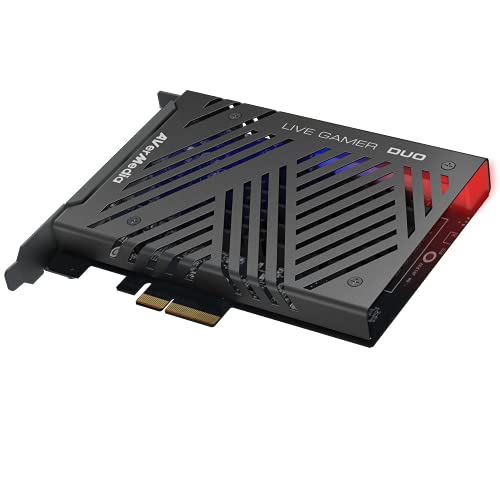
AVerMedia Live Gamer Duo Dual HDMI Capture Card
Best for: Dual input streaming setups
- Capture Resolution
- 1080p60
- Passthrough Resolution
- 4K60 HDR, FHD 240fps
- Host Interface
- PCIe
- Video Interface
- HDMI
- Platform
- Xbox, PS5, Xbox Series X/S
- Compatible Platform
- PlayStation 5, Nintendo Switch
The AVerMedia Live Gamer Duo is an internal PCIe capture card designed for creators who need two simultaneous video sources. It captures uncompressed 1080p60 video while passing through signals up to 4K60 HDR or Full HD 240fps. This model includes onboard processing for tone mapping and downscaling. It is ideal for setups requiring dual inputs, such as combining a console and a camera, without impacting the pass-through experience.
- Dual HDMI inputs for simultaneous capture
- Passes through 4K60 HDR or 1080p240fps
- Onboard HDR to SDR tone mapping
- Captures uncompressed 1080p60 video
- Compatible with major streaming software
- Limited to 1080p60 capture resolution
- Heavier at 7.37 ounces than competitors
- Larger physical dimensions at 9 inches
- You need two simultaneous HDMI inputs
- You require zero-lag 4K60 pass-through
- You stream from a console and camera
- You need 4K capture resolution
- You prefer a compact form factor
- You only have one video source
Verdict: AVerMedia Live Gamer Duo Dual HDMI 1080p60 suits creators needing dual inputs for simultaneous recording. It fits users who prioritize pass-through quality over capture resolution.

Guermok 4K144 HDMI USB Capture Card
Best for: Windows streaming with high refresh rates
- Capture Resolution
- 4K144
- Passthrough Resolution
- 4K144
- Host Interface
- USB 3.2 Gen 2
- Video Interface
- HDMI 2.1
- HDR Support
- HDR10
- VRR Support
- Supported
The Guermok GM-73F is a USB 3.2 Gen 2 capture card supporting 4K144 passthrough and capture. It handles 1080p240 and 1440p240 recording on Windows. macOS users are limited to 4K60. It includes HDMI 2.1 pass-through with HDR10 and VRR. The unit weighs 5.94 ounces and measures 5.03 inches long. It suits streamers needing high refresh rates and flexible audio inputs.
- HDMI 2.1 passthrough up to 4K144Hz
- Windows capture supports 1080p240 and 1440p240
- Built-in PD 3.0 for host device charging
- Multiple audio inputs including Mic In and Line In
- Supports HDR10 and VRR for smoother gameplay
- macOS capture is limited to 4K60
- Heavier at 5.94 ounces than many competitors
- Longer at 5.03 inches than compact alternatives
- You need 1080p240 or 1440p240 recording on Windows
- You want PD 3.0 charging for your laptop
- You require multiple audio input options for streaming
- You use macOS and need 4K144 capture
- You prefer a lighter or smaller form factor
- You do not need high-refresh-rate passthrough
Verdict: Guermok 4K144 HDMI 2.1 USB Capture Card fits Windows users who need high frame rate recording and charging capabilities. It is less suitable for macOS users or those prioritizing a compact design.
Specifications side by side
| Spec | Elgato 4K Pro Internal Capture Card | AVerMedia Live Gamer Ultra 2.1 | Ezcap 4K144 Pro Video Capture Card | BlueAVS Hunter4K Pro | AVerMedia HDMI 2.1 Internal PCIe Capture Card | AVerMedia Live Gamer Duo Dual HDMI Capture Card | Guermok 4K144 HDMI USB Capture Card |
|---|---|---|---|---|---|---|---|
| Capture Resolution | 4K60 | 4K144 | 4K144, 1080p240 | 4K 144 FPS | 4K60 | 1080p60 | 4K144 |
| Passthrough Resolution | 8K60 | 4K144, 1440p240, 1080p360 | 4K144, 1440p240, 1080p360 | 4K 144 FPS | – | 4K60 HDR, FHD 240fps | 4K144 |
| Host Interface | PCIe x4 | USB 3.2 Gen 2 Type-C | USB 3.2 Gen 2 | USB 3.2 Gen 2 | PCIe | PCIe | USB 3.2 Gen 2 |
| Video Interface | HDMI 2.1 | HDMI 2.1 | HDMI 2.1 | HDMI 2.1 | HDMI 2.1 | HDMI | HDMI 2.1 |
| HDR Support | HDR10 | HDR10 | HDR10 | HDR10 | – | – | HDR10 |
| VRR Support | – | Supported | – | VRR passthrough | – | – | Supported |
| Features | HDR, HDR10, VRR | RGB Lighting, HDR10, VRR | HDR10, VRR, Ultra-Low Latency | HDR10, VRR, Ultra-Low Latency | Ultra-Low Latency | HDR | HDR10, VRR, Ultra-Low Latency |
| Color | Black | Black | 4K144 Pro – 401 | Black | Multicolor | – | Black |
| Resolution | – | – | 4K UHD | – | 4K UHD | 1080p FHD | 4K UHD |
| Platform | PC, Xbox, PS5, Xbox Series X/S | PC, Xbox, PS5, Mac, Xbox Series X/S | PC, Xbox, PS5, Mac, Xbox Series X/S | PC, Xbox, PS5, Mac | Xbox, PS5, Xbox Series X/S, Xbox One | Xbox, PS5, Xbox Series X/S | PC, PS5, Mac |
| Compatible Platform | PlayStation 5, Nintendo Switch | PlayStation 5, Nintendo Switch | PlayStation 5, Nintendo Switch | PlayStation 5, Nintendo Switch | PlayStation 5, Nintendo Switch, PS4 | PlayStation 5, Nintendo Switch | PlayStation 5, Nintendo Switch |
| Use | – | – | – | – | Streaming | – | – |
| Connectivity | – | USB | USB | USB | – | – | USB |
| Lighting | – | RGB | – | – | – | – | – |
| Application | – | – | – | – | Recording | – | – |
| Operating System | – | – | – | – | – | Windows 11 | – |
| Dimensions | 5 × 2 × 1 inches | 2.7 × 7.3 × 6.3 inches | – | 2.95 × 0.91 × 5.12 inches | 4.76 × 6.32 × 0.83 inches | 9 × 8 × 3 inches | 5.03 × 2.91 × 0.83 inches |
| Weight | 4 ounces | 4.06 ounces | 7.69 ounces | 1.76 pounds | 5.31 ounces | 7.37 ounces | 5.94 ounces |
| Model | 10GBK9901 | Live Gamer ULTRA 2.1 | ezcap401 | Hunter4K Pro | GC575 | GC570D | GM-73F |
| Size | – | HDMI 2.1 – GC553G2 (Black) | – | Small | HDMI 2.1 – GC575 | 1080p60 – GC570D Live Gamer DUO | – |
Frequently asked questions
Is the Elgato 4K Pro better than external USB capture cards?
The Elgato 4K Pro uses a PCIe interface for internal installation, which typically offers more stable bandwidth than external USB connections. While external options like the AVerMedia Live Gamer Ultra 2.1 provide 4K144 capture speeds, the Elgato unit prioritizes stable passthrough and HDR10 support for desktop gamers who prefer not to use external dongles.
Which alternative offers the highest capture frame rate?
The AVerMedia Live Gamer Ultra 2.1 supports 4K144 capture, which is the highest frame rate listed among these alternatives. This makes it ideal for Windows users who need high-end performance and VRR support. The Elgato 4K Pro, by comparison, is limited to 4K60 capture resolution, making it less suitable for high-refresh-rate streaming.
Can I use these cards with Xbox Series X and PS5?
Yes, most listed cards support both Xbox Series X/S and PlayStation 5. The Elgato 4K Pro, AVerMedia Live Gamer Ultra 2.1, Ezcap 4K144 Pro, and BlueAVS Hunter4K Pro all list compatibility with these consoles. They utilize HDMI 2.1 interfaces to handle the high-bandwidth video signals required for modern gaming consoles at 4K resolutions.
Do these capture cards support HDR10?
Several models in this list include HDR10 support to preserve color accuracy during recording. The Elgato 4K Pro, AVerMedia Live Gamer Ultra 2.1, Ezcap 4K144 Pro, BlueAVS Hunter4K Pro, and Guermok 4K144 all feature HDR10. This ensures that high dynamic range content from your console is captured correctly without color banding or washing out.
Which card is best for dual-input streaming setups?
The AVerMedia Live Gamer Duo Dual HDMI Capture Card is designed specifically for dual inputs. It supports 1080p60 capture resolution and allows simultaneous recording from two sources. This makes it the top choice for creators who need to manage multiple game consoles or PCs at once, unlike the single-input internal or external cards listed.
Is there a budget-friendly option for 4K capture?
The BlueAVS Hunter4K Pro is labeled as the best budget option for high frame rate external capture. It provides 4K 144 FPS performance with VRR support and uses USB 3.2 connectivity. This makes it a practical choice for users who need high refresh rates without the higher cost associated with premium internal or flagship external models.
Do I need a specific operating system for these cards?
Most cards support Windows, but macOS compatibility varies. The AVerMedia Live Gamer Ultra 2.1 and Ezcap 4K144 Pro support both Windows and Mac. However, the Guermok 4K144 is noted as less suitable for macOS users. The Elgato 4K Pro is primarily geared toward PC desktop gamers, so check the platform list for your specific setup.

