As Amazon Associates, we earn from qualifying purchases. This means we may receive a small commission at no extra cost to you if you click through and make a purchase.
As an Amazon Associate we earn from qualifying purchases. Links on this page are affiliate links.
Finding the best 1080p FHD capture cards requires comparing published specifications rather than subjective opinions. This guide ranks 3 models based on their technical data to help you choose. The AVerMedia Live Gamer Duo Dual HDMI leads because it supports dual 1080p60 capture via a PCIe interface. This spec allows streamers to handle multiple inputs without sacrificing pass-through quality. Other picks offer high frame rates or multi-source mixing for different needs. Use this list to decide which hardware fits your specific streaming setup. We focus only on the facts listed by manufacturers. Your choice depends on whether you need portability, multiple inputs, or high frame rates. The data shows clear differences in host interfaces and capture resolutions.
Check host interface before buying
You must verify your computer’s available ports. The AVerMedia Live Gamer Duo uses a PCIe slot, requiring an open slot inside your case. The ASUS TUF Gaming CU4K30 connects via USB 3.2. Choose PCIe if you need dual inputs or lower latency. Select USB if you want a plug-and-play solution for a single console or PC source.
| # | Product | Best for | Price |
|---|---|---|---|
| 1 | AVerMedia Live Gamer Duo Dual HDMI Capture Card Best overall | Dual input 1080p streaming setups | |
| 2 | ASUS TUF Gaming CU4K30 Capture Card Best budget | 1080p 120fps streaming with 4K HDR passthrough | |
| 3 | RGBlink Mini 4-Channel HDMI Capture Best streaming | multi-source HDMI streaming with audio mixing |
The best fit for you
- You need dual 1080p60 capture for multiple inputs – AVerMedia Live Gamer Duo Dual HDMI Capture Card – It offers dual 1080p60 capture via PCIe for streamers needing multiple sources.
- You want 120fps streaming with durable hardware – ASUS TUF Gaming CU4K30 Capture Card – It delivers 1080p capture with 4K HDR passthrough in a sturdy metal enclosure.
- You need to mix four HDMI sources on the go – RGBlink Mini 4-Channel HDMI Capture – It combines four HDMI inputs and mixes audio in a portable form factor.
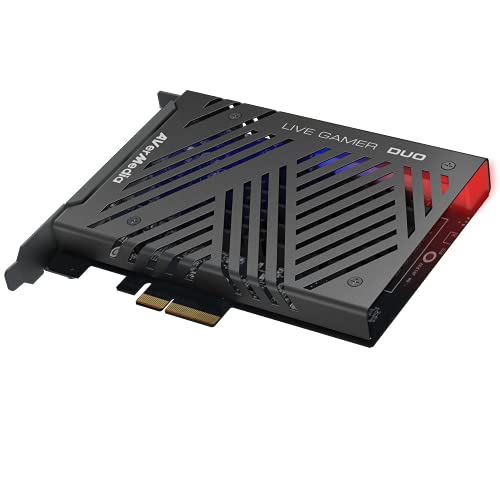
AVerMedia Live Gamer Duo Dual HDMI Capture Card
Best for: Dual input 1080p streaming setups
- Resolution
- 1080p FHD
- Capture Resolution
- 1080p60
- Passthrough Resolution
- 4K60 HDR, FHD 240fps
- Host Interface
- PCIe
- Video Interface
- HDMI
- Platform
- Xbox, PS5, Xbox Series X/S
The AVerMedia Live Gamer Duo is a PCIe capture card designed for creators who need dual inputs. It captures uncompressed 1080p60 video while passing through signals up to 4K60 HDR or Full HD 240fps. This model includes onboard processing for tone mapping and downscaling. It fits well in standard PC cases and supports major streaming software. You get two HDMI ports in a single expansion slot for flexible setup.
- Dual HDMI inputs for simultaneous capture
- Captures uncompressed 1080p60 video
- Passes through 4K60 HDR signals
- Supports Full HD 240fps pass-through
- Onboard HDR to SDR tone mapping
- Captures only 1080p60 while competitors offer higher frame rates
- Physical dimensions are 9 inches long and 8 inches wide
- Weighs 7.37 ounces which is bulkier than some alternatives
- You need to capture from two sources at once
- You want zero lag pass-through for high refresh rates
- You use Windows 11 for streaming
- You require 4K capture resolution
- You need a compact external USB device
- You want a lower profile internal card
Verdict: AVerMedia Live Gamer Duo Dual HDMI offers dual 1080p60 capture for streamers needing multiple inputs. It suits those prioritizing pass-through quality over higher capture frame rates.

ASUS TUF Gaming CU4K30 Capture Card
Best for: 1080p 120fps streaming with 4K HDR passthrough
- Resolution
- 1080p FHD
- Capture Resolution
- 4K30, 2K60, 1080p120
- Passthrough Resolution
- 4K60 HDR
- Host Interface
- USB 3.2 Type-C
- Video Interface
- HDMI 2.0
- HDR Support
- Supported
The ASUS TUF Gaming CU4K30 is a USB 3.2 Type-C capture card designed for high-frame-rate streaming. It supports 1080p capture at 120 fps and 4K passthrough at 60 Hz with HDR. The device uses a durable alloy shell and requires no extra drivers. It fits gamers who need smooth 120 fps performance and reliable plug-and-play setup on PC or consoles.
- Captures video at 1080p resolution with 120 fps support
- Passes through 4K video at 60 Hz with HDR
- Connects via USB 3.2 Type-C for plug-and-play use
- Features a durable alloy outer shell
- Capture resolution is limited to 4K at 30 fps
- Weight is 14.9 ounces, which is heavier than typical compact cards
- Dimensions are 6.4 by 5.5 by 2.5 inches, requiring more desk space
- You want to stream 1080p content at 120 fps
- You need 4K passthrough with HDR support
- You prefer a durable metal build over plastic
- You require 4K capture at 60 fps or higher
- You need a PCIe internal card for zero latency
- You want a compact device under 10 ounces
Verdict: ASUS TUF Gaming CU4K30 Capture Card delivers high-frame-rate 1080p capture and 4K HDR passthrough in a sturdy metal enclosure. It is ideal for streamers who prioritize 120 fps smoothness and durable hardware over minimal size.

RGBlink Mini 4-Channel HDMI Capture
Best for: multi-source HDMI streaming with audio mixing
- Resolution
- 1080p FHD
- Capture Resolution
- 1080p
- Host Interface
- USB 3.0
- Video Interface
- HDMI
- Channel Count
- 4
- Platform
- Xbox, PS5
The RGBlink Mini is a portable 1080p capture card with four HDMI inputs and a USB 3.0 host interface. It connects to consoles like the PS5 and Xbox. The device acts as a webcam for direct platform recognition. It includes dedicated MIC and LINE audio inputs for mixing. You need a 35W+ USB-C power adapter for stable operation. This compact unit suits streamers who need multi-source input without a PCIe slot.
- Four HDMI video inputs for multiple sources
- 1080p capture resolution for clear video
- Dedicated MIC and LINE audio mixing inputs
- Direct webcam recognition for OBS and Zoom
- Compact 0.09-inch height for portable use
- Requires a separate 35W+ USB-C power adapter
- Single HDMI input per channel limits total simultaneous capture
- Only supports 1080p resolution, not 4K
- You need to capture video from four separate HDMI sources
- You want to mix microphone and line audio inputs directly
- You prefer a portable device that fits in a bag
- You require 4K or higher resolution capture
- You need a PCIe internal card for your desktop
- You want a single unit without external power needs
Verdict: RGBlink Mini 4 HDMI USB-C Capture is ideal for streamers who need to combine four HDMI sources and mix audio inputs in a portable form factor. It fits users who prioritize multi-channel input flexibility over maximum resolution.
Specifications side by side
| Spec | AVerMedia Live Gamer Duo Dual HDMI Capture Card | ASUS TUF Gaming CU4K30 Capture Card | RGBlink Mini 4-Channel HDMI Capture |
|---|---|---|---|
| Capture Resolution | 1080p60 | 4K30, 2K60, 1080p120 | 1080p |
| Passthrough Resolution | 4K60 HDR, FHD 240fps | 4K60 HDR | – |
| Host Interface | PCIe | USB 3.2 Type-C | USB 3.0 |
| Video Interface | HDMI | HDMI 2.0 | HDMI |
| Channel Count | – | – | 4 |
| HDR Support | – | Supported | – |
| Features | HDR | HDR | – |
| Resolution | 1080p FHD | 1080p FHD | 1080p FHD |
| Platform | Xbox, PS5, Xbox Series X/S | PC, Xbox, PS5 | Xbox, PS5 |
| Compatible Platform | PlayStation 5, Nintendo Switch | PlayStation 5, Nintendo Switch | PlayStation 5 |
| Use | – | Gaming | Streaming |
| Connectivity | – | USB | USB |
| Application | – | Recording | Recording |
| Operating System | Windows 11 | – | – |
| Dimensions | 9 × 8 × 3 inches | 6.4 × 5.5 × 2.5 inches | – |
| Weight | 7.37 ounces | 14.9 ounces | – |
| Size | 1080p60 – GC570D Live Gamer DUO | – | – |
| Model | GC570D | TUF GAMING CAPTURE BOX-CU4K30 | RGBlink Mini |
| Color | – | CU4K30|HDMI 2.0|2160p60 | Black-2k video capture |
How to choose the right one
Check port availability
Verify your computer has the correct physical interface before purchasing. The AVerMedia Live Gamer Duo requires an open PCIe slot inside your desktop case. This internal connection supports dual HDMI inputs for complex streaming setups. If you lack free expansion slots or use a laptop, this model will not fit. Instead, look for USB-based cards like the ASUS TUF Gaming CU4K30. Its USB 3.2 connection plugs directly into an external port. Matching the host interface to your hardware prevents compatibility issues and installation failures.
Verify frame rate needs
Determine if you need high frame rates for smooth gameplay. The ASUS TUF Gaming CU4K30 supports 1080p capture with high frame rates, ideal for competitive gaming streams. The AVerMedia Live Gamer Duo caps at 1080p60. This limit suits creators who prioritize pass-through quality over extreme smoothness. If you stream fast-paced shooters, the higher frame rate capability of the ASUS card provides better visual fluidity. Check the capture resolution spec to ensure the card meets your specific content requirements.
Assess multi-source needs
Identify how many video sources you need to capture simultaneously. The AVerMedia Live Gamer Duo supports dual 1080p60 capture, allowing you to record from two consoles at once. The RGBlink Mini 4-Channel HDMI Capture handles four HDMI inputs. This flexibility suits professional streamers managing multiple feeds. The ASUS TUF Gaming CU4K30 focuses on a single high-quality stream. Choose a card based on the number of devices you plan to connect and record from simultaneously.
Consider build durability
Evaluate the physical construction if you move equipment often. The ASUS TUF Gaming CU4K30 features a sturdy metal enclosure. This design protects internal components during transport or heavy use. The AVerMedia Live Gamer Duo is an internal card, so its durability depends on your case. The RGBlink Mini 4-Channel HDMI Capture offers a portable form factor. Its compact size suits users who travel or set up temporary streaming stations. Match the build material to your usage environment and mobility requirements.
Check audio mixing
Determine if you need to mix audio inputs directly. The RGBlink Mini 4-Channel HDMI Capture includes audio mixing capabilities. This feature allows you to combine multiple audio sources without external software. The AVerMedia Live Gamer Duo and ASUS TUF Gaming CU4K30 do not list audio mixing in their attributes. If you require integrated audio control, the RGBlink model is the practical choice. Verify the features list to ensure the card handles your audio workflow without extra hardware.
Frequently asked questions
Which capture card handles dual 1080p60 inputs?
The AVerMedia Live Gamer Duo Dual HDMI supports dual 1080p60 capture. It connects via a PCIe slot to your computer. This setup allows you to record from two HDMI sources simultaneously. It is ideal if you need to manage multiple gaming consoles or PCs for your streams.
Can I get 120fps capture for streaming?
The ASUS TUF Gaming CU4K30 is designed for high-frame-rate capture. It supports 1080p capture at high speeds. It also features 4K HDR passthrough for your display. This model is a sturdy metal enclosure that prioritizes smooth motion for competitive gaming streams.
Is there a capture card with four HDMI inputs?
Yes, the RGBlink Mini 4-Channel HDMI Capture supports four HDMI sources. It allows you to combine multiple video feeds into one stream. It also includes audio mixing capabilities. This device is compact and suitable for complex streaming setups requiring multiple inputs.
Do these cards work with PlayStation 5?
All three listed models support PlayStation 5. The AVerMedia Live Gamer Duo, ASUS TUF Gaming CU4K30, and RGBlink Mini all list the PlayStation 5 as a compatible platform. You can connect your PS5 to any of these devices for recording or live streaming.
What is the connection type for the AVerMedia card?
The AVerMedia Live Gamer Duo uses a PCIe host interface. It connects directly to your motherboard inside the desktop case. This internal connection supports dual HDMI video interfaces. It requires an open PCIe slot on your computer to function properly.
Does the ASUS card use USB or PCIe?
The ASUS TUF Gaming CU4K30 uses a USB 3.2 host interface. It connects to your computer via a USB port. This external connection makes it easier to set up without opening your case. It supports HDMI video input for your gaming console or PC.
Can I use these cards with Nintendo Switch?
The AVerMedia Live Gamer Duo and ASUS TUF Gaming CU4K30 support Nintendo Switch. Both devices list the Nintendo Switch as a compatible platform. You can connect your Switch to capture 1080p FHD gameplay. The RGBlink Mini focuses on PlayStation 5 compatibility.
Which card is best for multi-source audio mixing?
The RGBlink Mini 4-Channel HDMI Capture is best for audio mixing. It allows you to mix audio inputs from its four HDMI channels. This feature is useful for streamers who need to combine different audio sources. It offers flexibility for complex streaming environments.

