As Amazon Associates, we earn from qualifying purchases. This means we may receive a small commission at no extra cost to you if you click through and make a purchase.
Power Supply Mounting Position
Top Mount (Rear Chamber)
Total Fan Mounting Capacity
Up to 10 Fans
Front Panel USB Connectivity
2x USB 3.0, 2x USB 2.0
Chassis Form Factor
Mid Tower (Dual Chamber)
Evaluating the hardware limits of any enclosure prevents costly clearance conflicts during assembly. The published hyte y70 specs establish clear physical boundaries for cooling hardware and core system components.
Full spec sheet 9 more rows from the listing
| Supported Motherboards | ATX |
| Chassis Materials | Metal, Tempered Glass |
| Primary Color Finish | Pink (Strawberry Milk) |
| Total Expansion Slots | 4 (Dedicated Vertical Orientation) |
| Included PCIe Riser | Luxury PCIe 4.0 x16 Riser Cable with Color-Matched Canopy |
| Side Radiator Support | Up to 360mm (Up to 125mm Maximum Thickness) |
| Top Radiator Support | Up to 360mm (Up to 68mm Maximum Thickness) |
| Cold Floor Bottom Fan Mounts | Up to 3x 120mm or 2x 140mm (Up to 32mm Thickness) |
| Internal Drive Bays | 4 |
Choosing an enthusiast PC chassis requires looking beyond showcase cosmetics to evaluate thermal headroom, electrical component safety, and structural integrity. Builders searching for the HYTE Y70 in Strawberry Milk are typically drawn to its striking three-piece panoramic tempered glass enclosure and soft pastel exterior. However, high-wattage components generate substantial heat, and enclosing them behind expansive glass panels raises legitimate thermal questions. If you are assembling a flagship gaming rig, verifying whether this chassis provides sufficient intake volume and reliable vertical expansion connectivity is essential before transferring your core components.
This technical inspection examines the functional realities of the hyte y70 pink mid-tower chassis. We break down the thermal architecture of the dual-chamber layout, assess the structural clearance of the dedicated four-slot vertical graphics mount, and examine the long-term reliability of the bundled luxury PCIe 4.0 riser cable. By reviewing intake and exhaust pathways, radiator thickness limits, and rear cable management infrastructure, this guide delivers an objective assessment of what builders should anticipate during and after assembly.
What You Get With the HYTE Y70
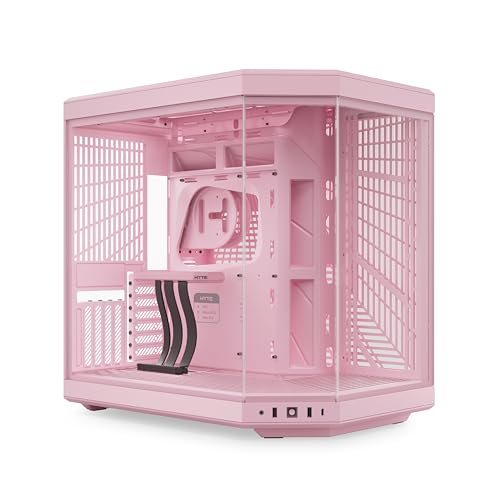


The HYTE Y70 arrives as a specialized mid-tower chassis designed around a dual-chamber internal format, prioritizing unobstructed interior display alongside compartmentalized hardware separation. The package supplies the primary structural chassis along with key integrated accessories meant to streamline vertical-only graphics configurations.
- Unified dual-chamber mid-tower steel chassis finished in Strawberry Milk pink with tool-less exterior panels
- Three-piece panoramic tempered glass wraparound viewing panels
- Pre-installed luxury PCIe 4.0 x16 riser cable featuring a color-matched milky protective canopy
- Integrated bottom cold floor cooling bracket accommodating up to three 120mm or two 140mm fans
- Rear chamber storage mounting sleds supporting up to four internal drives
- Pre-routed reusable internal Velcro cable management straps and labeled internal anchor points
- Signature clicky blue tactile power switch on the lower chassis face
- Front and top panel I/O interface featuring two USB 3.0 ports and two USB 2.0 ports
Airflow Dynamics and Thermal Headroom
A central consideration in any hyte y70 airflow review is how an enclosure wrapped in three distinct panes of tempered glass maintains stable internal temperatures. Traditional airflow cases draw air through open mesh front fascias, creating a linear front-to-back pressure gradient. Because the hyte y70 strawberry milk model replaces the front and corner panels with solid glass, it relies entirely on negative or positive pressure generated across its side, bottom, and top ventilation zones. Fresh intake air is pulled primarily through the side tray and the recessed cold floor fan bracket situated directly below the graphics card.
The chassis engineering directly addresses thermal buildup by allocating space for up to ten total fans. The cold floor intake is positioned to direct ambient air straight into the intake fans of modern graphics cards, which is critical given the vertical card orientation. Builders can mount either three 120mm fans or two 140mm fans beneath the floor, accepting fan frames up to 32mm thick. This extra clearance accommodates performance-grade thick fans that generate higher static pressure, counteracting the natural resistance created by the floor filter and floor grille.
Exhaust performance and radiator capacity provide significant thermal safety margins for high-wattage processors. The side compartment supports radiators up to 360mm in length with an expansive 125mm thickness allowance, accommodating push-pull fan arrays without crowding the main motherboard chamber. Meanwhile, the adjustable top exhaust bracket accommodates another 360mm radiator up to 68mm thick. For builders monitoring long-term hyte y70 cooling performance, using the bottom and side as dedicated filtered intakes while running the top and rear as active exhaust creates a reliable positive-pressure environment that curbs internal dust buildup.
PCIe Riser Reliability and Vertical GPU Clearance
Vertical graphics card mounting often introduces operational anxiety regarding riser degradation, thermal throttling, and physical clearance. In standard enclosures, mounting a massive card vertically pushes its cooling fans uncomfortably close to the side glass panel, choking off intake airflow and causing junction temperatures to spike. The HYTE Y70 mitigates this issue by providing a massive four-slot vertical footprint. This design spaces even modern multi-slot flagship graphics cards far enough away from the front tempered glass to preserve an adequate intake buffer.
Signal reliability across PCIe extension cables is another common point of failure for system builders. Past vertical configurations across the industry have suffered from riser cable issues where signal degradation causes PCIe link degradation, dropped frames, intermittent blue-screen errors, or failure to establish a stable PCIe 4.0 handshake. HYTE bundles a dedicated luxury PCIe 4.0 x16 riser cable engineered specifically for the chassis dimensions. The cable assembly includes a rigid color-matched milky canopy that secures the connector base, preventing mechanical strain and sagging when seating heavy, multi-slot graphics cards.
Maintaining signal stability requires zero sharp crimps along the riser ribbon traces during installation. Because the riser comes pre-aligned to the chassis floor, it eliminates the unpredictable torsion that standard aftermarket extension cables experience. When planning high-demand workstation or gaming hardware, clean physical integration is just as critical as dedicated circuit protection, a principle builders recognize when managing dedicated hardware infrastructure like the anker solix e10 whole-home system for continuous operational stability.
Chassis Build Quality and Internal Management
Overall hyte y70 build quality is defined by cold-rolled steel construction, rigid panel stampings, and precise manufacturing tolerances. The Strawberry Milk finish is applied consistently across external metal stampings and plastics, with the milky canopy on the riser cable matching the chassis theme. Both the steel side ventilation panel and the tempered glass segments feature tool-less retention mechanisms, allowing builders to pop panels free for maintenance without hunting for screwdrivers or stripping fragile thumbscrew threads.
Inside the secondary rear chamber, the chassis isolates power and storage away from the main display zone. The top-mounted power supply location sits above the motherboard backplate, clearing the bottom floor entirely for clean airflow routing. Four internal drive sleds float securely within the rear cavity, providing generous data storage options without protruding into the main chamber. The chassis includes integrated cable routing channels fitted with reusable Velcro tie-downs and clearly labeled pass-through locations, keeping thick ATX power harnesses organized and preventing mechanical pressure against the rear side panel.
Keeping a light-colored enthusiast chassis pristine over several years requires careful handling of both paint and glass surfaces. Dust accumulation on soft-toned panels shows quickly, though builders should avoid harsh cleaning formulas designed for bathrooms or ceramics, such as the pink stuff foaming toilet cleaner, in favor of simple microfiber cloths and mild glass cleaners that preserve powder-coated paint finishes and factory glass coatings.
Component Compatibility and Assembly Considerations
While the HYTE Y70 offers expansive volume, its dedicated layout imposes distinct physical constraints that builders must plan around. The most significant architectural factor is the lack of traditional horizontal expansion slots. With four vertical expansion slots, add-in peripheral devices such as dedicated internal sound cards, high-bandwidth capture cards, or secondary PCIe expansion brackets cannot be accommodated alongside a standard graphics card. System builders requiring multiple add-in cards must rely on USB external interfaces or motherboard-integrated features.
Motherboard compatibility centers on standard ATX boards. Clearances around the top and side radiator mounts are generous, but radiator tubing lengths must be considered. When installing a 360mm closed-loop liquid cooler along the side mount, ensure the AIO tubing spans the distance from the processor socket to the side chamber without putting bending tension on the water block fittings. Additionally, while the listing confirms extensive support for large air coolers, builders who opt for tall dual-tower air sinks must verify total height clearance against the vertical graphics card standing directly in front of the motherboard.
Precision fitment extends to modern front I/O connectivity. The chassis front panel features two USB 3.0 ports alongside two legacy USB 2.0 connections and the clicky blue power button. System integrators should verify that their chosen ATX motherboard possesses enough internal headers to power both generations of USB front connections simultaneously. Integrating complex personal technology requires checking configuration requirements in advance, similar to verifying port configurations and driver interfaces before deploying the hp 6155 printer in an active home office.
HYTE Y70 Pros and Cons
Pros
- Included luxury PCIe 4.0 riser cable
- Massive 4-slot vertical GPU clearance
- Three-piece panoramic tempered glass design
- Supports up to 10 cooling fans
- Side mount fits radiators up to 125mm thick
- Tool-less panels with dual-chamber cable space
Cons
- No pre-installed cooling fans included
- Restricted to vertical-only GPU mounting
- Top-mount PSU orientation limits some layouts
Is the HYTE Y70 Worth It
Deciding whether the HYTE Y70 represents a sound purchase depends heavily on your hardware priorities, cooling configuration, and aesthetic preferences. If you intend to build an uncompromising showcase system, this chassis delivers exceptional panel fitment, a durable steel frame, and genuine four-slot vertical GPU accommodation. By providing a cold-floor fan intake and thick radiator allowances on the side and top, it avoids the severe thermal throttling that commonly plagues enclosed glass cases, making the hyte y70 for high end gaming a viable and visually distinctive option.
On the other hand, the chassis demands an informed builder who understands its trade-offs. The case ships without pre-installed cooling fans, meaning you must budget for and source up to ten individual fans to establish an effective airflow cycle. Furthermore, buyers who require traditional horizontal expansion slots for auxiliary hardware will find the vertical-only expansion architecture overly restrictive. If your build plan focuses on a single powerful graphics card and liquid cooling, the structural rigidity and thoughtful cable routing make this chassis a reliable foundation.
FAQ
Does the HYTE Y70 include pre-installed cooling fans?
No, the listing specifies that the HYTE Y70 does not include pre-installed case fans. Builders must supply their own 120mm or 140mm fans to populate the up to 10 fan positions, including the bottom cold floor mount and the side or top exhaust locations.
Can you mount a graphics card horizontally in the HYTE Y70?
No, the chassis is engineered exclusively for vertical graphics card orientation. It features 4 vertical expansion slots and includes a luxury PCIe 4.0 x16 riser cable. There are no horizontal expansion brackets available on the rear frame.
What size radiators fit inside the chassis?
The HYTE Y70 supports up to a 360mm radiator on the side with a thickness allowance of up to 125mm, as well as up to a 360mm radiator on the top bracket with a maximum thickness clearance of 68mm.
Will the vertical mount cause thermal throttling on modern graphics cards?
The four-slot spacing provides a substantial air gap between multi-slot graphics cards and the side glass panel. Coupled with the cold floor fan bracket located directly underneath the card, the layout provides dedicated intake paths to keep GPU thermals stable under sustained loads.
What motherboard sizes does the HYTE Y70 support?
The product specifications confirm support for standard ATX motherboards within the main dual-chamber compartment.


