As Amazon Associates, we earn from qualifying purchases. This means we may receive a small commission at no extra cost to you if you click through and make a purchase.
As an Amazon Associate we earn from qualifying purchases. Links on this page are affiliate links.
This gaming keyboard buying guide helps you choose the right hardware for your setup. You will learn how to pick between wired and wireless connections, full-size and compact layouts, and mechanical or optical switch types. The selection process focuses on practical specifications that impact your daily gaming experience.
We evaluated 8 models based strictly on their published specifications. You can decide if you need rapid trigger response, low-profile keys, or dedicated macro buttons. Each recommended product was chosen by comparing these technical details against common gaming needs. This approach ensures you find a keyboard that matches your specific requirements for speed, comfort, and desk space.
Key Specs for Gaming Keyboards
Switch Type and Feel
Switches define how a keyboard feels and responds. Mechanical switches offer tactile feedback, which helps you confirm a press without bottoming out. Optical switches use light beams to register input, often providing faster response times and lower latency for competitive play. Hall Effect switches detect magnetic fields, allowing for adjustable actuation points. You should choose tactile switches if you prefer distinct feedback. Optical or Hall Effect options suit those prioritizing speed and rapid trigger capabilities. The choice impacts both typing comfort and gaming precision.
Look for
- Mechanical, tactile, or optical switches
- Adjustable actuation points
- Rapid trigger support
Keyboard Layout and Size
Layout determines how many keys are present and how much desk space the board occupies. Full-size keyboards include a numeric keypad, ideal for data entry or games that use number keys. Tenkeyless (TKL) layouts remove the numpad, saving space for mouse movement. Compact 96% layouts offer a middle ground, retaining the numpad in a smaller footprint. Low-profile designs reduce height, which can improve wrist comfort during long sessions. You need to decide if you require the numpad or prioritize mouse space for aiming.
Look for
- Full-size, TKL, or 96% layout
- Low-profile height specifications
- Numpad inclusion or exclusion
Connectivity Options
Connection type affects latency, cable management, and mobility. Wired keyboards provide a stable connection with no battery concerns, ensuring consistent performance. Wireless models offer freedom from cables, which is useful for clean desk setups or LAN events. Tri-mode connectivity allows you to switch between USB wired, 2.4GHz wireless, and Bluetooth connections. This flexibility lets you use the keyboard on different devices or switch modes based on your current need. You should consider whether your setup benefits from cable-free movement or absolute reliability.
Look for
- Wired, wireless, or tri-mode support
- 2.4GHz or Bluetooth connectivity
- Battery life for wireless models
Polling Rate and Latency
Polling rate measures how often the keyboard reports its state to the computer. Higher rates, such as 8K polling, reduce the time between a key press and the system registering it. This is critical for competitive gaming where milliseconds matter. Lower polling rates are sufficient for casual use. You should look for high polling rates if you play fast-paced shooters or racing games. For general gaming or typing, standard rates are adequate. Check the specifications to ensure the board meets your speed requirements.
Look for
- 8K polling rate specifications
- Low latency claims
- Rapid trigger feature support
Keycap Material and Durability
Keycap material affects longevity, feel, and resistance to wear. PBT keycaps are known for their durability and resistance to shine over time. They have a textured feel that some players prefer. ABS keycaps are smoother but may develop a shiny surface with heavy use. The material choice influences how the keyboard ages. You should select PBT keycaps if you want long-term durability and a specific tactile feel. Consider how often you type or game when weighing this factor against other features.
Look for
- PBT or ABS keycap material
- Textured or smooth finish
- Durability ratings or claims
Special Features and Controls
Extra features can enhance functionality or customization. Macro keys allow you to bind complex commands to single buttons. OLED displays provide on-device information or customization options. RGB lighting adds visual appeal but does not impact performance. Hot-swappable switches let you change switches without soldering. You should prioritize features that match your workflow. Macro keys suit players who need quick access to multiple actions. OLED screens offer convenient settings adjustments. Evaluate which extras add value to your specific gaming setup.
Look for
- Dedicated macro keys
- OLED display presence
- Hot-swappable switch support
Physical Dimensions and Weight
Size and weight determine how the keyboard fits on your desk and its stability. Compact boards save space but may feel cramped. Heavier keyboards resist sliding during intense gaming sessions. Lighter boards are easier to transport. You should measure your desk space to ensure compatibility. Consider the height of the keyboard for ergonomic comfort. Lower profiles reduce wrist strain. Weight impacts stability; heavier boards stay put better. Check dimensions to ensure the board fits your intended location and usage style.
Look for
- Width, length, and height specs
- Weight in pounds or ounces
- Low-profile height measurements
Types of Gaming Keyboards
Full-Size Layouts
Full-size keyboards include a dedicated numeric keypad, making them ideal for data entry and complex macros. The Razer BlackWidow V4 Pro offers tactile mechanical switches and RGB lighting in this form factor. You gain extensive key access but sacrifice desk space. The Logitech G915 X Wired provides a low-profile tactile experience with PBT keycaps. This layout suits users who need a numpad for gaming or work. The trade-off is a larger footprint that requires more desk real estate for mouse movement.
Tenkeyless (TKL) Designs
TKL keyboards remove the numpad to increase mouse space and improve portability. The Logitech G PRO X TKL Wireless uses tactile switches for reliable wireless performance. It weighs 5.29 ounces and fits compact setups. The SteelSeries Apex Pro TKL Gen 3 adds rapid trigger response and an OLED panel. You get faster inputs and a cleaner desk. The main compromise is the loss of numeric keys, which matters for spreadsheet-heavy workflows. These boards prioritize speed and agility for competitive gaming sessions.
Low-Profile Switches
Low-profile keyboards feature shorter switch travel for faster actuation and a flatter typing surface. The Razer Huntsman V3 Pro Low-Profile TKL uses optical switches with 8K polling for minimal latency. It weighs 1.42 pounds and offers precise analog control. You benefit from reduced finger travel and a modern aesthetic. The trade-off is a distinct typing feel that differs from traditional mechanical boards. This design suits FPS players seeking rapid response times without the bulk of standard-height switches.
Compact 96% Layouts
96% layouts retain a numpad while compressing the main keys for a smaller footprint. The ASUS ROG Strix Scope II 96 Wireless offers tri-mode connectivity and hot-swappable switches. It uses linear mechanical switches and PBT keycaps. The Corsair Vanguard PRO 96 Hall Effect provides rapid trigger and an 8,000Hz polling rate. You get a full feature set in a compact body. The trade-off is slightly tighter key spacing. This type suits gamers who want numeric keys without the width of a full-size board.
Common Mistakes to Avoid
Ignoring switch actuation point specs
You assume all mechanical switches feel identical. They do not. Actuation depth varies by brand and model. Check the millimeter measurement in the specs. This number tells you how far you must press to register a key. Shallow actuation helps in fast-paced games, while deeper points prevent accidental presses.
Overlooking polling rate for wireless
You buy a wireless keyboard without checking its polling rate. This spec defines how often the keyboard reports its state to the computer. A 1000 Hz rate sends data every millisecond. Lower rates introduce noticeable lag. Ensure the wireless model matches the high polling rates of wired options for consistent responsiveness.
Choosing layout without desk space check
You pick a full-size board without measuring your desk. These keyboards include a number pad that takes up significant width. If your mouse needs more room, a full-size layout forces your arm into an uncomfortable position. Measure your available surface area first. Consider tenkeyless or compact layouts if space is tight.
Assuming optical switches are always faster
You believe optical switches guarantee better performance. They use light beams to register input, which can reduce debounce delay. However, the actual speed depends on the controller and firmware. Compare the stated response times in the specifications. Do not assume one technology is superior without checking the specific model data.
| # | Product | Best for | Price |
|---|---|---|---|
| 1 | Razer BlackWidow V4 X Pokémon Edition | players wanting clicky switches and macro keys | |
| 2 | Logitech G PRO X TKL Wireless Tactile Keyboard | Competitive gamers needing compact wireless reliability | |
| 3 | SteelSeries Apex Pro TKL Gen 3 Wireless | competitive gamers needing rapid trigger | |
| 4 | Razer Huntsman V3 Pro Low-Profile TKL | competitive FPS players seeking low latency | |
| 5 | Razer BlackWidow V4 Pro Tactile Gaming Keyboard | Full-size tactile gaming with macros | |
| 6 | Logitech G915 X Wired Full-Size | Tactile low-profile gaming with numpad | |
| 7 | ASUS ROG Strix Scope II 96 Wireless | compact 96% layouts with tri-mode connectivity | |
| 8 | Corsair Vanguard PRO 96 Hall Effect Keyboard | compact layouts with numpads and rapid trigger |

Razer BlackWidow V4 X Pokémon Edition
Best for: players wanting clicky switches and macro keys
- Switch Type
- Green mechanical clicky
- Keycap Material
- Doubleshot ABS
- Lighting
- Per-key Chroma RGB
- Features
- RGB Lighting
- Use
- Gaming
- Dimensions
- 18.3 × 6 × 1.56 inches
The Razer BlackWidow V4 X Pokémon Edition is a wired mechanical gaming keyboard featuring green clicky switches with a 1.9mm actuation point and 50g force. It includes six dedicated macro keys, a multi-function roller, and per-key Chroma RGB lighting. The doubleshot ABS keycaps ensure durability. This licensed design suits players who want tactile feedback and customizable macros for specific gaming routines.
- Green mechanical clicky switches with 1.9mm actuation point
- Six dedicated programmable macro keys
- Multi-function roller and secondary media keys
- Per-key Chroma RGB lighting with 16.8 million colors
- Fixed 18.3-inch length limits compact desk setups
- Doubleshot ABS keycaps may wear faster over time
- You prefer tactile, clicky feedback for typing and gaming
- You want dedicated macro keys for complex commands
- You like official licensed designs for your setup
- You need a wireless connection for freedom of movement
- You require adjustable actuation points for precision
- You want a compact tenkeyless layout for more mouse space
Verdict: The Razer BlackWidow V4 X Pokémon Edition fits players who value tactile clicky switches and dedicated macro keys for precise inputs. Its fixed wired design and standard layout make it a solid choice for stationary gaming desks.

Logitech G PRO X TKL Wireless Tactile Keyboard
Best for: Competitive gamers needing compact wireless reliability
- Form Factor
- TKL
- Switch Type
- GX Brown tactile
- Connectivity
- LIGHTSPEED wireless, Bluetooth, USB
- Keycap Material
- Dual-shot PBT
- Lighting
- LIGHTSYNC RGB
- Features
- RGB Lighting
The Logitech G PRO X TKL is a tenkeyless gaming keyboard built for speed and reliability. It uses GX Brown tactile mechanical switches for a responsive feel. You get three connectivity options: LIGHTSPEED wireless, Bluetooth, and USB. Double-shot PBT keycaps ensure durability. The LIGHTSYNC RGB lighting adds visual flair. This compact layout saves desk space while keeping essential keys.
- GX Brown tactile mechanical switches
- LIGHTSPEED wireless, Bluetooth, and USB connectivity
- Double-shot PBT keycaps
- LIGHTSYNC RGB lighting
- Compact tenkeyless form factor
- Tactile switches may feel slower than linear options for rapid inputs
- TKL layout omits the numpad, reducing space for macros
- Wireless dongle storage is internal to the mouse or packaging, not the keyboard
- You need a compact keyboard for tournament play
- You want reliable wireless connectivity with multiple options
- You prefer tactile feedback for typing and gaming
- You require a full-size keyboard with a numpad
- You prefer linear switches for faster actuation
- You need a wired-only connection
Verdict: Logitech G PRO X TKL Wireless suits competitive gamers who value a compact, reliable wireless setup with tactile switches. It is ideal for players who prioritize speed and portability over extra keys.

SteelSeries Apex Pro TKL Gen 3 Wireless
Best for: competitive gamers needing rapid trigger
- Form Factor
- TKL
- Switch Type
- OmniPoint 3.0 analog magnetic
- Connectivity
- 2.4 GHz, Bluetooth
- Keycap Material
- PBT
- Lighting
- RGB
- Features
- RGB Lighting, Rapid Trigger
The SteelSeries Apex Pro TKL Gen 3 is a wireless gaming keyboard featuring OmniPoint 3.0 analog magnetic switches. It offers 40 levels of adjustable actuation from 0.1mm to 4.0mm. The layout is tenkeyless, saving desk space. It connects via 2.4 GHz or Bluetooth. PBT keycaps provide durability. This setup suits players who want rapid trigger response and customizable key sensitivity.
- OmniPoint 3.0 analog magnetic switches
- 40 levels of adjustable actuation
- 2.4 GHz and Bluetooth connectivity
- Rapid Trigger and Rapid Tap features
- PBT keycaps
- TKL form factor lacks a numpad
- 45g bottom out force is lower than typical mechanical switches
- You want adjustable actuation points
- You prefer a compact tenkeyless layout
- You need wireless flexibility
- You require a full-size layout with numpad
- You prefer traditional mechanical switch feel
- You only use wired connections
Verdict: SteelSeries Apex Pro TKL Gen 3 fits players who need rapid trigger response and customizable actuation in a compact wireless design. It is ideal for competitive gamers who value speed and desk space.

Razer Huntsman V3 Pro Low-Profile TKL
Best for: competitive FPS players seeking low latency
- Form Factor
- Low-Profile TKL
- Switch Type
- Low-Profile Analog Optical
- Connectivity
- USB-C wired
- Keycap Material
- Doubleshot PBT
- Lighting
- Chroma RGB
- Features
- Rapid Trigger, Low Profile
This low-profile TKL keyboard uses analog optical switches with adjustable actuation from 0.1 to 2.8 mm. It supports 8000 Hz polling for near-zero latency. The 19.5 mm front height promotes a natural wrist position. You get onboard controls for rapid trigger settings and doubleshot PBT keycaps. It suits competitive gamers who want speed and a compact layout.
- 8000 Hz hyperpolling for near-zero latency
- Adjustable 0.1-2.8 mm actuation depth
- Low 19.5 mm front height for comfort
- Onboard controls for rapid trigger sensitivity
- Wired USB-C connectivity limits desk mobility
- TKL layout removes the numpad area
- 1.42 pound weight adds desk mass
- You prioritize ultra-fast response times in shooters
- You prefer a low-profile key feel
- You need a compact TKL layout
- You require a wireless connection
- You need a full-size keyboard with numpad
- You prefer mechanical tactile switches
Verdict: Razer Huntsman V3 Pro Low-Profile TKL delivers top-tier speed and comfort for esports players who value low latency and a compact footprint. It is ideal for those who want precise analog control without the bulk of a full-sized board.

Razer BlackWidow V4 Pro Tactile Gaming Keyboard
Best for: Full-size tactile gaming with macros
- Switch Type
- Green tactile & clicky mechanical
- Keycap Material
- Doubleshot ABS
- Lighting
- Per-key Chroma RGB
- Features
- RGB Lighting
- Color
- Black
- Use
- Gaming
The Razer BlackWidow V4 Pro is a full-size mechanical gaming keyboard featuring green tactile and clicky switches. It includes per-key Chroma RGB lighting and a 3-side underglow. The layout adds a command dial and eight dedicated macro keys for custom functions. It comes with a magnetic plush leatherette wrist rest and doubleshot ABS keycaps. This model suits gamers who want tactile feedback and extensive lighting customization.
- Green tactile and clicky mechanical switches
- Per-key Chroma RGB lighting with 3-side underglow
- Command dial and 8 dedicated macro keys
- Magnetic plush leatherette wrist rest with RGB
- Doubleshot ABS keycaps with extra-thick walls
- Heavier build at 3.61 pounds compared to lighter wireless options
- Full-size layout occupies more desk space than TKL or 75% models
- Wired connection limits cable management flexibility
- You want tactile and clicky switch feedback
- You need dedicated macro keys and a command dial
- You prefer a full-size layout with a wrist rest
- You need a wireless connection for freedom of movement
- You want a compact layout to save desk space
- You prefer linear and silent switches
Verdict: The Razer BlackWidow V4 Pro offers tactile feedback and extensive lighting for gamers who value a full-size layout. It fits users who want physical macros and a wrist rest.

Logitech G915 X Wired Full-Size
Best for: Tactile low-profile gaming with numpad
- Form Factor
- Full-Size
- Switch Type
- Low-profile GL tactile mechanical
- Connectivity
- Wired
- Keycap Material
- Double-shot PBT
- Lighting
- LIGHTSYNC RGB
- Features
- RGB Lighting, Low Profile
The Logitech G915 X is a full-size wired gaming keyboard with low-profile GL tactile mechanical switches. It features a slim 0.89-inch profile, double-shot PBT keycaps, and LIGHTSYNC RGB. The design includes a sand-blasted aluminum top plate and dedicated media controls. This keyboard suits gamers who prefer a tactile feel and a compact vertical profile without sacrificing the numpad.
- Low-profile GL tactile mechanical switches for 1.3 mm actuation
- Double-shot PBT keycaps for durability
- Slim 0.89-inch height with sand-blasted aluminum top plate
- LIGHTSYNC RGB with ~16.8M colors
- Dedicated media controls and volume roller
- Heavier build at 3.2 pounds compared to lighter alternatives
- Wired connectivity limits placement flexibility
- Full-size form factor takes up more desk space
- You want tactile feedback in a low-profile design
- You need a numpad for productivity or gaming
- You prefer durable PBT keycaps over ABS
- You require wireless connectivity for clean setups
- You need a compact TKL or smaller layout
- You prefer linear switches over tactile ones
Verdict: Logitech G915 X Full-Size Wired offers a slim tactile experience for gamers who need a numpad and durable keycaps. It fits users who prioritize build quality and specific switch feel over wireless freedom.

ASUS ROG Strix Scope II 96 Wireless
Best for: compact 96% layouts with tri-mode connectivity
- Form Factor
- 96% Full-Size
- Switch Type
- ROG NX Snow linear mechanical
- Connectivity
- Bluetooth, 2.4 GHz, USB wired
- Keycap Material
- PBT
- Lighting
- Per-key RGB
- Features
- RGB Lighting, Hot-Swappable
This 96% mechanical keyboard offers full-size functionality in a compact layout. It supports tri-mode connectivity via Bluetooth, 2.4GHz wireless, or USB wired connection. The ROG NX Snow linear switches are factory-lubricated and hot-swappable. PBT keycaps provide durability. You get up to 1,500 hours of battery life in wireless mode. A detachable wrist rest and sound-dampening foam enhance comfort and acoustics for long sessions.
- Tri-mode connectivity with Bluetooth, 2.4GHz, and USB wired options
- Hot-swappable ROG NX Snow linear mechanical switches
- Durable PBT keycap material
- Up to 1,500 hours battery life in 2.4GHz mode
- Integrated sound-dampening foam for better acoustics
- Heavier build at 2.78 pounds compared to lighter alternatives
- Standard 96% form factor takes more desk space than TKL models
- Only three switch options available across variations
- You want a compact layout that retains a numpad
- You need flexible connectivity for multiple devices
- You prefer hot-swappable switches for customization
- You require a full-size keyboard with a dedicated arrow cluster
- You prefer optical switches over mechanical ones
- You need a keyboard under 2 pounds for portability
Verdict: ASUS ROG Strix Scope II 96 Wireless suits gamers who value a compact 96% layout with tri-mode connectivity and hot-swappable switches. It fits users who prioritize battery life and acoustic dampening in a sturdy, heavier build.
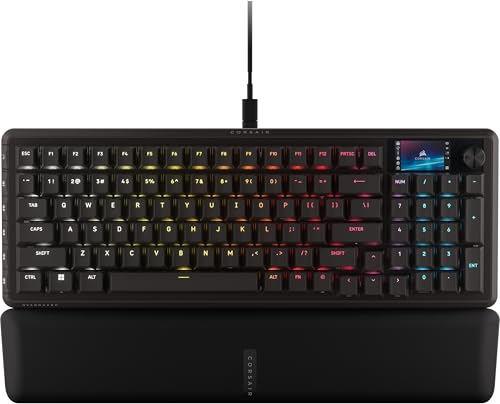
Corsair Vanguard PRO 96 Hall Effect Keyboard
Best for: compact layouts with numpads and rapid trigger
- Form Factor
- 96%
- Switch Type
- MGX Hyperdrive Hall Effect
- Connectivity
- Wired
- Lighting
- RGB
- Features
- RGB Lighting, Rapid Trigger
- Color
- Black
The Corsair Vanguard PRO 96 is a wired gaming keyboard with a 96% layout. It uses MGX Hyperdrive Hall Effect switches for rapid trigger control. An 8,000Hz polling rate ensures low input lag. A 1.9-inch color LCD screen adds customization. This compact design fits well on most desks while retaining arrow keys and a numpad.
- 8,000Hz hyper-polling for ultra-responsive inputs
- MGX Hyperdrive Hall Effect switches with rapid trigger
- 1.9-inch 320 x 170 IPS color LCD screen
- 96% form factor keeps arrow keys and numpad
- Wired connectivity limits cable-free desk setups
- 2.41-pound weight makes it less portable than lighter models
- You want a compact layout that includes a numpad
- You need rapid trigger functionality for competitive gaming
- You prefer a wired connection for maximum responsiveness
- You require wireless connectivity for a clutter-free desk
- You need a full-size keyboard with a dedicated number pad
- You prefer a lighter keyboard for easy transport
Verdict: The Corsair Vanguard PRO 96 Hall Effect delivers high-speed performance with its 8,000Hz polling rate and rapid trigger switches. It suits gamers who want a compact layout with a numpad and a customizable LCD screen.
Specifications side by side
| Spec | Razer BlackWidow V4 X Pokémon Edition | Logitech G PRO X TKL Wireless Tactile Keyboard | SteelSeries Apex Pro TKL Gen 3 Wireless | Razer Huntsman V3 Pro Low-Profile TKL | Razer BlackWidow V4 Pro Tactile Gaming Keyboard | Logitech G915 X Wired Full-Size | ASUS ROG Strix Scope II 96 Wireless | Corsair Vanguard PRO 96 Hall Effect Keyboard |
|---|---|---|---|---|---|---|---|---|
| Form Factor | – | TKL | TKL | Low-Profile TKL | – | Full-Size | 96% Full-Size | 96% |
| Switch Type | Green mechanical clicky | GX Brown tactile | OmniPoint 3.0 analog magnetic | Low-Profile Analog Optical | Green tactile & clicky mechanical | Low-profile GL tactile mechanical | ROG NX Snow linear mechanical | MGX Hyperdrive Hall Effect |
| Connectivity | – | LIGHTSPEED wireless, Bluetooth, USB | 2.4 GHz, Bluetooth | USB-C wired | – | Wired | Bluetooth, 2.4 GHz, USB wired | Wired |
| Keycap Material | Doubleshot ABS | Dual-shot PBT | PBT | Doubleshot PBT | Doubleshot ABS | Double-shot PBT | PBT | – |
| Lighting | Per-key Chroma RGB | LIGHTSYNC RGB | RGB | Chroma RGB | Per-key Chroma RGB | LIGHTSYNC RGB | Per-key RGB | RGB |
| Features | RGB Lighting | RGB Lighting | RGB Lighting, Rapid Trigger | Rapid Trigger, Low Profile | RGB Lighting | RGB Lighting, Low Profile | RGB Lighting, Hot-Swappable | RGB Lighting, Rapid Trigger |
| Size | – | TKL | TKL | TKL | – | Full-Size | Full-Size | 8 khz |
| Color | Pokémon Edition | Magenta | Black | Black | Black | Black | Black | Black |
| Panel Type | – | – | OLED | – | – | – | – | – |
| Platform | – | – | – | – | – | PC, Mac | PC, Mac | – |
| Use | Gaming | Gaming | Gaming | Gaming | Gaming | Gaming | Gaming | Gaming |
| Polling Rate | – | – | – | 8K Polling | – | – | – | 8K Polling |
| Dimensions | 18.3 × 6 × 1.56 inches | 5.91 × 13.9 × 1.34 inches | – | 14.1 × 5.37 × 0.73 inches | 18.4 × 6.01 × 1.73 inches | 18.7 × 5.91 × 0.89 inches | 14.8 × 5.16 × 1.57 inches | 15.3 × 5.55 × 1.69 inches |
| Weight | – | 5.29 ounces | – | 1.42 pounds | 3.61 pounds | 3.2 pounds | 2.78 pounds | 2.41 pounds |
| Model | RZ03-04704200-R3M1 | 920-012154 | 64871 | RZ03-05850200-R3U1 | RZ03-04680200-R3U1 | 920-012937 | X901 STRIX SCOPE II 96 WL/NXSW/CA/PBT | CH-91E911G-NA |
Frequently asked questions
Which gaming keyboard is best for competitive FPS players?
The Razer Huntsman V3 Pro Low-Profile TKL is designed for competitive FPS players seeking low latency. It features an 8K polling rate and optical switches for rapid response. The compact TKL layout provides more mouse space, which is critical for precise aiming in fast-paced shooters.
What is the difference between tactile and linear switches?
Tactile switches provide a physical bump during actuation to confirm a press without bottoming out. Linear switches, like those in the ASUS ROG Strix Scope II 96, offer a smooth keystroke without interruption. Tactile feedback helps with typing accuracy, while linear switches allow for faster repeated presses.
Do I need a wireless gaming keyboard?
Wireless keyboards like the Logitech G PRO X TKL offer freedom from cable clutter. They suit competitive gamers who value portability and desk space. Modern wireless models use reliable connections to maintain low latency, ensuring your inputs register instantly without the drag of a physical wire.
What does a TKL layout mean for gaming?
TKL stands for Tenkeyless, meaning the keyboard lacks a numeric keypad. This compact design saves desk space for wider mouse movements. The Logitech G PRO X TKL and SteelSeries Apex Pro TKL Gen 3 Wireless both use this layout to prioritize speed and maneuverability for gamers.
Are hot-swappable switches worth the extra cost?
Hot-swappable sockets allow you to change switches without soldering. The ASUS ROG Strix Scope II 96 Wireless features this capability for easy customization. You can experiment with different switch types to find your preferred feel, extending the keyboard's lifespan by simply replacing worn components.
Which keyboard is best for macro programming?
The Razer BlackWidow V4 X Pokémon Edition includes dedicated macro keys for precise inputs. It also offers tactile mechanical switches for clear feedback. This setup suits players who need quick access to complex commands without navigating through software menus during intense gameplay sessions.
What is the benefit of PBT keycaps?
PBT keycaps are durable and resistant to shine from oils. The Logitech G915 X Wired Full-Size and ASUS ROG Strix Scope II 96 Wireless both use PBT material. This ensures the legends remain visible and the texture stays consistent over time, unlike cheaper ABS plastic caps.
How does rapid trigger technology work?
Rapid trigger technology allows keys to reset immediately upon release, rather than waiting for a full travel back. The SteelSeries Apex Pro TKL Gen 3 Wireless and Corsair Vanguard PRO 96 use this feature. It enables faster repeated actions in games like fighting or rhythm titles.


