As Amazon Associates, we earn from qualifying purchases. This means we may receive a small commission at no extra cost to you if you click through and make a purchase.
As an Amazon Associate we earn from qualifying purchases. Links on this page are affiliate links.
Finding the best wireless gaming keyboards requires looking at the raw data rather than marketing claims. We compared 15 models based on the specifications published on their listings. The ASUS ROG Azoth Extreme 75% Keyboard leads because it offers a premium aluminum build and high polling rate for faster response times. Each pick focuses on specific technical attributes like switch type, connectivity mode, and physical dimensions. This guide helps you decide which keyboard matches your desk space and gameplay needs.
Check the polling rate for speed
Most wireless keyboards use standard 1000 Hz polling. The GravaStar Mercury K98 Pro and Razer BlackWidow V4 Pro offer 8K and 4K Hz rates respectively. Higher polling sends data to your PC more often, reducing input delay. If you play fast-paced competitive games, choose a board with a high polling rate for immediate response.
| # | Product | Best for | Price |
|---|---|---|---|
| 1 | ASUS ROG Azoth Extreme 75% Keyboard Best overall | premium aluminum build and high polling rate | |
| 2 | Logitech G PRO X TKL Wireless Tactile Keyboard Best budget | Compact wireless gaming with tactile switches | |
| 3 | SteelSeries Apex Pro TKL Gen 3 Wireless Best rapid trigger | players needing adjustable actuation and rapid trigger | |
| 4 | Logitech G915 X TKL Wireless Keyboard White Also great | Compact low-profile wireless gaming setups | |
| 5 | Razer BlackWidow V4 Pro 75% Wireless Keyboard Best premium | competitive gamers wanting 4K Hz wireless | |
| 6 | Razer BlackWidow V4 Low Profile Wireless Also great | Tactile low profile gaming with aluminum build | |
| 7 | GravaStar Mercury 75% Wireless Mechanical Keyboard Also great | Compact setups needing metal durability and tri-mode connectivity | |
| 8 | GravaStar Mercury K98 Pro 98-Key Keyboard Best 8k polling | Competitive gaming with a compact display | |
| 9 | Razer DeathStalker V2 Pro Best optical | Low-profile optical switch enthusiasts | |
| 10 | ASUS ROG Strix Scope II 96 Wireless Bundle Also great | Gamers wanting a complete wireless 96% setup | |
| 11 | ASUS ROG Strix Scope II 96 Wireless Keyboard Also great | Compact gaming setups needing a bundled mouse | |
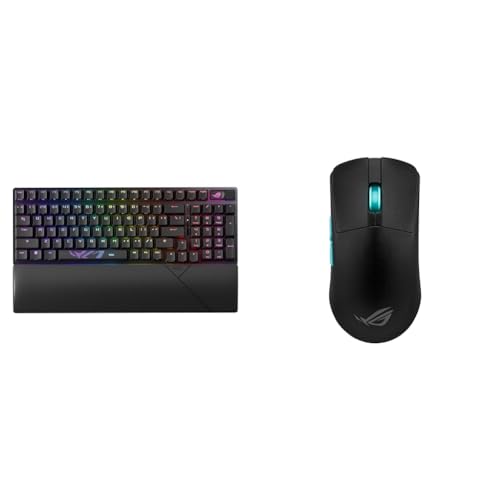
| 12 | ASUS ROG Strix Scope II 96 Wireless Also great | Players wanting a compact 96% keyboard and mouse bundle | |
| 13 | ASUS ROG Azoth 75% Wireless Keyboard Also great | Compact layouts with tactile feedback | |
| 14 | ASUS ROG Azoth Extreme 75% Wireless Also great | Collectors wanting premium 75% build quality | |
| 15 | ASUS ROG M703 Split Wireless Keyboard Best hall effect | gamers wanting split layout and magnetic switch precision |
The best fit for you
- You want the most premium build and high responsiveness – ASUS ROG Azoth Extreme 75% Keyboard – It features a heavy aluminum chassis and high-speed polling for top-tier performance.
- You need competitive gaming with adjustable actuation points – SteelSeries Apex Pro TKL Gen 3 Wireless – Its analog switches allow rapid trigger resets and precise actuation control for fast play.
- You want the highest polling rate available on the list – GravaStar Mercury K98 Pro 98-Key Keyboard – It supports 8K polling for ultra-low latency and includes a compact OLED display.
- You prefer a split ergonomic layout with magnetic switches – ASUS ROG M703 Split Wireless Keyboard – It uses Hall Effect sensors for precise magnetic switching and a flexible split design.

ASUS ROG Azoth Extreme 75% Keyboard
Best for: premium aluminum build and high polling rate
- Connectivity
- Wireless
- Form Factor
- 75%
- Switch Type
- ROG NX Storm clicky mechanical
- Keycap Material
- Doubleshot PBT
- Lighting
- RGB
- Features
- Carbon Fiber Surface, Gasket Mount
This 75% wireless mechanical keyboard features a solid aluminum-alloy chassis and ROG NX Storm clicky switches. It offers tri-mode connectivity with up to 1600 hours of battery life and an 8K Hz polling rate for low latency. The build includes a carbon-fiber plate and three-layer dampening for a refined sound. A 1.47-inch OLED touchscreen and multi-function knob provide intuitive controls for gaming and productivity tasks.
- 8K Hz polling rate in wired and wireless modes
- 1600 hours of battery life with RGB and OLED off
- Solid aluminum-alloy chassis with carbon-fiber positioning plate
- 1.47-inch OLED touch display with multi-function knob
- Heavier build at 4.9 pounds compared to lighter competitors
- Clicky switch profile may be too loud for shared spaces
- Compact 75% layout omits dedicated number pad
- You want a premium aluminum build with high polling rates
- You prefer tactile clicky switches for typing feedback
- You need an OLED screen for system stats
- You require a full-size layout with a number pad
- You prefer silent linear switches for quiet environments
- You want a lighter keyboard under 4 pounds
Verdict: ASUS ROG Azoth Extreme 75% Wireless Keyboard suits gamers who value a heavy, premium aluminum build and high-speed responsiveness. It is ideal for those who want tactile clicky switches and an OLED display for quick system monitoring.

Logitech G PRO X TKL Wireless Tactile Keyboard
Best for: Compact wireless gaming with tactile switches
- Connectivity
- Wireless
- Form Factor
- TKL
- Switch Type
- GX Brown tactile
- Keycap Material
- Dual-shot PBT
- Lighting
- LIGHTSYNC RGB
- Features
- RGB Lighting
The Logitech G PRO X TKL is a tenkeyless wireless mechanical keyboard featuring GX Brown tactile switches and double-shot PBT keycaps. It connects via LIGHTSPEED wireless, Bluetooth, or USB. The design includes a volume roller and LIGHTSYNC RGB. You get a compact layout that saves desk space while maintaining a full function row for gaming and productivity tasks.
- GX Brown tactile mechanical switches for precise feedback
- Double-shot PBT keycaps for durability and texture
- LIGHTSPEED wireless, Bluetooth, and USB connectivity options
- Integrated volume roller for quick audio adjustments
- TKL form factor omits the numpad section
- 5.29 ounce weight is lighter than many full-size boards
- No OLED display for system stats or settings
- You need a compact layout for more mouse space
- You prefer tactile feedback for typing and gaming
- You want multiple wireless connection options
- You require a full-size keyboard with a numpad
- You need an OLED display for system info
- You prefer linear switches over tactile ones
Verdict: Logitech G PRO X TKL Wireless Tactile is a solid choice for gamers who value a compact footprint and reliable wireless performance. It suits players who need tactile switches and a volume roller for quick adjustments during sessions.

SteelSeries Apex Pro TKL Gen 3 Wireless
Best for: players needing adjustable actuation and rapid trigger
- Connectivity
- Wireless
- Form Factor
- TKL
- Switch Type
- OmniPoint 3.0 analog magnetic
- Keycap Material
- PBT
- Lighting
- RGB
- Features
- RGB Lighting, Rapid Trigger
The SteelSeries Apex Pro TKL Gen 3 uses OmniPoint 3.0 analog magnetic switches to offer 40 levels of adjustable actuation from 0.1mm to 4.0mm. You get Rapid Trigger for instant resets and Rapid Tap for quick strafing. It connects via 2.4GHz or Bluetooth and features PBT keycaps. This TKL layout suits players who want precise, customizable key presses without a numpad.
- OmniPoint 3.0 analog magnetic switches allow 40 levels of adjustable actuation
- Rapid Trigger resets the moment you release a key
- Connects via 2.4GHz wireless or Bluetooth
- Includes Rapid Tap for faster movement and Protection Mode
- 45g bottom out force is lighter than many mechanical alternatives
- TKL form factor omits the numpad section
- Only offers two color options in the wireless generation
- You want to adjust actuation distance from 0.1mm to 4.0mm
- You need Rapid Trigger for competitive gaming
- You prefer a TKL layout without a numpad
- You require a full-size keyboard with a numpad
- You prefer traditional mechanical switches over analog magnetic ones
- You need more than two color choices for the wireless model
Verdict: SteelSeries Apex Pro TKL Gen 3 delivers precise analog control with adjustable actuation for competitive gamers. You should buy it if you value rapid resets and a compact TKL design over a full numpad.

Logitech G915 X TKL Wireless Keyboard White
Best for: Compact low-profile wireless gaming setups
- Connectivity
- Wireless
- Form Factor
- TKL
- Switch Type
- Low-profile GL tactile mechanical
- Keycap Material
- Double-shot PBT
- Lighting
- LIGHTSYNC RGB
- Features
- RGB Lighting, Low Profile
The Logitech G915 X TKL is a low-profile wireless mechanical keyboard with tactile GL switches. It uses 2.4 GHz LIGHTSPEED, Bluetooth, or USB-C for connectivity. The 1.3mm actuation point and 3.2mm travel distance offer speed. You get a 0.9-inch profile, PBT keycaps, and up to 100 hours of battery life. It suits players who want a compact, thin design with reliable wireless performance.
- Low-profile GL tactile mechanical switches with 1.3mm actuation
- Tri-mode connectivity: 2.4 GHz LIGHTSPEED, Bluetooth, USB-C
- Up to 100 hours battery life with RGB at 50%
- Double-shot PBT keycaps and brushed aluminum top plate
- Heavier at 1.89 pounds compared to lighter aluminum alternatives
- Shorter 3.2mm total travel distance limits tactile feedback depth
- 0.9-inch height is bulkier than ultra-thin low-profile options
- You prefer a compact TKL layout for more mouse space
- You want tri-mode connectivity for flexible device switching
- You value durable PBT keycaps and a low-profile design
- You need full-size layout with numpad for data entry
- You prefer high-travel switches for deeper tactile feedback
- You want a lighter keyboard under 1.5 pounds
Verdict: The Logitech G915 X TKL Wireless delivers a compact, low-profile design with reliable tri-mode connectivity and durable PBT keycaps, making it a solid choice for gamers who prioritize speed and portability. It fits players who want a thin, wireless setup without sacrificing switch quality.

Razer BlackWidow V4 Pro 75% Wireless Keyboard
Best for: competitive gamers wanting 4K Hz wireless
- Connectivity
- Wireless
- Form Factor
- 75%
- Switch Type
- Orange tactile & quiet
- Lighting
- Per-key Chroma RGB
- Features
- RGB Lighting, Bluetooth, Hot-Swappable
- Color
- Black
This Razer keyboard pairs a 75% layout with 4K Hz wireless polling for ultra-low latency. It features tactile Orange switches that are quiet during use. An OLED display and command dial offer system metrics and custom controls. The gasket-mounted design and dampening foam reduce rattling. It suits gamers who want high-speed wireless performance and a compact footprint with premium build details.
- 4K Hz wireless polling for minimal input lag
- Tactile Orange switches provide quiet feedback
- OLED display shows system metrics and GIFs
- Hot-swappable sockets allow easy switch customization
- Gasket-mounted build with foam dampens sound
- Heavier at 3.44 pounds compared to lighter TKL options
- 75% layout has fewer keys than full-size boards
- 3.03 inches height is bulkier than low-profile models
- You want 4K Hz wireless response for competitive gaming
- You prefer tactile switches that operate quietly
- You value an OLED display for system stats
- You need a full-size layout with numpad
- You require a low-profile keyboard design
- You prefer linear switches over tactile ones
Verdict: Razer BlackWidow V4 Pro 75% Wireless delivers high-speed 4K Hz connectivity and a premium tactile experience. It fits gamers who prioritize response time and compact size with added display features.

Razer BlackWidow V4 Low Profile Wireless
Best for: Tactile low profile gaming with aluminum build
- Connectivity
- Wireless
- Switch Type
- Low profile green mechanical
- Keycap Material
- Doubleshot PBT
- Features
- Bluetooth, Low Profile
- Color
- Black
- Use
- Gaming
This is a low-profile mechanical keyboard featuring 1.2 mm actuation switches with 45 g of force. It connects via 2.4 GHz wireless or Bluetooth. The aluminum top case keeps the front height to 1.37 inches. You get up to 980 hours of battery life in power saving mode. It suits players who prefer a lower profile and tactile feedback.
- Low profile green mechanical switches with 1.2 mm actuation point
- Dual connectivity with 2.4 GHz wireless and Bluetooth
- Up to 980 hours of battery life in power saving mode
- Solid 5052 aluminum alloy top case for durability
- 1.37 inch height is taller than ultra-thin optical low profile alternatives
- Fixed 75% layout limits spacebar and numpad customization
- You want tactile feedback from low profile switches
- You need Bluetooth pairing for multiple devices
- You prefer an aluminum build over plastic
- You require a full-size layout with a numpad
- You need hot-swappable switches for easy changes
- You want an ultra-slim profile under 1 inch
Verdict: Razer BlackWidow V4 Low Profile Wireless delivers tactile low profile switching with strong battery life. It fits gamers who value aluminum build quality and multi-device Bluetooth connectivity.

GravaStar Mercury 75% Wireless Mechanical Keyboard
Best for: Compact setups needing metal durability and tri-mode connectivity
- Connectivity
- Wireless
- Form Factor
- 75%
- Switch Type
- Kailh Speedy Mint linear
- Lighting
- Dual RGB
- Features
- RGB Lighting, Hot-Swappable, Gasket Mount
- Platform
- Mac
The GravaStar Mercury K1 Pro is a 75% wireless mechanical keyboard with a tri-mode connection system. It uses Kailh Speedy Mint linear switches rated for 70 million keystrokes. The aluminum alloy frame supports up to 470 hours of battery life without RGB. Dual RGB lighting and a dedicated control knob add functionality. This keyboard suits users who want a compact layout with a sturdy metal build and flexible connectivity options.
- Tri-mode connectivity with 2.4GHz, Bluetooth, and USB-C
- Kailh Speedy Mint linear switches rated for 70 million keystrokes
- Up to 470 hours of battery life with lighting off
- Premium aluminum alloy exoskeleton for structural stability
- Dedicated control knob for volume and mute adjustments
- Heavier build at 2.6 pounds compared to lighter plastic alternatives
- Shorter battery life with RGB on at 40 hours
- Smaller 75% layout with 79 keys limits full number pad access
- You need a compact keyboard that saves desk space for your mouse
- You want a sturdy metal frame that resists flex during gaming
- You switch between multiple devices using Bluetooth and 2.4GHz wireless
- You require a full-size layout with a dedicated numpad
- You prefer tactile or clicky switches over linear feedback
- You want a lightweight keyboard for easy portability
Verdict: GravaStar Mercury K1 Pro 75% Wireless is a solid choice for gamers who value a compact footprint and a premium metal build. It fits users who need flexible connectivity and long battery life for daily use.

GravaStar Mercury K98 Pro 98-Key Keyboard
Best for: Competitive gaming with a compact display
- Connectivity
- Wireless
- Form Factor
- 98%
- Switch Type
- Custom UFO linear
- Lighting
- ARGB
- Features
- RGB Lighting, Hot-Swappable, Gasket Mount
- Platform
- PC, Mac
The GravaStar Mercury K98 Pro is a 98-key wireless mechanical keyboard featuring tri-mode connectivity with 8000Hz polling on 2.4GHz and wired modes. It uses pre-lubed linear switches and a gasket mount for a smooth feel. A 1.65-inch TFT display and control knob add utility. It offers up to 228 hours of battery life and includes hot-swappable switches for customization.
- 8000Hz polling rate for 0.125ms response time in 2.4GHz and wired modes
- 1.65-inch TFT color display with multifunction control knob
- Pre-lubed linear switches rated for 70 million presses
- Up to 228 hours of battery life in 1K mode with RGB off
- Hot-swappable switch sockets allow for easy customization
- Heavier build at 3.42 pounds compared to lighter competitors
- Smaller 98% form factor lacks a full numpad row width of some layouts
- Battery life drops to 166 hours when using 8K polling mode
- You want a high polling rate for competitive gaming
- You prefer a compact layout that retains a number pad
- You like using a hardware display for system info
- You need a full-size keyboard with a complete numpad
- You prefer a lighter keyboard for easy portability
- You want maximum battery life regardless of polling speed
Verdict: GravaStar Mercury K98 Pro 98-Key Wireless suits gamers who prioritize low latency and want a compact board with a built-in display. It fits users who value a heavy, stable build and customizable linear switches.

Razer DeathStalker V2 Pro
Best for: Low-profile optical switch enthusiasts
- Connectivity
- Wireless
- Switch Type
- Low-profile clicky optical
- Lighting
- Chroma RGB
- Features
- RGB Lighting, Bluetooth, Low Profile
- Compatible Platform
- Nintendo Switch
- Use
- Gaming
This Razer keyboard uses low-profile clicky optical switches to reduce key travel distance for faster actuation. It connects via 2.4GHz HyperSpeed Wireless or Bluetooth 5.0, allowing you to toggle between three devices. The slim aluminum chassis measures 1.1 inches tall and weighs 2.27 pounds. You get up to 200 hours of battery life from a single charge, supported by a detachable Type-C cable for charging while gaming.
- Low-profile clicky optical switches with 70-million keystroke lifespan
- Dual connectivity via 2.4GHz HyperSpeed Wireless and Bluetooth 5.0
- Up to 200-hour battery life
- Durable aluminum alloy top plate
- Heavier build at 2.27 pounds compared to lighter competitors
- Shorter battery life than some peers offering 300+ hours
- Standard full-size layout limits desk space savings
- You prefer the tactile click of optical switches over linear ones
- You need to switch between three devices using Bluetooth
- You want a low-profile keyboard with a sturdy metal frame
- You require a compact TKL or 75% layout
- You prioritize the lightest possible keyboard weight
- You prefer mechanical switches over optical technology
Verdict: Razer DeathStalker V2 Pro Low-Profile Optical offers a sturdy, low-profile typing experience for gamers who value switch speed and multi-device connectivity. It suits players who want a durable aluminum build and do not mind a heavier, full-size footprint.

ASUS ROG Strix Scope II 96 Wireless Bundle
Best for: Gamers wanting a complete wireless 96% setup
- Connectivity
- Wireless
- Form Factor
- 96%
- Switch Type
- ROG NX Snow linear, NX Storm clicky
- Color
- Black
- Compatible Platform
- Nintendo Switch
- Use
- Gaming
This bundle includes the 96% layout keyboard, ROG Spatha X mouse, and Sheath mousepad. The keyboard uses tri-mode connectivity with Bluetooth, 2.4 GHz, or wired USB. It features hot-swappable ROG NX Snow linear and Storm clicky switches. The mouse offers 19,000 DPI accuracy and 12 programmable buttons. The extra-large mousepad provides ample space for your gear. This setup suits gamers who want a complete wireless peripheral package.
- 96% compact layout retains all function and number keys
- Tri-mode connectivity via Bluetooth, 2.4 GHz, or wired USB
- Hot-swappable switches with pre-lubed ROG NX Snow linear and Storm clicky options
- Mouse features 19,000 DPI optical sensor for high accuracy
- Extra-large mousepad measures 35.4 x 17.3 inches
- 96% layout has fewer keys than full-size boards
- Bundle includes three items which increases overall bulk
- Mousepad size is fixed at extra-large dimensions
- You want a complete wireless gaming setup in one purchase
- You prefer a compact 96% keyboard layout to save desk space
- You need high-DPI precision for competitive gaming
- You require a full-size keyboard with numpad
- You prefer a standalone keyboard without a mouse bundle
- You need a smaller mousepad for limited desk space
Verdict: ASUS ROG Strix Scope II 96 Wireless Bundle offers a comprehensive wireless setup with a compact 96% keyboard and high-precision mouse. It fits gamers who value a complete, space-saving peripheral package with tri-mode connectivity.

ASUS ROG Strix Scope II 96 Wireless Keyboard
Best for: Compact gaming setups needing a bundled mouse
- Connectivity
- Wireless
- Form Factor
- 96%
- Switch Type
- ROG NX Snow linear / NX Storm clicky
- Color
- Black
- Use
- Gaming
This keyboard pairs a 96% layout with tri-mode connectivity via Bluetooth, 2.4 GHz, or USB wired. It uses pre-lubed NX Snow linear and ROG NX Storm clicky switches. Sound-dampening foam reduces echo. The bundle includes the ROG Spatha X mouse with a 19,000 DPI sensor. It suits you if you want a compact board with a matching high-dpi mouse for gaming.
- 96% layout retains all keys in a compact form
- Tri-mode connection supports Bluetooth, 2.4 GHz, and wired USB
- Sound-dampening foam reduces keystroke echo
- Includes ROG Spatha X mouse with 19,000 DPI sensor
- 96% layout is smaller than full-size boards
- Switches are pre-lubed and cannot be adjusted by you
- Bundle includes a mouse you may not need
- You want a compact keyboard that keeps function keys
- You prefer tri-mode connectivity options
- You want a matching high-dpi mouse in the box
- You need a full-size keyboard layout
- You prefer hot-swappable switches for customization
- You do not want a bundled mouse
Verdict: ASUS ROG Strix Scope II 96 Wireless Keyboard offers a compact 96% layout with tri-mode connectivity and a bundled 19,000 DPI mouse. It fits you if you value desk space and a matched peripheral set.
ASUS ROG Strix Scope II 96 Wireless
Best for: Players wanting a compact 96% keyboard and mouse bundle
- Connectivity
- Wireless
- Form Factor
- 96%
- Switch Type
- ROG NX Snow linear / NX Storm clicky
- Color
- Black
- Use
- Gaming
This bundle pairs a 96% layout keyboard with a 54g wireless mouse. The keyboard uses tri-mode connectivity via Bluetooth, 2.4 GHz ROG SpeedNova, or wired USB. It features pre-lubed NX Snow linear and NX Storm clicky switches. Sound-dampening foam reduces pinging noises. The included mouse has a 36,000-dpi optical sensor. This setup suits players who want a compact keyboard and a lightweight mouse in one purchase.
- 96% layout retains all function and number keys while saving desk space
- Tri-mode connectivity supports Bluetooth, 2.4 GHz wireless, and USB wired connections
- Sound-dampening foam with switch-dampening pads improves keystroke acoustics
- Pre-lubed NX Snow linear and NX Storm clicky switches offer hot-swappable flexibility
- Included 54g mouse features a 36,000-dpi ROG AimPoint optical sensor
- 96% layout has fewer keys than full-size boards, requiring function layer access for numpad keys
- Switches are pre-lubed, limiting the ability to customize lubrication compared to fully DIY options
- You want a compact 96% keyboard that keeps the numpad and function keys
- You prefer a bundled setup with a lightweight wireless mouse included
- You value sound-dampening foam to reduce keyboard noise during gaming
- You need a full-size keyboard with a dedicated numpad and no function layer
- You want to customize switch lubrication yourself rather than using pre-lubed switches
- You only need a keyboard and do not want a wireless mouse included
Verdict: ASUS ROG Strix Scope II 96 Wireless offers a balanced 96% layout with tri-mode connectivity and acoustic dampening. It fits gamers who want a compact keyboard and a high-performance mouse in a single package.

ASUS ROG Azoth 75% Wireless Keyboard
Best for: Compact layouts with tactile feedback
- Connectivity
- Wireless
- Form Factor
- 75%
- Switch Type
- ROG NX Storm
- Features
- Hot-Swappable
- Color
- White
- Panel Type
- OLED
This is a 75% wireless mechanical keyboard featuring ROG NX Storm switches and a built-in OLED display. It uses a gasket mount design with three dampening layers for sound isolation. The switches are hot-swappable and come pre-lubed. A bundled lube kit allows for further customization. It suits users who want a compact layout with tactile feedback and DIY potential.
- 75% form factor saves desk space
- Hot-swappable pre-lubed ROG NX Storm switches
- Built-in OLED display for system info
- Gasket mount with silicone and dampening layers
- 75% layout omits the numpad
- Switches are clicky rather than linear
- OLED display consumes battery power
- You prefer a compact 75% layout
- You want hot-swappable switches for customization
- You like tactile clicky feedback
- You need a full-size numpad
- You prefer silent linear switches
- You want a minimalist design without an OLED screen
Verdict: ASUS ROG Azoth 75% Wireless Keyboard offers a customizable typing experience with its gasket mount and hot-swap design. It fits gamers who value tactile feedback and a compact footprint.

ASUS ROG Azoth Extreme 75% Wireless
Best for: Collectors wanting premium 75% build quality
- Connectivity
- Wireless
- Form Factor
- 75% TKL
- Switch Type
- ROG NX Snow V2 linear
- Features
- Carbon Fiber Surface
- Panel Type
- OLED
- Compatible Platform
- Nintendo Switch
The ASUS ROG Azoth Extreme is a 75% TKL wireless mechanical keyboard built for collectors and gamers. It features ROG NX Snow V2 linear switches and a carbon fiber positioning plate for crisp acoustics. The aluminum alloy chassis provides a sturdy build, while 24K gold elements and translucent black keycaps offer a unique aesthetic. This model suits those who want premium materials and a compact layout with high-end wireless performance.
- ROG NX Snow V2 linear mechanical switches
- Carbon fiber positioning plate for reduced vibration
- Aluminum alloy chassis for sturdy construction
- 24K gold elements and translucent keycaps
- Heavier at 3.3 pounds compared to lighter competitors
- Limited to 75% TKL form factor only
- You want a compact 75% layout with premium build materials
- You prefer linear switches for smooth keystrokes
- You value a distinctive gold and black aesthetic
- You need a full-size keyboard with a numpad
- You prefer a lighter, more portable design
- You are looking for a standard black or white color scheme
Verdict: ASUS ROG Azoth Extreme 75% Wireless is a heavy, premium 75% keyboard for users who prioritize build quality and unique aesthetics over weight savings. It fits collectors seeking a distinctive gold-accented design with linear switches.

ASUS ROG M703 Split Wireless Keyboard
Best for: gamers wanting split layout and magnetic switch precision
- Connectivity
- Wireless
- Form Factor
- 75% Split
- Switch Type
- ROG HFX V2 Magnetic
- Color
- Black
- Use
- Gaming
- Keycap Material
- PBT Keycaps
The ASUS ROG M703 is a 75% split wireless gaming keyboard featuring ROG HFX V2 magnetic switches. It uses ROG SpeedNova 8K wireless technology for high-speed connectivity. The design includes a detachable split layout and a multi-function wheel for quick adjustments. You get precise 0.1–3.5mm actuation tuning and PBT keycaps. This setup suits players who want customizable input response and a flexible desk arrangement.
- ROG HFX V2 magnetic switches with 0.1–3.5mm actuation range
- ROG SpeedNova 8K wireless technology for up to 8K polling rate
- Split 75% form factor with detachable wrist rests
- Multi-function wheel for instant control of actuation and media
- Heavier build at 3.7 pounds compared to standard TKL boards
- Split design requires more desk width than single-unit keyboards
- Smaller 75% layout limits number of keys versus full-size options
- You want precise actuation tuning via magnetic switches
- You prefer a split layout for ergonomic comfort
- You need high-speed 8K wireless polling for gaming
- You need a full-size keyboard with numpad
- You prefer a single-piece compact board
- You want a lighter portable keyboard under 2 pounds
Verdict: ASUS ROG M703 Split Wireless Keyboard offers high-precision magnetic switching and a flexible split layout for gamers who value customization and ergonomic desk space.
Specifications side by side
| Spec | ASUS ROG Azoth Extreme 75% Keyboard | Logitech G PRO X TKL Wireless Tactile Keyboard | SteelSeries Apex Pro TKL Gen 3 Wireless | Logitech G915 X TKL Wireless Keyboard White | Razer BlackWidow V4 Pro 75% Wireless Keyboard | Razer BlackWidow V4 Low Profile Wireless | GravaStar Mercury 75% Wireless Mechanical Keyboard | GravaStar Mercury K98 Pro 98-Key Keyboard | Razer DeathStalker V2 Pro | ASUS ROG Strix Scope II 96 Wireless Bundle | ASUS ROG Strix Scope II 96 Wireless Keyboard | ASUS ROG Strix Scope II 96 Wireless | ASUS ROG Azoth 75% Wireless Keyboard | ASUS ROG Azoth Extreme 75% Wireless | ASUS ROG M703 Split Wireless Keyboard |
|---|---|---|---|---|---|---|---|---|---|---|---|---|---|---|---|
| Form Factor | 75% | TKL | TKL | TKL | 75% | – | 75% | 98% | – | 96% | 96% | 96% | 75% | 75% TKL | 75% Split |
| Switch Type | ROG NX Storm clicky mechanical | GX Brown tactile | OmniPoint 3.0 analog magnetic | Low-profile GL tactile mechanical | Orange tactile & quiet | Low profile green mechanical | Kailh Speedy Mint linear | Custom UFO linear | Low-profile clicky optical | ROG NX Snow linear, NX Storm clicky | ROG NX Snow linear / NX Storm clicky | ROG NX Snow linear / NX Storm clicky | ROG NX Storm | ROG NX Snow V2 linear | ROG HFX V2 Magnetic |
| Connectivity | 2.4 GHz RF, Bluetooth, USB-C | LIGHTSPEED wireless, Bluetooth, USB | 2.4 GHz, Bluetooth | 2.4 GHz LIGHTSPEED, Bluetooth, USB-C | 4K Hz wireless, Bluetooth 5.1 | 2.4 GHz wireless, Bluetooth | 2.4 GHz, Bluetooth, USB-C | 2.4GHz wireless, Bluetooth 5.4, USB-C | 2.4GHz wireless, Bluetooth 5.0, Type-C | Bluetooth, 2.4 GHz, wired USB | Bluetooth, 2.4 GHz, USB wired | Bluetooth, 2.4 GHz, USB wired | Wireless | Wireless | Wireless, USB wired, Bluetooth |
| Keycap Material | Doubleshot PBT | Dual-shot PBT | PBT | Double-shot PBT | – | Doubleshot PBT | – | – | – | – | – | – | – | – | – |
| Lighting | RGB | LIGHTSYNC RGB | RGB | LIGHTSYNC RGB | Per-key Chroma RGB | – | Dual RGB | ARGB | Chroma RGB | – | – | – | – | – | – |
| Features | Carbon Fiber Surface, Gasket Mount | RGB Lighting | RGB Lighting, Rapid Trigger | RGB Lighting, Low Profile | RGB Lighting, Bluetooth, Hot-Swappable | Bluetooth, Low Profile | RGB Lighting, Hot-Swappable, Gasket Mount | RGB Lighting, Hot-Swappable, Gasket Mount | RGB Lighting, Bluetooth, Low Profile | – | – | – | Hot-Swappable | Carbon Fiber Surface | – |
| Size | TKL | TKL | TKL | TKL | – | – | – | – | DeathStalker V2 Pro | Extra Large | – | – | – | TKL | – |
| Color | Black | Magenta | Black | White | Black | Black | Cyberpunk | Phantom Black | Classic Black | Black | Black | Black | White | GOLD/BLACK | Black |
| Resolution | – | – | – | – | 4K UHD | – | – | – | – | – | – | – | – | – | – |
| Panel Type | OLED | – | OLED | – | OLED | – | – | – | – | – | – | – | OLED | OLED | – |
| Platform | PC, Mac | – | – | PC, Mac | – | – | Mac | PC, Mac | – | – | – | – | – | – | – |
| Compatible Platform | – | – | – | – | – | – | Nintendo Switch | Nintendo Switch | Nintendo Switch | Nintendo Switch | – | – | Nintendo Switch | Nintendo Switch | – |
| Use | Gaming | Gaming | Gaming | Gaming | Gaming | Gaming | Gaming | Gaming | Gaming | Gaming | Gaming | Gaming | Gaming | Gaming | Gaming |
| Polling Rate | – | – | – | – | – | – | – | 8K Polling | – | – | – | – | – | – | – |
| Capture Resolution | – | – | – | – | 4K | – | – | – | – | – | – | – | – | – | – |
| Dimensions | 13.1 × 5.51 × 1.57 inches | 5.91 × 13.9 × 1.34 inches | – | 15.2 × 5.9 × 0.9 inches | 14.9 × 8.86 × 3.03 inches | 18.1 × 6.32 × 1.37 inches | 16.3 × 7.03 × 2.27 inches | 14.4 × 12 × 1.57 inches | 17.2 × 5.52 × 1.1 inches | – | – | – | – | 12.9 × 9.3 × 1.53 inches | 12.9 × 8.54 × 1.49 inches |
| Weight | 4.9 pounds | 5.29 ounces | – | 1.89 pounds | 3.44 pounds | – | 2.6 pounds | 3.42 pounds | 2.27 pounds | – | – | – | – | 3.3 pounds | 3.7 pounds |
| Model | M702 AZOTH EXTREME/NXSM/CA/PBT | 920-012154 | 64871 | 920-012732 | RZ03-05130200-R3U1 | RZ03-05270200-R3U1 | K1 PRO | Mercury K98 Pro | RZ03-04361900-R3U1 | – | – | – | – | M709 ROG AZOTH EXTREME E20/NXSWV2/CA/PBT | M703 ROG FALCATA/HFXV2/CA/PBT |
If you want a compact board, compare redragon wireless gaming keyboard alternatives by switch type and connectivity specs.
How to Choose the Right Wireless Keyboard
Check the layout size
The physical footprint determines how much desk space you need. TKL models like the Logitech G PRO X TKL Wireless Tactile Keyboard omit the number pad, saving space. The GravaStar Mercury K98 Pro 98-Key Keyboard offers a middle ground with a compact layout that retains the numpad. The ASUS ROG Azoth Extreme 75% Keyboard is even smaller. Choose a layout that fits your current desk setup and workflow requirements.
Select the switch type
Switches define the typing feel and actuation. Tactile switches, found in the Logitech G PRO X TKL Wireless Tactile Keyboard, provide a bump you can feel. Linear switches, like those in the GravaStar Mercury K1 Pro, offer smooth travel without interruption. Magnetic Hall Effect switches, such as those in the ASUS ROG M703 Split Wireless Keyboard, enable rapid trigger features. Pick the type that matches your gaming and typing preferences.
Verify the build material
Build materials affect weight and durability. The ASUS ROG Azoth Extreme 75% Keyboard uses a premium aluminum chassis for stability. The Razer BlackWidow V4 Low Profile Wireless also features a strong aluminum build. Other models may use plastic or carbon fiber surfaces. Heavier boards like the Azoth Extreme weigh nearly five pounds, while lighter options like the Logitech G915 X TKL Wireless Keyboard weigh under two pounds. Choose based on your stability needs.
Review keycap quality
Keycap material influences longevity and feel. PBT keycaps are durable and resist shine over time. The ASUS ROG Azoth Extreme 75% Keyboard and the Logitech G915 X TKL Wireless Keyboard both include PBT keycaps. This material is preferred for heavy gaming sessions. Check the attributes section to confirm the material. Avoid keyboards with unspecified keycap materials if you want long-term durability and a consistent typing texture.
Consider extra features
Some keyboards include OLED displays for system monitoring. The ASUS ROG Azoth Extreme 75% Keyboard and the GravaStar Mercury K98 Pro 98-Key Keyboard feature these panels. Hot-swappable switches allow you to change switches without soldering, seen in the GravaStar Mercury K1 Pro. RGB lighting is common across many models. Decide which extras add value to your specific setup rather than buying features you will not use.
Frequently asked questions
Which wireless gaming keyboard has the fastest response time?
The GravaStar Mercury K98 Pro 98-Key Keyboard offers an 8K polling rate, the highest speed listed. The Razer BlackWidow V4 Pro 75% Wireless Keyboard provides a 4K Hz rate. Higher polling rates send input data to your PC more frequently, which reduces latency for competitive gaming.
Do any wireless keyboards feature OLED displays?
Yes, several models include built-in OLED panels for system monitoring. The ASUS ROG Azoth Extreme 75% Keyboard, SteelSeries Apex Pro TKL Gen 3 Wireless, and Razer BlackWidow V4 Pro 75% Wireless all feature these displays. The ASUS ROG Azoth 75% Wireless Keyboard also includes one for quick info access.
What is the lightest wireless gaming keyboard on the list?
The Logitech G PRO X TKL Wireless Tactile Keyboard is the lightest option at 5.29 ounces. It offers a compact TKL footprint for easy portability. In contrast, the ASUS ROG Azoth Extreme 75% Keyboard is significantly heavier at 4.9 pounds due to its premium aluminum build.
Are there wireless keyboards with low-profile designs?
Yes, several models feature low-profile switches for a thinner typing experience. The Logitech G915 X TKL Wireless Keyboard and Razer BlackWidow V4 Low Profile Wireless both offer this design. The Razer DeathStalker V2 Pro also uses low-profile optical switches for speed and a sturdy aluminum build.
Which keyboards support Bluetooth connectivity?
Multiple keyboards support Bluetooth for multi-device use. The Razer BlackWidow V4 Pro 75% Wireless and Razer BlackWidow V4 Low Profile Wireless both include Bluetooth. The Razer DeathStalker V2 Pro also supports Bluetooth alongside other wireless modes, allowing you to connect to various devices easily.
Which wireless keyboard uses magnetic or Hall Effect switches?
The ASUS ROG M703 Split Wireless Keyboard uses Hall Effect magnetic switches. This technology provides high precision and allows for customizable actuation points. It features a split layout for ergonomic flexibility and includes PBT keycaps for durability during intense gaming sessions.
Do any wireless keyboards come with a bundled mouse?
Yes, the ASUS ROG Strix Scope II 96 Wireless Bundle includes a high-precision mouse. The ASUS ROG Strix Scope II 96 Wireless Keyboard also comes with a bundled 19,000 DPI mouse. These packages offer a complete peripheral set with tri-mode connectivity for a space-saving desk setup.

