As Amazon Associates, we earn from qualifying purchases. This means we may receive a small commission at no extra cost to you if you click through and make a purchase.
As an Amazon Associate we earn from qualifying purchases. Links on this page are affiliate links.
Choosing the best PCIe capture cards depends on your specific resolution and input needs. We compared 11 models using only their published specifications. The Elgato 4K Pro Internal Capture Card leads because it supports high-refresh 4K capture with 8K passthrough via HDMI 2.1. Other options include multi-channel HDMI cards or SDI solutions for professional studio environments. This guide helps you decide which hardware matches your capture resolution and connectivity requirements.
Check your input count and resolution needs
Your choice depends on how many sources you feed and the resolution required. If you need four simultaneous inputs, models like the ACASIS or AVMATRIX handle 1080p60 streams. For single-console high-fidelity work, the Elgato 4K Pro or AVerMedia GC575 support 4K60 capture with HDMI 2.1. Match the card to your specific channel and resolution demands.
| # | Product | Best for | Price |
|---|---|---|---|
| 1 | Elgato 4K Pro Internal Capture Card Best overall | High-refresh 4K capture with 8K passthrough | |
| 2 | Magewell Pro Capture Quad HDMI Best premium | multi-camera professional production setups | |
| 3 | Blackmagic Design DeckLink Duo 2 Also great | Multi-camera SDI capture with genlock sync | |
| 4 | Blackmagic Design DeckLink Mini Recorder 4K Best 4k | SDI-based 4K production workflows | |
| 5 | Blackmagic DeckLink Quad HDMI 4K60 Also great | multi-source 4K60 HDMI recording | |
| 6 | AVerMedia Live Gamer Duo Dual HDMI Capture Card Best budget | multi-camera 1080p60 streaming setups | |
| 7 | ACASIS 4-Channel HDMI PCIe Capture Card Also great | multi-source 1080p60 streaming setups | |
| 8 | AVMATRIX 4-Channel HDMI PCIe Capture Card Also great | Multi-source 1080p60 streaming setups | |
| 9 | RGBlink Mini 4-Channel HDMI Capture Best usb | Multi-HDMI USB streaming setups | |
| 10 | AVerMedia HDMI 2.1 Internal PCIe Capture Card Also great | Single-console 4K60 internal streaming | |
| 11 | Blackmagic DeckLink 8K Pro G2 Also great | 4-channel 8Kp60 SDI capture with genlock |
The best fit for you
- You need high-refresh 4K capture with 8K passthrough – Elgato 4K Pro Internal Capture Card – It supports 4K60 capture and HDMI 2.1 passthrough for modern consoles.
- You manage multiple video feeds in a professional setting – Magewell Pro Capture Quad HDMI – It offers quad HDMI inputs with FPGA processing for stable output.
- You require multi-camera SDI capture with precise sync – Blackmagic Design DeckLink Duo 2 – It provides 1080p60 capture with genlock support for SDI setups.
- You stream from four HDMI sources simultaneously – Blackmagic DeckLink Quad HDMI 4K60 – It handles four simultaneous HDMI inputs for multi-source workflows.

Elgato 4K Pro Internal Capture Card
Best for: High-refresh 4K capture with 8K passthrough
- Host Interface
- PCIe
- Capture Resolution
- 4K60
- Passthrough Resolution
- 8K60
- Video Interface
- HDMI 2.1
- HDR Support
- HDR10
- Features
- HDR, HDR10, VRR
This internal PCIe x4 capture card supports 8K60 HDR passthrough and captures up to 4K60 with HDR10. It handles 1440p144 and 1080p240 for high-refresh gaming. VRR and ALLM passthrough ensure smooth visuals on PS5, Xbox Series X, and Switch. It fits Windows desktops and works with Elgato Studio, 4K Capture Utility, and OBS.
- HDMI 2.1 interface with 8K60 passthrough
- Captures 4K60 with HDR10 support
- VRR and ALLM passthrough for consoles
- Supports 1440p144 and 1080p240 capture
- Max capture resolution is 4K60, lower than 8K passthrough
- Internal PCIe x4 form factor limits portability
- You need 8K60 passthrough for future-proofing
- You play at 1440p144 or 1080p240
- You use VRR on PS5 or Xbox Series X
- You require capture resolutions above 4K60
- You need a portable or external USB device
- You use a Mac or Linux system
Verdict: Elgato 4K Pro HDMI 2.1 PCIe Card is the right pick if you need high-refresh 4K capture with 8K passthrough for modern consoles. It suits desktop gamers who prioritize VRR and HDR10 support.

Magewell Pro Capture Quad HDMI
Best for: multi-camera professional production setups
- Host Interface
- PCIe
- Capture Resolution
- Up to 2048×2160, 144 fps
- Video Interface
- HDMI
- Channel Count
- 4
- Features
- Ultra-Low Latency
- Dimensions
- 7.8 × 8.65 × 1.65 inches
This PCIe card handles four simultaneous HDMI inputs for multi-camera or switcher setups. It captures video up to 2048×2160 at 144 fps. An onboard FPGA processor handles cropping, scaling, and color conversion to lower host CPU load. It supports 8/10/12-bit color and 8-channel audio per input. The design allows for low latency and multiple cards in one system.
- Four independent HDMI inputs for simultaneous capture
- Onboard FPGA processing reduces host CPU load
- Supports up to 144 fps at 2048×2160 resolution
- Handles 8/10/12-bit color depths and 8-channel audio
- Compatible with Windows, macOS, and Linux
- Requires PCIe Gen2 x4 bandwidth which limits speed compared to newer standards
- Heavier build at 10.1 ounces compared to single-channel cards
- Larger physical dimensions at 8.65 inches in width
- You need to capture four separate HDMI sources at once
- You want to offload video processing tasks from your main CPU
- You require high frame rates and deep color depth for professional work
- You only need to capture a single HDMI signal
- Your system lacks a PCIe Gen2 x4 slot
- You are on a tight budget and need a basic solution
Verdict: Magewell Pro Capture Quad HDMI is a robust solution for users managing multiple video feeds. It fits professional environments where FPGA processing and high frame rates are necessary for stable, low-latency output.

Blackmagic Design DeckLink Duo 2
Best for: Multi-camera SDI capture with genlock sync
- Host Interface
- PCIe
- Capture Resolution
- Up to 1080p60
- Video Interface
- 3G-SDI
- Channel Count
- 4
- Color
- Black
- Dimensions
- 6 × 6 × 6 inches
The Blackmagic Design DeckLink Duo 2 is a PCIe capture card featuring four independent 3G-SDI connections. It supports simultaneous capture and playback of up to four video streams at resolutions up to 1080p60. The card uses a PCIe 4-lane Gen 2 interface for reliable data transfer. It includes a reference input for external genlock synchronization, making it suitable for multi-camera setups requiring precise timing.
- Four independent 3G-SDI connections for simultaneous capture
- Supports up to 1080p60 resolution per channel
- Reference input for external genlock synchronization
- Compatible with SD, HD, and 3G-SDI formats
- Max capture resolution is limited to 1080p60, lower than 4K or 8K options
- Requires PCIe 4-lane Gen 2 slot, limiting compatibility with older slots
- You need to capture four separate SDI video streams simultaneously
- You require precise timing synchronization using external genlock signals
- You work with standard HD and 3G-SDI formats
- You need to capture 4K or higher resolution video
- You prefer HDMI inputs over SDI connections
- Your system only supports older PCIe generations without Gen 2 support
Verdict: The Blackmagic Design DeckLink Duo 2 fits professionals managing multi-camera SDI setups who need precise sync. It is not suitable for those requiring 4K capture or HDMI connectivity.
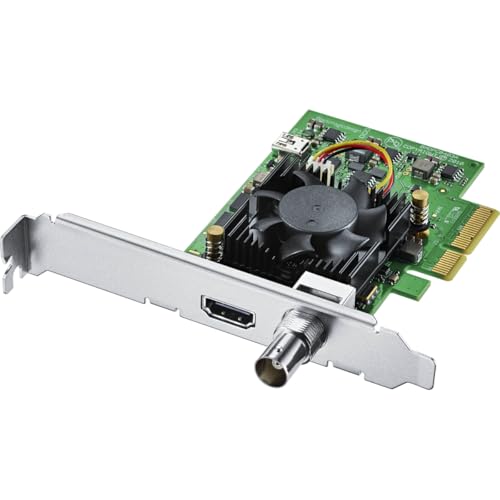
Blackmagic Design DeckLink Mini Recorder 4K
Best for: SDI-based 4K production workflows
- Host Interface
- PCIe
- Video Interface
- HDMI 2.0a, SDI
- Color
- Black
- Resolution
- 4K UHD
- Dimensions
- 6 × 6 × 6 inches
- Weight
- 5.64 ounces
The Blackmagic Design DeckLink Mini Recorder 4K is a PCIe capture card built for professional workflows. It features a Gen 2 PCIe Express 4-lane host interface and supports HDMI 2.0a and SDI inputs. The unit handles 10-bit SD, HD, and Ultra HD video with up to 16 channels of embedded SDI audio. Its compact 6-inch square form factor and 5.64-ounce weight make it suitable for standard rack or desktop setups.
- Supports 4K UHD capture resolution
- Includes SDI input for 16 channels of embedded audio
- HDMI 2.0a connector for video input
- Gen 2 PCIe Express 4-lane interface
- Single HDMI input limits multi-source capture
- Single SDI input restricts simultaneous video sources
- 5.64-ounce weight is heavier than standard single-slot cards
- You require SDI connectivity for professional broadcast gear
- You need embedded multi-channel audio capture
- You are building a 4K UHD production workflow
- You need to capture from multiple HDMI sources simultaneously
- You require native 8K resolution support
- You prefer a lightweight, ultra-compact form factor
Verdict: Blackmagic Design DeckLink Mini Recorder 4K is ideal for studios that rely on SDI signals and need high-quality 4K capture with embedded audio. It is less suitable for users who need multiple simultaneous HDMI inputs or lighter hardware.
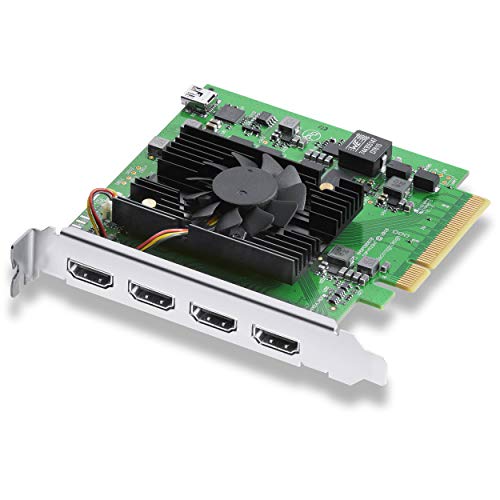
Blackmagic DeckLink Quad HDMI 4K60
Best for: multi-source 4K60 HDMI recording
- Host Interface
- PCIe
- Capture Resolution
- Up to 4K60
- Video Interface
- HDMI 2.0b
- Channel Count
- 4
- Dimensions
- 6 × 6 × 1 inches
- Weight
- 4.52 ounces
This Blackmagic Design capture card offers four HDMI 2.0b inputs for simultaneous video acquisition. It supports capture resolutions up to 4K60 and utilizes a PCIe 8-lane generation 3 interface for stable data transfer. The hardware handles 8, 10, and 12-bit color depths with HDR support. It suits users needing multi-source recording for live production or broadcast workflows on Mac, Windows, or Linux systems.
- Four HDMI 2.0b inputs for simultaneous capture
- Supports capture resolutions up to 4K60
- PCIe 8-lane generation 3 interface for low latency
- Handles 8, 10, and 12-bit RGB and YUV color formats
- Captures up to 4K60, which is lower than the 8K60 HDR pass of the top-ranked Elgato card
- Weighs 4.52 ounces, making it heavier than lighter internal alternatives
- Inputs cannot capture from copy-protected HDMI sources
- You need to record from four separate HDMI sources at once
- You require 4K60 resolution with HDR support
- You use professional software like vMix or Wirecast
- You need to capture from protected HDMI content
- You require 8K resolution support
- You only need a single HDMI input
Verdict: Blackmagic Design DeckLink Quad HDMI PCIe Card provides four simultaneous HDMI inputs for multi-source workflows. It fits professionals who need 4K60 capture with HDR and do not require 8K resolution.
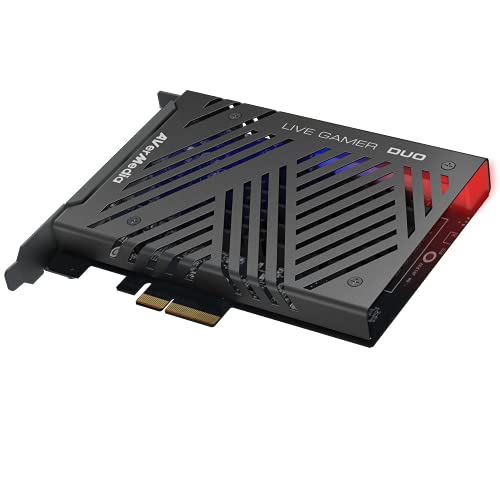
AVerMedia Live Gamer Duo Dual HDMI Capture Card
Best for: multi-camera 1080p60 streaming setups
- Host Interface
- PCIe
- Capture Resolution
- 1080p60
- Passthrough Resolution
- 4K60 HDR, FHD 240fps
- Video Interface
- HDMI
- Platform
- Xbox, PS5, Xbox Series X/S
- Compatible Platform
- PlayStation 5, Nintendo Switch
The AVerMedia Live Gamer Duo is a PCIe capture card featuring dual HDMI inputs. It records uncompressed 1080p60 video from two sources simultaneously. The pass-through supports 4K60 HDR or FHD 240fps with zero lag. Onboard processing handles tone mapping and downscaling. This card suits creators who need multiple camera angles for production.
- Dual HDMI inputs for simultaneous capture
- Records uncompressed 1080p60 video
- Pass-through supports 4K60 HDR
- Pass-through supports FHD 240fps
- Onboard HDR to SDR tone mapping
- Capture resolution limited to 1080p60
- Weight is 7.37 ounces
- Dimensions are 9 inches by 8 inches by 3 inches
- You need to capture from two HDMI sources at once
- You want uncompressed 1080p60 recording
- You require zero-lag pass-through for high refresh rate gaming
- You require 4K capture resolution
- You need a single-slot card with minimal footprint
- You want to capture at 240fps instead of 60fps
Verdict: AVerMedia Live Gamer Duo Dual HDMI offers dual-channel 1080p60 capture with high-quality pass-through. It fits creators who need multiple simultaneous inputs for streaming or recording.

ACASIS 4-Channel HDMI PCIe Capture Card
Best for: multi-source 1080p60 streaming setups
- Host Interface
- PCIe
- Capture Resolution
- 1080p60
- Video Interface
- HDMI
- Channel Count
- 4
- Features
- Ultra-Low Latency
- Platform
- PC
The ACASIS card offers four HDMI inputs on a single PCIe x4 slot. It captures 1080p60 video with ultra-low latency. The built-in fan helps with heat dissipation during long sessions. You can use it for streaming or recording to multiple platforms. It fits in standard PCIe slots on Windows or Linux systems.
- Four simultaneous HDMI capture channels
- 1080p60 resolution support
- Built-in cooling fan for heat management
- Ultra-low latency performance
- Max capture resolution is 1080p60, lower than the 4K or 8K options on this list
- Weighs 5.29 ounces, which is heavier than single-channel cards
- You need to capture four HDMI sources at once
- You stream 1080p60 content
- You want a single card for multiple inputs
- You require 4K or higher resolution capture
- You only need one HDMI input
- You prefer a passive cooling design
Verdict: ACASIS 4-Channel PCIe HDMI Capture Card is a practical solution for users who need to manage four HDMI signals simultaneously. It suits streamers who prioritize channel count over 4K resolution.

AVMATRIX 4-Channel HDMI PCIe Capture Card
Best for: Multi-source 1080p60 streaming setups
- Host Interface
- PCIe
- Capture Resolution
- 1080p60
- Video Interface
- HDMI 1.4
- Channel Count
- 4
- Features
- Ultra-Low Latency
- Platform
- Xbox, PS5, Xbox Series X/S, Xbox One
This AVMATRIX card offers four HDMI inputs on a single PCIe Gen 2 slot. It captures 1080p60 video with ultra-low latency, making it suitable for multi-source streaming. The device supports portrait and landscape modes and works with major streaming software. You get four simultaneous channels without needing multiple cards. It is a practical option for users who need to record or stream from four different HDMI devices at once.
- Four HDMI channels on one PCIe slot
- Captures 1080p60 video at up to 200Mbps
- Ultra-low latency via PCIe Gen 2 interface
- Supports portrait and landscape orientation modes
- Max capture resolution is 1080p60, lower than the 4K or 8K options in this list
- Uses HDMI 1.4 interface, which limits bandwidth compared to HDMI 2.1 cards
- You need to capture video from four separate HDMI sources simultaneously
- You stream to multiple platforms at the same time from one PC
- You require ultra-low latency for live gaming broadcasts
- You need to capture 4K or higher resolution video
- You only have one HDMI source to capture
- You require HDMI 2.1 support for future-proofing
Verdict: AVMATRIX VC42 4-Channel PCIe Capture Card fits users who must manage four HDMI inputs without filling all their motherboard slots. It is a solid choice for multi-platform streamers who prioritize channel count over maximum resolution.

RGBlink Mini 4-Channel HDMI Capture
Best for: Multi-HDMI USB streaming setups
- Host Interface
- PCIe
- Capture Resolution
- 1080p
- Video Interface
- HDMI
- Channel Count
- 4
- Platform
- Xbox, PS5
- Compatible Platform
- PlayStation 5
The RGBlink Mini captures 1080p video via HDMI. It connects to your PC through a USB 3.0 interface, acting as a standard webcam for OBS or Zoom. The device includes four HDMI inputs and dedicated MIC/LINE audio ports. This compact unit is designed for streaming and recording. It suits creators who need straightforward HD capture without complex PCIe installation.
- Captures 1080p FHD video resolution
- Four HDMI input channels
- Recognized directly as a webcam
- Includes dedicated MIC/LINE audio inputs
- Compact portable design
- Uses USB 3.0 interface instead of PCIe
- Limited to 1080p capture resolution
- Requires external 35W+ USB-C power adapter
- You want a plug-and-play webcam alternative
- You need multiple HDMI inputs for a single source
- You prefer portable streaming setups
- You require PCIe host interface connectivity
- You need 4K or 8K capture resolution
- You want to avoid external power adapters
Verdict: RGBlink Mini 4K HDMI USB Capture is a practical USB-based option for streamers who prioritize ease of use over internal installation. It fits users who need multiple HDMI inputs and dedicated audio mixing in a portable form factor.

AVerMedia HDMI 2.1 Internal PCIe Capture Card
Best for: Single-console 4K60 internal streaming
- Host Interface
- PCIe
- Capture Resolution
- 4K60
- Video Interface
- HDMI 2.1
- Features
- Ultra-Low Latency
- Platform
- Xbox, PS5, Xbox Series X/S, Xbox One
- Compatible Platform
- PlayStation 5, Nintendo Switch, PS4
The AVerMedia GC575 is an internal PCIe capture card designed for streaming and recording. It supports HDMI 2.1 inputs and captures video at 4K60 resolution. The device handles refresh rates up to 240Hz and features ultra-low latency for responsive gameplay. It weighs 5.31 ounces and measures 6.32 inches in width. This card suits gamers using PlayStation 5, Xbox Series X/S, or Nintendo Switch who need reliable internal capture without external hardware.
- Supports HDMI 2.1 video interface
- Captures 4K60 resolution video
- Handles refresh rates up to 240Hz
- Features ultra-low latency for streaming
- Captures only 4K60, while other cards on the list support 8K or higher frame rates
- Single HDMI input, whereas competitors offer dual or quad channel capabilities
- You need an internal PCIe card for PS5 or Xbox Series X/S
- You prioritize ultra-low latency for competitive gaming
- You want 4K60 capture with HDMI 2.1 support
- You require multi-channel HDMI capture for multiple sources
- You need 8K resolution pass-through or capture
- You prefer external USB capture devices over internal PCIe cards
Verdict: The AVerMedia GC575 PCIe Capture Card fits players who want low-latency 4K60 capture for a single console. It is a solid choice for internal installation but does not match the multi-input or higher-resolution specs of other cards on this list.

Blackmagic DeckLink 8K Pro G2
Best for: 4-channel 8Kp60 SDI capture with genlock
- Host Interface
- PCIe
- Capture Resolution
- 8Kp60
- Video Interface
- 12G-SDI, HDMI 2.1
- Channel Count
- 4
- Dimensions
- 10.3 × 8.4 × 6.9 inches
- Weight
- 10.4 ounces
The Blackmagic Design DeckLink 8K Pro G2 is a 4-channel PCIe capture card built for high-resolution workflows. It supports up to 8Kp60 resolution via four 12G-SDI ports and one HDMI 2.1 port. The card uses a PCIe Gen 3 x8 interface for reliable data transfer. It includes a reference input for external genlock synchronization. This hardware suits professionals requiring precise timing and multi-channel connectivity in a studio environment.
- Supports up to 8Kp60 capture resolution
- Four 12G-SDI inputs and outputs for multi-channel workflows
- Includes HDMI 2.1 input and output
- Features reference input for external genlock synchronization
- Uses PCIe Gen 3 x8 interface for low-latency performance
- Requires a PCI Express 8 lane generation 3 slot
- Physical dimensions of 10.3 inches in length are bulky for small cases
- Weight of 10.4 ounces is heavier than standard internal cards
- You need 4-channel capture with 8Kp60 support
- You require 12G-SDI connectivity for professional video signals
- You need external genlock synchronization for multi-camera setups
- You only have PCIe Gen 2 slots available
- You need a compact card for a small form factor case
- You only require single-channel HDMI capture
Verdict: Blackmagic DeckLink 8K Pro G2 PCIe is a heavy, large-format card for studios needing 4-channel 8Kp60 capture with SDI and genlock. It fits professional broadcast environments but is too bulky for standard PC builds.
Specifications side by side
| Spec | Elgato 4K Pro Internal Capture Card | Magewell Pro Capture Quad HDMI | Blackmagic Design DeckLink Duo 2 | Blackmagic Design DeckLink Mini Recorder 4K | Blackmagic DeckLink Quad HDMI 4K60 | AVerMedia Live Gamer Duo Dual HDMI Capture Card | ACASIS 4-Channel HDMI PCIe Capture Card | AVMATRIX 4-Channel HDMI PCIe Capture Card | RGBlink Mini 4-Channel HDMI Capture | AVerMedia HDMI 2.1 Internal PCIe Capture Card | Blackmagic DeckLink 8K Pro G2 |
|---|---|---|---|---|---|---|---|---|---|---|---|
| Capture Resolution | 4K60 | Up to 2048×2160, 144 fps | Up to 1080p60 | – | Up to 4K60 | 1080p60 | 1080p60 | 1080p60 | 1080p | 4K60 | 8Kp60 |
| Passthrough Resolution | 8K60 | – | – | – | – | 4K60 HDR, FHD 240fps | – | – | – | – | – |
| Host Interface | PCIe x4 | PCIe Gen2 x4 | PCI Express 4 lane generation 2 | Gen 2 PCIe Express 4 lane | PCI Express 8 lane generation 3 | PCIe | PCIe x4 | PCIe Gen 2 | USB 3.0 | PCIe | PCI Express Gen 3 x8 |
| Video Interface | HDMI 2.1 | HDMI | 3G-SDI | HDMI 2.0a, SDI | HDMI 2.0b | HDMI | HDMI | HDMI 1.4 | HDMI | HDMI 2.1 | 12G-SDI, HDMI 2.1 |
| Channel Count | – | 4 | 4 | – | 4 | – | 4 | 4 | 4 | – | 4 |
| HDR Support | HDR10 | – | – | – | – | – | – | – | – | – | – |
| Features | HDR, HDR10, VRR | Ultra-Low Latency | – | – | – | HDR | Ultra-Low Latency | Ultra-Low Latency | – | Ultra-Low Latency | – |
| Color | Black | – | Black | Black | ブラック | – | – | PCIE-4CH HDMI | Black-2k video capture | Multicolor | – |
| Resolution | – | – | – | 4K UHD | – | 1080p FHD | 4K UHD | – | 1080p FHD | 4K UHD | – |
| Platform | PC, Xbox, PS5, Xbox Series X/S | – | – | – | – | Xbox, PS5, Xbox Series X/S | PC | Xbox, PS5, Xbox Series X/S, Xbox One | Xbox, PS5 | Xbox, PS5, Xbox Series X/S, Xbox One | – |
| Compatible Platform | PlayStation 5, Nintendo Switch | – | – | – | – | PlayStation 5, Nintendo Switch | – | PlayStation 5, Nintendo Switch, PS4 | PlayStation 5 | PlayStation 5, Nintendo Switch, PS4 | – |
| Use | – | – | – | – | – | – | Streaming | – | Streaming | Streaming | – |
| Connectivity | – | – | – | – | – | – | – | – | USB | – | – |
| Application | – | – | – | – | – | – | Recording | Recording | Recording | Recording | – |
| Operating System | – | – | – | – | – | Windows 11 | – | – | – | – | – |
| Dimensions | 5 × 2 × 1 inches | 7.8 × 8.65 × 1.65 inches | 6 × 6 × 6 inches | 6 × 6 × 6 inches | 6 × 6 × 1 inches | 9 × 8 × 3 inches | 3.94 × 3.94 × 1.18 inches | 4.73 × 3.48 × 0.85 inches | – | 4.76 × 6.32 × 0.83 inches | 10.3 × 8.4 × 6.9 inches |
| Weight | 4 ounces | 10.1 ounces | 5.3 ounces | 5.64 ounces | 4.52 ounces | 7.37 ounces | 5.29 ounces | – | – | 5.31 ounces | 10.4 ounces |
| Model | 10GBK9901 | 11100 | BDLKDUO2 | BDLKMINIREC4K | BM-BDLKDVQDHDMI4K | GC570D | AC-4HDMI | VC42 | RGBlink Mini | GC575 | BM-BDLKHCPRO8K12GG2 |
| Size | – | Quad HDMI | – | – | – | 1080p60 – GC570D Live Gamer DUO | 4HDMI | VC42 | – | HDMI 2.1 – GC575 | – |
To balance motherboard expansion lanes with your capture card, compare specs for the best graphics cards with pcie 3 0.
Check Inputs, Resolution, and Interface
Match Input Count to Workflow
Decide how many video sources you need to record simultaneously. If you stream from multiple consoles or cameras, look for cards with multiple HDMI ports. The Magewell Pro Capture Quad HDMI provides four HDMI inputs for professional multi-feed setups. The Blackmagic DeckLink Quad HDMI 4K60 also offers four simultaneous HDMI connections for high-resolution recording. For users who only need to capture from one device, a single-input card like the Elgato 4K Pro is sufficient. Fewer inputs often mean lower cost and simpler installation.
Verify Capture Resolution Limits
Check the maximum resolution the card can capture internally. If you play at 4K, ensure the card supports 4K60 capture. The Elgato 4K Pro and the AVerMedia GC575 both handle 4K60 capture for smooth gameplay recording. The Blackmagic DeckLink Mini Recorder 4K is designed for 4K UHD workflows using SDI signals. If you stream at 1080p, cards like the AVerMedia Live Gamer Duo or the ACASIS 4-Channel model are sufficient. They capture 1080p60, which is standard for most streaming platforms and reduces system load.
Confirm Host Interface Compatibility
Ensure your motherboard has an available PCIe slot. All cards in this list use the PCIe interface for high-speed data transfer. This connection type offers lower latency compared to USB capture devices. The Elgato 4K Pro fits into a standard PCIe slot inside your desktop. The Blackmagic DeckLink 8K Pro G2 is a larger card that requires more space. Check your case size to ensure the card fits physically. PCIe cards draw power directly from the motherboard, so no external power cables are needed.
Check Video Interface Standards
Look at the HDMI version supported for passthrough and capture. HDMI 2.1 is necessary for next-gen consoles to output high refresh rates. The Elgato 4K Pro supports HDMI 2.1 for 8K passthrough and 4K60 capture. The AVerMedia GC575 also features HDMI 2.1 for low-latency 4K60 capture. Older cards like the Magewell Pro Capture Quad use standard HDMI. If you have a PS5 or Xbox Series X, HDMI 2.1 ensures you can capture the full signal without downscaling or frame drops.
Consider Specialized Signal Types
Some professional cards use SDI instead of HDMI for video input. The Blackmagic Design DeckLink Duo 2 and the Mini Recorder 4K use SDI connections. SDI is common in broadcast studios for its reliability and long-distance transmission. These cards are not suitable for home gamers who only have HDMI outputs. The DeckLink Duo 2 captures 1080p60 via SDI. Choose an HDMI-based card if you connect directly from a console or PC. SDI cards require additional converters if you only have HDMI sources.
Frequently asked questions
What is the best PCIe capture card for 4K gaming?
The Elgato 4K Pro Internal Capture Card is the top choice for high-refresh 4K capture. It supports 4K60 resolution and includes HDMI 2.1 for 8K passthrough. This model also features HDR and VRR support, making it ideal for modern consoles like the PS5 and Xbox Series X/S.
Which PCIe card handles multiple camera inputs best?
The Magewell Pro Capture Quad HDMI is designed for multi-camera professional production setups. It provides four HDMI inputs with ultra-low latency. This card uses FPGA processing to ensure stable output, making it suitable for environments where managing multiple video feeds is necessary.
Can I use a PCIe card for SDI capture?
Yes, the Blackmagic Design DeckLink Duo 2 and Mini Recorder 4K support SDI workflows. The Duo 2 fits multi-camera SDI setups with genlock sync, while the Mini Recorder 4K is ideal for studios needing high-quality 4K capture with embedded audio. Neither supports HDMI connectivity.
Is there a budget PCIe card for 1080p streaming?
The AVerMedia Live Gamer Duo Dual HDMI is the best budget option for 1080p60 streaming. It offers dual-channel capture with high-quality pass-through. This card is suitable for creators who need multiple simultaneous inputs for streaming or recording on Windows 11.
Which card is best for four HDMI sources?
The ACASIS 4-Channel HDMI PCIe Capture Card and AVMATRIX VC42 are practical for managing four HDMI signals. Both support 1080p60 capture with ultra-low latency. These models suit streamers who prioritize channel count over 4K resolution and need to record from multiple platforms simultaneously.
Does the AVerMedia GC575 support HDMI 2.1?
Yes, the AVerMedia GC575 Internal PCIe Capture Card supports HDMI 2.1. It provides single-console 4K60 capture with ultra-low latency. This card is a solid choice for internal installation, though it does not match the multi-input specs of other cards on this list.
What is the largest PCIe capture card available?
The Blackmagic DeckLink 8K Pro G2 is a heavy, large-format card measuring 8.4 by 6.9 inches. It supports 4-channel 8Kp60 capture with SDI and genlock. This model fits professional broadcast environments but is too bulky for standard PC builds.
Can I use a USB card if I have no PCIe slots?
The RGBlink Mini 4K HDMI USB Capture Card is a practical USB-based option. It provides multiple HDMI inputs and dedicated audio mixing in a portable form factor. This model fits users who prioritize ease of use over internal installation for streaming setups.

