As Amazon Associates, we earn from qualifying purchases. This means we may receive a small commission at no extra cost to you if you click through and make a purchase.
Tracking Speed
750 IPS
Chassis Material and Weight
Injection-Molded Carbon Fiber, 39 Grams
Maximum Resolution
42,000 DPI
Optical Sensor
PixArt PAW3950MAX Optical Engine
Full spec sheet 6 more rows from the listing
| Microcontroller Unit (MCU) | Nordic 52840 Chip |
| Maximum Polling Rate | 8000Hz HyperSpeed Wireless (0.125ms Latency) |
| Switch Durability | Flagship Microswitches Rated for 100M Clicks |
| Scroll Wheel Encoder | F-Switch Dust-Resistant Encoder |
| Connectivity Modes | 2.4GHz Wireless, Bluetooth, USB-C Wired |
| Operating System Compatibility | Windows 10, Mac, PC, Tablets, Gaming Consoles |
Choosing an ultralight peripheral often forces a tough trade-off between structural rigidity and competitive agility. The Attack Shark R5 Ultra targets competitive gamers who want the lowest possible mass without turning to brittle plastics. Featuring an injection-molded carbon fiber skeleton, this mouse reaches an exceptionally light thirty-nine grams. With a PixArt PAW3950MAX optical engine and a Nordic 52840 MCU, it delivers tournament-grade tracking and an eight-thousand-hertz wireless polling rate. For fast-paced tactical shooters, the attack shark r5 ultra specs rival top-tier esports mice on paper.
However, aggressive weight reduction introduces practical compromises that promotional listings rarely highlight. Open-frame designs expose internal electronics to dust, oils, and moisture, while high polling rates place heavy demands on battery life and system processing power. This attack shark r5 ultra review examines the reality behind the marketing claims, evaluating frame rigidity, switch longevity, driver stability, and daily usability. By examining these engineering choices, this guide helps you decide whether the mouse provides dependable performance or cuts too many corners in chasing record lightness.
What You Get With the Attack Shark R5 Ultra
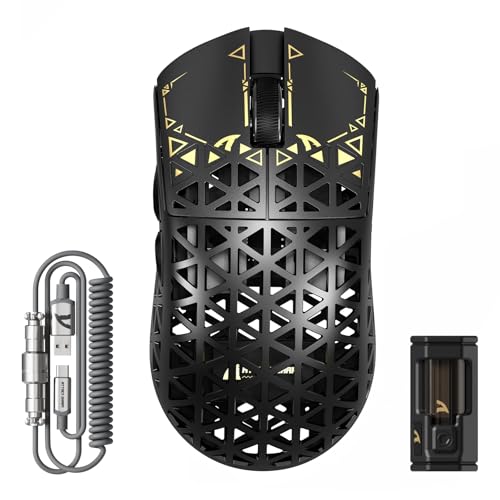


The Attack Shark R5 Ultra comes packaged with specialized accessories tailored for competitive play, focusing on flexible connectivity and distinct aesthetics.
- Attack Shark R5 Ultra wireless mouse with an injection-molded carbon fiber hollow chassis
- Dedicated HyperSpeed wireless nano dongle receiver supporting up to 8000Hz polling
- Upgraded TPU coiled mouse cable with metal aviation connectors and Type-C charging
- PixArt PAW3950MAX optical sensor paired with the Nordic 52840 microcontroller
- Flagship optical microswitches rated for 100 million actuations
- F-Switch dust-resistant mechanical scroll wheel encoder
- Tri-mode connectivity module supporting 2.4GHz wireless, Bluetooth, and wired USB-C
Structural Integrity of the Hollow Carbon Fiber Frame
Reaching an ultra-low attack shark r5 ultra weight of thirty-nine grams requires an aggressive skeletal design. Instead of a solid outer shell, the design uses an injection-molded attack shark r5 ultra carbon fiber composite formed into a hollow grid. Carbon fiber composites offer a superior strength-to-weight ratio compared to standard ABS plastics, allowing the thin structural struts to resist flexing during intense aiming sessions. Under normal grip pressure, the frame stays rigid without the noticeable creaking found in budget lightweight mice. The RelaxClaw ergonomic profile supports balanced hand positioning, allowing fingers to rest comfortably without forcing an extreme arch.
However, structural integrity involves more than just resisting hand pressure. The skeletonized framework leaves the printed circuit board, surface-mount components, and internal battery exposed to the elements. Weight reduction engineering often introduces structural compromises across different consumer product sectors; just as an appliance evaluation like the shark ultralight rocket vacuum scrutinizes thin-wall plastics against heavy mechanical stress, assessing a 39-gram skeleton mouse requires looking past weight metrics to examine rigidity under force and vulnerability to everyday contaminants. Over time, dust, desk debris, and hand sweat settle directly on the internal board. Without sealed internal compartments, accumulated debris can trigger unexpected attack shark r5 ultra problems like sensor tracking errors or short circuits.
The minimalist shell also makes concessions in daily ergonomics and versatility. The mouse lists a basic three-button configuration, leaving out side rail grips and extra macro buttons found on standard productivity or gaming mice. The raw composite surface lacks rubberized coatings, relying entirely on the physical texture of the carbon fiber struts for traction. Players with dry hands may find the smooth composite somewhat slick during quick lifts, while those with sweatier palms must clean the recessed cavities frequently. Preserving long-term attack shark r5 ultra durability requires regular dusting with compressed air to prevent grime from collecting inside the frame.
Sensor Precision and High Polling Performance
The standout feature of this peripheral is the flagship PixArt attack shark r5 ultra paw3950max optical sensor paired with the Nordic 52840 MCU. This pairing sits at the top tier of gaming hardware, providing up to 42,000 DPI and tracking speeds reaching 750 inches per second. In competitive gaming scenarios, tracking remains precise with zero perceptible smoothing, jitter, or cursor drift across standard cloth and hybrid mouse pads. The Nordic microcontroller processes signals cleanly, utilizing proprietary anti-jitter algorithms to keep tracking linear and predictable during fast, low-DPI crosshair swipes.
The hardware pushes boundaries further through its high-speed wireless reporting. Using the included HyperSpeed wireless nano dongle, the attack shark r5 ultra 8k polling feature raises data transmission up to 8000Hz, cutting reporting intervals to 0.125 milliseconds. On paper, this provides smoother cursor motion and tighter synchronization on high-refresh-rate monitors operating at 240Hz or 360Hz. In competitive first-person shooters where fractions of a millisecond matter, high polling ensures fast physical movements register immediately without micro-delays between mouse reports.
Despite the appeal of 8K polling, practical wireless use comes with trade-offs. Broadcasting eight thousand tracking packets every second places heavy processing demands on your computer processor, which can trigger stuttering or frame drops in poorly optimized titles. In addition, 8K wireless transmission drains the internal battery far quicker than a standard 1000Hz polling rate. Gamers planning long sessions will need to recharge frequently. Fortunately, the tri-mode design allows switching to Bluetooth for low-drain office tasks or using wired USB-C mode when power runs low.
Driver Software and Customization Quirks
Configuring the mouse requires downloading the manufacturer utility, which grants access to sensor parameters, button assignments, and wireless settings. Through the attack shark r5 ultra software interface, users can adjust DPI steps up to 42,000, calibrate lift-off distance, adjust debounce timings, and change polling rates from 125Hz to 8000Hz. The utility also allows basic macro creation and custom profile storage, helping players adjust settings for specific game genres. The listing confirms broad baseline compatibility across Windows 10, PC platforms, Mac systems, tablets, and gaming consoles.
In practice, boutique peripheral software can introduce minor friction. The software installer may trigger security warnings on modern operating systems due to unrecognized publisher certificates, requiring manual user approval during setup. Interface translation inconsistencies and unconventional menu layouts can also make locating specific settings, like lift-off distance thresholds, slightly awkward. Brand ecosystem consistency is another factor to weigh, as buyers familiar with peripherals like the attack shark x85 keyboard know that companion software experiences across budget-focused hardware brands can vary noticeably between product categories. While a keyboard utility focuses on lighting and macros, mouse utilities must reliably write parameters directly to the microcontroller.
Firmware persistence is an important factor for users outside Windows environments. While the mouse functions normally as a basic pointing device on macOS, Linux, tablets, and consoles, the customization program runs only on Windows 10. Non-Windows users must configure custom DPI steps, polling rates, and button mappings on a Windows PC first, letting the onboard Nordic 52840 MCU store those profiles for use on other hardware. If firmware fails or driver glitches occur, the listing directs users to contact customer support promptly for guidance.
Switch Actuation and Physical Component Lifespan
Long-term mechanical reliability in gaming mice usually centers on the durability of the primary switches and the scroll wheel assembly. The Attack Shark R5 Ultra addresses common hardware failures by using flagship microswitches rated for 100 million clicks. Operating with a rapid 0.2ms actuation speed, these switches eliminate the mechanical contact wear that causes double-clicking defects over time. For players who click heavily through thousands of daily engagements in strategy games or fast shooters, the tactile response stays consistent without premature contact fatigue.
The scroll wheel is another area where ultralight designs face challenges, as open frames let dust and lint enter the wheel mechanism. To mitigate this issue, the manufacturer uses an F-Switch dust-resistant mechanical encoder. This sealed encoder prevents debris from reaching internal rotating contacts, reducing the risk of erratic wheel scrolling, missed steps, or stiff rotation. The middle mouse click requires a positive actuation force that avoids accidental scrolling during rapid button presses, delivering dependable feedback during tense matches.
A distinct inclusion in the package is the upgraded TPU coiled mouse cable, equipped with metal aviation connectors, four copper signal wires, and aluminum foil shielding. While this cable ensures stable data sync and fast Type-C charging, its physical weight contrasts sharply with the mouse itself. The coiled structure and heavy metal aviation joint create noticeable desk drag when connected. Players choosing a 39-gram mouse specifically to minimize hand inertia will find the heavy coiled cable counterproductive in wired mode, making 2.4GHz wireless operation the preferred way to play.
Attack Shark R5 Ultra Pros and Cons
Pros
- Ultra-light 39-gram carbon fiber chassis
- Flagship PixArt PAW3950MAX optical sensor
- Reliable Nordic 52840 microcontroller
- Up to 8000Hz wireless polling rate
- Durable 100M-click optical microswitches
- Dust-resistant F-Switch scroll encoder
Cons
- Hollow shell exposes internal PCB to dust
- 8K polling accelerates battery consumption
- Basic three-button layout lacks side controls
- Configuration utility limited to Windows 10
Is the Attack Shark R5 Ultra Worth It
Deciding whether this mouse suits your gaming setup depends on your performance priorities and comfort with routine maintenance. If you are asking is attack shark r5 ultra worth it as a dedicated first-person shooter player seeking maximum agility, the combination of an attack shark r5 ultra carbon fiber body, the Nordic 52840 MCU, and the PixArt PAW3950MAX sensor delivers outstanding tracking fidelity. The 39-gram skeleton shell reduces wrist fatigue during long training sessions, while the 8000Hz wireless polling option provides high response speeds for systems capable of handling the CPU load.
However, gamers seeking a durable, low-maintenance daily mouse should proceed carefully. The open skeleton shell requires constant vigilance against spilled drinks, dust buildup, and pet hair, making it a poor fit for cluttered desks or travel bags. The three-button configuration offers no support for productivity users or MMO players who rely on thumb macro buttons. Furthermore, the unpolished software utility requires patience, and users without a Windows PC cannot adjust settings on the fly.
Ultimately, the Attack Shark R5 Ultra functions best as a focused esports tool built for pure speed rather than general-purpose versatility. If you keep a clean desk, have a capable PC that handles high polling rates, and prioritize lightweight construction above all else, this mouse offers impressive hardware specifications. If you prefer sealed shell protection, refined software support, or extra side buttons, a traditional enclosed mouse remains a more dependable long-term investment.
FAQ
How does the hollow carbon fiber frame handle dust and spills?
The hollow skeleton design leaves the internal circuit board and battery exposed to open air. While the carbon fiber structure resists physical flexing, the exposed internal components lack sealed dust or water resistance. Maintaining the mouse requires routine cleaning with compressed air and keeping liquids away from your desk setup.
Does the mouse support 8000Hz polling in all connection modes?
No. The 8000Hz polling rate functions exclusively through the HyperSpeed wireless nano dongle in 2.4GHz wireless mode. In Bluetooth mode, the mouse operates at standard energy-saving polling rates, while wired USB-C mode depends on default system bus settings.
Can you configure settings on macOS or gaming consoles?
The companion software runs exclusively on Windows 10 PC systems. While the mouse functions as a basic pointing device on macOS, tablets, and gaming consoles, customizing DPI stages, lift-off distance, or polling rates requires connecting to a Windows PC first to save settings to the onboard memory.
Why does battery life drain faster when using 8K wireless polling?
Transmitting 8,000 reports every second forces the Nordic 52840 microcontroller and wireless transmitter to send data eight times more often than standard 1000Hz mode. This continuous radio transmission draws significantly more power from the rechargeable battery, resulting in shorter runtimes between charges.
What should you do if you encounter software installation issues?
Because boutique peripheral drivers may lack standard operating system certificates, antivirus software may flag the utility during installation. Verify you are installing official software from the manufacturer, allow necessary security exceptions, and contact customer support promptly if you experience firmware or connection errors.


