As Amazon Associates, we earn from qualifying purchases. This means we may receive a small commission at no extra cost to you if you click through and make a purchase.
As an Amazon Associate we earn from qualifying purchases. Links on this page are affiliate links.
When you look at STGAubron vs msi gaming PC options, you see two very different machines. Both run Windows 11 and target gamers. The main difference lies in performance tier. The STGAubron model uses an older Intel Core i5 and Radeon RX 550 for entry-level tasks. The MSI Codex Z2 pairs a modern AMD Ryzen 7 with an RTX 5070 for high-end gaming. You need to decide which hardware level matches your actual needs.
Processor
Intel Core i5
AMD Ryzen 7 8700F
Graphics Card
Radeon RX 550 4G
NVIDIA GeForce RTX 5070
RAM
16GB
32GB DDR5
Storage
512GB SSD
2TB SSD
Wireless
Wi-Fi 6
not listed
Cooling
2 RGB Fans
4 System Fans + ARGB Air Cooler
Choose the first if
- You need a budget-friendly PC for esports titles and streaming.
- You want Wi-Fi 6 and Bluetooth 5.0 connectivity built-in.
- You prefer a system with a 1-year parts and labor warranty.
Choose the second if
- You want to play AAA games with ray tracing at high settings.
- You need 32GB of fast DDR5 RAM for heavy multitasking.
- You require 2TB of storage for large game libraries.
Verdict
The MSI Codex Z2 is the clear choice for serious gamers who want modern performance and high-end graphics. The STGAubron desktop is better suited for casual users who only need basic gaming and office capabilities. Choose based on the graphical power you actually require.
STGAubron vs MSI Gaming PC Specs
Processor performance
Edge: MSI Codex Z2 RTX 5070 Gaming Desktop
The MSI Codex Z2 uses an AMD Ryzen 7 8700F with 8 cores and 16 threads. It boosts up to 5.0 GHz for smooth gameplay and multitasking. The STGAubron desktop relies on an Intel Core i5 with a base clock of 3.6 GHz. The MSI processor offers more cores and a higher boost speed. This gives it a clear advantage for demanding AAA titles and background tasks like streaming. The STGAubron chip is suitable for entry-level gaming but lacks the raw power of the Ryzen 7.
Graphics capability
Edge: MSI Codex Z2 RTX 5070 Gaming Desktop
Graphics performance differs significantly between these two machines. The MSI Codex Z2 features the NVIDIA GeForce RTX 5070, built on the next-generation Blackwell architecture. It delivers major leaps in rasterization and ray tracing. The STGAubron model includes the Radeon RX 550 with 4GB of GDDR5 memory. The RTX 5070 is far superior for high-resolution gaming and modern effects. The RX 550 handles older or less demanding games at 60+ FPS but cannot match the visual fidelity of the RTX 5070.
Memory capacity
Edge: MSI Codex Z2 RTX 5070 Gaming Desktop
System memory affects how many applications you can run simultaneously. The MSI Codex Z2 comes with 32GB of DDR5 RAM. DDR5 offers higher bandwidth than previous generations. The STGAubron desktop provides 16GB of RAM. While 16GB is sufficient for basic gaming, the 32GB in the MSI system allows for heavier multitasking and future-proofing. The larger capacity and faster type in the MSI model give it a distinct edge for serious users.
Storage space
Edge: MSI Codex Z2 RTX 5070 Gaming Desktop
Storage capacity determines how many games and files you can keep on the drive. The MSI Codex Z2 includes a 2TB SSD. This provides ample room for large game libraries and high-resolution media files. The STGAubron desktop offers a 512GB SSD. While fast, this capacity fills up quickly with modern game sizes. The 2TB drive in the MSI system allows you to install more titles without needing to manage space constantly.
Wireless connectivity
Edge: STGAubron Core i5 RX 550 Gaming Desktop
Connectivity options impact how you link peripherals and networks. The STGAubron desktop includes Wi-Fi 6 and Bluetooth 5.0. This ensures fast wireless networking and reliable connection for controllers or headsets. The MSI Codex Z2 data highlights USB Type-C connectivity but does not explicitly list its wireless standards in the provided specs. For users prioritizing specific Wi-Fi generations or Bluetooth versions out of the box, the STGAubron provides clear, documented wireless specifications.
Which Gaming PC Fits Your Needs?
Budget-conscious casual gamers
Our pick: STGAubron Core i5 RX 550 Gaming Desktop
The STGAubron desktop offers an Intel Core i5 and Radeon RX 550 with 4GB GDDR5 memory. It includes 16GB of RAM and a 512GB SSD. This setup supports entry-level titles like Fortnite and Valorant. Wi-Fi 6 and Bluetooth 5.0 ensure stable connectivity. It runs Windows 11 Home and includes basic RGB lighting for a functional, affordable gaming experience.
High-performance AAA gamers
Our pick: MSI Codex Z2 RTX 5070 Gaming Desktop
The MSI Codex Z2 features an AMD Ryzen 7 8700F boosting to 5.0 GHz. It pairs this with an NVIDIA GeForce RTX 5070 GPU for next-gen Blackwell architecture performance. You get 32GB of DDR5 RAM and a spacious 2TB SSD. Four system cooling fans keep temperatures low during intense gaming sessions and multitasking tasks.
Content creators needing storage
Our pick: MSI Codex Z2 RTX 5070 Gaming Desktop
Video editing and streaming benefit from the MSI Codex Z2’s 2TB SSD and 32GB of DDR5 RAM. The eight-core Ryzen 7 processor handles background tasks smoothly while you work. The RTX 5070 accelerates rendering and ray tracing. This combination provides the processing power and memory capacity required for demanding creative workflows and modern game development.

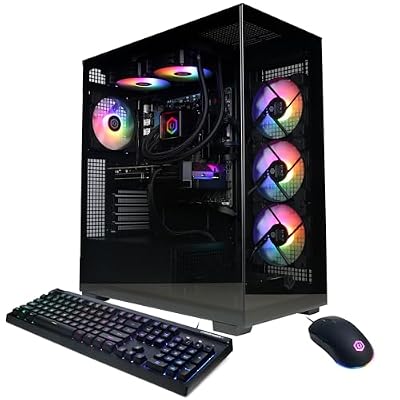
STGAubron Core i5 RX 550 Gaming Desktop
Best for: entry-level gaming and streaming
- Graphics Card
- Radeon RX 550 4G GDDR5
- Processor
- Intel Core i5
- RAM Capacity
- 16GB
- Storage Capacity
- 512GB SSD
- Wireless Standard
- Wi-Fi 6
- Operating System
- Windows 11 Home 64-bit
The STGAubron Gaming PC Desktop pairs an Intel Core i5 processor with 16GB of RAM and a 512GB SSD. It uses an AMD Radeon RX 550 4G graphics card for entry-level gaming. This system runs Windows 11 Home and includes Wi-Fi 6 and Bluetooth 5.0. It suits users who need a reliable tower for streaming, video editing, and light gaming tasks at home or in the office.
- Intel Core i5 processor up to 3.6GHz
- 16GB RAM for multitasking
- 512GB SSD for fast storage
- Wi-Fi 6 connectivity
- Includes RGB gaming mouse and keyboard
- Radeon RX 550 4G GPU is significantly less powerful than the RTX 5070 in the MSI Codex Z2
- 512GB SSD storage is smaller than the 2TB SSD in the MSI Codex Z2
- 16GB RAM capacity is lower than the 32GB in the MSI Codex Z2
- You need a budget-friendly tower for 1080p gaming and streaming
- You want a system that includes a mouse and keyboard
- You require Wi-Fi 6 for stable wireless connections
- You need high-end graphics for modern AAA titles
- You require 32GB of RAM for heavy video editing
- You want 2TB of storage for large game libraries
Verdict: STGAubron Core i5 RX 550 Gaming PC fits casual gamers and streamers who prioritize value over raw power. It is a practical entry point for users who do not need high-end rendering capabilities.

MSI Codex Z2 RTX 5070 Gaming Desktop
Best for: High-performance gaming and streaming
- Graphics Card
- NVIDIA GeForce RTX 5070
- Processor
- AMD Ryzen 7 8700F
- RAM Capacity
- 32GB
- RAM Type
- DDR5
- Storage Capacity
- 2TB SSD
- Cooling Type
- ARGB fan Air Cooler
This MSI desktop pairs an AMD Ryzen 7 8700F processor with an NVIDIA GeForce RTX 5070 graphics card. It includes 32GB of DDR5 RAM and a 2TB SSD. The system uses a Blackwell architecture GPU for strong ray tracing. You get Windows 11 Home and multiple cooling fans. It suits gamers who want high-end performance for AAA titles and streaming.
- AMD Ryzen 7 8700F boosts to 5.0 GHz
- NVIDIA GeForce RTX 5070 with Blackwell architecture
- 32GB DDR5 RAM for multitasking
- 2TB SSD storage capacity
- Four system cooling fans for heat management
- Heavier at 21.3 pounds compared to lighter desktops
- Taller at 19 inches which may not fit small desks
- Includes Windows 11 Home instead of Pro
- You play demanding AAA games at high settings
- You need fast DDR5 RAM for streaming
- You want a large 2TB SSD for your library
- You need a compact desktop under 15 inches
- You prefer Windows 11 Pro pre-installed
- You want a lighter unit under 15 pounds
Verdict: MSI Codex Z2 RTX 5070 Gaming PC delivers high-end specs for serious gamers. It fits those who prioritize raw power and large storage over portability.
Specifications side by side
| Spec | STGAubron Core i5 RX 550 Gaming Desktop | MSI Codex Z2 RTX 5070 Gaming Desktop |
|---|---|---|
| Graphics Card | Radeon RX 550 4G GDDR5 | NVIDIA GeForce RTX 5070 |
| Processor | Intel Core i5 | AMD Ryzen 7 8700F |
| RAM Capacity | 16GB | 32GB |
| RAM Type | – | DDR5 |
| Storage Capacity | 512GB SSD | 2TB SSD |
| Cooling Type | – | ARGB fan Air Cooler |
| Wireless Standard | Wi-Fi 6 | – |
| Operating System | Windows 11 Home 64-bit | Windows 11 Home |
| Color | Black | Black |
| Resolution | 4K UHD | – |
| Platform | PC | – |
| Storage | 512GB SSD | 2TB SSD |
| Use | Streaming, Video Editing, Gaming | VR, Gaming |
| Connectivity | – | USB |
| Capture Resolution | 4K | – |
| Video Interface | HDMI | – |
| RAM | 16GB RAM | 32GB RAM |
| Dimensions | 18.1 × 10.2 × 18.9 inches | 16 × 8.38 × 19 inches |
| Weight | – | 21.3 pounds |
| Size | RX 550 4G | – |
| Model | ABR1222 | CodZ2A8NVP436 |
Frequently asked questions
Which PC is better for streaming?
The MSI Codex Z2 RTX 5070 is the better choice for streaming. It features a Ryzen 7 processor and 32GB of DDR5 RAM. This setup handles demanding tasks like VR and high-end gaming simultaneously. The STGAubron model is suitable for casual streaming but lacks the raw power for serious content creation.
How much storage does each system have?
The MSI desktop includes 2TB of SSD storage. This provides ample space for large game libraries and files. The STGAubron model comes with 512GB of SSD storage. While sufficient for entry-level gaming, it holds significantly less data than the MSI option.
Is the MSI PC suitable for VR?
Yes, the MSI Codex Z2 is explicitly designed for VR use. Its RTX 5070 graphics card and Ryzen 7 processor deliver the high performance required for virtual reality. The STGAubron PC targets entry-level gaming and is not optimized for VR experiences.
What graphics card does the entry-level PC use?
The STGAubron desktop uses an RX 550 graphics card with 4GB of memory. This component supports 4K UHD resolution and basic gaming tasks. It is intended for users who prioritize value over high-end graphical performance.
How much RAM does each gaming PC include?
The MSI system includes 32GB of DDR5 RAM. This large memory capacity supports multitasking and heavy workloads. The STGAubron model comes with 16GB of RAM. This amount is adequate for casual gaming and standard streaming applications.
What operating system do these PCs run?
Both the STGAubron and MSI gaming PCs run Windows 11. This ensures compatibility with modern games and software. You get the same core operating system experience on both machines, differing mainly in hardware performance and storage capacity.