As Amazon Associates, we earn from qualifying purchases. This means we may receive a small commission at no extra cost to you if you click through and make a purchase.
As an Amazon Associate we earn from qualifying purchases. Links on this page are affiliate links.
When you compare skytech gaming vs KOTIN gaming PC options, you are looking at two distinct prebuilt towers. Both systems use AMD Ryzen 7 processors and NVIDIA graphics cards to handle modern titles. They both run Windows 11 and include essential connectivity for gaming setups. The main difference lies in their performance tier and cooling approach. Skytech offers higher-end components with liquid cooling, while KOTIN provides a more compact air-cooled build focused on value and upgradeability.
Processor
AMD Ryzen 7 9800X3D
AMD Ryzen 7 8700F
Graphics Card
RTX 5070 Ti 16GB GDDR7
RTX 5060 Ti 8GB
RAM
32GB DDR5 6000
16GB DDR5
Storage
2TB Gen4 NVMe SSD
1TB PCIe Gen4 NVMe SSD
Cooling
360mm AIO Liquid Cooler
Air cooler with 6 copper heat pipes
Wireless Standard
Wi-Fi 5 (802.11 AC)
WiFi 7
Choose the first if
- You want the highest possible frame rates at 1440p and 4K resolutions.
- You prefer liquid cooling for quieter operation under heavy loads.
- You need 32GB of RAM and 2TB of storage for large game libraries.
Choose the second if
- You prioritize future upgradeability with multiple M.2 and DIMM slots.
- You want the latest WiFi 7 standard for low-latency connectivity.
- You prefer a more compact tower with a digital temperature display.
Verdict
The Skytech King 95 is the better choice if you seek maximum raw performance and premium cooling for high-resolution gaming. The KOTIN system suits buyers who want a compact, upgrade-friendly machine with modern connectivity features. Your decision depends on whether you value peak graphical power or flexible expansion options.
Skytech vs KOTIN PC Specs
Graphics performance
Edge: Skytech King 95 RTX 5070 Ti Gaming PC
Skytech includes the NVIDIA GeForce RTX 5070 Ti with 16GB of GDDR7 memory. This card offers significantly more video memory and a newer memory architecture than the KOTIN system. KOTIN uses the GeForce RTX 5060 Ti, which comes with only 8GB of GDDR6 memory. The 5070 Ti is designed for higher resolution gaming at 1440p and beyond. The 5060 Ti is capable for 1080p and 1440p gaming but has less headroom for texture-heavy titles. If you plan to play at Ultra settings or future-proof your system, the Skytech GPU is the stronger choice. The extra 8GB of VRAM on the Skytech model helps manage high-resolution assets without stuttering.
Processor power
Edge: Skytech King 95 RTX 5070 Ti Gaming PC
Skytech features the AMD Ryzen 7 9800X3D, which is a newer generation processor with 3D V-Cache technology. It boosts up to 5.2GHz and is optimized for high-frame-rate gaming. KOTIN uses the AMD Ryzen 7 8700F. While still a strong eight-core processor, it lacks the 3D V-Cache found in the 9800X3D. The 9800X3D generally provides better performance in CPU-bound games and complex simulations. The 8700F is a capable chip for gaming and streaming, but the 9800X3D is the more powerful option for pure gaming speed. If you want the latest top-tier CPU performance, the Skytech system has the advantage here.
Memory capacity
Edge: Skytech King 95 RTX 5070 Ti Gaming PC
Skytech comes equipped with 32GB of DDR5 RAM running at 6000MHz. This amount of memory allows for heavy multitasking, streaming while gaming, and running large open-world games without swapping to storage. KOTIN includes 16GB of DDR5 memory. While 16GB is sufficient for many modern games, it can become a bottleneck if you have many background applications open. The 32GB on the Skytech system provides more room for future software demands. If you often switch between games, browsers, and communication apps, the larger memory pool on the Skytech PC is more practical for a smoother experience.
Storage space
Edge: Skytech King 95 RTX 5070 Ti Gaming PC
Skytech provides a 2TB Gen4 NVMe M.2 SSD. This large capacity allows you to install many modern games, which often exceed 100GB each, without worrying about running out of space. KOTIN includes a 1TB PCIe Gen4 NVMe SSD. While fast, this drive will fill up much quicker than the Skytech drive. You may need to manage your library more frequently on the KOTIN system. The 2TB storage on the Skytech PC offers more convenience and fewer decisions about which games to keep installed. For players with large libraries, the extra space is a significant practical benefit.
Cooling system
Edge: Skytech King 95 RTX 5070 Ti Gaming PC
Skytech uses a 360mm AIO liquid CPU cooler. Liquid cooling is generally more efficient at dissipating heat from high-performance processors, allowing for sustained boost clocks. KOTIN uses a CPU air cooler with six copper heat pipes. Air coolers are reliable and do not require pumps, but they may not handle the thermal output of the 9800X3D as effectively as a large liquid cooler. The AIO on the Skytech system helps prevent thermal throttling during intense gaming sessions. However, the KOTIN air cooler is a simpler design that avoids potential pump failure risks. Both systems include fans for case airflow, but the cooling method differs in complexity and capacity.
Connectivity
Edge: KOTIN Ryzen 7 8700F RTX 5060 Ti Gaming PC
KOTIN includes WiFi 7 and Bluetooth. This is the latest wireless standard, offering lower latency and higher potential throughput for online gaming and wireless peripherals. Skytech uses 802.11 AC, which is WiFi 5. While WiFi 5 is still widely supported and stable, it is an older standard. If you have a WiFi 7 router and want the best possible wireless connection speed, KOTIN has the advantage. For most users, WiFi 5 is still very capable, but KOTIN offers more modern wireless technology out of the box.
Physical size
Edge: KOTIN Ryzen 7 8700F RTX 5060 Ti Gaming PC
Skytech measures 18.7 inches in length, 11.8 inches in width, and 17.4 inches in height, weighing 48.3 pounds. This is a large, heavy tower that requires significant desk or floor space. KOTIN is more compact, measuring 12.4 inches in length, 8.5 inches in width, and 15.6 inches in height. It does not list a weight, but it is likely lighter due to smaller components. If you have a smaller desk or need a system that is easier to move, the KOTIN tower is the better fit. The Skytech system is a full-size tower built for maximum component space and cooling potential.
Which Gaming PC Fits Your Needs
High-end 1440p gaming enthusiasts
Our pick: Skytech King 95 RTX 5070 Ti Gaming PC
You need the RTX 5070 Ti with 16GB GDDR7 for demanding titles. The Ryzen 7 9800X3D and 32GB DDR5 RAM handle heavy loads. The 360mm AIO liquid cooler prevents thermal throttling during long sessions. This setup delivers smooth 60+ FPS at 1440p Ultra settings for modern AAA games.
Budget-conscious 1080p and 1440p gamers
Our pick: KOTIN Ryzen 7 8700F RTX 5060 Ti Gaming PC
This KOTIN system offers solid 1080p and 1440p performance with the RTX 5060 Ti and Ryzen 7 8700F. You get WiFi 7 for low-latency play and a 650W Gold PSU. The 16GB DDR5 RAM and 1TB SSD provide a responsive experience for esports and streaming without overspending.
Users wanting future upgrade flexibility
Our pick: KOTIN Ryzen 7 8700F RTX 5060 Ti Gaming PC
KOTIN includes four DDR5 DIMM slots and three M.2 SSD slots for easy expansion. The 650W 80 PLUS Gold power supply supports future component upgrades. You can increase RAM or add storage later. The air cooler with digital temperature display helps you monitor system health during these changes.

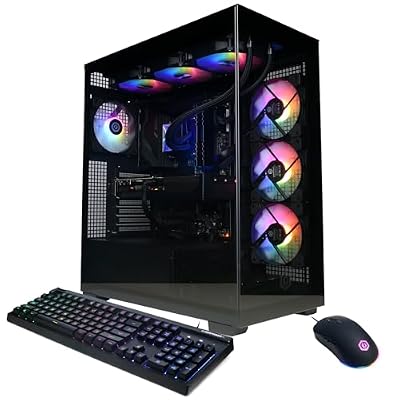
Skytech King 95 RTX 5070 Ti Gaming PC
Best for: High-end 1440p gaming and content creation
- Graphics Card
- NVIDIA Geforce RTX 5070 Ti 16GB GDDR7
- Processor
- AMD Ryzen 7 9800X3D
- RAM Capacity
- 32GB
- RAM Type
- DDR5 6000
- Storage Capacity
- 2TB Gen4 NVMe M.2 SSD
- Cooling Type
- 360mm AIO Liquid CPU Cooler
This Skytech Gaming desktop pairs the AMD Ryzen 7 9800X3D processor with an NVIDIA GeForce RTX 5070 Ti graphics card. It includes 32GB of DDR5 RAM and a 2TB Gen4 NVMe SSD. The system uses a 360mm AIO liquid cooler to manage heat. You get Windows 11 Home pre-installed. This setup targets high-end gaming at 1440p resolution with smooth frame rates.
- AMD Ryzen 7 9800X3D CPU with 5.2GHz Turbo Boost
- NVIDIA GeForce RTX 5070 Ti with 16GB GDDR7 memory
- 32GB DDR5 RAM running at 6000MHz
- 2TB Gen4 NVMe M.2 SSD for fast storage
- 360mm AIO liquid cooler for thermal management
- Wi-Fi 5 (802.11 AC) standard instead of newer Wi-Fi 6
- Heavier build at 48.3 pounds compared to lighter alternatives
- Larger chassis dimensions requiring more desk space
- You want high-end 1440p gaming performance
- You prefer liquid cooling for better thermal headroom
- You need 32GB of RAM for multitasking
- You require the latest Wi-Fi 6E connectivity
- You have limited space for a large desktop tower
- You are on a tight budget for entry-level gaming
Verdict: Skytech Gaming 9800X3D/5070 Ti PC delivers top-tier specs for serious gamers who value raw power and efficient cooling. It is ideal for players targeting high frame rates at 1440p resolution.

KOTIN Ryzen 7 8700F RTX 5060 Ti Gaming PC
Best for: 1440p gaming with future upgrade potential
- Graphics Card
- GeForce RTX 5060 Ti 8GB
- Processor
- AMD Ryzen 7 8700F
- RAM Capacity
- 16GB
- RAM Type
- DDR5
- Storage Capacity
- 1TB PCIe Gen4 NVMe SSD
- Cooling Type
- Air cooler with 6 copper heat pipes
This KOTIN desktop pairs an AMD Ryzen 7 8700F processor with an NVIDIA GeForce RTX 5060 Ti 8GB graphics card. You get 16GB of DDR5 RAM and a 1TB PCIe Gen4 NVMe SSD for storage. The system includes WiFi 7 and a 650W 80 PLUS Gold power supply. It is designed for 1080p and 1440p gaming, streaming, and creative work. The build features an air cooler with six copper heat pipes and five 120mm ARGB fans.
- AMD Ryzen 7 8700F processor for responsive speed
- NVIDIA GeForce RTX 5060 Ti 8GB with DLSS 4 and ray tracing
- 16GB DDR5 RAM and 1TB PCIe Gen4 NVMe SSD
- WiFi 7 and Bluetooth for low-latency online play
- 650W 80 PLUS Gold power supply with upgrade-ready DIMM and M.2 slots
- 16GB RAM capacity is lower than the 32GB in the competing Skytech model
- RTX 5060 Ti graphics card offers less power than the RTX 5070 Ti in the comparison
- 1TB SSD storage is smaller than the 2TB drive in the alternative option
- You want a prebuilt PC optimized for 1080p and 1440p gaming
- You need WiFi 7 connectivity for stable online play
- You plan to upgrade RAM or storage later using the available slots
- You require 32GB of RAM for heavy multitasking or streaming
- You need the higher performance of an RTX 5070 Ti graphics card
- You prefer a larger 2TB SSD for extensive game libraries
Verdict: KOTIN Ryzen 7 8700F Gaming PC suits gamers who prioritize modern connectivity and upgradability over maximum raw power. It is a solid choice for 1440p play if you are comfortable adding more RAM or storage later.
Specifications side by side
| Spec | Skytech King 95 RTX 5070 Ti Gaming PC | KOTIN Ryzen 7 8700F RTX 5060 Ti Gaming PC |
|---|---|---|
| Graphics Card | NVIDIA Geforce RTX 5070 Ti 16GB GDDR7 | GeForce RTX 5060 Ti 8GB |
| Processor | AMD Ryzen 7 9800X3D | AMD Ryzen 7 8700F |
| RAM Capacity | 32GB | 16GB |
| RAM Type | DDR5 6000 | DDR5 |
| Storage Capacity | 2TB Gen4 NVMe M.2 SSD | 1TB PCIe Gen4 NVMe SSD |
| Cooling Type | 360mm AIO Liquid CPU Cooler | Air cooler with 6 copper heat pipes |
| Wireless Standard | Wi-Fi 5, 802.11 AC | WiFi 7 |
| Operating System | Windows 11 Home 64-bit | Windows 11 Home |
| Color | Black | Black |
| Resolution | – | 1440p QHD |
| Platform | PC | PC |
| Storage | 2TB SSD | 1TB SSD |
| Use | Gaming | Streaming, Gaming |
| Capture Resolution | – | 1080p |
| RAM | 32GB RAM | 16GB RAM |
| Cooling | Liquid Cooling | – |
| Dimensions | 18.7 × 11.8 × 17.4 inches | 12.4 × 8.5 × 15.6 inches |
| Weight | 48.3 pounds | – |
| Model | ST-KING95-1866-B-AM | KTD32BA787F16G506T8G |
Frequently asked questions
Which PC has more RAM?
The Skytech King 95 includes 32GB of DDR5 RAM. This is double the 16GB found in the KOTIN Ryzen 7 8700F system. The larger memory pool in the Skytech model supports heavier multitasking and content creation workflows without needing immediate upgrades.
What is the storage difference?
Skytech provides a 2TB SSD for your games and files. KOTIN ships with a 1TB SSD. You get twice the storage space with the Skytech unit, which is helpful if you install many large titles or keep a large media library.
Do both systems use liquid cooling?
The Skytech King 95 features liquid cooling to manage heat. The KOTIN specifications do not list a cooling type in the provided data. You should check the KOTIN listing directly if thermal management is a primary concern for your build.
How do the physical sizes compare?
The Skytech PC is significantly larger at 18.7 inches long. The KOTIN tower is more compact at 12.4 inches long. If you have limited desk space, the smaller KOTIN chassis may fit better into tighter setups or smaller cases.
Is there a weight difference?
The Skytech system weighs 48.3 pounds due to its larger frame and components. The KOTIN weight is not listed in the current data. The heavier Skytech build suggests a more robust internal structure and potentially more substantial power delivery components.
Which is better for streaming?
KOTIN lists its use for both streaming and gaming. It captures video at 1080p resolution. While the Skytech PC has more raw power, the KOTIN system is explicitly marketed for users who plan to stream their gameplay sessions alongside playing.
What operating system is included?
Both prebuilt systems come with Windows 11 installed. You do not need to purchase a separate license or perform a fresh installation. Both machines are ready to use out of the box with the latest Microsoft operating system preloaded.
Which has the better graphics card?
Skytech uses the RTX 5070 Ti, while KOTIN uses the RTX 5060 Ti. The 5070 Ti offers higher performance for demanding 1440p titles. If you prioritize maximum frame rates and visual fidelity, the Skytech GPU is the superior choice.