As Amazon Associates, we earn from qualifying purchases. This means we may receive a small commission at no extra cost to you if you click through and make a purchase.
As an Amazon Associate we earn from qualifying purchases. Links on this page are affiliate links.
This sceptre vs alienware gaming monitor guide helps you choose between two distinct approaches to PC gaming. Both brands offer high refresh rates and fast response times for smooth visuals. The Sceptre model provides a wide ultrawide curved display with built-in audio. The Alienware unit delivers a standard aspect ratio with advanced color accuracy and adaptive sync. You must decide which screen format and feature set matches your specific hardware and desk space.
Screen Size
34 inches
27 inches
Resolution
3440 x 1440
2560 x 1440
Panel Type
Curved
Fast IPS
Refresh Rate
240Hz
240Hz (280Hz overclocked)
Color Coverage
100% sRGB
95% DCI-P3
Audio
Built-in speakers
Not listed
Choose the first if
- You want a wider field of view for immersive gaming and productivity.
- You prefer a curved screen that wraps around your peripheral vision.
- You need integrated speakers to reduce desk clutter.
Choose the second if
- You prioritize accurate color reproduction for creative work or vibrant visuals.
- You require G-SYNC Compatible and VESA Adaptive Sync for tear-free gameplay.
- You want a fully adjustable stand with height, swivel, and pivot options.
Verdict
Choose the Sceptre if you value screen real estate and built-in audio for a streamlined setup. Pick the Alienware if you need precise color fidelity, adaptive sync technology, and a highly adjustable stand. Both monitors deliver fast response times for competitive gaming.
Sceptre vs Alienware Key Specs
Screen Size and Shape
Edge: Sceptre 34-Inch Curved 240Hz Ultrawide Monitor
The Sceptre model offers a 34-inch ultrawide display with a 1500R curvature, providing a 3440 x 1440 resolution that fills your peripheral vision. This curved format is ideal for immersive gaming and multitasking. In contrast, the Alienware unit features a standard 27-inch flat panel with a 2560 x 1440 resolution. While the Alienware screen is smaller, the flat surface avoids the distortion some players feel with curved glass. You must decide if you prefer the expansive width of the Sceptre or the traditional aspect ratio of the Alienware.
Refresh Rate Performance
Edge: Alienware 27-Inch 240Hz Gaming Monitor
Both monitors deliver high refresh rates suitable for fast-paced gaming, but they operate at different peaks. The Sceptre monitor supports a native 240Hz refresh rate, ensuring smooth visuals across its entire 34-inch surface. The Alienware display matches this with a 240Hz native rate but offers an overclocked mode that reaches 280Hz. This extra headroom on the Alienware panel can provide a marginal advantage in competitive titles where every millisecond counts. If you seek the absolute highest number, the Alienware takes the lead, though both are well above standard 60Hz or 144Hz screens.
Color Accuracy and HDR
Edge: Alienware 27-Inch 240Hz Gaming Monitor
Visual fidelity differs significantly between these two options. The Alienware monitor utilizes an IPS Nano Color panel that covers 95% of the DCI-P3 color gamut and carries VESA DisplayHDR 600 certification. This combination delivers vibrant, dynamic colors and better contrast for supported content. The Sceptre monitor focuses on a 100% sRGB coverage, which is excellent for standard web and office work but lacks the wider color range of the Alienware. Additionally, the Sceptre data does not list any HDR certification. For creative work or HDR gaming, the Alienware offers superior color performance.
Sync Technology and Latency
Edge: Alienware 27-Inch 240Hz Gaming Monitor
Both monitors feature a 1ms response time to minimize ghosting and input lag. However, the Alienware includes NVIDIA G-SYNC Compatible and VESA Adaptive Sync certifications. These technologies synchronize the refresh rate with the graphics card output to eliminate screen tearing and stuttering. The Sceptre data does not explicitly list G-SYNC or FreeSync compatibility in its provided specifications, though it mentions smooth visuals. For players using NVIDIA graphics cards who want certified tear-free performance, the Alienware provides a more robust and verified sync solution.
Audio and Connectivity
Edge: Sceptre 34-Inch Curved 240Hz Ultrawide Monitor
The Sceptre monitor distinguishes itself by including built-in speakers, allowing you to hear game audio without connecting external headphones or a sound system. It also provides two HDMI and two DisplayPort connections for versatile device linking. The Alienware data does not mention built-in speakers, meaning you will need external audio equipment. While the Alienware offers a more premium design with cable management and a fully adjustable stand, the Sceptre provides immediate audio convenience and flexible connectivity options for users who want a simpler, all-in-one desk setup.
Which Monitor Fits Your Setup Best
Immersive ultrawide gamers seeking wide fields
Our pick: Sceptre 34-Inch Curved 240Hz Ultrawide Monitor
The 34-inch ultrawide screen with 1500R curvature fills your peripheral vision for deeper immersion. You get a 3440 x 1440 resolution that enhances multitasking and cinematic gaming. The 240Hz refresh rate and 1ms response time ensure smooth visuals without input lag, keeping you engaged in fast-paced action.
Competitive players wanting color accuracy and HDR
Our pick: Alienware 27-Inch 240Hz Gaming Monitor
This 27-inch Fast IPS panel delivers 95% DCI-P3 color coverage and VESA DisplayHDR 600 certification for vibrant, accurate visuals. You benefit from NVIDIA G-SYNC Compatible and VESA Adaptive Sync for tear-free gameplay. The 280Hz overclocked refresh rate offers top-tier performance for competitive gaming with precise color reproduction.
Users preferring built-in audio and simplicity
Our pick: Sceptre 34-Inch Curved 240Hz Ultrawide Monitor
Built-in speakers eliminate desk clutter by providing direct audio output without external hardware. You also gain Blue-Light Shift technology to reduce eye strain during long sessions. The versatile connectivity includes two HDMI and two DisplayPort inputs, allowing you to link multiple devices easily while enjoying 100% sRGB color accuracy.

Sceptre 34-Inch Curved 240Hz Ultrawide Monitor
Best for: immersive ultrawide gaming and multitasking
- Screen Size
- 34"
- Resolution
- 3440 x 1440
- Refresh Rate
- 240Hz
- Response Time
- 1ms
- Screen Curvature
- 1500R
- Features
- Built-in Speakers
This Sceptre monitor offers a 34-inch curved screen with a 3440 x 1440 resolution and a 240Hz refresh rate. It features a 1ms response time and 100% sRGB color coverage. Built-in speakers and blue-light shift technology add convenience. You get a large, smooth display suitable for immersive gaming and multitasking without needing external audio gear.
- 34-inch 3440 x 1440 resolution for wide viewing
- 240Hz refresh rate for smooth motion
- 1ms response time with blur reduction
- Built-in speakers reduce desk clutter
- 100% sRGB color gamut for accurate visuals
- 1500R curvature is less aggressive than typical 1000R gaming monitors
- 14-pound weight makes it heavier than smaller 27-inch alternatives
- Limited to HDMI and DisplayPort interfaces without USB-C connectivity
- You want a wide ultrawide screen for immersive gaming
- You prefer built-in speakers to keep your desk tidy
- You need high refresh rates for fast-paced titles
- You require a flat panel for precise alignment tasks
- You prefer a smaller 27-inch footprint for tight desks
- You need USB-C connectivity for single-cable setups
Verdict: Sceptre 34-inch Curved Gaming Monitor delivers a large, fast ultrawide display for players who value immersion and convenience. It fits those who want high refresh rates and built-in audio without extra hardware.

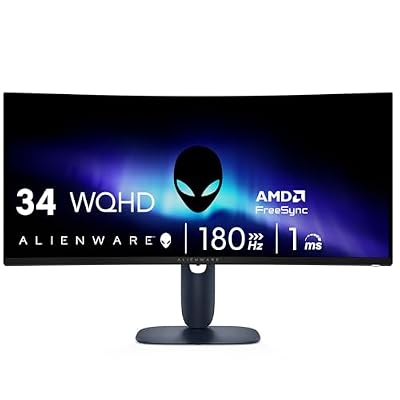
Alienware 27-Inch 240Hz Gaming Monitor
Best for: competitive gamers wanting speed and color accuracy
- Screen Size
- 27"
- Resolution
- 2560 x 1440
- Refresh Rate
- 280Hz
- Response Time
- 1ms GtG
- Panel Type
- Fast IPS
- Sync Technology
- G-SYNC Compatible, VESA Adaptive Sync
This Alienware monitor features a 27-inch Fast IPS panel with 2560 x 1440 resolution. It offers a 240Hz native refresh rate, overclocking to 280Hz, and a 1ms response time. The display supports G-SYNC Compatible and VESA Adaptive Sync for smooth visuals. With 95% DCI-P3 color coverage and DisplayHDR 600, it suits gamers seeking high speed and vivid color accuracy in a compact footprint.
- Fast IPS panel with 1ms GtG response time
- 240Hz native refresh rate, overclockable to 280Hz
- NVIDIA G-SYNC Compatible and VESA Adaptive Sync support
- 95% DCI-P3 color coverage with DisplayHDR 600
- 27-inch screen is smaller than the 34-inch alternative
- 19.6-pound weight is heavier than compact options
- 2560 x 1440 resolution is lower than 3440 x 1440
- You prioritize high refresh rates and fast response times
- You want accurate colors for immersive gaming
- You prefer a compact 27-inch desk footprint
- You need ultra-wide 3440 x 1440 resolution
- You prefer larger screens for immersive viewing
- You want the lightest possible monitor setup
Verdict: Alienware 27-inch 240Hz Gaming Monitor delivers high-speed performance and vivid color for competitive players. It fits those who value speed and accuracy in a standard 16:9 format.
Specifications side by side
| Spec | Sceptre 34-Inch Curved 240Hz Ultrawide Monitor | Alienware 27-Inch 240Hz Gaming Monitor |
|---|---|---|
| Screen Size | 34" | 27" |
| Resolution | 3440 x 1440 | 2560 x 1440 |
| Refresh Rate | 240Hz | 280Hz |
| Response Time | 1ms | 1ms GtG |
| Panel Type | – | Fast IPS |
| Sync Technology | – | G-SYNC Compatible, VESA Adaptive Sync |
| HDR Support | – | VESA DisplayHDR 600 |
| Screen Curvature | 1500R | – |
| Features | Built-in Speakers | – |
| Use | Gaming | Gaming |
| Video Interface | HDMI | – |
| Dimensions | 8.5 × 31.8 × 18 inches | 23.9 × 10.6 × 20.3 inches |
| Weight | 14 pounds | 19.6 pounds |
| Size | 34 inches | – |
| Color | Machine Black | Lunar Light |
| Model | C345B-QU240T | AW2723DF |
Frequently asked questions
Which monitor is better for competitive shooting games?
The Alienware 27-inch model is the stronger choice for competitive play. It features G-SYNC sync technology to eliminate screen tearing and stuttering. The standard 16:9 aspect ratio aligns with most competitive titles. Its 240Hz refresh rate and 1ms response time ensure rapid visual updates.
Does the Sceptre monitor have built-in audio?
Yes, the Sceptre 34-inch Curved Monitor includes built-in speakers. This feature allows you to connect via HDMI without needing external audio hardware. It simplifies your desk setup by removing the need for separate speakers or headphones for basic sound needs.
What is the difference in screen size between these two?
The Sceptre offers a 34-inch ultrawide display, while the Alienware provides a 27-inch standard screen. The Sceptre’s larger width suits immersive gaming and multitasking. The Alienware’s smaller footprint fits standard desk setups and aligns with traditional 16:9 gaming formats.
Do both monitors support high refresh rates?
Both monitors operate at a 240Hz refresh rate. This specification ensures smooth motion rendering for fast-paced games. You will experience reduced blur during rapid movements on either device. Both also list a 1ms response time for quick pixel transitions.
Is the Alienware monitor compatible with NVIDIA graphics cards?
Yes, the Alienware 27-inch model supports G-SYNC technology. This sync technology requires compatible NVIDIA graphics hardware to function. It helps maintain stable frame rates and reduces visual artifacts. This makes it ideal for users with NVIDIA GPUs seeking precise color and speed.
Which monitor is lighter and easier to move?
The Sceptre 34-inch model weighs 14 pounds. The Alienware 27-inch model weighs 19.6 pounds. The Sceptre is lighter, making it easier to reposition on your desk. Its dimensions are also broader, but the lower weight simplifies handling during setup.
Can I use the Sceptre monitor with an HDMI cable?
Yes, the Sceptre 34-inch Monitor lists HDMI as its video interface. You can connect your PC or console using standard HDMI cables. This ensures compatibility with most modern gaming systems and computers that feature HDMI ports for display output.