As Amazon Associates, we earn from qualifying purchases. This means we may receive a small commission at no extra cost to you if you click through and make a purchase.
As an Amazon Associate we earn from qualifying purchases. Links on this page are affiliate links.
When you compare the SANSUI vs CRUA gaming monitor, you face a choice between speed and immersion. Both offer QHD resolution and FreeSync support for smooth gameplay. The SANSUI prioritizes high refresh rates on a flat panel, while the CRUA focuses on a larger curved screen. You need to decide if faster motion or a wider field of view matters more for your setup.
Screen Size
24.5 inches
32 inches
Panel Type
Fast IPS
VA
Refresh Rate
300Hz
180Hz
Screen Shape
Flat
Curved (1800R)
Color Gamut
130% sRGB
120% sRGB
Ergonomic Stand
Pivot, Swivel, Height, Tilt
Tilt only
Choose the first if
- You play competitive shooters and need the highest possible refresh rate.
- You want a smaller screen that fits easily on a compact desk.
- You prefer IPS color accuracy and wide viewing angles.
Choose the second if
- You want a larger display for immersive single-player games.
- You prefer the deeper contrast and curved field of view of a VA panel.
- You need a monitor with a simpler, space-saving stand design.
Verdict
The SANSUI suits competitive gamers who prioritize speed and precise color on a smaller, adjustable stand. The CRUA is better for those who want a larger, immersive curved experience with strong contrast. Choose based on whether you value refresh rate or screen size more.
SANSUI vs CRUA Monitor Specs
Panel and curvature
Edge: Tie
The SANSUI uses a flat Fast IPS panel, which typically offers better color accuracy and wider viewing angles than VA panels. It supports a 178-degree viewing angle. The CRUA features a 32-inch curved VA panel with an 1800R curvature. This curvature wraps around your field of view, creating a more immersive experience for gaming and movies. However, VA panels generally have slower pixel response times and narrower viewing angles compared to IPS technology. You should choose the SANSUI if you prioritize color fidelity and wide viewing angles, or the CRUA if you prefer the immersive depth of a curved screen.
Refresh rate speed
Edge: SANSUI 24.5-Inch 300Hz QHD Gaming Monitor
Refresh rate determines how many times per second the screen updates its image. The SANSUI boasts a maximum refresh rate of 300Hz via its HDMI 2.1 ports. This high speed reduces motion blur significantly, which is critical for competitive shooters. The CRUA offers a 180Hz refresh rate. While 180Hz is smooth and reduces tearing with FreeSync support, it is not as fast as the SANSUI’s 300Hz. If you play fast-paced competitive games where every millisecond counts, the SANSUI provides a tangible advantage in fluidity. Casual gamers may find 180Hz sufficient.
Screen size and space
Edge: Tie
Screen size affects your immersion and desk footprint. The SANSUI is a 24.5-inch monitor, which is standard for competitive gaming setups where quick eye movement is needed. It is more compact and easier to fit on smaller desks. The CRUA is a 32-inch monitor, offering a much larger canvas. This size is better for multitasking, media consumption, and immersive single-player games. The CRUA measures 28 inches in width, requiring more desk space than the SANSUI’s 21.9-inch length. Choose the SANSUI for compact setups and the CRUA for a spacious, immersive display.
Connectivity options
Edge: SANSUI 24.5-Inch 300Hz QHD Gaming Monitor
Both monitors offer robust connectivity for modern PCs. The SANSUI includes two HDMI 2.1 ports and two DisplayPort 1.4 ports, all supporting up to 300Hz. This flexibility allows you to connect multiple high-bandwidth devices without bottlenecking the refresh rate. The CRUA provides two HDMI ports and two DisplayPort inputs. While the specific HDMI version is not listed, it supports 180Hz gaming. The SANSUI’s inclusion of HDMI 2.1 ensures future-proofing for high-refresh-rate connections, giving it an edge for users with the latest graphics cards.
Ergonomic stand features
Edge: SANSUI 24.5-Inch 300Hz QHD Gaming Monitor
Adjustability impacts long-term comfort. The SANSUI stand offers pivot, swivel, height, and tilt adjustments. You can raise it up to 110mm, swivel left or right by 20 degrees, and tilt between -5 and 20 degrees. It also supports pivoting for vertical orientation. The CRUA offers tilt adjustment from -5 to 15 degrees and supports VESA 100x100mm wall mounting. However, it lacks height and swivel adjustments. The SANSUI provides superior ergonomic flexibility out of the box, allowing you to fine-tune your viewing position without needing a separate monitor arm.
Choose the right monitor for you
Competitive FPS gamers needing speed
Our pick: SANSUI 24.5-Inch 300Hz QHD Gaming Monitor
The SANSUI offers a 300Hz refresh rate on a 24.5-inch Fast IPS panel. This combination minimizes motion blur and input lag for fast-paced titles. Its 1ms response time ensures crisp visuals during rapid movements. You get high frame rates without sacrificing color accuracy, making it ideal for ranked play.
Immersive single-player and story fans
Our pick: CRUA 32" 2K 180Hz Curved Monitor
The CRUA provides a 32-inch curved VA panel with 1800R curvature. This design wraps the screen around your field of view for deeper immersion. The higher static contrast ratio of the VA panel delivers richer blacks and more vivid colors. You enjoy a cinematic experience for games and movies on a larger canvas.
Users wanting ergonomic flexibility
Our pick: SANSUI 24.5-Inch 300Hz QHD Gaming Monitor
The SANSUI includes pivot, swivel, and height adjustment capabilities. You can rotate the screen to portrait mode or adjust the height for optimal neck comfort. The CRUA only offers tilt adjustment. If you need precise positioning for long work sessions or varied viewing angles, the SANSUI stand provides superior ergonomic control.
Content creators needing color accuracy
Our pick: SANSUI 24.5-Inch 300Hz QHD Gaming Monitor
The SANSUI Fast IPS panel covers 130% sRGB with 350 nits brightness. IPS technology generally offers better color consistency and wider viewing angles than VA panels. You get more accurate color reproduction for photo editing or design work. The CRUA covers 120% sRGB but uses a VA panel, which can shift colors at angles.
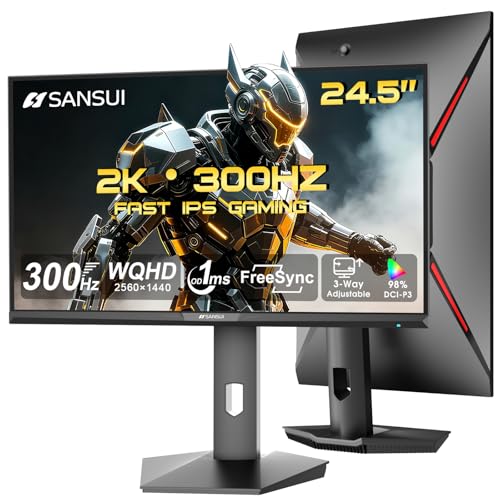
SANSUI 24.5-Inch 300Hz QHD Gaming Monitor
Best for: competitive gaming on compact desks
- Screen Size
- 24.5"
- Resolution
- 2560 x 1440
- Refresh Rate
- 300Hz
- Response Time
- 1ms
- Panel Type
- Fast IPS
- Sync Technology
- FreeSync
This SANSUI monitor pairs a 24.5-inch Fast IPS panel with a 300Hz refresh rate and 1ms response time. You get QHD 1440p resolution and FreeSync support for smooth visuals. The stand offers height, pivot, swivel, and tilt adjustments. It includes two HDMI 2.1 and two DP 1.4 ports. This setup suits competitive gamers who prioritize speed and pixel density on a compact screen.
- 300Hz refresh rate for ultra-smooth motion
- QHD 1440p resolution on a 24.5-inch panel
- Ergonomic stand with height and pivot adjustments
- Dual HDMI 2.1 and dual DP 1.4 inputs
- 24.5-inch screen is smaller than the 32-inch competitor
- Resolution is lower than the 2K QHD competitor
- 130% sRGB color gamut is modest for creative work
- You want high refresh rates for competitive gaming
- You prefer a compact desk footprint
- You need flexible stand adjustments
- You require a larger 32-inch display
- You need built-in speakers
- You prioritize color accuracy over speed
Verdict: SANSUI 24.5" 300Hz QHD Monitor delivers high-speed performance in a compact frame. It fits players who value responsiveness and screen real estate balance over large size.

CRUA 32" 2K 180Hz Curved Monitor
Best for: immersive gaming and media consumption on a large screen
- Screen Size
- 32"
- Resolution
- 2560×1440
- Refresh Rate
- 180Hz
- Sync Technology
- AMD FreeSync
- Screen Curvature
- 1800R
- Color
- Black
This CRUA monitor offers a 32-inch QHD display with an 180Hz refresh rate and 1800R curvature. It uses a VA panel covering 120% sRGB for vivid colors. The 1ms response time and FreeSync support help reduce motion blur. You get dual HDMI and DisplayPort inputs for flexible connectivity. It suits gamers and remote workers who want an immersive, large screen for daily use.
- 32-inch QHD 2560×1440 resolution for sharp detail
- 180Hz refresh rate with AMD FreeSync for smooth motion
- 1800R curved VA panel for immersive viewing
- 120% sRGB color gamut for vivid visuals
- 180Hz refresh rate is lower than the 300Hz option on this list
- VA panel has a 3000:1 static contrast ratio, which is lower than typical IPS panels
- 250cd/m² brightness is modest for very bright rooms
- You want a large 32-inch screen for immersive gaming
- You prioritize color accuracy with 120% sRGB coverage
- You need multiple inputs like HDMI and DisplayPort
- You require the highest possible 300Hz refresh rate
- You prefer IPS panels for faster pixel response times
- You need a 24.5-inch form factor for tight desks
Verdict: CRUA 32" 180Hz QHD Curved Monitor fits users who value a large, curved QHD screen with solid color reproduction over raw speed. It is a practical option for immersive gaming and media consumption.
Specifications side by side
| Spec | SANSUI 24.5-Inch 300Hz QHD Gaming Monitor | CRUA 32" 2K 180Hz Curved Monitor |
|---|---|---|
| Screen Size | 24.5" | 32" |
| Resolution | 2560 x 1440 | 2560×1440 |
| Refresh Rate | 300Hz | 180Hz |
| Response Time | 1ms | – |
| Panel Type | Fast IPS | – |
| Sync Technology | FreeSync | AMD FreeSync |
| HDR Support | HDR | – |
| Screen Curvature | – | 1800R |
| Color | Black | Black |
| Use | Gaming | Video Editing, Gaming |
| Video Interface | HDMI, HDMI 2.1 | HDMI |
| Dimensions | 21.9 × 8.66 × 21 inches | 2.1 × 28 × 16.6 inches |
| Size | 25 Inch | 32Inch-Black |
| Model | ES-G25F6Q Pro | CR320QW |
Frequently asked questions
Is the SANSUI monitor better for competitive gaming?
Yes, the SANSUI 24.5-inch model is optimized for speed. It features a 300Hz refresh rate and a 1ms response time on a flat IPS panel. This setup reduces motion blur and input lag, which helps you react faster in fast-paced titles. The compact 24.5-inch size also fits well on smaller desks.
Does the CRUA monitor have a curved screen?
Yes, the CRUA 32-inch model features a curved VA panel. This design wraps around your field of view for a more immersive experience. The curvature helps reduce eye strain during long gaming or media sessions. It is ideal if you prefer a larger, enveloping display over a flat one.
Which monitor has a higher refresh rate?
The SANSUI monitor has the higher refresh rate. It supports up to 300Hz, compared to the CRUA’s 180Hz. A higher refresh rate allows for smoother motion rendering. This makes the SANSUI a better choice for competitive shooters where frame consistency matters most.
Are both monitors QHD resolution?
Yes, both monitors offer 1440p QHD resolution. This provides sharp image clarity and detailed visuals. You get a good balance between screen real estate and pixel density on both the 24.5-inch SANSUI and the 32-inch CRUA. This resolution is suitable for both gaming and productivity tasks.
What type of panel does each monitor use?
The SANSUI uses a Fast IPS panel, while the CRUA uses a VA panel. IPS panels typically offer wider viewing angles and better color accuracy. VA panels provide higher contrast ratios, which enhances dark scene details. Your choice depends on whether you prioritize color fidelity or contrast.
Which monitor is larger in size?
The CRUA monitor is larger. It has a 32-inch screen, whereas the SANSUI has a 24.5-inch screen. The CRUA’s larger footprint requires more desk space. It is better for users who want a spacious display for immersive gaming or media consumption.

