As Amazon Associates, we earn from qualifying purchases. This means we may receive a small commission at no extra cost to you if you click through and make a purchase.
As an Amazon Associate we earn from qualifying purchases. Links on this page are affiliate links.
You are comparing the SANSUI vs alienware gaming monitor options for high-refresh gaming. Both units use 1440p Fast IPS panels and offer 1ms response times for clear motion. The main difference lies in their refresh rates and connectivity. The SANSUI model pushes up to 300Hz with dual HDMI 2.1 ports, while the Alienware reaches 280Hz with NVIDIA G-SYNC compatibility. You need to decide which specs match your GPU and desk setup.
Screen Size
24.5 inches
27 inches
Max Refresh Rate
300Hz
280Hz (240Hz native)
Sync Technology
FreeSync
NVIDIA G-SYNC Compatible, VESA Adaptive Sync
HDR Certification
HDR (unspecified standard)
VESA DisplayHDR 600
Color Gamut
130% sRGB
95% DCI-P3
Video Ports
2x HDMI 2.1, 2x DP 1.4
DP 1.4 (HDMI not listed)
Choose the first if
- You want the highest possible refresh rate for competitive esports.
- You need multiple HDMI 2.1 connections for consoles or PCs.
- You prefer a smaller 24.5-inch footprint for your desk.
Choose the second if
- You use an NVIDIA GPU and want certified G-SYNC compatibility.
- You want certified VESA DisplayHDR 600 for better brightness and contrast.
- You prefer a wider color gamut covering 95% of DCI-P3.
Verdict
The SANSUI monitor suits players who prioritize raw refresh rate and versatile HDMI connectivity. The Alienware model is better for NVIDIA users who value certified sync technology and higher HDR standards. Your choice depends on whether you need more hertz or better color and sync certification.
SANSUI vs Alienware Monitor Specs
Maximum refresh rate
Edge: SANSUI 24.5-Inch 300Hz QHD Gaming Monitor
The SANSUI model offers a native refresh rate of 300Hz, which is the highest available in this comparison. This allows for extremely smooth motion in competitive shooters. The Alienware monitor provides a native 240Hz rate, with an overclocked option reaching 280Hz. For pure speed specifications, the SANSUI panel delivers a higher ceiling. You will notice the difference in frame delivery, especially if you use a high-end GPU. The SANSUI edges ahead on raw numbers.
Color accuracy and HDR
Edge: Alienware 27-Inch 240Hz Gaming Monitor
Alienware uses Nano Color technology to cover 95% of the DCI-P3 color space, which is wider than the SANSUI 130% sRGB rating. The Alienware also holds a VESA DisplayHDR 600 certification, ensuring better peak brightness and contrast for supported content. The SANSUI lists only generic HDR support with 350 nits brightness. If you play story-rich games or edit photos, the Alienware provides more vibrant colors and better dynamic range. The Alienware wins on color fidelity.
Sync technology compatibility
Edge: Alienware 27-Inch 240Hz Gaming Monitor
The Alienware monitor features NVIDIA G-SYNC Compatible certification and VESA Adaptive Sync. This ensures broad compatibility with both NVIDIA and AMD graphics cards while minimizing screen tearing. The SANSUI monitor relies solely on FreeSync technology. While FreeSync works well with AMD cards, it may not offer the same level of optimization for NVIDIA users. If you use an NVIDIA GPU, the Alienware provides a more certified and stable experience. The Alienware has better sync versatility.
Connectivity ports
Edge: SANSUI 24.5-Inch 300Hz QHD Gaming Monitor
The SANSUI monitor includes two HDMI 2.1 ports and two DisplayPort 1.4 ports. This allows you to connect multiple modern consoles or PCs without swapping cables. The Alienware monitor lists only one DisplayPort 1.4 connection in its key specs. It does not mention HDMI 2.1 ports. If you need to connect multiple high-bandwidth devices simultaneously, the SANSUI offers more flexibility. The SANSUI provides superior port variety.
Screen size and bezels
Edge: Alienware 27-Inch 240Hz Gaming Monitor
The Alienware monitor features a 27-inch display with InfinityEdge bezels, providing a more immersive view with minimal borders. The SANSUI model is a 24.5-inch screen, which is smaller and typically found in competitive esports setups. The Alienware offers more screen real estate for a single monitor setup. The SANSUI is better if you need multiple monitors side-by-side. The Alienware wins for immersion.
Which gaming monitor fits your needs
Competitive shooter players seeking max speed
Our pick: SANSUI 24.5-Inch 300Hz QHD Gaming Monitor
The SANSUI model offers a 300Hz refresh rate, which is higher than the Alienware's 240Hz. This faster rate reduces motion blur in fast-paced games. You also get FreeSync technology to prevent screen tearing. The 1ms response time ensures inputs are registered quickly. This makes it ideal for ranked play where every millisecond counts.
Players wanting certified smooth visuals and color
Our pick: Alienware 27-Inch 240Hz Gaming Monitor
The Alienware monitor features NVIDIA G-SYNC Compatible and VESA Adaptive Sync certifications. This ensures tear-free gameplay across various frame rates. It also includes VESA DisplayHDR 600 for better brightness and contrast. The 95% DCI-P3 color coverage provides vibrant, accurate colors. These features create a more polished visual experience for immersive gaming sessions.
Users needing versatile connectivity options
Our pick: SANSUI 24.5-Inch 300Hz QHD Gaming Monitor
The SANSUI monitor includes two HDMI 2.1 ports and two DisplayPort 1.4 ports. This allows you to connect multiple devices like consoles and PCs easily. Both HDMI ports support up to 300Hz refresh rates. The Alienware model only lists one DisplayPort. This extra connectivity makes the SANSUI more flexible for complex battle stations.
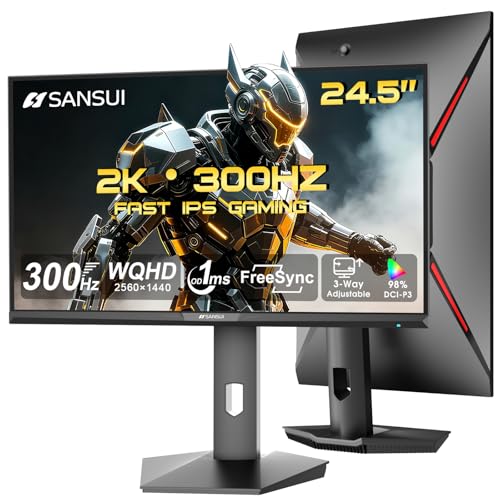
SANSUI 24.5-Inch 300Hz QHD Gaming Monitor
Best for: competitive gamers wanting speed and color
- Screen Size
- 24.5"
- Resolution
- 2560 x 1440
- Refresh Rate
- 300Hz
- Response Time
- 1ms
- Panel Type
- Fast IPS
- Sync Technology
- FreeSync
This SANSUI monitor pairs a 24.5-inch fast IPS panel with a 300Hz refresh rate and 1ms response time. It delivers 2560 x 1440 resolution and covers 130% sRGB color gamut. The stand offers height, pivot, swivel, and tilt adjustments. You get two HDMI 2.1 and two DisplayPort 1.4 inputs for high-speed connectivity. It fits competitive gamers who want speed and color accuracy in a compact frame.
- 300Hz refresh rate for smooth motion
- 1ms fast response time on IPS panel
- 130% sRGB color gamut coverage
- Ergonomic stand with height and pivot adjustment
- 24.5-inch screen is smaller than the 27-inch alternative
- No built-in speakers despite audio jack presence
- You prioritize high refresh rates for competitive gaming
- You want a compact monitor for a tight desk setup
- You need flexible stand adjustments for ergonomic comfort
- You prefer a larger 27-inch or bigger display
- You need integrated speakers for media consumption
- You require HDR10 or higher dynamic range support
Verdict: SANSUI 24.5 Inch 300Hz QHD Monitor suits players who value speed and color fidelity in a space-saving design. It delivers high refresh rates and ergonomic flexibility for focused gaming sessions.

Alienware 27-Inch 240Hz Gaming Monitor
Best for: 27-inch gamers seeking speed and color accuracy
- Screen Size
- 27"
- Resolution
- 2560 x 1440
- Refresh Rate
- 280Hz
- Response Time
- 1ms GtG
- Panel Type
- Fast IPS
- Sync Technology
- G-SYNC Compatible, VESA Adaptive Sync
The Alienware AW2723DF is a 27-inch Fast IPS monitor with a 2560 x 1440 resolution. It offers a native 240Hz refresh rate, overclocking to 280Hz, and a 1ms response time. The panel covers 95% DCI-P3 colors and supports VESA DisplayHDR 600. It includes NVIDIA G-SYNC Compatible and VESA Adaptive Sync for smooth gameplay. This monitor suits gamers who want high refresh rates and vibrant color accuracy in a 27-inch form factor.
- 27-inch Fast IPS panel with 2560 x 1440 resolution
- 240Hz native refresh rate, overclockable to 280Hz
- 1ms Gray to Gray response time
- 95% DCI-P3 color coverage and VESA DisplayHDR 600
- Fully adjustable stand with swivel, pivot, tilt, and height adjustment
- Lower maximum refresh rate than the 300Hz SANSUI option
- Heavier build at 19.6 pounds compared to smaller monitors
- Smaller 27-inch screen size versus larger 34-inch ultrawide alternatives
- You want a 27-inch display with high refresh rates for competitive gaming
- You prioritize color accuracy with 95% DCI-P3 coverage
- You need a fully adjustable stand for ergonomic positioning
- You need the highest possible refresh rate available
- You prefer a lighter, more portable monitor setup
- You want a larger 34-inch ultrawide screen
Verdict: Alienware 27-inch 240Hz Gaming Monitor delivers a balanced mix of speed and color fidelity for 27-inch enthusiasts. It fits players who value a responsive Fast IPS panel and adjustable ergonomics over raw refresh rate numbers.
Specifications side by side
| Spec | SANSUI 24.5-Inch 300Hz QHD Gaming Monitor | Alienware 27-Inch 240Hz Gaming Monitor |
|---|---|---|
| Screen Size | 24.5" | 27" |
| Resolution | 2560 x 1440 | 2560 x 1440 |
| Refresh Rate | 300Hz | 280Hz |
| Response Time | 1ms | 1ms GtG |
| Panel Type | Fast IPS | Fast IPS |
| Sync Technology | FreeSync | G-SYNC Compatible, VESA Adaptive Sync |
| HDR Support | HDR | VESA DisplayHDR 600 |
| Color | Black | Lunar Light |
| Use | Gaming | Gaming |
| Video Interface | HDMI, HDMI 2.1 | – |
| Dimensions | 21.9 × 8.66 × 21 inches | 23.9 × 10.6 × 20.3 inches |
| Weight | – | 19.6 pounds |
| Size | 25 Inch | – |
| Model | ES-G25F6Q Pro | AW2723DF |
Frequently asked questions
Is the SANSUI monitor better for competitive gaming?
Yes, if you prioritize maximum frame rates. The SANSUI model offers a 300Hz refresh rate, which exceeds the Alienware's 240Hz. This higher rate reduces motion blur in fast-paced shooters. It also includes HDMI 2.1 ports for modern console support. The 1440p resolution ensures clear details without sacrificing speed.
Which monitor has better color accuracy?
Both use IPS panels, which generally provide good color reproduction. The Alienware is described as having color fidelity suitable for 27-inch enthusiasts. The SANSUI also emphasizes color accuracy for competitive play. You should choose based on your preferred screen size, as both deliver vibrant images with wide viewing angles typical of IPS technology.
Does the Alienware monitor support G-SYNC?
Yes, the Alienware 27-inch model features G-SYNC sync technology. This helps eliminate screen tearing and stuttering when your GPU frame rate varies. The SANSUI monitor does not list G-SYNC in its attributes. It focuses on high refresh rates instead. If you use an NVIDIA card, G-SYNC offers a smoother experience.
What is the difference in screen size?
The SANSUI is a 24.5-inch display, while the Alienware is 27 inches. The larger Alienware screen provides more desktop real estate and immersive gaming. The SANSUI offers a more compact footprint, fitting smaller desks. Both maintain 1440p resolution, so pixel density is slightly higher on the smaller SANSUI unit.
Are both monitors compatible with consoles?
The SANSUI monitor includes HDMI 2.1 ports, which support next-gen console features like higher bandwidth and variable refresh rates. The Alienware listing does not specify HDMI 2.1. You should check your console's output requirements. The SANSUI's connectivity options make it a stronger choice for PlayStation 5 or Xbox Series X users.
How do the response times compare?
Both monitors feature a 1ms response time. This specification ensures minimal ghosting and sharp motion clarity. The Alienware uses a Fast IPS panel to achieve this speed. The SANSUI also delivers 1ms performance. Neither unit has a significant advantage in pixel transition speed, making both suitable for rapid reflex actions.