As Amazon Associates, we earn from qualifying purchases. This means we may receive a small commission at no extra cost to you if you click through and make a purchase.
As an Amazon Associate we earn from qualifying purchases. Links on this page are affiliate links.
This logitech g x52 flight control system review covers the hardware you need for serious simulation. The unit features magnetic, non-contact X and Y axis sensors for precise stick movement. It also includes a 3D twist rudder control with a lock function. These specs define its core handling. The device offers 282 programmable commands across three modes. An LCD display shows programmed commands and acts as a clock. The grip system has five positions for comfort. It weighs 4.19 pounds. This setup targets pilots who want dedicated hardware without switching to a keyboard during intense flight sequences.
- Magnetic, non-contact X and Y axis sensors for longevity and accuracy
- 282 programmable commands across three modes
- Multifunction LCD display with built-in clock
- 3D twist rudder control with rudder lock
Good fit for
You should buy this if you play Elite Dangerous or Star Citizen and want to keep all commands accessible. The 282 programmable controls let you map complex actions directly to the hardware. The magnetic sensors ensure the stick remains accurate over time. If you already have rudder pedals, the rudder lock feature prevents accidental activation. The five-position grip system helps maintain comfort during long sessions. This system suits users who value precision and dedicated hardware over wireless convenience.
Who can skip it
You should skip this option if you need a wireless setup. The data does not mention wireless connectivity. You might also look elsewhere if you prefer a simpler interface without an LCD screen. The 4.19-pound weight may be too heavy for some portable setups. If you do not need 282 commands, the complexity might be unnecessary. Users who want a compact, lightweight controller for casual play will find this system too bulky and feature-heavy for their needs.
Verdict
The Logitech G X52 is a robust, wired option for sim pilots who need extensive programmable controls and precise sensor accuracy. It suits dedicated setups but may be too bulky or complex for casual users.
Key specs explained for this unit
Sensor Type: Magnetic, non-contact
This sensor technology eliminates physical wear from moving parts. You get pinpoint accuracy without friction degrading the stick over time. This design enhances longevity, meaning you can fly for hours without the stick feeling loose or inconsistent. It is a reliable choice for simulation gamers who want consistent performance without maintenance concerns.
Rudder Control: 3D Twist with Rudder Lock
The stick allows you to twist the grip for rudder input, adding a third axis of control. The lock function prevents accidental activation if you already use separate rudder pedals. This is essential for precise simulation control. You can customize the axis behavior to fit your specific cockpit setup or flight plan requirements.
Programmable Controls: 282
You have 282 commands available across three different modes. This high number ensures you can map complex actions for games like Elite Dangerous or Star Citizen directly to the hardware. You do not need to switch back to your keyboard during intense flight sequences. This keeps all critical functions within your fingertips for faster response.
Display: Multifunction LCD
The built-in LCD screen lets you check programmed commands before activation. It also functions as a clock to time your flight plans. This visual feedback helps you verify settings without looking at your monitor. It is a practical feature for managing complex control schemes and keeping track of mission timing during long simulation sessions.
Grip System: 5-position
The grip offers five adjustment positions to suit your hand size and preference. This ergonomic design helps you maintain comfort during extended use. You do not need to stretch to reach buttons, which reduces fatigue. It ensures the controls remain accessible regardless of your grip style, making it suitable for various user preferences.
Design and build
According to the listing, the Logitech G X52 Flight Control System weighs 4.19 pounds. This mass provides stability during intense simulation sessions. The unit features a 5-position grip system designed to maintain ergonomic comfort. You do not need to stretch to reach buttons, which reduces hand fatigue during long flights.
The finish combines black, blue, and silver elements. This color scheme is standard for gaming peripherals and helps the device blend into typical desk setups. The physical layout centers around a multifunction LCD display. This screen allows you to check all programmed commands on your HOTAS before activating them. It also includes a built-in clock for timing your flight plan, keeping critical data visible without switching windows.
Control inputs are managed through 282 programmable commands across three modes. This density of controls ensures that commands for games like Elite Dangerous or Star Citizen are at your fingertips. The 3D twist rudder control includes a lock function. This feature is essential for simulation control. If you already use separate rudder pedals, you can lock off the axis to prevent accidental activation. The design prioritizes direct access to complex flight functions without requiring external software menus for basic adjustments.
Setup and daily operation details
The Logitech G X52 Flight Control System connects to your PC for use with simulation titles. You program commands directly into the hardware, reducing the need to switch back to a keyboard during play. The listing highlights 282 programmable commands across three distinct modes. This allows you to keep controls for games like Elite Dangerous or Star Citizen within immediate reach. You can verify these settings before activation using the multifunction LCD display. This screen shows programmed commands and includes a built-in clock to help time your flight plans. The magnetic, non-contact X and Y axis sensors ensure the stick returns to center with pinpoint accuracy. You do not need to worry about physical wear affecting movement over time. For rudder control, the unit offers a 3D twist mechanism with a lock function. This feature is essential for simulation precision. If you already own rudder pedals, you can lock this axis to prevent accidental activation. The 5-position grip system adjusts to your hand size, ensuring you maintain ergonomic comfort without stretching. The unit weighs 4.19 pounds, providing a stable base during operation. Colors available include black, blue, and silver. You set up the device by connecting it and assigning your preferred commands via the software interface. Daily use involves manipulating the stick and twist rudder while monitoring the LCD for status checks. The design prioritizes direct control and readability, keeping your focus on the simulation rather than on-screen menus.
Before You Buy The X52
You need a PC to use this device. It does not work with consoles. Check your simulation software for HOTAS support. Most major titles like Elite Dangerous recognize the 282 programmable commands. You should verify that your desk has enough space. The unit weighs 4.19 pounds. It needs room for the 3D twist rudder control. If you already have rudder pedals, use the lock function. This prevents accidental activation. Clean the magnetic sensors with a dry cloth. Avoid liquids. The non-contact design reduces wear, but dust can still accumulate. This system fits pilots who want precise control without a full HOTAS setup. It is a middle ground between simple sticks and complex throttle units. You get enhanced longevity from the sensor type. However, you must program the commands yourself. The LCD display helps, but it is small. Ensure you are comfortable with manual configuration. This device suits dedicated simmers. It may overwhelm casual players. Consider your time for setup. The 5-position grip system offers comfort, but you must adjust it correctly. This product stands out for its sensor accuracy and programmable depth.
Check before you buy
- Verify PC compatibility with your simulation software.
- Ensure desk space for the rudder twist axis.
- Check if you already own separate rudder pedals.
- Confirm you are willing to program 282 commands.
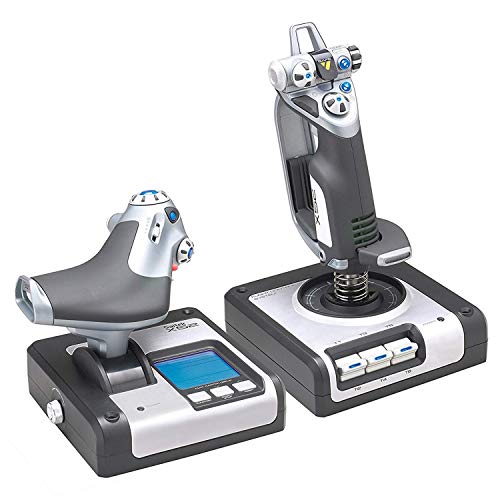
Logitech G X52 Flight Control System
Best for: Sim pilots needing sensor accuracy and LCD feedback
- Sensor Type
- Magnetic, non-contact
- Programmable Controls
- 282
- Rudder Control
- 3D Twist with Rudder Lock
- Weight
- 4.19 pounds
The Logitech G X52 Flight Control System offers 282 programmable commands across three modes. It uses magnetic, non-contact X and Y axis sensors for pinpoint accuracy. A 3D twist rudder with a lock feature helps prevent accidental activation. An LCD display shows programmed commands and includes a clock. This HOTAS unit weighs 4.19 pounds and suits sim pilots needing dedicated hardware.
- Magnetic, non-contact X and Y axis sensors provide enhanced longevity
- 282 programmable commands available over three modes
- Multifunction LCD display shows commands and includes a built-in clock
- 3D twist rudder control with a lock function
- 5-position grip system for ergonomic comfort
- Weight of 4.19 pounds may feel bulky for small desks
- Limited to 282 programmable commands compared to higher-end models
- You need dedicated hardware for Elite Dangerous or Star Citizen
- You want an LCD display to check commands before activation
- You require a rudder lock to prevent accidental axis activation
- You prefer a lighter device under 4 pounds
- You need more than 282 programmable commands
- You do not want a built-in LCD display
Verdict: Logitech G X52 Flight Control System fits sim pilots who value sensor accuracy and visual feedback. It is a solid choice for players using Elite Dangerous or Star Citizen.
Specifications side by side
| Spec | Logitech G X52 Flight Control System |
|---|---|
| Sensor Type | Magnetic, non-contact |
| Programmable Controls | 282 |
| Rudder Control | 3D Twist with Rudder Lock |
| Weight | 4.19 pounds |
| Color | Black,Blue,Silver |
| Model | 945-000065 |
Frequently asked questions
Is the Logitech G X52 compatible with consoles?
No, this flight control system is designed exclusively for PC use. The listing confirms it connects to your PC for operation. You cannot use it with PlayStation or Xbox consoles. If you fly on console, you will need a different HOTAS setup. Stick to PC titles like Elite Dangerous for full compatibility.
Does the X52 stick include an LCD display?
Yes, the unit features an integrated LCD screen. This display provides real-time feedback on your flight status. You can monitor critical data without switching windows. The screen complements the magnetic sensor accuracy. It offers a clear view of your systems during intense simulation sessions.
How many programmable commands does the X52 support?
The device supports 282 programmable commands. You can assign these controls directly into the hardware. This reduces the need to alt-tab to a keyboard. The high number of buttons allows for detailed configuration. You can map complex flight maneuvers for games like Star Citizen.
What type of sensors does the Logitech X52 use?
It uses magnetic, non-contact X and Y axis sensors. This technology prevents physical wear from moving parts. You get precise stick movement without friction. The design enhances longevity for long gaming sessions. You do not need to worry about mechanical degradation over time.
Is the X52 heavy enough to stay stable?
The unit weighs 4.19 pounds. This mass provides stability during intense simulation. You will not experience unwanted movement on your desk. The weight helps anchor the control stick. It ensures consistent performance even during rapid maneuvers in flight simulators.
Can I adjust the grip position on the stick?
Yes, the device features a 5-position grip system. You can adjust the stick to find your ergonomic comfort. This design helps prevent strain during long flights. You do not need to stretch to reach controls. The adjustability supports various desk setups and user preferences.
Does the X52 include a twist rudder control?
Yes, it includes a 3D twist rudder control. This feature allows for precise yaw management. The rudder also has a lock function. You can engage the lock for hands-free operation. This adds versatility for complex flight scenarios in simulation games.