As Amazon Associates, we earn from qualifying purchases. This means we may receive a small commission at no extra cost to you if you click through and make a purchase.
As an Amazon Associate we earn from qualifying purchases. Links on this page are affiliate links.
When you compare the logitech g vs corsair gaming keyboard options, you see two distinct approaches to performance. Both brands target serious gamers with mechanical switches and RGB lighting. The main difference lies in their design philosophy. Logitech G offers wireless flexibility with a tenkeyless layout, while Corsair focuses on wired precision with a compact 96% form factor and advanced Hall Effect switches. You must choose between mobility and raw speed.
Connectivity
Wireless (LIGHTSPEED, Bluetooth, USB)
Wired only
Form Factor
TKL (Tenkeyless)
96% (Compact with numpad)
Switch Technology
GX Brown tactile mechanical
MGX Hyperdrive Hall Effect magnetic
Polling Rate
Not listed
8,000Hz
Display
Not listed
1.9-inch color LCD
Choose the first if
- You need wireless freedom for tournaments or LAN events
- You prefer a tactile switch feel for typing accuracy
- You want a compact layout without a number pad
Choose the second if
- You prioritize ultra-low latency with 8,000Hz polling
- You want rapid trigger features for fast-paced gaming
- You desire a custom LCD screen for personalization
Verdict
Choose the Logitech G PRO X TKL if you value wireless connectivity and a traditional tactile feel for competitive play. Pick the Corsair Vanguard PRO if you need the fastest possible response times via Hall Effect switches and want a compact layout with extra utility keys.
Logitech G vs Corsair Keyboards Compared
Connectivity options
Edge: Logitech G PRO X TKL Wireless Tactile Keyboard
Logitech G PRO X TKL gives you three ways to connect. It uses LIGHTSPEED wireless, Bluetooth, and a standard USB cable. This flexibility helps you switch between a PC and a laptop easily. Corsair Vanguard PRO is wired only. It uses a high-speed connection for zero latency. If you hate cable clutter or need to move your setup often, the Logitech G option is better. The Corsair keyboard locks you into a desk setup. You must manage the cable for the best experience. For most gamers, wireless freedom is a major plus.
Switch technology
Edge: Corsair Vanguard PRO 96 Hall Effect Keyboard
Corsair uses MGX Hyperdrive Hall Effect switches. These are magnetic and support rapid trigger. This means the key resets instantly when you lift your finger. You do not need to press all the way down. Logitech G uses GX Brown tactile mechanical switches. They have a physical bump you can feel. This is good for typing accuracy. However, Corsair’s magnetic tech is faster for competitive gaming. It eliminates mechanical wear from physical contacts. If you play fast-paced shooters, the Corsair switch type offers a clear advantage in response time.
Form factor size
Edge: Logitech G PRO X TKL Wireless Tactile Keyboard
Both keyboards save desk space but in different ways. Logitech G PRO X TKL is a tenkeyless design. It removes the number pad entirely. Corsair Vanguard PRO is a 96% layout. It keeps the number pad and arrow keys but makes them narrower. The Corsair unit is wider at 15.3 inches compared to the Logitech G at 13.9 inches. If you need a numpad for data entry or games, Corsair is the right choice. If you want maximum mouse space, the Logitech G TKL is smaller.
Display features
Edge: Corsair Vanguard PRO 96 Hall Effect Keyboard
Corsair Vanguard PRO includes a 1.9-inch IPS color LCD screen. You can show custom images, animations, or system stats. It also has a rotary dial for volume or zoom. Logitech G PRO X TKL has no screen. It uses a volume roller and media controls instead. The Corsair display is a unique feature that adds personality and utility. You can see FPS or chat without alt-tabbing. For gamers who want extra information on their gear, Corsair wins this round easily.
Keycap material
Edge: Logitech G PRO X TKL Wireless Tactile Keyboard
Logitech G PRO X TKL uses double-shot PBT keycaps. PBT plastic is thick and resistant to shine. It feels rough and durable over time. Corsair does not list the specific keycap material in the provided data. We only know it uses MGX switches. PBT is generally preferred for longevity and texture. If keycap feel and durability are top priorities, the Logitech G specification is superior. You can trust the PBT material to last longer without becoming slippery.
Choose Your Keyboard Based On Specs
Wireless gamers who want portability
Our pick: Logitech G PRO X TKL Wireless Tactile Keyboard
You need freedom from cables. The Logitech G PRO X TKL offers LIGHTSPEED wireless, Bluetooth, and USB connectivity. Its TKL form factor keeps it compact. The tactile GX Brown switches provide clear feedback without noise. You get double-shot PBT keycaps for durability. This setup suits players who move gear between desks or LAN events.
Competitive players needing low latency
Our pick: Corsair Vanguard PRO 96 Hall Effect Keyboard
You prioritize raw speed and precision. The Corsair Vanguard PRO features 8,000Hz hyper-polling to minimize input lag. Its Hall Effect switches enable rapid trigger technology for instant reset. The 96% layout keeps arrow keys and numpad in a small footprint. You get an LCD screen for custom info. Wired connection ensures stable performance.
Users wanting integrated display controls
Our pick: Corsair Vanguard PRO 96 Hall Effect Keyboard
You value on-board information and customization. The Corsair Vanguard PRO includes a 1.9-inch IPS color screen. You can display animations or system stats directly on the device. Six programmable G-keys and a rotary dial add control layers. The MGX Hyperdrive switches are pre-lubed for smooth action. This screen is unique to this model in this comparison.

Logitech G PRO X TKL Wireless Tactile Keyboard
Best for: Players wanting tactile wireless TKL performance
- Form Factor
- TKL
- Switch Type
- GX Brown tactile
- Connectivity
- LIGHTSPEED wireless, Bluetooth, USB
- Keycap Material
- Dual-shot PBT
- Lighting
- LIGHTSYNC RGB
- Features
- RGB Lighting
This tenkeyless keyboard uses GX Brown tactile switches for distinct feedback. It connects via LIGHTSPEED wireless, Bluetooth, or USB. The double-shot PBT keycaps resist shine. A volume roller and LIGHTSYNC RGB add control. You get a compact 13.9-inch layout. This setup suits players who want reliable wireless performance with a tactile feel.
- GX Brown tactile mechanical switches
- LIGHTSPEED wireless and Bluetooth connectivity
- Double-shot PBT keycaps
- Integrated volume roller
- LIGHTSYNC RGB lighting
- Heavier at 5.29 ounces compared to lighter alternatives
- Fixed tactile switch type limits linear preference
- TKL form factor reduces key count
- You prefer tactile feedback for typing accuracy
- You want wireless freedom with Bluetooth support
- You need a compact desk layout
- You require a full-size numpad
- You prefer linear smooth keystrokes
- You need magnetic Hall Effect switches
Verdict: Logitech G PRO X TKL Wireless Tactile delivers reliable wireless performance with tactile switches. It fits players who value a compact layout and distinct key feedback.
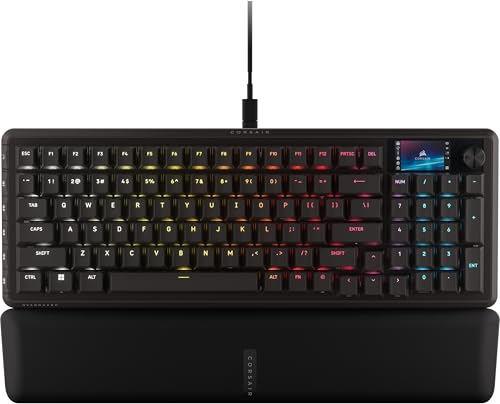
Corsair Vanguard PRO 96 Hall Effect Keyboard
Best for: compact layouts with rapid trigger response
- Form Factor
- 96%
- Switch Type
- MGX Hyperdrive Hall Effect
- Connectivity
- Wired
- Lighting
- RGB
- Features
- RGB Lighting, Rapid Trigger
- Color
- Black
The Corsair Vanguard PRO 96 uses a compact 96% form factor to fit arrow keys and a numpad in a TKL-sized frame. It features MGX Hyperdrive Hall Effect switches with 8,000Hz polling for instant response. The 1.9-inch color LCD screen allows for custom visuals. This wired keyboard suits gamers who want rapid trigger precision and a small footprint without sacrificing essential keys.
- 96% form factor fits in a TKL-sized space
- 8,000Hz hyper-polling for minimal input lag
- MGX Hyperdrive Hall Effect switches with rapid trigger
- 1.9-inch IPS color LCD screen for customization
- Wired connectivity limits cable-free movement
- 2.41-pound weight adds desk mass
- 96% layout includes a numpad you may not need
- You need arrow keys and a numpad in a compact frame
- You want rapid trigger response for competitive gaming
- You prefer a wired connection for stable polling
- You require wireless freedom for your setup
- You want a full-size keyboard with dedicated number pad
- You prefer a traditional mechanical switch feel over Hall Effect
Verdict: Corsair Vanguard PRO 96 Keyboard delivers high-speed 8,000Hz polling and a compact 96% layout for gamers who need extra keys without the bulk. It fits players who prioritize rapid trigger precision and a small desk footprint.
Specifications side by side
| Spec | Logitech G PRO X TKL Wireless Tactile Keyboard | Corsair Vanguard PRO 96 Hall Effect Keyboard |
|---|---|---|
| Form Factor | TKL | 96% |
| Switch Type | GX Brown tactile | MGX Hyperdrive Hall Effect |
| Connectivity | LIGHTSPEED wireless, Bluetooth, USB | Wired |
| Keycap Material | Dual-shot PBT | – |
| Lighting | LIGHTSYNC RGB | RGB |
| Features | RGB Lighting | RGB Lighting, Rapid Trigger |
| Size | TKL | 8 khz |
| Color | Magenta | Black |
| Use | Gaming | Gaming |
| Polling Rate | – | 8K Polling |
| Dimensions | 5.91 × 13.9 × 1.34 inches | 15.3 × 5.55 × 1.69 inches |
| Weight | 5.29 ounces | 2.41 pounds |
| Model | 920-012154 | CH-91E911G-NA |
Frequently asked questions
Is Logitech G or Corsair better for wireless gaming?
Logitech G offers a wireless option with its PRO X TKL model. This keyboard uses LIGHTSPEED wireless technology for reliable performance. Corsair’s featured Vanguard PRO is a wired device. If you need freedom from cables, Logitech G is the practical choice here.
Which brand provides faster polling rates for competitive play?
Corsair provides an 8,000Hz polling rate on its Vanguard PRO keyboard. This high speed ensures rapid trigger response for precise inputs. The Logitech G PRO X TKL focuses on tactile feedback rather than ultra-high polling speeds. For raw speed metrics, Corsair leads in this comparison.
Do Corsair and Logitech G keyboards come with RGB lighting?
Yes, both brands include RGB lighting in their featured models. The Corsair Vanguard PRO features per-key RGB illumination. The Logitech G PRO X TKL also supports RGB lighting. You can customize colors on both devices to match your setup aesthetic.
Which keyboard is more compact for small desks?
The Corsair Vanguard PRO uses a 96% layout, which is compact but retains extra keys. The Logitech G PRO X TKL uses a tenkeyless design, removing the number pad entirely. The Logitech G model offers a smaller footprint for limited desk space.
What switch types do these brands offer?
Logitech G uses tactile mechanical switches in its PRO X model. Corsair offers Hall Effect mechanical switches on its Vanguard PRO. Hall Effect switches provide magnetic actuation for rapid trigger capabilities. Logitech G focuses on traditional tactile feedback for distinct key press confirmation.
Are these keyboards suitable for general gaming use?
Both keyboards are designed specifically for gaming use. The Logitech G PRO X TKL targets players wanting tactile wireless performance. The Corsair Vanguard PRO suits gamers needing rapid trigger precision. Each device prioritizes performance features over general productivity tasks.
Which brand supports Bluetooth connectivity?
Logitech G supports Bluetooth connectivity on its PRO X TKL model. This allows you to connect to multiple devices easily. The Corsair Vanguard PRO is a wired keyboard without Bluetooth support. If you need wireless versatility, Logitech G is the better option.


