As Amazon Associates, we earn from qualifying purchases. This means we may receive a small commission at no extra cost to you if you click through and make a purchase.
As an Amazon Associate we earn from qualifying purchases. Links on this page are affiliate links.
The KTC 32-Inch 1440p 120Hz IPS Monitor offers a large, sharp display with strong color accuracy for gaming and office work. If you are looking for ktc 32 inch 1440p 120hz ips alternatives, you might want a different refresh rate, panel type, or screen size. This list compares 6 similar picks that share core specifications with the original model. We selected these options because their specs overlap with the KTC monitor, ensuring they meet similar performance needs.
Some alternatives provide higher refresh rates for smoother motion, while others use VA panels for better contrast. You might also prefer a smaller 27-inch footprint for tighter desk spaces. Each option in this guide focuses on practical differences in resolution, panel technology, and connectivity. You can compare these monitors side by side to find the right balance of speed, clarity, and size for your setup.
How these monitors differ
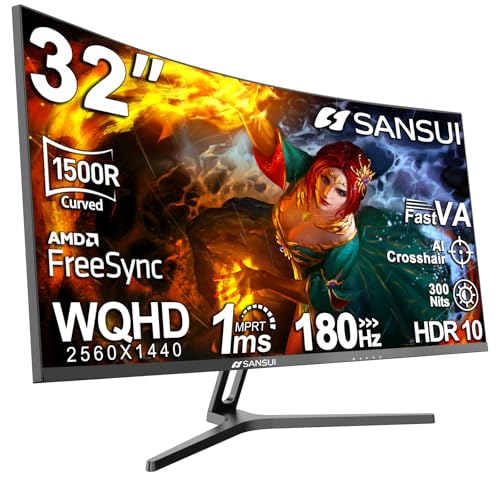
SANSUI 32-Inch Curved 180Hz Gaming Monitor
The SANSUI 32-Inch Curved 180Hz Gaming Monitor switches from an IPS panel to VA technology. This change gives you deeper blacks and higher contrast, which improves immersion in dark scenes. You also get a faster 180Hz refresh rate compared to the 120Hz on the KTC. The curved design wraps around your field of view for a more engaging experience. However, VA panels can have slower response times and potential ghosting in fast-paced games. You should pick this if you prioritize contrast and speed over the wide viewing angles and color accuracy of the KTC IPS panel. It is a strong choice for single-player games where visual depth matters most.
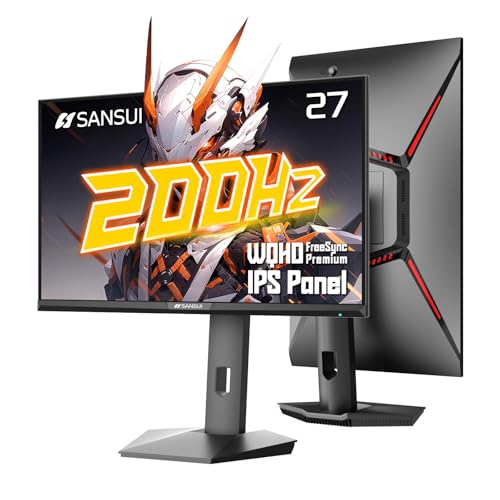
SANSUI 27-Inch 1440p Fast IPS Gaming Monitor
The SANSUI 27-Inch 1440p Fast IPS Gaming Monitor reduces the screen size from 32 inches to 27 inches. This makes it ideal for desks with limited space. You get a higher 180Hz refresh rate and a Fast IPS panel, which offers faster pixel transitions than standard IPS. The 1ms response time ensures minimal blur during rapid movements. You give up the large screen real estate of the KTC, which may affect your productivity or immersion. This monitor suits competitive gamers who need speed and color accuracy but cannot fit a 32-inch display. It delivers a premium, compact experience that balances performance with a smaller footprint.
KTC 32-Inch Curved 165Hz Gaming Monitor
The KTC 32-Inch Curved 165Hz Gaming Monitor keeps the 32-inch size but drops the resolution to 1080p. This results in lower pixel density, making images appear less sharp than the 1440p KTC. You gain a higher 165Hz refresh rate and a curved screen for immersion. The budget-friendly nature makes it accessible if you prioritize frame rate over clarity. This option fits you if you play fast-paced games on a large screen and do not need crisp text or detailed visuals. It sacrifices the sharpness of the original model for speed and a wider field of view. Choose this if you value smooth motion and screen size above pixel density.
LG UltraGear 32-Inch QHD 200Hz IPS Monitor
The LG UltraGear 32-Inch QHD 200Hz IPS Monitor matches the 32-inch size and 1440p resolution of the KTC but offers a significantly faster 200Hz refresh rate. You get HDR10 support and G-Sync compatibility for smooth, tear-free gaming. The IPS panel ensures consistent color and viewing angles. This model is built for players who want maximum speed without sacrificing screen size or image quality. You pay a premium for the higher refresh rate and brand reputation. It is the best choice if you need the fastest possible performance on a large, sharp display. The LG delivers superior motion clarity compared to the 120Hz KTC, making it ideal for competitive gaming.
KOORUI 32-Inch QHD Curved Monitor
The KOORUI 32-Inch QHD Curved Monitor combines a 32-inch curved screen with 1440p resolution. You get G-Sync and FreeSync compatibility for smooth gameplay. The curved design enhances immersion, similar to the SANSUI VA option. However, the specific refresh rate is not listed in the provided data, so you cannot compare speed directly. The 1ms response time suggests fast performance. This monitor suits you if you want a large, immersive display with broad sync support. It offers a balanced mix of size, resolution, and curvature. Choose this if you prioritize immersion and compatibility over the specific 120Hz refresh rate of the KTC. It provides a versatile option for various gaming genres.
GIGABYTE G27Q20 27-inch QHD IPS Monitor
The GIGABYTE G27Q20 27-inch QHD IPS Monitor reduces the screen size to 27 inches while maintaining 1440p resolution. You get a 200Hz refresh rate and a 0.5ms response time, which is faster than the KTC. The compact size fits smaller desks better. This monitor is designed for competitive gamers who need speed and precision. You lose the large screen area of the KTC, which may impact your productivity or immersion. It is the best choice if you prioritize response time and refresh rate over screen size. The GIGABYTE delivers sharp visuals and rapid updates, making it ideal for fast-paced games where every millisecond counts.
| # | Product | Best for | Price |
|---|---|---|---|
| 1 | KTC 32-Inch 1440p 120Hz IPS Monitor Best overall | large screen gaming and color-critical work | |
| 2 | SANSUI 32-Inch Curved 180Hz Gaming Monitor Best va | players wanting large curved 1440p immersion | |
| 3 | SANSUI 27-Inch 1440p Fast IPS Gaming Monitor Best premium | Compact high-refresh gaming setups | |
| 4 | KTC 32-Inch Curved 165Hz Gaming Monitor Best budget | budget 32-inch 1080p gaming | |
| 5 | LG UltraGear 32-Inch QHD 200Hz IPS Monitor Best hdr10 | players wanting high refresh rates on a 32-inch flat screen | |
| 6 | KOORUI 32-Inch QHD Curved Monitor Also great | immersive curved gaming and color accuracy | |
| 7 | GIGABYTE G27Q20 27-inch QHD IPS Monitor Best 0.5ms | Competitive gamers needing speed on a 27-inch screen |

KTC 32-Inch 1440p 120Hz IPS Monitor
Best for: large screen gaming and color-critical work
- Screen Size
- 32"
- Resolution
- 2560 x 1440
- Refresh Rate
- 120Hz
- Panel Type
- IPS
- Sync Technology
- G-Sync, FreeSync
- HDR Support
- HDR
The KTC 32-inch monitor uses an IPS panel with 1440p resolution and a 120Hz refresh rate. It covers 109% sRGB for accurate colors and supports G-Sync and FreeSync to reduce tearing. The frameless design helps with multi-monitor setups. You get flicker-free viewing and low blue light features for comfort. It includes HDMI 2.0 and DisplayPort 1.4 connections for easy setup.
- 1440p resolution on a 32-inch IPS panel
- 120Hz refresh rate with G-Sync and FreeSync
- 109% sRGB color gamut coverage
- Frameless bezel design for multi-monitor use
- 120Hz refresh rate is lower than the 180Hz and 200Hz options on this list
- HDMI 2.0 ports limit bandwidth compared to HDMI 2.1 found in some competitors
- 32-inch size is bulkier than the 27-inch alternatives available
- You want a larger 32-inch screen for immersive gaming
- You need accurate colors with 109% sRGB coverage
- You plan to use multiple monitors with a frameless design
- You require a high refresh rate above 120Hz for competitive play
- You prefer a smaller 27-inch footprint for your desk
- You need HDMI 2.1 for next-gen console features
Verdict: KTC 32-Inch 1440p 120Hz IPS Monitor suits you if you prioritize screen real estate and color accuracy over maximum speed. It is a solid choice for general gaming and office work where a large, sharp display is key.
SANSUI 32-Inch Curved 180Hz Gaming Monitor
Best for: players wanting large curved 1440p immersion
- Screen Size
- 32"
- Resolution
- 2560 x 1440
- Refresh Rate
- 180Hz
- Response Time
- 1ms
- Panel Type
- Fast VA
- Sync Technology
- FreeSync
This 32-inch curved monitor uses a Fast VA panel for deep contrast and a 1500R curvature. It offers 1440p resolution and an 180Hz refresh rate. The display covers 95% of the DCI-P3 color gamut and reaches 300 nits of brightness. You get FreeSync support and a 1ms response time. This setup suits gamers who want immersive visuals and high speed on a larger screen.
- 180Hz refresh rate for smooth motion
- 1500R curved screen for immersion
- 95% DCI-P3 color coverage
- 1ms response time
- 300 nits peak brightness is lower than the 200Hz IPS options on this list
- 13.2 pounds weight makes it heavier than the 27-inch alternatives
- Limited tilt range of -5 to 15 degrees compared to full height adjustment
- You want a larger 32-inch display for gaming
- You prefer the high contrast of a VA panel over IPS
- You need a high refresh rate for competitive play
- You require a flat screen design
- You need built-in speakers for audio
- You want a 27-inch form factor instead
Verdict: SANSUI 32-Inch 180Hz VA Monitor delivers strong contrast and speed for players who prioritize screen size and color depth. It fits those who want a curved 1440p experience without the bulk of ultra-premium models.
SANSUI 27-Inch 1440p Fast IPS Gaming Monitor
Best for: Compact high-refresh gaming setups
- Screen Size
- 27"
- Resolution
- 2560 x 1440
- Refresh Rate
- 200Hz
- Response Time
- 1ms (MPRT)
- Panel Type
- Fast IPS
- Sync Technology
- FreeSync Premium
This SANSUI monitor offers a 27-inch Fast IPS panel with a 2560 x 1440 resolution and a 200Hz refresh rate. It includes FreeSync Premium technology and a 1ms MPRT response time for smooth gaming. The display covers 95% of the DCI-P3 color gamut and reaches 400 nits of brightness. Its stand provides height, pivot, and swivel adjustments, making it a strong option for users seeking high refresh rates in a compact form factor.
- 200Hz refresh rate on a 27-inch 1440p Fast IPS panel
- Ergonomic stand with height, pivot, and swivel adjustments
- 95% DCI-P3 color coverage and 400 nits brightness
- FreeSync Premium support for reduced screen tearing
- 27-inch screen is smaller than the 32-inch standard in this guide
- HDMI 2.0 ports limit refresh rates to 144Hz at full resolution
- 10.4-pound weight is lighter but offers less stability than larger 32-inch models
- You want a high refresh rate for competitive gaming on a smaller desk
- You need precise color reproduction for creative work alongside gaming
- You prefer an ergonomic stand with full height and tilt adjustments
- You require a 32-inch display for immersive viewing
- You need HDMI 2.1 ports for 200Hz at 1440p
- You prioritize a larger screen real estate for multitasking
Verdict: SANSUI 27-inch 1440p 200Hz Fast IPS Monitor delivers a compact, high-refresh-rate experience that suits gamers who value speed and color accuracy over screen size. It is ideal for users with limited desk space who still want premium panel technology.

KTC 32-Inch Curved 165Hz Gaming Monitor
Best for: budget 32-inch 1080p gaming
- Screen Size
- 32 inch
- Resolution
- 1920×1080
- Refresh Rate
- 165Hz
- Sync Technology
- FreeSync, G-Sync
- HDR Support
- HDR
- Screen Curvature
- 1500R
This 32-inch curved monitor uses a VA panel with 1920×1080 resolution and a 165Hz refresh rate. It covers 122% of the sRGB color gamut and reaches 350 cd/m² brightness. The 1500R curvature and FreeSync support help reduce eye strain and screen tearing. It suits you if you want a large screen for gaming on a budget, even though the resolution is lower than the 1440p options on this list.
- 165Hz refresh rate for smooth motion
- 122% sRGB color gamut coverage
- 1500R curved VA panel
- FreeSync and G-Sync support
- 1080p resolution is lower than the 1440p standard of other picks
- 32-inch size with 1080p results in lower pixel density
- 1500R curvature is less aggressive than the 1700R or 1500R options in the list
- You want a large 32-inch screen for a limited budget
- You prefer the deeper contrast of a VA panel
- You play games at 1080p resolution
- You need 1440p or 4K sharpness
- You want a flat display
- You prioritize high pixel density on a large screen
Verdict: KTC 32 Inch 1080p 165Hz Curved Monitor fits you if you prioritize screen size and refresh rate over pixel density. It delivers a smooth, colorful experience for 1080p gaming, though it falls short of the 1440p clarity found in the other recommendations.

LG UltraGear 32-Inch QHD 200Hz IPS Monitor
Best for: players wanting high refresh rates on a 32-inch flat screen
- Screen Size
- 32"
- Resolution
- 2560 x 1440
- Refresh Rate
- 200Hz
- Response Time
- 1ms GtG
- Panel Type
- IPS
- Sync Technology
- G-SYNC Compatible, FreeSync Premium
This 32-inch LG monitor uses an IPS panel with a 2560 x 1440 resolution. It runs at 200Hz with 1ms GtG response time. HDR10 support and 99% sRGB coverage improve color accuracy. NVIDIA G-SYNC Compatible and AMD FreeSync Premium sync technologies reduce screen tearing. It includes Black Stabilizer and Dynamic Action Sync for competitive gaming clarity.
- 200Hz refresh rate for smooth motion
- 1ms GtG response time minimizes ghosting
- HDR10 and 99% sRGB color coverage
- NVIDIA G-SYNC Compatible and FreeSync Premium
- Black Stabilizer brightens dark scenes
- 200Hz refresh rate is lower than the 2560 x 1440 180Hz SANSUI curved option
- 15.9 pounds weight is heavier than the 27-inch GIGABYTE alternative
- HDMI is the only listed video interface
- You want a 32-inch QHD display with high refresh rates
- You need HDR10 support for better contrast
- You play competitive shooters requiring low input lag
- You prefer a curved screen for immersion
- You want a lighter monitor under 10 pounds
- You require DisplayPort connectivity
Verdict: LG 32G620B 32-inch 200Hz QHD Monitor delivers sharp QHD visuals and fast 200Hz performance. It fits players who prioritize high refresh rates and color accuracy on a large flat screen.

KOORUI 32-Inch QHD Curved Monitor
Best for: immersive curved gaming and color accuracy
- Screen Size
- 32"
- Resolution
- 2560×1440
- Refresh Rate
- 170Hz
- Response Time
- 1ms
- Sync Technology
- FreeSync Premium, G-SYNC Compatible
- HDR Support
- HDR10
This 32-inch Koorui monitor delivers a 1440p QHD resolution on a 1500R curved VA panel. It runs at 170Hz with 1ms response time and supports both FreeSync Premium and G-SYNC Compatible for smooth gameplay. The 3000:1 contrast ratio and 95% DCI-P3 color coverage offer deep blacks and accurate tones. It includes flicker-free technology and low blue light settings to reduce eye strain during long sessions.
- 170Hz refresh rate with 1ms response time
- 1500R curved VA panel for immersive viewing
- 95% DCI-P3 color gamut coverage
- FreeSync Premium and G-SYNC Compatible
- 170Hz refresh rate is lower than the 200Hz options on this list
- 300 nits brightness is lower than typical high-end gaming displays
- 1-year warranty is shorter than the industry standard of three years
- You want a large curved screen for immersive gaming
- You need G-SYNC compatibility with an NVIDIA GPU
- You prefer high contrast for dark room viewing
- You require a flat panel for precise alignment
- You need a refresh rate above 170Hz
- You want built-in speakers for audio
Verdict: Koorui 32-Inch 170Hz Curved QHD Monitor fits gamers who prioritize immersive curvature and color accuracy over maximum speed. It is a solid choice for those using NVIDIA cards who want a large, high-contrast display for single-player titles.

GIGABYTE G27Q20 27-inch QHD IPS Monitor
Best for: Competitive gamers needing speed on a 27-inch screen
- Screen Size
- 27"
- Resolution
- 2560×1440
- Refresh Rate
- 200Hz / OC 210Hz
- Response Time
- 0.5ms GTG
- Panel Type
- SuperSpeed IPS
- Sync Technology
- AMD FreeSync Premium, G-SYNC Compatible
This 27-inch QHD monitor uses a SuperSpeed IPS panel for accurate colors and wide viewing angles. It runs at 200Hz, with an overclocked option of 210Hz, and delivers a 0.5ms response time. AMD FreeSync Premium and G-SYNC compatibility help reduce screen tearing. It includes HDR10 support and covers 123% of the sRGB color gamut. This setup suits gamers who prioritize speed and color fidelity on a mid-sized screen.
- 200Hz refresh rate with 210Hz overclock option
- 0.5ms GTG response time for fast motion
- 123% sRGB color gamut for vivid visuals
- AMD FreeSync Premium and G-SYNC Compatible
- 27-inch screen is smaller than the 32-inch options in this list
- 1080p resolution is lower than the 1440p standard here
- Only HDMI video interface is listed
- You want a smaller 27-inch display for closer desk setups
- You need a 0.5ms response time for competitive gaming
- You prefer IPS panels for better color accuracy
- You require a 32-inch screen for a larger field of view
- You need multiple connection types like DisplayPort
- You prefer a higher native resolution than 1440p
Verdict: GIGABYTE G27Q20 27-inch 200Hz IPS offers a compact, fast display for players who value speed and color over screen size. It fits users who want high refresh rates on a desk that cannot accommodate a 32-inch monitor.
Specifications side by side
| Spec | KTC 32-Inch 1440p 120Hz IPS Monitor | SANSUI 32-Inch Curved 180Hz Gaming Monitor | SANSUI 27-Inch 1440p Fast IPS Gaming Monitor | KTC 32-Inch Curved 165Hz Gaming Monitor | LG UltraGear 32-Inch QHD 200Hz IPS Monitor | KOORUI 32-Inch QHD Curved Monitor | GIGABYTE G27Q20 27-inch QHD IPS Monitor |
|---|---|---|---|---|---|---|---|
| Screen Size | 32" | 32" | 27" | 32 inch | 32" | 32" | 27" |
| Resolution | 2560 x 1440 | 2560 x 1440 | 2560 x 1440 | 1920×1080 | 2560 x 1440 | 2560×1440 | 2560×1440 |
| Refresh Rate | 120Hz | 180Hz | 200Hz | 165Hz | 200Hz | 170Hz | 200Hz / OC 210Hz |
| Response Time | – | 1ms | 1ms (MPRT) | – | 1ms GtG | 1ms | 0.5ms GTG |
| Panel Type | IPS | Fast VA | Fast IPS | – | IPS | – | SuperSpeed IPS |
| Sync Technology | G-Sync, FreeSync | FreeSync | FreeSync Premium | FreeSync, G-Sync | G-SYNC Compatible, FreeSync Premium | FreeSync Premium, G-SYNC Compatible | AMD FreeSync Premium, G-SYNC Compatible |
| HDR Support | HDR | HDR | HDR | HDR | HDR10 | HDR10 | HDR10 |
| Screen Curvature | – | 1500R | – | 1500R | – | 1500R | – |
| Features | HDR | HDR | HDR | HDR | HDR10 | HDR | – |
| Color | Black | Black | Black | Black | Black | Black | Black |
| Platform | PC | – | – | PC | – | – | – |
| Use | Gaming | Gaming | Gaming | Gaming | Gaming | Gaming | Gaming |
| Capture Resolution | – | – | – | 1080p | – | – | – |
| Video Interface | HDMI | HDMI | HDMI | HDMI | HDMI | HDMI | HDMI |
| Dimensions | 23.6 × 4.92 × 17.9 inches | 8.06 × 24.2 × 17.8 inches | 24.1 × 8.66 × 21 inches | 6.69 × 31.1 × 21.1 inches | 8.7 × 28.1 × 24 inches | 20 × 10 × 28 inches | 7.56 × 24.1 × 20.3 inches |
| Weight | – | 13.2 pounds | 10.4 pounds | – | 15.9 pounds | 14.6 pounds | – |
| Size | 32" QHD 120Hz | 32 Inch | 27.00001 | 32 inch | – | 32 Inch 170Hz/ QHD/ Curved | 27" QHD |
| Model | H32T13 | ES-G32C3 | ES-G27F6Q | H32S17C | 32G620B-B.AUSQ | G3221SC | G27Q20 |
Frequently asked questions
Which alternative offers the highest refresh rate for fast-paced gaming?
The LG UltraGear 32G620B provides a 200Hz refresh rate, the highest in this list. It pairs this speed with QHD resolution and an IPS panel. This combination suits players who want smooth motion and accurate colors on a large 32-inch screen without compromising image clarity.
Is there a curved option for better immersion?
Yes, the SANSUI ES-G32C3 features a curved VA panel. This design wraps around your field of view, enhancing depth in games. It also delivers a 180Hz refresh rate and 1ms response time, making it ideal for players who prefer curved displays for a more engaging experience.
What is the best choice for a smaller desk setup?
The GIGABYTE G27Q20 is a 27-inch monitor, making it suitable for limited desk space. It offers a 200Hz refresh rate and 0.5ms response time on an IPS panel. This compact size allows for high-speed performance without requiring the footprint of a larger 32-inch display.
Does any alternative support both FreeSync and G-SYNC?
Several monitors support both adaptive sync technologies. The KTC H32T13, LG 32G620B, and KOORUI G3221SC all list compatibility with FreeSync and G-SYNC. This dual support ensures smoother gameplay by reducing screen tearing across different graphics card brands, providing flexibility for your system setup.
Which monitor is best if I prioritize color accuracy?
The KTC H32T13 is noted for color accuracy, making it suitable for color-critical work and general gaming. Its IPS panel ensures wide viewing angles and consistent colors. This makes it a solid choice if you need a display that handles both office tasks and gaming effectively.
Are there budget-friendly curved options available?
The KTC H32S17C is labeled as the best budget option. It offers a 32-inch curved screen with a 165Hz refresh rate. While it uses 1080p resolution instead of QHD, it provides a smooth gaming experience for those prioritizing size and refresh rate over pixel density.


