As Amazon Associates, we earn from qualifying purchases. This means we may receive a small commission at no extra cost to you if you click through and make a purchase.
As an Amazon Associate we earn from qualifying purchases. Links on this page are affiliate links.
This KOTIN vs OKAMUS gaming PC comparison looks at two very different prebuilt towers. Both run Windows 11 Home and use air cooling for stability. The main difference is their approach to graphics and memory. The KOTIN includes a dedicated GPU and more RAM for modern gaming. The OKAMUS relies on integrated graphics and less memory for basic tasks. You should choose based on whether you need serious gaming power or just a budget desktop.
Processor
AMD Ryzen 7 8700F
Intel Core i5 (up to 3.6GHz)
Graphics
GeForce RTX 5060 Ti 8GB
Integrated Graphics Only
RAM
16GB DDR5
8GB
Storage
1TB PCIe Gen4 NVMe SSD
256 GB M.2
Wireless
WiFi 7
WiFi 6
Power Supply
650W 80 PLUS Gold
400W
Choose the first if
- You want to play AAA titles at 1080p or 1440p with ray tracing.
- You need fast load times and room for more games or files.
- You plan to upgrade memory or storage later.
Choose the second if
- You only need a desktop for light gaming and web browsing.
- You are on a tight budget and do not need a dedicated GPU.
- You want a simple PC for basic multitasking and office work.
Verdict
The KOTIN is the better choice for anyone who wants to actually game at higher settings. Its dedicated GPU and larger memory make it a true gaming machine. The OKAMUS is only suitable for very light use or basic office tasks.
KOTIN vs OKAMUS Gaming PC Specs
Graphics capability
Edge: KOTIN Ryzen 7 8700F RTX 5060 Ti Gaming PC
The KOTIN includes a dedicated GeForce RTX 5060 Ti with 8GB of video memory. This card supports DLSS 4 and ray tracing, allowing for smoother visuals in AAA titles and esports. You can expect responsive speed for 1080p and 1440p gaming. The OKAMUS relies entirely on integrated graphics. It does not include a dedicated GPU, meaning performance is limited by shared system memory. This setup is suitable only for basic tasks or very light gaming. For serious gaming, the KOTIN is the clear choice.
Memory capacity
Edge: KOTIN Ryzen 7 8700F RTX 5060 Ti Gaming PC
Memory speed and size affect multitasking and game loading. The KOTIN comes with 16GB of DDR5 RAM. DDR5 is a newer standard that offers higher bandwidth than previous generations. This supports smooth gaming, streaming apps, and game launchers simultaneously. The OKAMUS provides 8GB of RAM. While sufficient for basic multitasking, it may bottleneck modern games that require more resources. The KOTIN also offers four DIMM slots for future upgrades, whereas the OKAMUS configuration is more limited in expansion potential.
Storage speed
Edge: KOTIN Ryzen 7 8700F RTX 5060 Ti Gaming PC
Storage determines how fast your system boots and loads games. The KOTIN features a 1TB PCIe Gen4 NVMe SSD. Gen4 drives offer significantly faster read and write speeds than older standards, reducing load times for large game files. The OKAMUS uses a 256GB M.2 drive. While M.2 drives are fast, the 256GB capacity fills up quickly with modern games. The KOTIN also includes three M.2 slots for additional storage expansion, providing more flexibility for your library.
Network connectivity
Edge: KOTIN Ryzen 7 8700F RTX 5060 Ti Gaming PC
Wireless standards impact online latency and download speeds. The KOTIN supports WiFi 7 and Bluetooth. WiFi 7 offers lower latency and higher throughput, which is beneficial for competitive online play. The OKAMUS supports WiFi 6. While WiFi 6 is still capable and stable, it is an older standard than WiFi 7. For users prioritizing the lowest possible ping in multiplayer games, the newer wireless technology in the KOTIN provides a technical advantage.
Power supply
Edge: KOTIN Ryzen 7 8700F RTX 5060 Ti Gaming PC
The power supply unit (PSU) delivers energy to all components. The KOTIN includes a 650W 80 PLUS Gold certified PSU. The Gold rating indicates high energy efficiency, reducing heat and electricity waste. The 650W wattage also supports the power demands of the dedicated GPU. The OKAMUS uses a 400W wide-voltage power supply. This lower wattage is adequate for integrated graphics but offers less headroom for future component upgrades or high-performance parts.
Choose the right gaming PC for your needs
You want high frame rates and modern graphics
Our pick: KOTIN Ryzen 7 8700F RTX 5060 Ti Gaming PC
The KOTIN includes a dedicated GeForce RTX 5060 Ti with 8GB of video memory. This card supports DLSS 4 and ray tracing for smoother visuals. You also get 16GB of DDR5 RAM and a 1TB PCIe Gen4 NVMe SSD for fast load times. This setup handles 1080p and 1440p gaming effectively.
You need basic performance for light tasks
Our pick: OKAMUS Core i5 Desktop with 8GB RAM
The OKAMUS uses an Intel Core i5 processor with integrated graphics. It includes 8GB of RAM and a 256GB M.2 SSD. This configuration is suitable for basic multitasking and entry-level gaming. It lacks a dedicated GPU, so performance relies on shared system memory and the CPU's integrated capabilities.
You want future upgrade flexibility
Our pick: KOTIN Ryzen 7 8700F RTX 5060 Ti Gaming PC
The KOTIN offers four DDR5 DIMM slots and three M.2 SSD slots. It also includes a 650W 80 PLUS Gold power supply. This provides room for adding more memory and storage later. The OKAMUS has a 400W power supply and only 8GB of RAM, limiting expansion potential.

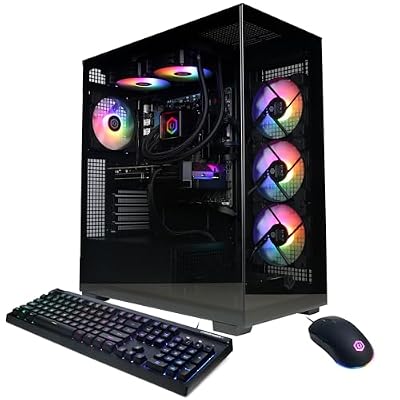
KOTIN Ryzen 7 8700F RTX 5060 Ti Gaming PC
Best for: 1080p/1440p gaming and streaming
- Graphics Card
- GeForce RTX 5060 Ti 8GB
- Processor
- AMD Ryzen 7 8700F
- RAM Capacity
- 16GB
- RAM Type
- DDR5
- Storage Capacity
- 1TB PCIe Gen4 NVMe SSD
- Cooling Type
- Air cooler with 6 copper heat pipes
This KOTIN desktop pairs an AMD Ryzen 7 8700F processor with an NVIDIA GeForce RTX 5060 Ti 8GB GPU. You get 16GB of DDR5 RAM and a 1TB PCIe Gen4 NVMe SSD for fast load times. The system includes WiFi 7 and a 650W 80 PLUS Gold power supply. It is designed for 1080p and 1440p gaming, streaming, and creative work. The build features a digital temperature display and six copper heat pipes for cooling.
- AMD Ryzen 7 8700F processor for responsive speed
- GeForce RTX 5060 Ti 8GB with DLSS 4 and ray tracing
- 16GB DDR5 RAM and 1TB PCIe Gen4 NVMe SSD
- WiFi 7 connectivity for low-latency online play
- 650W 80 PLUS Gold power supply with upgrade slots
- 16GB RAM capacity is lower than the 32GB option available in variations
- Integrated graphics only on the competitor OKAMUS model lacks dedicated GPU power
- Air cooler with 6 copper heat pipes offers less thermal headroom than liquid solutions
- You want a prebuilt PC ready for 1080p and 1440p gaming
- You need WiFi 7 for stable wireless connections
- You plan to upgrade RAM or storage later
- You require 32GB of RAM out of the box
- You prefer a liquid cooling system
- You need a dedicated GPU with more than 8GB of VRAM
Verdict: KOTIN Ryzen 7 8700F RTX 5060 Ti Gaming PC is a solid choice for gamers who want strong 1440p performance and future-proof connectivity. It suits those who value upgradeability and modern wireless standards over maximum cooling capacity.

OKAMUS Core i5 Desktop with 8GB RAM
Best for: light 1080p gaming and basic multitasking
- Graphics Card
- Integrated Graphics Only
- Processor
- i5 CPU
- RAM Capacity
- 8 GB
- Cooling Type
- Vertical Design CPU Cooler
- Wireless Standard
- WiFi 6
- Operating System
- Windows 11 Home
The OKAMUS i5 desktop uses an Intel Core i5 processor with integrated graphics and 8 GB of RAM. It includes a 256 GB M.2 drive and WiFi 6 connectivity. The system runs Windows 11 Home and features RGB lighting with a vertical CPU cooler. This setup suits you if you need a basic machine for light 1080p gaming and multitasking without a dedicated graphics card.
- Intel Core i5 processor delivers strong frame rates for 1080p gaming
- 256 GB M.2 SSD provides fast boot times and game loading
- Integrated graphics and 8 GB RAM support smooth multitasking
- WiFi 6 ensures stable wireless connectivity
- 8 GB RAM is lower than the 16 GB found in competing models
- 256 GB storage capacity is smaller than typical 1 TB drives
- Integrated graphics limit performance compared to dedicated GPU options
- You want a budget-friendly PC for light gaming
- You need basic multitasking capabilities for work or streaming
- You prefer a system with RGB lighting and efficient cooling
- You require high-end gaming with a dedicated graphics card
- You need more than 8 GB of RAM for heavy workloads
- You want a larger 1 TB or greater storage drive
Verdict: OKAMUS i5 8GB RAM Gaming PC fits you if you need a basic, affordable system for light gaming and multitasking. It is not suitable for demanding games or heavy professional workloads.
Specifications side by side
| Spec | KOTIN Ryzen 7 8700F RTX 5060 Ti Gaming PC | OKAMUS Core i5 Desktop with 8GB RAM |
|---|---|---|
| Graphics Card | GeForce RTX 5060 Ti 8GB | Integrated Graphics Only |
| Processor | AMD Ryzen 7 8700F | i5 CPU |
| RAM Capacity | 16GB | 8 GB |
| RAM Type | DDR5 | – |
| Storage Capacity | 1TB PCIe Gen4 NVMe SSD | – |
| Cooling Type | Air cooler with 6 copper heat pipes | Vertical Design CPU Cooler |
| Wireless Standard | WiFi 7 | WiFi 6 |
| Operating System | Windows 11 Home | Windows 11 Home |
| Features | – | RGB Lighting |
| Color | Black | i5 CPU+256GB+8GB |
| Resolution | 1440p QHD | – |
| Platform | PC | PC |
| Storage | 1TB SSD | – |
| Use | Streaming, Gaming | Gaming |
| Lighting | – | RGB |
| Capture Resolution | 1080p | – |
| RAM | 16GB RAM | 8GB RAM |
| Dimensions | 12.4 × 8.5 × 15.6 inches | – |
| Model | KTD32BA787F16G506T8G | OKAMUS-7 |
Frequently asked questions
Is the KOTIN PC good for 1440p gaming?
Yes. This system targets 1440p QHD resolution and includes an RTX 5060 Ti graphics card. It also features 16GB of DDR5 RAM and a Ryzen 7 processor. These specs handle modern titles well. You can stream in 1080p while playing games on this machine.
Does the OKAMUS desktop have enough RAM for gaming?
It has 8GB of RAM, which is limited for heavy tasks. This setup suits light 1080p gaming and basic multitasking. It lacks the memory needed for demanding games or professional workloads. You should expect slower performance in complex scenes compared to systems with more memory.
Can I stream on the KOTIN Ryzen 7 PC?
Yes. The KOTIN is designed for both streaming and gaming. It captures video at 1080p resolution while you play. The Ryzen 7 processor and RTX 5060 Ti provide the necessary power. You get a solid experience for content creation and high-frame-rate gaming simultaneously.
What operating system do these gaming PCs use?
Both computers run Windows 11. This ensures compatibility with modern games and software. You do not need to install a new OS after purchase. The system is ready to use right out of the box with the latest Microsoft platform.
Is the KOTIN tower larger than the OKAMUS?
The KOTIN has specific dimensions of 8.5 inches wide, 15.6 inches tall, and 12.4 inches long. The OKAMUS listing does not provide external size measurements. You should check your desk space for the KOTIN based on these exact measurements. The OKAMUS size remains unspecified in the data.
Does the OKAMUS PC include RGB lighting?
Yes. The OKAMUS desktop features RGB lighting. This adds visual flair to your setup. It is a basic system focused on entry-level performance. The lighting is a standard feature for many gaming towers, enhancing the aesthetic without impacting core processing speed.
Which PC has faster memory technology?
The KOTIN uses DDR5 RAM. This is a newer and faster standard than previous generations. The OKAMUS does not specify its RAM type in the provided data. DDR5 offers higher bandwidth, which can improve performance in memory-intensive games and applications.
Is the KOTIN suitable for future upgrades?
It offers strong upgrade potential. The system includes 1TB of SSD storage and 16GB of RAM. You can add more storage or memory as needed. The modern connectivity and dedicated GPU also support long-term use. This makes it a versatile choice for evolving gaming needs.