As Amazon Associates, we earn from qualifying purchases. This means we may receive a small commission at no extra cost to you if you click through and make a purchase.
As an Amazon Associate we earn from qualifying purchases. Links on this page are affiliate links.
When you compare KOTIN vs msi gaming PC options, you see two distinct approaches to the same core components. Both systems use the AMD Ryzen 7 8700F processor and DDR5 memory. The main difference lies in the graphics card and memory capacity. The MSI Codex Z2 includes the more powerful RTX 5070 GPU and 32GB of RAM. The KOTIN desktop offers a more compact build with WiFi 7 connectivity.
Graphics Card
GeForce RTX 5060 Ti 8GB
NVIDIA GeForce RTX 5070
RAM Capacity
16GB
32GB
Storage
1TB PCIe Gen4 NVMe SSD
2TB SSD
Wireless Standard
WiFi 7
not listed
Dimensions
12.4 x 8.5 x 15.6 inches
16 x 8.38 x 19 inches
Choose the first if
- You need a smaller desktop that fits in tighter spaces
- You want built-in WiFi 7 for low-latency online play
- You are satisfied with 16GB of RAM for 1080p gaming
Choose the second if
- You want higher ray tracing performance with the RTX 5070
- You require 32GB of RAM for heavy multitasking or streaming
- You prefer double the storage capacity with a 2TB SSD
Verdict
The MSI Codex Z2 is the better choice for users seeking maximum graphical fidelity and headroom for future software demands. The KOTIN desktop suits those who prioritize a compact footprint and modern wireless connectivity. Your decision should depend on whether you value raw GPU power or physical size.
KOTIN vs MSI Gaming PC Specs
Graphics performance
Edge: MSI Codex Z2 RTX 5070 Gaming Desktop
The MSI Codex Z2 features the NVIDIA GeForce RTX 5070 graphics card. This GPU uses the next-generation Blackwell architecture for significant improvements in rasterization and ray tracing. It delivers higher frame rates and better visual fidelity for demanding AAA titles. The KOTIN desktop uses the GeForce RTX 5060 Ti 8GB. While it supports DLSS 4 and ray tracing for smoother visuals at 1080p and 1440p, it is a lower-tier card. The RTX 5070 provides more raw power and generational leap in graphics processing compared to the 5060 Ti.
Memory capacity
Edge: MSI Codex Z2 RTX 5070 Gaming Desktop
Memory capacity directly impacts multitasking and future-proofing. The MSI Codex Z2 comes with 32GB of DDR5 RAM. This larger pool allows you to run heavy background applications, stream games, and switch between multiple programs without slowing down. The KOTIN desktop includes 16GB of DDR5 memory. While sufficient for smooth everyday gaming and standard multitasking, it offers half the capacity of the MSI system. If you plan to keep many apps open simultaneously or edit video, the 32GB option provides more headroom.
Storage space
Edge: MSI Codex Z2 RTX 5070 Gaming Desktop
Storage capacity determines how many games and files you can keep on the drive. The MSI Codex Z2 includes a 2TB SSD. This ample space allows you to install large modern games without frequently managing file space. The KOTIN desktop is equipped with a 1TB PCIe Gen4 NVMe SSD. It helps shorten boot times and load games faster, but you will have half the storage volume. You may need to uninstall older titles sooner on the KOTIN system to make room for new releases.
Wireless connectivity
Edge: KOTIN Ryzen 7 8700F RTX 5060 Ti Gaming PC
Connectivity options affect how you link to your network and peripherals. The KOTIN desktop supports WiFi 7 and Bluetooth. WiFi 7 helps support low-latency online play, which is critical for competitive esports. The MSI Codex Z2 features USB Type-C connectivity but does not list WiFi 7 or specific wireless standards in its provided data. If you rely on the latest wireless networking technology for minimal lag, the KOTIN system offers a clear advantage in modern wireless standards.
Cooling system
Edge: KOTIN Ryzen 7 8700F RTX 5060 Ti Gaming PC
Cooling efficiency keeps components stable during long gaming sessions. The KOTIN desktop uses an air cooler with six copper heat pipes and five 120mm ARGB fans. It also includes a digital temperature display to monitor thermal performance. The MSI Codex Z2 uses an ARGB fan air cooler with four system cooling fans, three in the front and one in the rear. While both systems use air cooling, the KOTIN setup specifies six heat pipes and five fans, potentially offering more robust thermal management than the four-fan MSI configuration.
Which Gaming PC Fits Your Needs
High-resolution gaming enthusiasts
Our pick: MSI Codex Z2 RTX 5070 Gaming Desktop
The MSI Codex Z2 includes the NVIDIA GeForce RTX 5070. This GPU uses the Blackwell architecture for better ray tracing and rasterization. It handles demanding AAA titles and VR content with higher visual fidelity. You get smoother gameplay at elevated settings compared to the lower-tier graphics option in the KOTIN system.
Users needing more memory
Our pick: MSI Codex Z2 RTX 5070 Gaming Desktop
The MSI Codex Z2 comes with 32GB of DDR5 RAM. This doubled capacity supports heavy multitasking and background streaming without slowing down your main gaming session. The larger 32GB buffer ensures smoother performance when running game launchers, browsers, and capture software simultaneously alongside your favorite titles.
Streamers wanting modern connectivity
Our pick: KOTIN Ryzen 7 8700F RTX 5060 Ti Gaming PC
The KOTIN system features WiFi 7 for low-latency online play. It also includes a digital temperature display and a 650W 80 PLUS Gold power supply. The four DDR5 DIMM slots and three M.2 SSD slots offer room for future upgrades. This setup is ready for streaming and creative work with stable airflow.

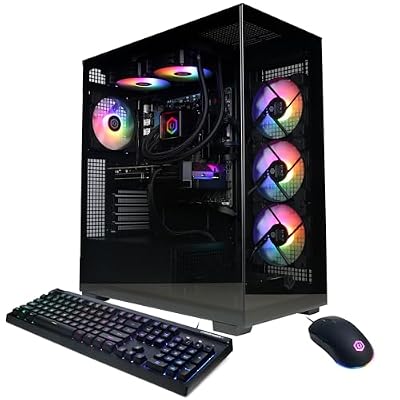
KOTIN Ryzen 7 8700F RTX 5060 Ti Gaming PC
Best for: 1080p/1440p gaming and streaming
- Graphics Card
- GeForce RTX 5060 Ti 8GB
- Processor
- AMD Ryzen 7 8700F
- RAM Capacity
- 16GB
- RAM Type
- DDR5
- Storage Capacity
- 1TB PCIe Gen4 NVMe SSD
- Cooling Type
- Air cooler with 6 copper heat pipes
This KOTIN desktop pairs an AMD Ryzen 7 8700F processor with an NVIDIA GeForce RTX 5060 Ti 8GB graphics card. You get 16GB of DDR5 memory and a 1TB PCIe Gen4 NVMe SSD for fast load times. The system includes WiFi 7 and a 650W 80 PLUS Gold power supply. It suits players targeting 1080p and 1440p gaming, streaming, and creative workloads with solid prebuilt reliability.
- AMD Ryzen 7 8700F and RTX 5060 Ti 8GB for 1080p/1440p gaming
- 16GB DDR5 RAM and 1TB PCIe Gen4 NVMe SSD
- WiFi 7 and Bluetooth connectivity
- 650W 80 PLUS Gold power supply with upgrade slots
- 16GB RAM capacity is lower than the 32GB found in comparable MSI models
- RTX 5060 Ti GPU offers less power than the RTX 5070 in the MSI Codex Z2
- 1TB storage capacity is smaller than the 2TB SSD in the MSI alternative
- You want a prebuilt PC ready for 1080p and 1440p gaming
- You need WiFi 7 for low-latency online play
- You plan to upgrade RAM or storage later
- You require 32GB of RAM for heavy multitasking
- You want an RTX 5070 for higher 1440p performance
- You need 2TB of storage for large game libraries
Verdict: KOTIN Ryzen 7 8700F Gaming PC fits players who want a capable 1080p/1440p tower with WiFi 7 and room to upgrade. It is a solid entry-level choice if you do not need the extra GPU power or memory of higher-end builds.

MSI Codex Z2 RTX 5070 Gaming Desktop
Best for: High-end gaming and VR multitasking
- Graphics Card
- NVIDIA GeForce RTX 5070
- Processor
- AMD Ryzen 7 8700F
- RAM Capacity
- 32GB
- RAM Type
- DDR5
- Storage Capacity
- 2TB SSD
- Cooling Type
- ARGB fan Air Cooler
The MSI Codex Z2 pairs an AMD Ryzen 7 8700F processor with an NVIDIA GeForce RTX 5070 graphics card. It includes 32GB of DDR5 RAM and a 2TB SSD. This configuration supports high-end gaming and VR. The unit weighs 21.3 pounds and measures 19 inches in height. It runs Windows 11 Home and features internal ARGB lighting.
- AMD Ryzen 7 8700F processor with 8 cores and 16 threads
- NVIDIA GeForce RTX 5070 graphics card
- 32GB DDR5 RAM capacity
- 2TB SSD storage
- Four system cooling fans for heat management
- Heavier build at 21.3 pounds compared to lighter competitors
- Standard ARGB fan air cooler instead of liquid cooling
- Windows 11 Home OS limits advanced business features
- You want high-end ray tracing performance for AAA titles
- You need 32GB of RAM for multitasking and streaming
- You prefer a compact tower design under 20 inches tall
- You require liquid cooling for extreme overclocking
- You need Windows 11 Pro for business use
- You prefer a lighter desktop under 15 pounds
Verdict: MSI Codex Z2 Ryzen 7 Gaming PC delivers strong 1440p and 4K gaming capabilities through its RTX 5070 and 32GB DDR5 setup. It suits players who prioritize raw graphical power and fast multitasking over portability or professional operating system features.
Specifications side by side
| Spec | KOTIN Ryzen 7 8700F RTX 5060 Ti Gaming PC | MSI Codex Z2 RTX 5070 Gaming Desktop |
|---|---|---|
| Graphics Card | GeForce RTX 5060 Ti 8GB | NVIDIA GeForce RTX 5070 |
| Processor | AMD Ryzen 7 8700F | AMD Ryzen 7 8700F |
| RAM Capacity | 16GB | 32GB |
| RAM Type | DDR5 | DDR5 |
| Storage Capacity | 1TB PCIe Gen4 NVMe SSD | 2TB SSD |
| Cooling Type | Air cooler with 6 copper heat pipes | ARGB fan Air Cooler |
| Wireless Standard | WiFi 7 | – |
| Operating System | Windows 11 Home | Windows 11 Home |
| Color | Black | Black |
| Resolution | 1440p QHD | – |
| Platform | PC | – |
| Storage | 1TB SSD | 2TB SSD |
| Use | Streaming, Gaming | VR, Gaming |
| Connectivity | – | USB |
| Capture Resolution | 1080p | – |
| RAM | 16GB RAM | 32GB RAM |
| Dimensions | 12.4 × 8.5 × 15.6 inches | 16 × 8.38 × 19 inches |
| Weight | – | 21.3 pounds |
| Model | KTD32BA787F16G506T8G | CodZ2A8NVP436 |
Frequently asked questions
Does the KOTIN PC support modern wireless standards?
Yes, the KOTIN Ryzen 7 8700F model includes WiFi 7 connectivity. This allows for faster and more stable wireless connections compared to older standards. You get reliable internet performance for online gaming and streaming without needing a physical Ethernet cable for basic tasks.
Is 16GB of RAM enough for the KOTIN build?
The KOTIN system comes with 16GB of DDR5 RAM. This capacity is sufficient for 1080p and 1440p gaming and general multitasking. It serves as a solid baseline for entry-level users who do not require heavy professional workloads or extreme multitasking scenarios.
How much storage space does the MSI Codex Z2 offer?
The MSI Codex Z2 is equipped with a 2TB SSD. This provides ample space for a large library of games and applications. The solid-state drive ensures fast load times for your operating system, games, and other frequently used software on your desktop.
Can the MSI PC handle virtual reality gaming?
Yes, the MSI Codex Z2 is designed for VR multitasking. Its powerful RTX 5070 graphics card and 32GB of DDR5 RAM support demanding VR titles. The system delivers the necessary graphical power and memory bandwidth required for immersive virtual reality experiences and high-end gaming.
What operating system comes with these gaming PCs?
Both the KOTIN and MSI systems ship with Windows 11 pre-installed. This ensures you have the latest features and security updates right out of the box. You can start gaming or working immediately without needing to perform a fresh OS installation or configuration.
Which PC is better for streaming at 1080p?
The KOTIN Ryzen 7 8700F model is listed as suitable for streaming. It captures video at 1080p resolution while gaming. This makes it a practical choice for content creators who want to broadcast gameplay without needing the extra graphical overhead of higher-end dedicated streaming setups.
What are the physical dimensions of the MSI desktop?
The MSI Codex Z2 measures 8.38 inches in width, 19 inches in height, and 16 inches in length. It also weighs 21.3 pounds. These dimensions indicate a standard tower form factor that fits on most desks, though you should verify your space before purchasing.