As Amazon Associates, we earn from qualifying purchases. This means we may receive a small commission at no extra cost to you if you click through and make a purchase.
As an Amazon Associate we earn from qualifying purchases. Links on this page are affiliate links.
You might look for guermok 4k144 hdmi USB capture alternatives if you need a different form factor or specific audio routing. The Guermok 4K144 HDMI USB Capture Card delivers high-bandwidth 4K 144Hz passthrough and flexible audio options for Windows streamers. It fits creators who prioritize low latency and high refresh rates over broad macOS frame rate support. Its HDMI 2.1 interface and USB 3.2 Gen 2 connection ensure stable, low-latency video transmission for gaming and content creation.
The alternatives in this list were chosen because their specs overlap with the original product. Each option supports similar high-resolution passthrough or capture capabilities. You may prefer the Elgato 4K Pro Internal Capture Card if you need 8K60 passthrough for desktop PCs. Or you might choose the ASUS TUF Gaming CU4K30 if you prioritize high-frame-rate 1080p recording over 4K speed. These devices offer different interfaces, sizes, or feature sets while maintaining the core performance metrics you likely need for streaming or recording.
How each alternative compares
Ezcap 4K144 Pro Video Capture Card
The Ezcap 4K144 Pro matches the Guermok in HDMI 2.1 passthrough and HDR10 support, offering similar 4K 144Hz output for gaming. You get comparable low-latency performance for high-refresh-rate streaming on Windows or consoles. However, the Ezcap weighs 7.69 ounces, making it slightly heavier than the Guermok’s 5.94 ounces. It lacks the explicit PD 3.0 charging feature found on the Guermok, so you may need a separate power source for host devices. The Ezcap focuses on straightforward audio mixing for streamers who want a reliable high-bandwidth connection without extra power management complexity. It is a solid choice if you prioritize simple audio routing over device charging capabilities.
BlueAVS Hunter4K Pro
The BlueAVS Hunter4K Pro provides the same 4K 144 capture and passthrough specs with HDR10 and VRR support as the Guermok. It is designed for gamers who need high frame rates and low latency. The key difference is portability; the BlueAVS is significantly larger and heavier at 1.76 pounds compared to the Guermok’s 5.94 ounces. This makes the BlueAVS less suitable for travel or tight desk setups. It lacks the specific audio input options like Mic In and Line Out that the Guermok offers for flexible audio control. If you do not need external audio mixing or PD charging, the BlueAVS is a capable alternative for high-refresh-rate gaming capture that prioritizes core video performance over compact size and audio versatility.
AVerMedia Live Gamer Ultra 2.1
The AVerMedia Live Gamer Ultra 2.1 shares the HDMI 2.1 passthrough and HDR10 capabilities with the Guermok, supporting 4K 144Hz output. It distinguishes itself with RGB lighting and support for 5.1 audio routing, which the Guermok does not specify. The AVerMedia is slightly lighter at 4.06 ounces than the Guermok’s 5.94 ounces. It targets Windows users who need detailed audio channel management for professional streaming setups. However, it lacks the explicit PD 3.0 charging feature and the specific flexible audio inputs like Mic In found on the Guermok. If you prioritize multi-channel audio output and aesthetic lighting over device charging and versatile audio input options, the AVerMedia is a strong premium alternative for your streaming needs.
Elgato 4K Pro Internal Capture Card
The Elgato 4K Pro Internal Capture Card differs fundamentally as a PCIe card rather than a USB device. It supports 8K60 passthrough, exceeding the Guermok’s 4K144 limit, but captures only up to 4K60. This makes it ideal for desktop users who need high-resolution output rather than high-frame-rate capture. It lacks the USB connectivity and external form factor of the Guermok, requiring internal installation. You lose the flexible audio inputs and PD charging features available on the USB-based Guermok. It is best for users who prioritize internal stability and maximum passthrough resolution over capture frame rates and external device connectivity. If you need a compact USB solution with high refresh rate capture, the Elgato internal card is not the right fit.
ASUS TUF Gaming CU4K30 Capture Card
The ASUS TUF Gaming CU4K30 focuses on 1080p capture rather than the 4K144 capability of the Guermok. It supports 1080p120 recording, which is suitable for streamers who prioritize high-frame-rate Full HD performance over 4K resolution. It lacks HDMI 2.1 support, using HDMI 2.0 instead, and does not mention VRR support. The ASUS is larger and heavier at 14.9 ounces compared to the Guermok’s 5.94 ounces. It does not offer the flexible audio inputs or PD charging found on the Guermok. This card is ideal for users who do not need 4K capture and prefer stable 1080p streaming. If you require 4K passthrough or high refresh rate 4K capture, the ASUS TUF is a step down in resolution and feature set.
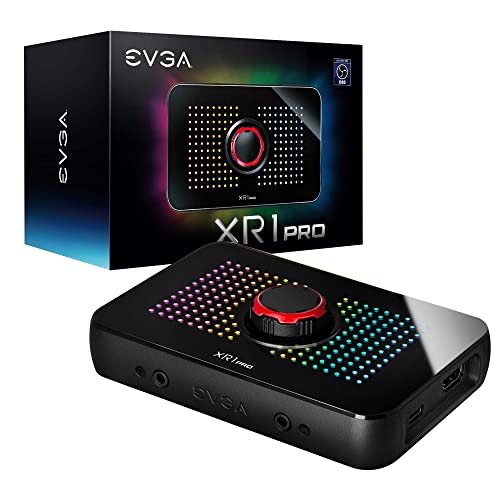
EVGA XR1 Pro Capture Card
The EVGA XR1 Pro Capture Card supports 1440p144 passthrough, which is lower than the Guermok’s 4K144 output. It captures up to 4K but focuses on smooth 1440p gaming experiences. It lacks the HDMI 2.1 specification and explicit VRR support mentioned for the Guermok. The EVGA is significantly larger and heavier at 15.8 ounces compared to the Guermok’s 5.94 ounces. It does not offer the PD 3.0 charging or the specific flexible audio inputs like Mic In found on the Guermok. This card is best for users who prioritize 1440p passthrough smoothness over maximum resolution. If you need 4K144 passthrough for high-end gaming or flexible audio mixing, the EVGA XR1 Pro is a less capable alternative in terms of resolution and connectivity features.
| # | Product | Best for | Price |
|---|---|---|---|
| 1 | Guermok 4K144 HDMI USB Capture Card Best overall | high-refresh-rate Windows streaming | |
| 2 | Ezcap 4K144 Pro Video Capture Card Also great | High-refresh-rate 4K streaming with audio mixing | |
| 3 | BlueAVS Hunter4K Pro Best budget | high frame rate gaming capture | |
| 4 | AVerMedia Live Gamer Ultra 2.1 Best premium | Windows users needing VRR and 5.1 audio | |
| 5 | Elgato 4K Pro Internal Capture Card Best 4k60 | desktop PCs needing 8K60 passthrough | |
| 6 | ASUS TUF Gaming CU4K30 Capture Card Best 1080p fhd | Full HD 120 fps streaming | |
| 7 | EVGA XR1 Pro Capture Card Best 1440p qhd | 1440p passthrough and audio control |

Guermok 4K144 HDMI USB Capture Card
Best for: high-refresh-rate Windows streaming
- Capture Resolution
- 4K144
- Passthrough Resolution
- 4K144
- Host Interface
- USB 3.2 Gen 2
- Video Interface
- HDMI 2.1
- HDR Support
- HDR10
- VRR Support
- Supported
This Guermok capture card supports 4K at 144 FPS via HDMI 2.1. It features HDR10 and VRR passthrough for smooth gameplay. The USB 3.2 Gen 2 interface ensures stable data transmission. You get flexible audio inputs and outputs for streaming. It works with OBS on Windows and macOS. This unit suits streamers who need high refresh rates and low latency for competitive gaming.
- HDMI 2.1 passthrough up to 4K@144Hz with HDR10 and VRR support
- Capture formats include MJPEG 4K@144FPS and NV12 1080P@240FPS
- USB 3.2 Gen 2 host interface for high-bandwidth transmission
- Built-in PD 3.0 input to power host devices during use
- Multiple audio inputs including Mic In, Line In, and HDMI Audio
- macOS capture resolution limited to 4K@60FPS versus higher rates on Windows
- YUY2 capture format restricted to 4K@50FPS
- USB-C port may require reconnection if PD power status changes
- You need 4K 144Hz passthrough for high-refresh-rate gaming
- You stream on Windows using OBS Studio or Streamlabs
- You want to power your laptop via the capture card
- You require consistent 4K capture at high frame rates on macOS
- You prefer a simpler setup without PD power management concerns
- You need RGB24 capture at more than 4K@30FPS
Verdict: Guermok 4K144 HDMI 2.1 USB Capture Card delivers high-bandwidth 4K 144Hz passthrough and flexible audio options for Windows streamers. It fits creators who prioritize low latency and high refresh rates over broad macOS frame rate support.

Ezcap 4K144 Pro Video Capture Card
Best for: High-refresh-rate 4K streaming with audio mixing
- Capture Resolution
- 4K144, 1080p240
- Passthrough Resolution
- 4K144, 1440p240, 1080p360
- Host Interface
- USB 3.2 Gen 2
- Video Interface
- HDMI 2.1
- HDR Support
- HDR10
- Features
- HDR10, VRR, Ultra-Low Latency
The Ezcap 401 delivers native 4K144 capture and passthrough via HDMI 2.1. It supports HDR10 and VRR for tear-free visuals. The USB 3.2 Gen 2 interface provides 10Gbps bandwidth for ultra-low latency. You can record 1080p240 or 1440p240 as well. Dedicated audio ports allow you to mix party chat and commentary directly. It works with Windows, macOS, and major consoles.
- Native 4K144 capture and passthrough resolution
- HDMI 2.1 interface with HDR10 and VRR support
- USB 3.2 Gen 2 host interface for 10Gbps bandwidth
- Dedicated 3.5mm Line In and headset ports for audio mixing
- Heavier build at 7.69 ounces compared to lighter competitors
- Limited to HDR10 without support for higher dynamic range formats like Dolby Vision
- You need native 4K144 passthrough for high-refresh-rate gaming
- You want to mix console party chat without an external mixer
- You stream on Windows or macOS using OBS or Streamlabs
- You require support for HDR10+ or Dolby Vision formats
- You prefer a lighter, more portable capture device
- You need capture resolutions higher than 4K144
Verdict: Ezcap 4K144 HDMI 2.1 Capture Card fits streamers who need high-bandwidth 4K144 passthrough and simple audio mixing. It is a solid choice for high-refresh-rate gaming on consoles or PCs.

BlueAVS Hunter4K Pro
Best for: high frame rate gaming capture
- Capture Resolution
- 4K 144 FPS
- Passthrough Resolution
- 4K 144 FPS
- Host Interface
- USB 3.2 Gen 2
- Video Interface
- HDMI 2.1
- HDR Support
- HDR10
- VRR Support
- VRR passthrough
The BlueAVS Hunter4K Pro is a compact HDMI 2.1 capture card designed for high-performance gaming. It records and passes through video at 4K 144 FPS with HDR10 and VRR support. You get a USB 3.2 Gen 2 connection for stable data transfer. It also handles 1080p 240 FPS recording. This device suits players who want low-latency streaming and detailed gameplay capture on PS5 or PC.
- Records and passes through 4K 144 FPS video
- Supports HDR10 and VRR passthrough for smoother visuals
- USB 3.2 Gen 2 interface ensures fast data transfer
- Captures 1080p 240 FPS for high-refresh-rate monitors
- Heavier build at 1.76 pounds compared to lighter alternatives
- Maximum recording resolution is 4K, while others support 8K pass-through
- Larger physical footprint with a height of 5.12 inches
- You play competitive games at 144 FPS or higher
- You need VRR support to reduce screen tearing
- You stream from PS5 or PC with HDR content
- You require 8K video capture or pass-through
- You prefer a lighter or more compact device
- You need support for resolutions beyond 4K
Verdict: BlueAVS Hunter4K Pro 4K144 delivers reliable 4K 144 FPS capture with HDR and VRR support. It fits gamers who prioritize high frame rates and low latency over maximum resolution or portability.

AVerMedia Live Gamer Ultra 2.1
Best for: Windows users needing VRR and 5.1 audio
- Capture Resolution
- 4K144
- Passthrough Resolution
- 4K144, 1440p240, 1080p360
- Host Interface
- USB 3.2 Gen 2 Type-C
- Video Interface
- HDMI 2.1
- HDR Support
- HDR10
- VRR Support
- Supported
This AVerMedia capture card supports 4K144 video capture on Windows and HDR10 with VRR passthrough. It connects via USB-C 10Gbps and handles up to 4K144, 1440p240, or 1080p360 passthrough. The device includes dual 3.5mm ports for 5.1 audio and RGB lighting. It suits users needing high refresh rates and console compatibility with detailed audio routing options.
- Supports 4K144 capture on Windows
- Passes through up to 4K144 HDR/VRR
- USB-C 10Gbps connection for fast data
- Dual 3.5mm ports for 5.1 audio
- Includes RGB lighting for setup aesthetics
- macOS capture limited to 4K60
- DSC monitors may limit passthrough to 4K120
- Weighs 4.06 ounces
- You need 4K144 capture on Windows
- You require VRR passthrough for gaming
- You want 5.1 audio input support
- You rely on macOS for capture
- You need 8K passthrough support
- You prefer a lighter device under 3 ounces
Verdict: AVerMedia Live Gamer Ultra 2.1 4K144 delivers high-end capture and passthrough specs for Windows users. It is ideal for those who need VRR support and detailed audio routing for their streaming setup.

Elgato 4K Pro Internal Capture Card
Best for: desktop PCs needing 8K60 passthrough
- Capture Resolution
- 4K60
- Passthrough Resolution
- 8K60
- Host Interface
- PCIe x4
- Video Interface
- HDMI 2.1
- HDR Support
- HDR10
- Features
- HDR, HDR10, VRR
The Elgato 4K Pro is an internal PCIe x4 capture card for Windows desktop PCs. It captures up to 4K60 with HDR10 support. You get 8K60 passthrough over HDMI 2.1. It also supports VRR and ALLM for modern consoles. This card works with Elgato Studio, 4K Capture Utility, and OBS. It suits users who need high-resolution passthrough and internal installation.
- Captures up to 4K60 at 1440p144 or 1080p240
- Passthrough up to 8K60 HDR over HDMI 2.1
- Supports VRR and ALLM for PS5 and Xbox Series X
- Internal PCIe x4 design saves USB ports
- Requires a desktop PC with an open PCIe slot
- Captures only 4K60, while competitors offer 4K144
- Limited to HDR10 support without higher dynamic range options
- You own a Windows desktop PC with available PCIe slots
- You need 8K60 passthrough for future-proofing your display
- You want VRR and ALLM support for console gaming
- You use a laptop or lack an internal PCIe slot
- You need capture rates higher than 4K60
- You prefer a portable USB-connected device
Verdict: Elgato 4K Pro PCIe Capture Card fits desktop users needing 8K60 passthrough and internal installation. It is ideal for those prioritizing high-resolution output over maximum capture frame rates.

ASUS TUF Gaming CU4K30 Capture Card
Best for: Full HD 120 fps streaming
- Capture Resolution
- 4K30, 2K60, 1080p120
- Passthrough Resolution
- 4K60 HDR
- Host Interface
- USB 3.2 Type-C
- Video Interface
- HDMI 2.0
- HDR Support
- Supported
- Platform
- PC, Xbox, PS5
The ASUS TUF Gaming CU4K30 offers Full HD capture at 120 fps and 4K at 30 fps. It supports 4K HDR passthrough at 60 Hz via HDMI 2.0. The USB 3.2 Type-C connection ensures plug-and-play compatibility with OBS Studio. Its alloy shell provides a slim, durable build for PC, Xbox, and PS5 users seeking stable streaming performance.
- Captures Full HD video at 120 fps
- Supports 4K HDR passthrough at 60 Hz
- Plug-and-play USB 3.2 Type-C connection
- Certified OBS Studio compatibility
- Durable alloy outer shell
- HDMI 2.0 interface limits passthrough to 60 Hz
- Capture resolution capped at 4K 30 fps
- Heavier build at 14.9 ounces
- You need Full HD capture at 120 fps
- You want reliable OBS Studio integration
- You prefer a durable alloy build
- You require 4K passthrough at 120 Hz
- You need 4K capture at higher frame rates
- You want the lightest possible device
Verdict: The ASUS TUF Gaming CU4K30 Capture Card fits streamers who prioritize high-frame-rate 1080p recording over 4K speed. It delivers stable performance for console and PC gaming setups.
EVGA XR1 Pro Capture Card
Best for: 1440p passthrough and audio control
- Capture Resolution
- 1440p60, 4K30
- Passthrough Resolution
- 1440p144 HDR, 4K60 HDR
- Host Interface
- USB 3.1
- Platform
- PC, Xbox, PS5, Xbox Series X/S, Xbox One
- Compatible Platform
- PlayStation 5, Nintendo Switch, PS4
- Dimensions
- 10 × 8 × 6 inches
The EVGA XR1 Pro captures 1440p at 60fps or 4K at 30fps. It passes through 1440p144 HDR or 4K60 HDR. You get USB 3.1 connectivity and certified OBS support. The unit includes an audio mixer and customizable ARGB. It weighs 15.8 ounces. This card suits players who prioritize high refresh rate passthrough over maximum capture resolution.
- Captures 1440p at 60fps
- Passes through 1440p144 HDR
- Certified for OBS
- Built-in audio mixer controls
- Lower capture resolution than competitors (1440p60 vs 4K144)
- Heavier build at 15.8 ounces
- You need 1440p144 HDR passthrough for your display
- You want certified OBS compatibility
- You prefer a device with an audio mixer
- You require 4K capture at high frame rates
- You need a lighter, more portable unit
- You want the highest possible capture resolution
Verdict: The EVGA XR1 Pro 1440p60 Capture Card fits users who prioritize smooth 1440p144 passthrough and integrated audio mixing over raw capture resolution.
Specifications side by side
| Spec | Guermok 4K144 HDMI USB Capture Card | Ezcap 4K144 Pro Video Capture Card | BlueAVS Hunter4K Pro | AVerMedia Live Gamer Ultra 2.1 | Elgato 4K Pro Internal Capture Card | ASUS TUF Gaming CU4K30 Capture Card | EVGA XR1 Pro Capture Card |
|---|---|---|---|---|---|---|---|
| Capture Resolution | 4K144 | 4K144, 1080p240 | 4K 144 FPS | 4K144 | 4K60 | 4K30, 2K60, 1080p120 | 1440p60, 4K30 |
| Passthrough Resolution | 4K144 | 4K144, 1440p240, 1080p360 | 4K 144 FPS | 4K144, 1440p240, 1080p360 | 8K60 | 4K60 HDR | 1440p144 HDR, 4K60 HDR |
| Host Interface | USB 3.2 Gen 2 | USB 3.2 Gen 2 | USB 3.2 Gen 2 | USB 3.2 Gen 2 Type-C | PCIe x4 | USB 3.2 Type-C | USB 3.1 |
| Video Interface | HDMI 2.1 | HDMI 2.1 | HDMI 2.1 | HDMI 2.1 | HDMI 2.1 | HDMI 2.0 | – |
| HDR Support | HDR10 | HDR10 | HDR10 | HDR10 | HDR10 | Supported | – |
| VRR Support | Supported | – | VRR passthrough | Supported | – | – | – |
| Features | HDR10, VRR, Ultra-Low Latency | HDR10, VRR, Ultra-Low Latency | HDR10, VRR, Ultra-Low Latency | RGB Lighting, HDR10, VRR | HDR, HDR10, VRR | HDR | HDR |
| Color | Black | 4K144 Pro – 401 | Black | Black | Black | CU4K30|HDMI 2.0|2160p60 | – |
| Resolution | 4K UHD | 4K UHD | – | – | – | 1080p FHD | 1440p QHD |
| Platform | PC, PS5, Mac | PC, Xbox, PS5, Mac, Xbox Series X/S | PC, Xbox, PS5, Mac | PC, Xbox, PS5, Mac, Xbox Series X/S | PC, Xbox, PS5, Xbox Series X/S | PC, Xbox, PS5 | PC, Xbox, PS5, Xbox Series X/S, Xbox One |
| Compatible Platform | PlayStation 5, Nintendo Switch | PlayStation 5, Nintendo Switch | PlayStation 5, Nintendo Switch | PlayStation 5, Nintendo Switch | PlayStation 5, Nintendo Switch | PlayStation 5, Nintendo Switch | PlayStation 5, Nintendo Switch, PS4 |
| Use | – | – | – | – | – | Gaming | – |
| Connectivity | USB | USB | USB | USB | – | USB | USB |
| Lighting | – | – | – | RGB | – | – | – |
| Application | – | – | – | – | – | Recording | – |
| Dimensions | 5.03 × 2.91 × 0.83 inches | – | 2.95 × 0.91 × 5.12 inches | 2.7 × 7.3 × 6.3 inches | 5 × 2 × 1 inches | 6.4 × 5.5 × 2.5 inches | 10 × 8 × 6 inches |
| Weight | 5.94 ounces | 7.69 ounces | 1.76 pounds | 4.06 ounces | 4 ounces | 14.9 ounces | 15.8 ounces |
| Model | GM-73F | ezcap401 | Hunter4K Pro | Live Gamer ULTRA 2.1 | 10GBK9901 | TUF GAMING CAPTURE BOX-CU4K30 | 144-U1-CB21-LR |
| Size | – | – | Small | HDMI 2.1 – GC553G2 (Black) | – | – | XR1 Pro |
Frequently asked questions
Which capture card offers the best 4K 144Hz passthrough for Windows?
The Guermok 4K144 HDMI USB Capture Card is the top choice for high-refresh-rate Windows streaming. It features HDMI 2.1 connectivity and supports HDR10 with VRR. This setup ensures low latency for competitive gaming. The device connects via USB 3.2 and weighs 5.94 ounces. It fits creators who need high bandwidth without complex setup.
What is the best budget-friendly option for 4K 144 FPS capture?
The BlueAVS Hunter4K Pro serves as the best budget alternative for high frame rate gaming. It delivers reliable 4K 144 FPS capture with HDR10 and VRR support. The unit connects via USB 3.2 and uses HDMI 2.1 for video output. It weighs 1.76 pounds. This model prioritizes high frame rates and low latency over maximum resolution or portability.
Does the Elgato 4K Pro support 8K passthrough?
Yes, the Elgato 4K Pro Internal Capture Card supports 8K60 passthrough for desktop PCs. It is an internal PCIe card, not a USB device. The card captures up to 4K60 resolution. It supports HDR and VRR features. This makes it ideal for users prioritizing high-resolution output over maximum capture frame rates on their gaming console or PC.
Which card is best for 1440p passthrough and audio control?
The EVGA XR1 Pro 1440p60 Capture Card is best for users prioritizing smooth 1440p144 passthrough. It offers integrated audio mixing capabilities. The device captures up to 4K resolution. It connects via USB and supports HDR. This model fits users who need detailed audio routing and smooth high-refresh-rate output for Xbox or PlayStation consoles.
Can I use these cards with PlayStation 5 and Nintendo Switch?
Most listed cards support PlayStation 5 and Nintendo Switch. The Guermok, Ezcap, BlueAVS, AVerMedia, Elgato, ASUS, and EVGA models list these platforms as compatible. They generally use HDMI 2.1 or HDMI 2.0 interfaces. Ensure your host computer meets the USB 3.2 requirements for optimal performance and low latency during gameplay recording.
What is the difference between the Guermok and Ezcap models?
Both cards offer 4K 144Hz passthrough with HDMI 2.1 and HDR10 support. The Guermok weighs 5.94 ounces, while the Ezcap weighs 7.69 ounces. The Ezcap is noted for simple audio mixing. Both use USB 3.2 connectivity. The Guermok is positioned as the best overall for Windows streamers, whereas the Ezcap is a solid choice for high-refresh-rate gaming.
Which capture card is best for Full HD 120 FPS streaming?
The ASUS TUF Gaming CU4K30 Capture Card is best for Full HD 120 FPS streaming. It captures at 1080p resolution. The device supports HDR and connects via USB 3.2. It uses an HDMI interface. This card fits streamers who prioritize high-frame-rate 1080p recording over 4K speed for stable performance on console and PC gaming setups.

