As Amazon Associates, we earn from qualifying purchases. This means we may receive a small commission at no extra cost to you if you click through and make a purchase.
As an Amazon Associate we earn from qualifying purchases. Links on this page are affiliate links.
This gaming PC buying guide helps you choose the right system for your needs. You will learn how to match processor power, graphics cards, and memory to your target resolution. We evaluated eight models based strictly on their published specifications. Each product was ranked by performance tier and key features like cooling type and storage capacity. You can decide whether you need entry-level esports hardware or high-end 1440p gaming rigs. The list includes options with liquid cooling, DDR5 memory, and various SSD sizes. You will see how raw processing power compares to graphical fidelity across different price points. Our selection process focused on technical data rather than subjective experience. You can confidently pick a machine that fits your specific gaming requirements. The recommendations are derived directly from the technical attributes provided by manufacturers. This approach ensures you get accurate information for your purchase decision.
Key Specs for Gaming PCs
Graphics card power
The GPU determines visual quality and frame rates. Higher-end cards like the RTX 5070 handle demanding titles at 1440p or 4K with ease. Budget options such as the RX 550 or RTX 3060 Ti offer solid entry-level performance for 1080p gaming. You should match the card to your monitor resolution. If you play competitive shooters, prioritize frame rate stability. For immersive story-driven games, focus on visual fidelity. The Alienware Aurora and Skytech King 95 both feature modern RTX 50-series GPUs, providing a significant performance leap over older generations. Choose a card that ensures smooth gameplay at your desired settings.
Look for
- RTX 5070 or higher for 1440p gaming
- RTX 3060 Ti for budget 1080p play
- RX 550 for entry-level esports titles
Processor performance
The CPU handles game logic, physics, and background tasks. High-core-count processors like the Ryzen 9 9900X or Ryzen 7 9800X3D excel in multitasking and heavy gaming loads. Mid-range chips like the Ryzen 5 5500 or Core i5 provide reliable performance for most games. You should consider your usage beyond gaming, such as streaming or video editing. A stronger CPU prevents bottlenecks when the GPU is working hard. The Skytech King 95 uses a Ryzen 7 9800X3D, which is optimized for gaming efficiency. The STGAubron model pairs a Core i5 with an entry-level GPU, balancing cost and capability for casual users.
Look for
- Ryzen 7 or 9 for high-end gaming
- Ryzen 5 or Core i5 for mid-range
- High core count for multitasking and streaming
Memory capacity and type
RAM allows the system to store active data for quick access. 32GB of DDR5 RAM is becoming the standard for high-end gaming PCs, ensuring smooth performance in modern titles. The Alienware Aurora, Skytech King 95, MSI Codex Z2, and CyberPowerPC models all include 32GB DDR5. Budget options like the Olialia and OKAMUS systems offer 16GB or 8GB, which may limit future-proofing. DDR5 memory offers faster speeds than DDR4, enhancing overall system responsiveness. You should aim for at least 16GB for basic gaming, but 32GB is recommended for heavy multitasking. Check the RAM type to ensure compatibility with future upgrades.
Look for
- 32GB DDR5 for high-end performance
- 16GB DDR5 or DDR4 for mid-range
- 8GB for casual or budget gaming
Storage speed and capacity
Storage holds your games, operating system, and files. SSDs provide much faster load times than traditional hard drives. Most modern gaming PCs include 512GB to 2TB of SSD storage. The Skytech King 95 and MSI Codex Z2 offer 2TB, which is ideal for large game libraries. Entry-level models like the STGAubron and Olialia provide 512GB, which may fill up quickly with modern titles. You should consider how many large games you plan to install. A 1TB drive, like in the Alienware Aurora, offers a balanced middle ground. Faster storage reduces stuttering and improves system boot times.
Look for
- 2TB SSD for extensive game libraries
- 1TB SSD for balanced storage needs
- 512GB SSD for entry-level gaming
Cooling system efficiency
Effective cooling maintains performance during long gaming sessions. Liquid cooling systems, like those in the Skytech King 95, offer superior heat dissipation compared to air cooling. This allows processors to run at higher speeds without throttling. Air-cooled systems are generally quieter and easier to maintain but may not sustain peak performance as long. You should consider your case size and airflow. High-performance GPUs and CPUs generate significant heat. The CyberPowerPC Ryzen 9 model emphasizes efficient cooling to handle its 12-core processor. Ensure the system has adequate vents and fan placement for optimal airflow.
Look for
- Liquid cooling for high-end processors
- Adequate airflow vents for air cooling
- Quiet operation during extended gaming sessions
Physical dimensions and weight
The size and weight of the tower affect placement and portability. Most gaming PCs range from 20 to 50 pounds. The Skytech King 95 weighs 48.3 pounds, while the MSI Codex Z2 is lighter at 21.3 pounds. You should measure your desk or shelf space before purchasing. Larger cases often accommodate better cooling and more components. Compact systems may be easier to move but can run hotter. The Alienware Aurora and CyberPowerPC Gamer Master models offer standard tower sizes. Consider the height and width to ensure it fits your setup comfortably without obstructing airflow.
Look for
- Measure desk space for height and width
- Check weight for portability needs
- Ensure adequate clearance for airflow
Connectivity options
Ports and wireless capabilities determine how you connect peripherals. Most systems include USB ports for keyboards, mice, and controllers. The Alienware Aurora supports Bluetooth for wireless accessories. The Olialia model features WiFi 6 for faster wireless internet. You should check the number and type of USB ports available. HDMI or DisplayPort outputs connect to your monitor. Some models, like the STGAubron, highlight 4K capture capabilities for streaming. Ensure the system has enough ports for all your devices. Wireless connectivity reduces cable clutter and improves desk organization.
Look for
- Multiple USB ports for peripherals
- WiFi 6 for fast wireless internet
- Bluetooth for wireless accessories
Operating system compatibility
The pre-installed OS determines initial setup and software compatibility. All listed models run Windows 11, ensuring access to the latest games and applications. You should verify that your preferred software is supported on this platform. Windows 11 offers improved gaming features and security updates. Some users may prefer Linux or other systems, but Windows remains the standard for gaming. The OKAMUS and CyberPowerPC models come with Windows 11 ready to use. You should check for driver updates and system requirements for your specific games. Compatibility with your existing peripherals is also important.
Look for
- Windows 11 for latest game support
- Check driver availability for peripherals
- Verify software compatibility before purchase
Types of Gaming PCs
Premium Towers
Premium towers like the Alienware Aurora RTX 5070 offer top-tier components such as the RTX 5070 graphics card and 32GB of DDR5 RAM. These systems prioritize build quality and include features like Bluetooth connectivity. They suit gamers who want the latest standards and do not mind a larger footprint. The trade-off is a higher cost and often heavier weight, as seen in the 33.9-pound Alienware unit. You get excellent performance but pay for the brand and onsite support services included with these high-end machines.
High-Performance Mid-Range
Mid-range systems like the Skytech King 95 and MSI Codex Z2 balance power with practicality. The Skytech model uses a Ryzen 7 processor and liquid cooling for high frame rates at 1440p. The MSI Codex Z2 also features an RTX 5070 and 32GB of DDR5 RAM for smooth gaming and streaming. These PCs are ideal for players who want strong performance without the premium price tag of top-tier brands. The trade-off involves slightly larger dimensions or less distinctive cooling solutions compared to custom builds. You get reliable 1440p performance with ready-to-use Windows 11 setups.
Budget Entry-Level
Entry-level PCs like the STGAubron Core i5 RX 550 and OKAMUS Core i5 target casual gamers and esports players. These systems use older or lower-tier GPUs like the RX 550 or basic integrated graphics. The STGAubron model includes 16GB of RAM and a 512GB SSD, suitable for streaming and light content creation. The OKAMUS unit offers an 8GB RAM configuration for basic 1080p gaming. The main trade-off is lower graphical fidelity and slower load times due to smaller storage and memory. You sacrifice visual quality for affordability and compact sizes, making them practical for tight budgets.
Common Mistakes To Avoid
Ignoring CPU bottleneck with weak GPUs
Pairing a high-end graphics card with an entry-level processor limits performance. The CPU cannot feed data fast enough, causing stuttering. Check the processor’s core count and clock speed. Match it to your GPU tier for balanced gaming performance at your target resolution.
Overlooking RAM speed and capacity
Gaming requires sufficient memory bandwidth and capacity. Eight gigabytes may cause lag in modern titles. Aim for sixteen gigabytes minimum. Ensure the RAM speed matches your motherboard’s supported frequency. Faster DDR5 modules improve frame stability and reduce loading times significantly.
Neglecting storage type and size
Traditional hard drives create long load times and texture pop-in. Always choose a solid-state drive for your operating system and games. NVMe drives offer faster data transfer rates. Ensure you have enough space for large game files and future updates.
Choosing inadequate cooling for high specs
High-performance components generate significant heat. Poor cooling leads to thermal throttling and reduced frame rates. Check the case airflow and cooler specifications. Ensure the system includes adequate fans or liquid cooling to maintain stable temperatures during intense gaming sessions.
Matching power supply to only the GPU
The power supply unit must support the entire system, not just the graphics card. Calculate total wattage needs for the CPU, GPU, and peripherals. Choose a unit with enough headroom for efficiency. An underpowered PSU can cause instability or shutdowns under load.
| # | Product | Best for | Price |
|---|---|---|---|
| 1 | Alienware Aurora RTX 5070 Gaming Desktop | Premium gaming with onsite support | |
| 2 | Skytech King 95 RTX 5070 Ti Gaming PC | High-end 1440p gaming with liquid cooling | |
| 3 | STGAubron Core i5 RX 550 Gaming Desktop | Entry-level esports and streaming | |
| 4 | MSI Codex Z2 RTX 5070 Gaming Desktop | 1440p gaming and streaming with 32GB RAM | |
| 5 | CyberPowerPC Ryzen 9 9900X RTX 5070 Gaming PC | High-performance gaming and multitasking | |
| 6 | Olialia RTX 3060 Ti Ryzen 5 5500 Gaming PC | 1440p gaming on a budget | |
| 7 | CyberPowerPC Gamer Master RTX 5060 Ti Desktop | 1080p gaming with fast DDR5 storage | |
| 8 | OKAMUS Core i5 Desktop with 8GB RAM | casual 1080p gaming on a budget |

Alienware Aurora RTX 5070 Gaming Desktop
Best for: Premium gaming with onsite support
- Graphics Card
- NVIDIA GeForce RTX 5070
- Processor
- Intel Core Ultra 7 265F
- RAM Capacity
- 32GB
- RAM Type
- DDR5
- Storage Capacity
- 1TB SSD
- Wireless Standard
- Wi-Fi 7
The Alienware Aurora pairs an Intel Core Ultra 7 265F processor with an NVIDIA GeForce RTX 5070 graphics card. It includes 32GB of DDR5 RAM and a 1TB SSD. This setup handles gaming and multitasking efficiently. The chassis features customizable AlienFX lighting zones. You get Wi-Fi 7 connectivity and Bluetooth support. One year of onsite service is included for hardware issues.
- Intel Core Ultra 7 265F processor
- NVIDIA GeForce RTX 5070 graphics
- 32GB DDR5 RAM capacity
- 1TB SSD storage
- One year onsite service
- 1TB SSD is smaller than the 2TB drives found on other models
- 33.9 pound weight is heavier than lighter alternatives
- You want a prebuilt system with high-end graphics
- You prefer onsite service for hardware support
- You need Wi-Fi 7 connectivity
- You need more than 1TB of storage
- You prefer a lighter desktop chassis
- You want a Ryzen processor instead of Intel
Verdict: Alienware Aurora RTX 5070 suits gamers who value premium build quality and onsite support. It fits users who prioritize the latest wireless standards and high-end graphics performance.

Skytech King 95 RTX 5070 Ti Gaming PC
Best for: High-end 1440p gaming with liquid cooling
- Graphics Card
- NVIDIA Geforce RTX 5070 Ti 16GB GDDR7
- Processor
- AMD Ryzen 7 9800X3D
- RAM Capacity
- 32GB
- RAM Type
- DDR5 6000
- Storage Capacity
- 2TB Gen4 NVMe M.2 SSD
- Cooling Type
- 360mm AIO Liquid CPU Cooler
This Skytech desktop pairs the AMD Ryzen 7 9800X3D processor with an NVIDIA GeForce RTX 5070 Ti graphics card. It includes 32GB of DDR5 RAM and a 2TB Gen4 NVMe SSD. The system uses a 360mm AIO liquid cooler to manage heat. It runs Windows 11 Home and connects via Wi-Fi 5. You get a prebuilt machine ready for high-resolution gaming tasks.
- Ryzen 7 9800X3D CPU with 5.2GHz Turbo Boost
- RTX 5070 Ti GPU with 16GB GDDR7 memory
- 32GB DDR5 RAM running at 6000MHz
- 2TB Gen4 NVMe M.2 SSD storage
- 360mm AIO liquid cooling system
- Wi-Fi 5 (802.11 AC) standard instead of newer Wi-Fi 6
- 48.3 pounds weight requires a sturdy desk surface
- 17.4 inches height limits placement in smaller cases
- You want a liquid-cooled system for sustained high performance
- You need a large 2TB storage drive for game libraries
- You prefer a prebuilt desktop with Windows 11 installed
- You require the latest Wi-Fi 6 or Wi-Fi 6E connectivity
- You have limited desk space for a 17.4-inch tall tower
- You need a lighter system under 40 pounds for portability
Verdict: Skytech Gaming PC Ryzen 7 9800X3D fits users who prioritize raw processing power and advanced cooling over the newest wireless standards. It is ideal for gamers who want high frame rates at 1440p without building the machine themselves.

STGAubron Core i5 RX 550 Gaming Desktop
Best for: Entry-level esports and streaming
- Graphics Card
- Radeon RX 550 4G GDDR5
- Processor
- Intel Core i5
- RAM Capacity
- 16GB
- Storage Capacity
- 512GB SSD
- Wireless Standard
- Wi-Fi 6
- Operating System
- Windows 11 Home 64-bit
The STGAubron desktop pairs an Intel Core i5 processor with 16GB of RAM and a Radeon RX 550 graphics card. It includes a 512GB SSD and runs Windows 11. You get Wi-Fi 6 and Bluetooth 5.0 for connectivity. This setup handles esports titles and streaming at moderate settings. It suits entry-level gamers who need a reliable tower for lighter workloads without high-end graphics performance.
- Intel Core i5 processor up to 3.6GHz
- 16GB RAM for smooth multitasking
- 512GB SSD for fast boot times
- Wi-Fi 6 and Bluetooth 5.0 connectivity
- Radeon RX 550 graphics card trails the RTX 5070 series in the other products
- 16GB RAM is less than the 32GB found in several competing models
- 512GB SSD storage is smaller than the 2TB drives in other listings
- You play competitive esports titles like Valorant or League of Legends
- You need a budget-friendly PC for streaming or video editing
- You want a pre-built system with included peripherals
- You require high-end graphics for 4K gaming
- You need more than 16GB of RAM for heavy workloads
- You want the latest RTX 5070 or 5070 Ti graphics cards
Verdict: STGAubron i5 RX 550 Gaming PC fits budget-conscious gamers who prioritize CPU performance and connectivity over high-end graphics. It is a practical entry-level tower for esports and light content creation.

MSI Codex Z2 RTX 5070 Gaming Desktop
Best for: 1440p gaming and streaming with 32GB RAM
- Graphics Card
- NVIDIA GeForce RTX 5070
- Processor
- AMD Ryzen 7 8700F
- RAM Capacity
- 32GB
- RAM Type
- DDR5
- Storage Capacity
- 2TB SSD
- Cooling Type
- ARGB fan Air Cooler
The MSI Codex Z2 pairs an AMD Ryzen 7 8700F with an NVIDIA GeForce RTX 5070 and 32GB of DDR5 RAM. This combination handles AAA titles and streaming smoothly. You get a 2TB SSD for storage and a dedicated air cooler with ARGB fans to manage heat. It runs Windows 11 Home and includes USB Type-C connectivity for modern peripherals.
- AMD Ryzen 7 8700F processor boosts to 5.0 GHz
- NVIDIA GeForce RTX 5070 with Blackwell architecture
- 32GB DDR5 RAM for multitasking
- 2TB SSD storage capacity
- Four system cooling fans with ARGB lighting
- Heavier at 21.3 pounds compared to lighter desktops
- Bulky dimensions of 16 x 8.38 x 19 inches
- Includes Windows 11 Home instead of Pro
- You want high-end 1440p gaming performance
- You need 32GB of RAM for streaming
- You prefer a prebuilt with RGB lighting
- You need a compact mini-ITX form factor
- You require Windows 11 Pro out of the box
- You are looking for a lightweight portable setup
Verdict: MSI Codex Z2 Ryzen 7 Gaming PC delivers strong 1440p gaming power with its RTX 5070 and 32GB DDR5 RAM, making it ideal for players who want a ready-to-use system with ample storage and cooling.
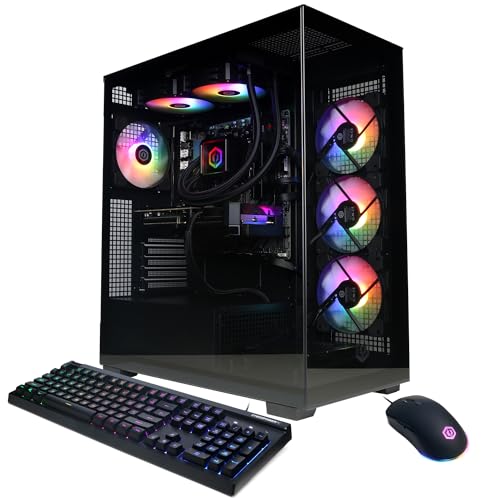
CyberPowerPC Ryzen 9 9900X RTX 5070 Gaming PC
Best for: High-performance gaming and multitasking
- Graphics Card
- NVIDIA GeForce RTX 5070 12GB
- Processor
- AMD Ryzen 9 9900X
- RAM Capacity
- 32GB
- RAM Type
- DDR5
- Storage Capacity
- 1TB PCIe 4.0 NVMe SSD
- Cooling Type
- Liquid Cool CPU
This CyberPowerPC build pairs an AMD Ryzen 9 9900X processor with an NVIDIA GeForce RTX 5070 graphics card. It includes 32GB of DDR5 RAM and a 1TB PCIe 4.0 NVMe SSD. The system uses liquid cooling for the CPU and runs Windows 11 Home. It suits gamers who want high-end processing power and modern graphics performance in a single package.
- AMD Ryzen 9 9900X 12-core processor
- NVIDIA GeForce RTX 5070 12GB graphics
- 32GB DDR5 RAM capacity
- 1TB PCIe 4.0 NVMe SSD storage
- Liquid CPU cooling system
- 1TB storage is smaller than the 2TB drives found in other options
- WiFi 6 standard is older than WiFi 6E or WiFi 7 in newer builds
- You need a high-core-count CPU for multitasking
- You prefer liquid cooling for thermal management
- You want 32GB of DDR5 RAM pre-installed
- You require 2TB of storage space
- You want the latest WiFi standard
- You prefer Intel processors over AMD
Verdict: CyberPowerPC Ryzen 9 9900X RTX 5070 Gaming PC delivers strong 12-core performance and modern graphics for high-end gaming. It fits users who prioritize CPU power and efficient cooling over maximum storage capacity.

Olialia RTX 3060 Ti Ryzen 5 5500 Gaming PC
Best for: 1440p gaming on a budget
- Graphics Card
- RTX 3060 Ti
- Processor
- AMD Ryzen 5 5500
- RAM Capacity
- 16GB
- Storage Capacity
- 512GB SSD
- Cooling Type
- RGB CPU cooler
- Wireless Standard
- WiFi 6
This prebuilt desktop pairs an AMD Ryzen 5 5500 processor with an RTX 3060 Ti graphics card. It includes 16GB of DDR4 RAM and a 512GB SSD. The system runs Windows 11 and features WiFi 6 connectivity. The compact mid-tower case offers dual tempered glass panels and RGB lighting. It targets gamers who want smooth 1440p performance for AAA titles without needing the latest high-end components.
- RTX 3060 Ti supports DLSS and 1440p gaming
- AMD Ryzen 5 5500 provides 6 cores and 12 threads
- 16GB DDR4 RAM ensures smooth multitasking
- Built-in WiFi 6 for wireless connectivity
- Windows 11 pre-installed and ready to use
- 512GB SSD storage is smaller than the 1TB or 2TB drives in other listed PCs
- 16GB RAM capacity is lower than the 32GB or 64GB options found in competitors
- RTX 3060 Ti is an older generation GPU compared to the RTX 5070 series in other models
- You want solid 1440p gaming performance on a budget
- You prefer a compact mid-tower design with visible RGB lighting
- You need WiFi 6 for wireless internet connection
- You require 32GB or more RAM for heavy multitasking
- You need 1TB or larger SSD storage capacity
- You want the latest RTX 5070 or 5070 Ti graphics cards
Verdict: Olialia RTX 3060 Ti Ryzen 5 Gaming PC delivers reliable 1440p performance for players who prioritize value over the newest hardware generations. It suits those who want a compact, visually appealing system with essential modern connectivity like WiFi 6.

CyberPowerPC Gamer Master RTX 5060 Ti Desktop
Best for: 1080p gaming with fast DDR5 storage
- Graphics Card
- NVIDIA GeForce RTX 5060 Ti 8GB
- Processor
- AMD Ryzen 7 8700F
- RAM Capacity
- 16GB
- RAM Type
- DDR5
- Storage Capacity
- 1TB PCIe 4.0 NVMe SSD
- Wireless Standard
- WiFi 6
This CyberPowerPC desktop pairs an AMD Ryzen 7 8700F processor with an NVIDIA GeForce RTX 5060 Ti 8GB graphics card. It includes 16GB of DDR5 RAM and a 1TB PCIe 4.0 NVMe SSD. The system runs Windows 11 Home and connects via WiFi 6. You get a complete setup with a keyboard and mouse. This configuration suits gamers who want solid 1080p performance without the bulk of higher-end components.
- AMD Ryzen 7 8700F 8-core processor
- NVIDIA GeForce RTX 5060 Ti 8GB graphics
- 16GB DDR5 RAM for multitasking
- 1TB PCIe 4.0 NVMe SSD storage
- Includes WiFi 6 and Bluetooth 5.3
- 16GB RAM is lower than the 32GB found in other list options
- 1TB storage is smaller than the 2TB drives in other list options
- RTX 5060 Ti GPU is a step below the 5070 and 5070 Ti cards in other options
- You want a complete gaming setup with included peripherals
- You prioritize DDR5 RAM and fast PCIe 4.0 storage
- You need WiFi 6 connectivity for stable wireless gaming
- You require 32GB of RAM for heavy professional workloads
- You need 2TB of storage for large game libraries
- You want an RTX 5070 or higher for 1440p gaming
Verdict: CyberPowerPC Ryzen 7 8700F Gaming PC delivers reliable mid-range performance for 1080p gaming. It fits buyers who value modern DDR5 memory and fast storage over maximum GPU power or large storage capacity.

OKAMUS Core i5 Desktop with 8GB RAM
Best for: casual 1080p gaming on a budget
- Graphics Card
- Integrated Graphics Only
- Processor
- i5 CPU
- RAM Capacity
- 8 GB
- Cooling Type
- Vertical Design CPU Cooler
- Wireless Standard
- WiFi 6
- Operating System
- Windows 11 Home
This OKAMUS pre-built PC uses an Intel Core i5 processor clocked up to 3.6GHz. It includes 8GB of RAM and a 256GB M.2 SSD for storage. The system relies on integrated graphics rather than a dedicated video card. It features RGB lighting and a vertical CPU cooler. WiFi 6 is included for connectivity. This setup targets budget-conscious users who need basic gaming and multitasking capabilities.
- Intel Core i5 CPU provides strong frame rates for 1080p gaming.
- 8GB RAM supports smooth multitasking and streaming.
- 256GB M.2 SSD enables fast boot times and game loading.
- WiFi 6 ensures reliable wireless connectivity.
- Integrated graphics limit visual performance compared to dedicated GPUs.
- 8GB RAM is lower than the 16GB or 32GB found in other listed PCs.
- 256GB storage capacity is smaller than the 512GB or larger drives in competitors.
- You need a low-cost entry into PC gaming.
- You play less demanding titles at 1080p.
- You want a system with RGB lighting aesthetics.
- You require high-end graphics for modern AAA titles.
- You need 16GB or more RAM for heavy multitasking.
- You want to store a large library of games.
Verdict: OKAMUS i5 Gaming PC is a budget-friendly option for casual gamers who prioritize cost over graphical fidelity and storage space.
Specifications side by side
| Spec | Alienware Aurora RTX 5070 Gaming Desktop | Skytech King 95 RTX 5070 Ti Gaming PC | STGAubron Core i5 RX 550 Gaming Desktop | MSI Codex Z2 RTX 5070 Gaming Desktop | CyberPowerPC Ryzen 9 9900X RTX 5070 Gaming PC | Olialia RTX 3060 Ti Ryzen 5 5500 Gaming PC | CyberPowerPC Gamer Master RTX 5060 Ti Desktop | OKAMUS Core i5 Desktop with 8GB RAM |
|---|---|---|---|---|---|---|---|---|
| Graphics Card | NVIDIA GeForce RTX 5070 | NVIDIA Geforce RTX 5070 Ti 16GB GDDR7 | Radeon RX 550 4G GDDR5 | NVIDIA GeForce RTX 5070 | NVIDIA GeForce RTX 5070 12GB | RTX 3060 Ti | NVIDIA GeForce RTX 5060 Ti 8GB | Integrated Graphics Only |
| Processor | Intel Core Ultra 7 265F | AMD Ryzen 7 9800X3D | Intel Core i5 | AMD Ryzen 7 8700F | AMD Ryzen 9 9900X | AMD Ryzen 5 5500 | AMD Ryzen 7 8700F | i5 CPU |
| RAM Capacity | 32GB | 32GB | 16GB | 32GB | 32GB | 16GB | 16GB | 8 GB |
| RAM Type | DDR5 | DDR5 6000 | – | DDR5 | DDR5 | – | DDR5 | – |
| Storage Capacity | 1TB SSD | 2TB Gen4 NVMe M.2 SSD | 512GB SSD | 2TB SSD | 1TB PCIe 4.0 NVMe SSD | 512GB SSD | 1TB PCIe 4.0 NVMe SSD | – |
| Cooling Type | – | 360mm AIO Liquid CPU Cooler | – | ARGB fan Air Cooler | Liquid Cool CPU | RGB CPU cooler | – | Vertical Design CPU Cooler |
| Wireless Standard | Wi-Fi 7 | Wi-Fi 5, 802.11 AC | Wi-Fi 6 | – | WiFi 6 | WiFi 6 | WiFi 6 | WiFi 6 |
| Operating System | Windows 11 Home | Windows 11 Home 64-bit | Windows 11 Home 64-bit | Windows 11 Home | Windows 11 Home | Windows 11 | Windows 11 Home | Windows 11 Home |
| Features | Bluetooth | – | – | – | – | RGB Lighting | – | RGB Lighting |
| Color | Black | Black | Black | Black | Black | – | Black | i5 CPU+256GB+8GB |
| Resolution | – | – | 4K UHD | – | – | – | – | – |
| Platform | – | PC | PC | – | PC | PC | PC | PC |
| Storage | 1TB SSD | 2TB SSD | 512GB SSD | 2TB SSD | – | 512GB SSD | – | – |
| Use | Gaming | Gaming | Streaming, Video Editing, Gaming | VR, Gaming | Gaming | Streaming, Gaming | Gaming | Gaming |
| Connectivity | Wired | – | – | USB | – | – | – | – |
| Lighting | – | – | – | – | – | RGB | – | RGB |
| Capture Resolution | – | – | 4K | – | – | – | – | – |
| Host Interface | – | – | – | – | PCIe | PCIe | PCIe | – |
| Video Interface | – | – | HDMI | – | – | – | – | – |
| RAM | 32GB RAM | 32GB RAM | 16GB RAM | 32GB RAM | 32GB RAM | 16GB RAM | 16GB RAM | 8GB RAM |
| Cooling | – | Liquid Cooling | – | – | – | – | – | – |
| Dimensions | 18.1 × 7.76 × 16.5 inches | 18.7 × 11.8 × 17.4 inches | 18.1 × 10.2 × 18.9 inches | 16 × 8.38 × 19 inches | – | – | – | – |
| Weight | 33.9 pounds | 48.3 pounds | – | 21.3 pounds | – | – | 39.1 pounds | – |
| Size | 1 TB | – | RX 550 4G | – | GXiVR8080A41 | – | GMA2900A2 | – |
| Model | DACT1250-7229BLK-PUS | ST-KING95-1866-B-AM | ABR1222 | CodZ2A8NVP436 | GXiVR8080A41 | Gaming PC | GMA2900A2 | OKAMUS-7 |
Frequently asked questions
Which gaming PC is best for premium build quality and support?
The Alienware Aurora RTX 5070 is the top choice for users who value premium construction and onsite support. It features an RTX 5070 graphics card and 32GB of DDR5 RAM for high-end performance. The system includes Bluetooth connectivity and runs on Windows 11. Its compact design measures 18.1 inches in length.
What is the best gaming PC for high-end 1440p gaming with liquid cooling?
The Skytech King 95 RTX 5070 Ti is ideal for gamers seeking raw processing power and advanced cooling. It uses a Ryzen 7 9800X3D processor and 32GB of DDR5 RAM. The system employs liquid cooling to maintain performance. It comes with 2TB of SSD storage and runs Windows 11.
Is there a gaming PC suitable for entry-level esports and streaming?
The STGAubron Core i5 RX 550 Gaming Desktop is designed for budget-conscious gamers focusing on CPU performance. It includes 16GB of RAM and a 512GB SSD. The system supports 4K UHD resolution and features an HDMI video interface. It runs Windows 11 and is suitable for light content creation and streaming.
Which system offers strong 1440p gaming power with ample storage?
The MSI Codex Z2 RTX 5070 Gaming Desktop delivers strong 1440p performance with its RTX 5070 graphics card. It includes 32GB of DDR5 RAM and 2TB of SSD storage. The system is designed for VR and gaming use. It runs Windows 11 and features USB connectivity options.
What gaming PC provides high-performance multitasking with a 12-core processor?
The CyberPowerPC Ryzen 9 9900X RTX 5070 Gaming PC offers strong 12-core performance for high-end gaming and multitasking. It pairs the Ryzen 9 processor with an RTX 5070 graphics card. The system includes 32GB of DDR5 RAM. It runs Windows 11 and features efficient cooling for sustained performance.
Which gaming PC is a good budget option for 1440p gaming?
The Olialia RTX 3060 Ti Ryzen 5 5500 Gaming PC delivers reliable 1440p performance for players prioritizing value. It includes 16GB of DDR4 RAM and a 512GB SSD. The system features RGB lighting and WiFi 6 connectivity. It runs Windows 11 and is designed for streaming and gaming use.
What is a good gaming PC for 1080p gaming with fast storage?
The CyberPowerPC Gamer Master RTX 5060 Ti Desktop provides reliable mid-range performance for 1080p gaming. It features a Ryzen 7 processor and 16GB of DDR5 RAM. The system includes fast DDR5 memory for quick data access. It runs Windows 11 and is designed for pure gaming use.
Which gaming PC is best for casual 1080p gaming on a budget?
The OKAMUS Core i5 Desktop with 8GB RAM is a budget-friendly option for casual gamers. It features an Intel Core i5 processor and 8GB of RAM. The system includes 256GB of storage and RGB lighting. It runs Windows 11 and is suitable for basic gaming tasks without high graphical demands.


