As Amazon Associates, we earn from qualifying purchases. This means we may receive a small commission at no extra cost to you if you click through and make a purchase.
As an Amazon Associate we earn from qualifying purchases. Links on this page are affiliate links.
Finding the best STGAubron Intel Core i7 gaming PCs requires focusing on published specifications. This guide compares 3 models based on their listed hardware details. The top pick is the STGAubron Core i7 GTX 1660 Super Gaming PC. It leads because it includes Wi-Fi 6 for reliable connectivity alongside a capable i7 processor. These selections are derived strictly from the data provided on each product page. You will use this information to decide which machine fits your specific gaming and streaming needs. The list highlights options for budget-conscious buyers and those requiring higher storage capacity.
Match RAM and storage to your needs
You should choose your STGAubron system based on memory and storage requirements. The best overall pick offers 512GB SSD storage, which suits basic gaming and streaming. If you need more capacity, the best black option includes 32GB RAM and 2TB SSD. Select the model that matches your specific workload rather than just the graphics card.
| # | Product | Best for | Price |
|---|---|---|---|
| 1 | STGAubron Core i7 GTX 1660 Super Gaming PC Best overall | 1080p gaming and streaming on a budget | |
| 2 | STGAubron Core i7 Radeon RX 470 Gaming Desktop Best budget | Budget 1080p gaming and streaming | |
| 3 | STGAubron RTX 3060 Ti i7-6700 Gaming PC Best black | users needing high RAM and storage capacity |
The best fit for you
- You want the best overall balance for 1080p gaming – STGAubron Core i7 GTX 1660 Super Gaming PC – It includes Wi-Fi 6 and an i7 processor for solid streaming performance.
- You need the highest storage and RAM capacity available – STGAubron RTX 3060 Ti i7-6700 Gaming PC – This model features 32GB of RAM and a 2TB SSD for large libraries.
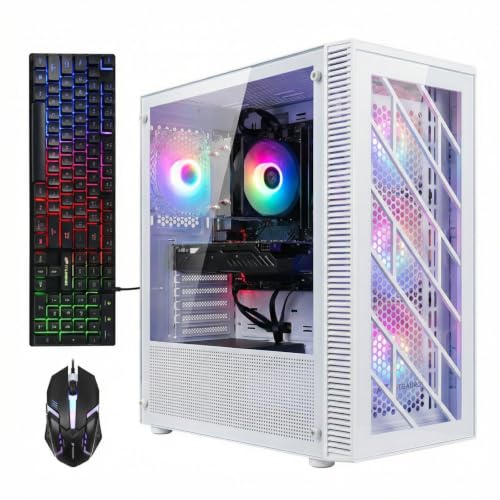
- You prefer a white desktop for a clean setup – STGAubron Core i7 Radeon RX 470 Gaming Desktop – It offers a white chassis with 16GB of RAM for budget-conscious builders.

STGAubron Core i7 GTX 1660 Super Gaming PC
Best for: 1080p gaming and streaming on a budget
- Processor
- Intel Core i7
- Graphics Card
- GeForce GTX 1660 Super 6G
- RAM Capacity
- 16GB
- RAM Type
- DDR4
- Storage Capacity
- 512GB SSD
- Cooling Type
- RGB Fan x 4
This STGAubron desktop pairs an 8th Gen Intel Core i7 processor with a GeForce GTX 1660 Super graphics card. It includes 16GB of DDR4 RAM and a 512GB SSD. The system runs Windows 11 Home and features Wi-Fi 6 connectivity. It is designed for gaming, streaming, and video editing tasks. This configuration offers a balanced setup for users seeking reliable performance in a standard tower form factor.
- Intel Core i7 processor up to 4.1GHz
- GeForce GTX 1660 Super 6GB graphics card
- 16GB DDR4 RAM capacity
- Wi-Fi 6 wireless connectivity
- 512GB SSD storage
- 16GB RAM is lower than the 32GB found in other list options
- 512GB SSD capacity is smaller than the 2TB drive in competing models
- GTX 1660 Super GPU is less powerful than the RTX 3060 Ti in other picks
- You need a capable i7 system for 1080p gaming
- You want Wi-Fi 6 and Bluetooth 5.2 included
- You prefer a pre-built PC with Windows 11 Home
- You require 32GB of RAM for heavy multitasking
- You need massive 2TB storage for large libraries
- You want an RTX 3060 Ti for higher frame rates
Verdict: STGAubron i7 GTX 1660 Super Gaming PC suits players who want solid 1080p performance without paying for higher-tier specs. It is a practical choice for those who prioritize the i7 processor and Wi-Fi 6 over maximum storage or GPU power.
STGAubron Core i7 Radeon RX 470 Gaming Desktop
Best for: Budget 1080p gaming and streaming
- Processor
- Intel Core i7
- Graphics Card
- Radeon RX 470 8G GDDR5
- RAM Capacity
- 16GB
- Storage Capacity
- 512GB SSD
- Wireless Standard
- Wi-Fi 6
- Operating System
- Windows 11 Home 64-bit
This STGAubron desktop pairs an Intel Core i7 processor with an AMD Radeon RX 470 graphics card. It includes 16GB of RAM and a 512GB SSD for fast load times. The system runs Windows 11 Home and features Wi-Fi 6 connectivity. It is designed for 1080p gaming, streaming, and video editing tasks. The white tower case includes RGB lighting and comes with a mouse and keyboard.
- Intel Core i7 processor up to 3.9GHz
- AMD Radeon RX 470 8GB GDDR5 graphics
- 16GB DDR4 RAM for smooth multitasking
- 512GB SSD for quick boot and load speeds
- Wi-Fi 6 and Bluetooth 5.0 wireless support
- RX 470 GPU is older than the RTX 3060 Ti in other picks
- 16GB RAM is lower than the 32GB in other options
- 512GB SSD capacity is smaller than the 2TB in other models
- You want a budget-friendly entry into PC gaming
- You need reliable performance for 1080p titles
- You require Wi-Fi 6 for stable streaming
- You need high-end 4K gaming performance
- You require extensive storage for large libraries
- You want the latest generation graphics cards
Verdict: STGAubron Core i7 RX 470 Gaming PC is a solid entry-level choice for players who prioritize value over raw graphical power. It suits those who want a complete setup with peripherals for casual gaming and content creation.

STGAubron RTX 3060 Ti i7-6700 Gaming PC
Best for: users needing high RAM and storage capacity
- Processor
- Intel Core i7
- Graphics Card
- GeForce RTX 3060 Ti 8G
- RAM Capacity
- 32GB
- RAM Type
- DDR4
- Storage Capacity
- 2TB SSD
- Wireless Standard
- Wi-Fi 6
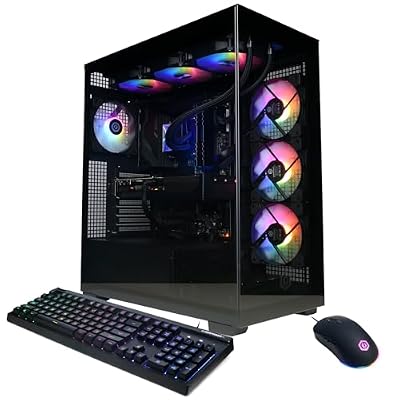
This black STGAubron desktop pairs an Intel Core i7-6700 processor with an RTX 3060 Ti 8G graphics card. It includes 32GB of DDR4 RAM and a 2TB SSD for fast storage. The system runs Windows 11 Home and features Wi-Fi 6. You get a complete setup with RGB peripherals and six fans. It supports 4K UHD output and handles popular games at 60+ FPS.
- Intel Core i7-6700 processor up to 4.0GHz
- GeForce RTX 3060 Ti 8G graphics card
- 32GB DDR4 memory capacity
- 2TB SSD storage space
- Wi-Fi 6 wireless connectivity
- Intel Core i7-6700 is an older 6th generation chip
- Bulky tower with 17.6 inches height
- Includes six RGB fans adding bulk
- You need 32GB of RAM for heavy multitasking
- You want a 2TB SSD for large game libraries
- You prefer a black desktop with Wi-Fi 6
- You require the latest 8th generation or newer processors
- You need a compact desktop under 15 inches tall
- You prioritize a newer graphics card generation
Verdict: STGAubron i7-6700 RTX 3060 Ti Gaming PC fits users who prioritize high RAM and storage capacity over the newest CPU generation. It suits those who need a large black tower with modern wireless standards.
Specifications side by side
| Spec | STGAubron Core i7 GTX 1660 Super Gaming PC | STGAubron Core i7 Radeon RX 470 Gaming Desktop | STGAubron RTX 3060 Ti i7-6700 Gaming PC |
|---|---|---|---|
| Graphics Card | GeForce GTX 1660 Super 6G | Radeon RX 470 8G GDDR5 | GeForce RTX 3060 Ti 8G |
| Processor | Intel Core I7 up to 4.1GHz | Intel Core i7 up to 3.9GHz | Intel Core i7-6700 |
| RAM Capacity | 16GB | 16GB | 32GB |
| RAM Type | DDR4 | – | DDR4 |
| Storage Capacity | 512GB SSD | 512GB SSD | 2TB SSD |
| Cooling Type | RGB Fan x 4 | – | – |
| Wireless Standard | Wi-Fi 6 | Wi-Fi 6 | Wi-Fi 6 |
| Operating System | Windows 11 Home 64-bit | Windows 11 Home 64-bit | Windows 11 Home 64-bit |
| Color | – | White | Black |
| Resolution | 4K UHD | 4K UHD | 4K UHD |
| Platform | PC | PC | PC |
| Storage | 512GB SSD | 512GB SSD | 2TB SSD |
| Use | Streaming, Video Editing, Gaming | Streaming, Video Editing, Gaming | Streaming, Video Editing, Gaming |
| Capture Resolution | 4K | 4K | 4K |
| Video Interface | HDMI | HDMI | HDMI |
| RAM | – | 16GB RAM | 32GB RAM |
| Weight | 22.1 pounds | – | – |
| Dimensions | – | 14.8 × 7.5 × 17.6 inches | – |
| Size | Large | – | 6700/RTX 3060Ti |
| Model | ABR1824 | ABR0122 | ABR0923 |
How to choose the right STGAubron i7 PC
Check your wireless needs
You should verify if your system includes modern connectivity standards. The top pick features Wi-Fi 6, which offers faster and more stable connections for streaming and online gaming. Other models in this list do not explicitly list this feature in their published data. If you rely on a strong wireless signal for low-latency play or high-quality video broadcasts, prioritizing the model with Wi-Fi 6 is a practical decision. Ensure your home network supports this standard to get the most out of the hardware.
Match storage to your library
Storage capacity determines how many games and applications you can keep installed. The best overall option provides 512GB of SSD storage, which is sufficient for a moderate game library and streaming apps. If you have a large collection or need space for video editing projects, look at the model with 2TB of SSD storage. This larger capacity allows you to store more high-resolution files without constantly managing space. Choose the drive size that aligns with your actual usage habits.
Evaluate RAM for multitasking
Random Access Memory affects how smoothly you can run multiple programs at once. Most models in this guide list 16GB of RAM, which is standard for gaming and general use. However, one specific model offers 32GB of RAM. This higher capacity is beneficial if you plan to stream gameplay while playing or edit video files concurrently. Check the RAM specifications carefully before buying. If you only game and browse, 16GB is likely enough. If you multitask heavily, the 32GB option is the better choice.
Consider physical dimensions
The physical size of the tower matters for your desk or entertainment center. One model is described as large and weighs 22.1 pounds. Another model provides specific dimensions, measuring 17.6 inches in height. You should measure your available space before purchasing. A large tower might not fit under a standard desk. Ensure the height and width fit your setup comfortably. Checking these physical specs prevents the frustration of buying a system that does not fit your designated area.
Select your preferred color
Aesthetic preferences are important for how your setup looks. You can choose between a white tower or a black tower based on your personal style. One model is listed as white, while another is black. This choice does not affect performance but impacts how the PC blends with your room decor. If you have a white desk or monitor stand, the white model might look more cohesive. If you prefer a traditional dark look, the black option is suitable. Pick the color that matches your existing gear.
Frequently asked questions
Does the best overall STGAubron i7 PC support 4K output?
Yes, the STGAubron Core i7 GTX 1660 Super Gaming PC supports 4K UHD resolution. It uses an HDMI video interface to connect to your display. This setup allows you to stream content and game at high clarity. The system runs on Windows 11 for a modern computing experience.
What is the RAM configuration in the STGAubron RTX 3060 Ti model?
The STGAubron RTX 3060 Ti i7-6700 Gaming PC includes 32GB of RAM. It uses DDR4 memory type for system operations. This high capacity suits users who need extensive memory for video editing or heavy multitasking alongside gaming.
Is the budget-friendly STGAubron desktop available in a white color?
Yes, the STGAubron Core i7 Radeon RX 470 Gaming Desktop comes in a white color. It is listed as the best budget option for entry-level gaming. The unit measures 7.5 inches in width and 17.6 inches in height, fitting standard desk setups.
Which STGAubron i7 PC has the largest storage capacity?
The STGAubron RTX 3060 Ti i7-6700 Gaming PC offers the largest storage at 2TB SSD. This capacity is ideal for storing large game libraries and video files. The other models in this guide provide 512GB SSD storage instead.
Does the top pick include Wi-Fi 6 connectivity?
Yes, the STGAubron Core i7 GTX 1660 Super Gaming PC features Wi-Fi 6. This standard provides faster and more stable wireless connections for online gaming and streaming. It is a key reason this model is ranked as the best overall choice.
What operating system do these STGAubron gaming PCs run?
All three STGAubron Intel Core i7 gaming PCs listed here run Windows 11. This operating system is standard across the best overall, best budget, and best black options. It ensures compatibility with modern games and creative software.