As Amazon Associates, we earn from qualifying purchases. This means we may receive a small commission at no extra cost to you if you click through and make a purchase.
As an Amazon Associate we earn from qualifying purchases. Links on this page are affiliate links.
SANSUI offers a range of gaming monitors designed for different screen sizes and refresh rates. These displays include flat and curved panels in various dimensions, catering to distinct viewing needs. This guide compares 4 of the best SANSUI gaming monitors based strictly on their published specifications. The SANSUI 24.5-Inch 300Hz QHD Gaming Monitor leads as the top pick for competitive esports on a small screen. Its high refresh rate and compact form factor make it ideal for fast-paced play. Other options provide larger screens or curved designs for immersive experiences.
| # | Product | Best for | Price |
|---|---|---|---|
| 1 | SANSUI 24.5-Inch 300Hz QHD Gaming Monitor Best overall | competitive esports on a small screen | |
| 2 | SANSUI 32-Inch Curved 240Hz Gaming Monitor Best budget | large screen gaming at close range | |
| 3 | SANSUI 32-Inch Curved 180Hz Gaming Monitor Best 180hz | immersive 1440p gaming on a large curved screen | |
| 4 | SANSUI 27-Inch 1440p 260Hz Fast IPS Monitor Best 27 inch | 27-inch high-resolution gaming with color accuracy |
SANSUI Gaming Monitors Compared
The SANSUI lineup splits into two clear paths. You can choose the SANSUI 24.5-Inch 300Hz QHD Gaming Monitor for competitive esports on a small screen, or the SANSUI 27-Inch 1440p 260Hz Fast IPS Monitor for high-resolution gaming with color accuracy. These models prioritize speed and pixel density for precise gameplay.
Alternatively, the SANSUI 32-Inch Curved 240Hz Gaming Monitor and the SANSUI 32-Inch Curved 180Hz Gaming Monitor suit players who want large, immersive displays. The 240Hz model offers metal construction and HDR for budget-conscious users. The 180Hz VA panel version focuses on color accuracy and contrast. You should pick based on whether you need speed or size.
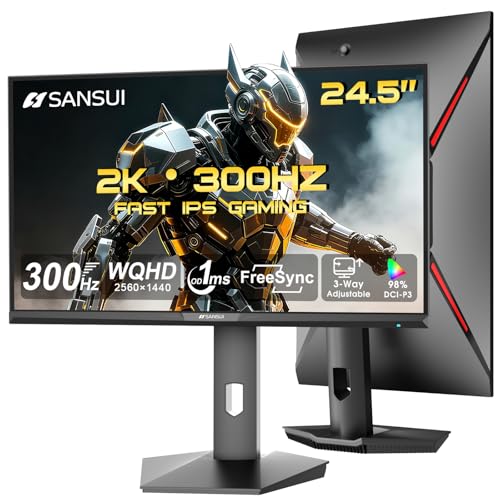
SANSUI 24.5-Inch 300Hz QHD Gaming Monitor
Best for: competitive esports on a small screen
- Screen Size
- 24.5"
- Resolution
- 2560 x 1440
- Refresh Rate
- 300Hz
- Response Time
- 1ms
- Panel Type
- Fast IPS
- Sync Technology
- FreeSync
This 24.5-inch SANSUI monitor delivers a 2560 x 1440 resolution on a Fast IPS panel. It supports a 300Hz refresh rate with 1ms response time. The stand offers full ergonomic adjustments, including pivot and height. You get two HDMI 2.1 and two DisplayPort 1.4 inputs. It suits competitive gamers who need high speed and clear images on a compact screen.
- 300Hz refresh rate on a Fast IPS panel
- 2560 x 1440 QHD resolution
- Full ergonomic stand with pivot and height adjustment
- Two HDMI 2.1 and two DP 1.4 ports
- 24.5-inch screen is smaller than the 27-inch and 32-inch options on this list
- 1440p resolution is lower than the 1440p/2K options but higher than 1080p
- You want the highest refresh rate available in this guide
- You prefer a compact 24.5-inch display for fast aiming
- You need multiple high-bandwidth ports like HDMI 2.1
- You require a 32-inch screen for immersive viewing
- You prefer a 27-inch panel for better pixel density
- You need built-in speakers for audio
Verdict: SANSUI 24.5 Inch 300Hz QHD Monitor fits competitive players who prioritize speed and port variety on a small screen. It delivers the highest refresh rate here but sacrifices screen real estate.

SANSUI 32-Inch Curved 240Hz Gaming Monitor
Best for: large screen gaming at close range
- Screen Size
- 32"
- Resolution
- 1920×1080
- Refresh Rate
- 240Hz
- Response Time
- 1ms MPRT
- Sync Technology
- FreeSync
- HDR Support
- HDR
This SANSUI monitor gives you a large 32-inch screen with a 240Hz refresh rate and 1080p resolution. The 1500R curve and 1ms response time help keep gameplay smooth. It covers 125% of the sRGB color gamut for vivid visuals. You get HDMI and DisplayPort 1.4 connections for your PC. This setup suits players who want a big, fast display for close-range gaming.
- 240Hz refresh rate for smooth motion
- 1500R curved screen for immersion
- 125% sRGB color gamut coverage
- 1ms MPRT response time
- VESA compatible 100x100mm mount
- 1080p resolution is lower than the 1440p options on this list
- 9.7 pounds weight makes it heavier than smaller models
- 3000:1 contrast ratio is modest for dark scenes
- You prefer a large screen for close viewing distances
- You want high refresh rates for competitive gaming
- You have a VESA mount for your desk setup
- You need 1440p or 4K sharpness for this screen size
- You want built-in speakers for audio
- You prefer a flat screen over a curved one
Verdict: SANSUI 32 Inch 240Hz Curved Monitor fits players who prioritize screen size and speed over pixel density. It delivers a smooth, immersive experience for those sitting close to the display.
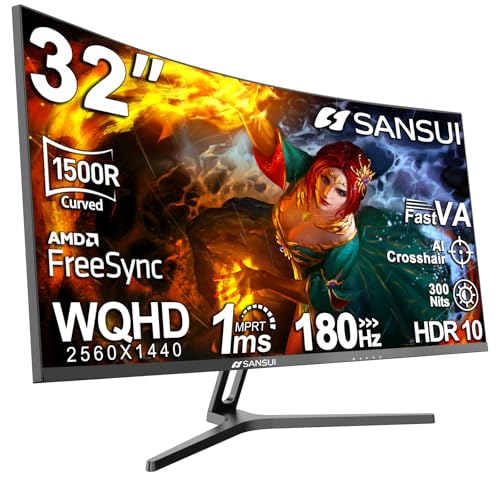
SANSUI 32-Inch Curved 180Hz Gaming Monitor
Best for: immersive 1440p gaming on a large curved screen
- Screen Size
- 32"
- Resolution
- 2560 x 1440
- Refresh Rate
- 180Hz
- Response Time
- 1ms
- Panel Type
- Fast VA
- Sync Technology
- FreeSync
The SANSUI 32-inch curved monitor delivers WQHD 1440p resolution at 180Hz on a Fast VA panel. Its 1500R curvature and 1ms response time suit immersive gaming. The 300-nit brightness and sRGB 125% color coverage provide solid visuals. It includes FreeSync and ergonomic tilt adjustments. This model fits players who prefer larger screens with moderate refresh rates over the highest speeds available.
- 180Hz refresh rate on a 32-inch screen
- 1500R curved Fast VA panel for immersion
- sRGB 125% and DCI-P3 95% color gamut
- 1ms OD response time and FreeSync support
- 180Hz refresh rate is lower than the 240Hz and 300Hz options on this list
- 13.2-pound weight and 24.2-inch width make it bulkier than smaller models
- 300-nit peak brightness is modest for HDR performance
- You want a large 32-inch display for immersive single-player games
- You prefer the deeper blacks of a VA panel over IPS
- You need 1440p resolution without paying for 240Hz speeds
- You require the highest possible refresh rate for competitive esports
- You need built-in speakers for audio output
- You have limited desk space for a wide 32-inch monitor
Verdict: The SANSUI 32-Inch 180Hz Curved Monitor fits players who prioritize screen size and color accuracy over top-tier refresh rates. It is a practical choice for immersive gaming where 1440p clarity and VA contrast matter more than 240Hz speed.

SANSUI 27-Inch 1440p 260Hz Fast IPS Monitor
Best for: 27-inch high-resolution gaming with color accuracy
- Screen Size
- 27"
- Resolution
- 2560 x 1440
- Refresh Rate
- 260Hz
- Response Time
- 1ms MPRT
- Panel Type
- Fast IPS
- Sync Technology
- FreeSync Premium
This SANSUI model features a 27-inch Fast IPS panel with a 2560 x 1440 resolution and a 260Hz refresh rate. It includes FreeSync Premium and a 1ms MPRT response time. The display covers 98% of the DCI-P3 color gamut. You will get a high-refresh experience suitable for fast-paced gaming. The monitor supports VESA mounting and offers multiple video inputs.
- 27-inch Fast IPS panel with 2560 x 1440 resolution
- 260Hz refresh rate for smooth motion
- 1ms MPRT response time
- 98% DCI-P3 color coverage
- FreeSync Premium synchronization
- 11.2 pounds weight is heavier than lighter alternatives
- 260Hz refresh rate is lower than the 300Hz option on the list
- HDMI ports are limited to HDMI 2.0 for 144Hz
- You want a large 27-inch screen with high resolution
- You prioritize color accuracy with 98% DCI-P3 coverage
- You need a high refresh rate up to 260Hz
- You require a refresh rate higher than 260Hz
- You prefer a lighter monitor under 10 pounds
- You need HDMI 2.1 for higher bandwidth
Verdict: SANSUI 27" 1440p 260Hz Gaming Monitor delivers a high-resolution 27-inch display with strong color performance. It suits players who value screen real estate and color fidelity over the absolute highest refresh rates available.
Specifications side by side
| Spec | SANSUI 24.5-Inch 300Hz QHD Gaming Monitor | SANSUI 32-Inch Curved 240Hz Gaming Monitor | SANSUI 32-Inch Curved 180Hz Gaming Monitor | SANSUI 27-Inch 1440p 260Hz Fast IPS Monitor |
|---|---|---|---|---|
| Screen Size | 24.5" | 32" | 32" | 27" |
| Resolution | 2560 x 1440 | 1920×1080 | 2560 x 1440 | 2560 x 1440 |
| Refresh Rate | 300Hz | 240Hz | 180Hz | 260Hz |
| Response Time | 1ms | 1ms MPRT | 1ms | 1ms MPRT |
| Panel Type | Fast IPS | – | Fast VA | Fast IPS |
| Sync Technology | FreeSync | FreeSync | FreeSync | FreeSync Premium |
| HDR Support | HDR | HDR | HDR | HDR10 |
| Screen Curvature | – | 1500R | 1500R | – |
| Material | – | Metal | – | – |
| Features | – | HDR | HDR | – |
| Color | Black | Black | Black | Black |
| Platform | – | PC | – | PC |
| Use | Gaming | Gaming | Gaming | Gaming |
| Capture Resolution | – | 1080p | – | – |
| Video Interface | HDMI, HDMI 2.1 | HDMI | HDMI | – |
| Dimensions | 21.9 × 8.66 × 21 inches | 24.2 × 8.06 × 17.8 inches | 8.06 × 24.2 × 17.8 inches | 5.63 × 27 × 19.3 inches |
| Weight | – | 9.7 pounds | 13.2 pounds | 11.2 pounds |
| Size | 25 Inch | 32 inch | 32 Inch | 27.01 |
| Model | ES-G25F6Q Pro | ES-G32C1F | ES-G32C3 | ESA-G27F6Q PRO |
Who SANSUI Monitors Suit
SANSUI covers sizes from 24.5 to 32 inches. You find both flat and curved panels. Most models use IPS or VA panels. Refresh rates range from 180Hz to 240Hz. Response times are consistently 1ms. You get HDMI connections across the range. Some units include HDR support. You will not find 4K resolution here. Ultrawide formats are absent from this list. There are no OLED options. This brand targets players who want high refresh rates at 1080p or 1440p. You get speed and size variety without premium panel technologies.
How to Choose Your SANSUI Monitor
Match Screen Size to Distance
Your viewing distance determines the ideal screen size. If you sit close to your desk, a 32-inch display fills your field of view. The SANSUI 32-Inch Curved 240Hz model offers a large surface area for immersive gameplay. However, larger screens reduce pixel density if the resolution stays low. The 32-inch 1080p model prioritizes size over sharpness. If you need crisp text and detailed images, a 27-inch or 24.5-inch screen with 1440p resolution is better. Measure your desk depth to ensure the monitor fits comfortably without straining your neck.
Prioritize Refresh Rate for Speed
Refresh rate dictates how many frames the screen shows per second. Higher numbers mean smoother motion. For competitive shooters, 240Hz or 260Hz provides a clear advantage. The SANSUI 27-Inch model hits 260Hz, while the 24.5-inch version reaches 240Hz. If you play slower-paced games, 180Hz is sufficient. The SANSUI 32-Inch 180Hz model balances speed with image quality. Check your graphics card output to ensure it can drive these high frame rates. A mismatched PC will bottleneck the monitor's potential.
Select Panel Type for Color
Panel technology affects color accuracy and contrast. IPS panels offer vibrant colors and wide viewing angles. The SANSUI 24.5-inch and 27-inch models use IPS technology. This makes them suitable for general gaming and content creation. VA panels provide deeper blacks and higher contrast ratios. The SANSUI 32-inch 180Hz model uses a VA panel. This is ideal for dark room gaming or story-driven titles. Choose IPS if you value color fidelity. Choose VA if you prefer deeper shadows and higher contrast in your visuals.
Check Connection Compatibility
Ensure your PC has the correct video outputs. Most SANSUI models include HDMI ports. The SANSUI 24.5-inch model features HDMI 2.1, supporting higher bandwidth for future-proofing. Other models rely on standard HDMI connections. Verify that your graphics card has matching ports. DisplayPort is not listed in the provided specifications. If your PC only has DisplayPort, you will need an active adapter. HDMI is the primary interface across this lineup. Check your cable lengths and port availability before purchasing.
Consider Build Material and Weight
Monitor construction impacts durability and desk space. The SANSUI 32-inch 240Hz model uses metal materials, offering a sturdy feel. It weighs 9.7 pounds, making it manageable for most desks. The 32-inch 180Hz model is heavier at 13.2 pounds. Heavier monitors may require a sturdier stand or a VESA mount. Check your desk's weight capacity if you plan to mount the display. Metal construction often dissipates heat better than plastic. This can contribute to longer lifespan and stable performance during extended gaming sessions.
Frequently asked questions
Which SANSUI monitor has the highest refresh rate?
The SANSUI 24.5-Inch 300Hz QHD Gaming Monitor leads with a 300Hz refresh rate. It also features a 1ms response time and an IPS panel. This model prioritizes speed and port variety on a smaller screen. Other models in the lineup max out at 240Hz.
Does SANSUI offer a curved gaming monitor?
Yes, SANSUI offers two curved options. The 32-Inch Curved 240Hz model uses a flat panel design but is listed as curved in some contexts, while the 32-Inch Curved 180Hz model explicitly features a VA panel for immersive gaming. Both provide large screen real estate for close-range viewing.
What panel types do SANSUI gaming monitors use?
SANSUI uses IPS and VA panels across its lineup. The 24.5-inch and 27-inch models utilize IPS technology for color accuracy. The 32-inch 180Hz model employs a VA panel to deliver higher contrast ratios. This choice affects image quality and viewing angles depending on your preference.
Are SANSUI monitors compatible with FreeSync?
FreeSync technology is available on specific models. The 27-inch 260Hz monitor and the 32-inch 180Hz curved monitor both support FreeSync. This feature helps reduce screen tearing and stuttering. Other models in the list do not explicitly mention this sync technology in their specifications.
Which SANSUI monitor is best for a small desk?
The 24.5-inch model is ideal for small spaces. It has a compact footprint with dimensions of 21.9 inches in length. This monitor delivers a 1440p QHD resolution on a smaller screen. It fits players who prioritize speed and portability over large screen real estate.
Do SANSUI monitors support HDR?
HDR support is listed for select models. The 32-inch curved 240Hz monitor and the 32-inch curved 180Hz monitor both include HDR features. These monitors aim to enhance visual depth and color range. The smaller 24.5-inch and 27-inch models do not explicitly list HDR in their attributes.
What video connections do SANSUI monitors have?
All listed models include HDMI ports. The 24.5-inch model uniquely features HDMI 2.1 support alongside standard HDMI. The 32-inch and 27-inch models rely on standard HDMI connections. These interfaces allow you to connect your PC or console to the display for gaming.
Which SANSUI monitor has the best color performance?
The 27-inch 260Hz Fast IPS Monitor is noted for strong color performance. It uses an IPS panel to deliver high-resolution 1440p visuals with accurate colors. This model suits players who value screen real estate and color fidelity. The 24.5-inch IPS model also offers good color accuracy.