As Amazon Associates, we earn from qualifying purchases. This means we may receive a small commission at no extra cost to you if you click through and make a purchase.
As an Amazon Associate we earn from qualifying purchases. Links on this page are affiliate links.
You are looking for the best msi gaming monitors to match your display needs. Msi offers a range of sizes from 27 to 32 inches, featuring OLED and IPS panels with refresh rates up to 320Hz. We compared 4 models based strictly on their published specifications. The MSI 27-Inch 240Hz QD-OLED Monitor leads as the top pick for 1440p gamers valuing color and speed. This selection highlights options for various resolutions and response times.
| # | Product | Best for | Price |
|---|---|---|---|
| 1 | MSI 27-Inch 240Hz QD-OLED Monitor Best overall | 1440p gamers valuing color and speed | |
| 2 | MSI 27-Inch 200Hz Rapid IPS Gaming Monitor Best budget | 1440p gamers seeking high refresh rates | |
| 3 | MSI 32-Inch 4K 320Hz Dual-Mode Monitor Also great | 4K gaming with high refresh rates | |
| 4 | MSI 32-Inch 4K QD-OLED Monitor Best 165hz | 4K OLED immersion and color accuracy |
The Msi Lineup At A Glance
The MAG 272QP QD-OLED X24 stands out as the best overall choice for 1440p gamers who prioritize color fidelity and speed. Its 240Hz refresh rate and 0.03ms response time on a 27-inch OLED panel deliver excellent visual performance in a compact frame. This model suits players who value visual fidelity over higher resolutions.
For those seeking high refresh rates on a budget, the MAG 274QF E20 offers 200Hz performance with FreeSync and G-SYNC support. If you need 4K clarity, the MAG 321UP E14 provides 320Hz speeds in a sturdy, adjustable 32-inch frame. Alternatively, the MAG 321UP QD-OLED delivers 4K OLED immersion with 165Hz refresh rates for those valuing color precision over maximum speed.

MSI 27-Inch 240Hz QD-OLED Monitor
Best for: 1440p gamers valuing color and speed
- Screen Size
- 27-Inch
- Resolution
- 2560 x 1440
- Refresh Rate
- 240Hz
- Response Time
- 0.03ms (GtG)
- Panel Type
- QD-OLED
- Sync Technology
- Adaptive-Sync
The MSI MAG 272QP QD-OLED X24 is a 27-inch gaming monitor with a WQHD resolution and 240Hz refresh rate. It uses a Quantum Dot OLED panel for 10-bit color and 0.03ms response time. This display suits players who want high image fidelity and fast motion clarity. The 240Hz rate and OLED tech provide a smooth visual experience for competitive and immersive gaming sessions.
- 240Hz refresh rate for smooth motion
- 0.03ms response time for fast reactions
- QD-OLED panel with 10-bit color accuracy
- 400 nits peak brightness
- HDMI 2.1 and DisplayPort 1.4a connectivity
- 240Hz refresh rate is lower than the 320Hz on the MAG 321UPD E14
- 27-inch screen size is smaller than the 32-inch options on this list
- 19.9 pounds weight is heavier than typical 27-inch LCD monitors
- You prioritize image quality and color accuracy over maximum refresh rates
- You want a 27-inch display for a moderate desk setup
- You play games where fast response times matter
- You need a 4K resolution for detailed visuals
- You prefer a 32-inch screen for a larger viewing area
- You want the highest possible refresh rate available
Verdict: MSI 27-inch QD-OLED Gaming Monitor delivers excellent color and speed for 1440p gamers. It fits players who value visual fidelity and a compact 27-inch footprint over higher resolutions or refresh rates.

MSI 27-Inch 200Hz Rapid IPS Gaming Monitor
Best for: 1440p gamers seeking high refresh rates
- Screen Size
- 27-inch
- Resolution
- 2560 x 1440
- Refresh Rate
- 200Hz
- Response Time
- 0.5ms
- Panel Type
- Rapid IPS
- Sync Technology
- FreeSync Premium, G-SYNC Compatible
The Msi MAG 274QF E20 is a 27-inch gaming monitor with a 2560 x 1440 resolution and a 200Hz refresh rate. It uses a Rapid IPS panel for a 0.5ms response time and supports AMD FreeSync Premium and NVIDIA G-SYNC Compatible. AI Vision enhances dark details and brightness. This monitor suits players who want smooth motion and clear images without the premium cost of OLED or 4K displays.
- 200Hz refresh rate for smoother gameplay
- 0.5ms response time on Rapid IPS panel
- Supports FreeSync Premium and G-SYNC Compatible
- AI Vision technology for better dark area visibility
- 200Hz refresh rate is lower than the 320Hz on the MAG 321UPD E14
- 1440p resolution is lower than the 4K UHD on the MAG 321UPD E14 and MAG 321UP QD-OLED
- Standard IPS panel lacks the QD-OLED technology found in the MAG 272QP and MAG 321UP
- You want a high refresh rate at a budget-friendly price point
- You prefer 1440p resolution for a balance of clarity and performance
- You use both AMD and NVIDIA graphics cards and need broad sync support
- You require 4K resolution for maximum visual fidelity
- You want the fastest possible refresh rate above 200Hz
- You prefer the superior color and contrast of QD-OLED panels
Verdict: Msi MAG 274QF E20 27-inch WQHD Monitor offers solid 1440p performance for gamers who prioritize smooth motion over the highest resolution or OLED contrast.
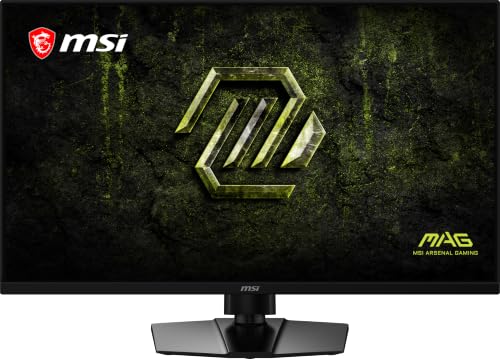
MSI 32-Inch 4K 320Hz Dual-Mode Monitor
Best for: 4K gaming with high refresh rates
- Screen Size
- 32"
- Resolution
- 3840 x 2160
- Refresh Rate
- 320Hz
- Response Time
- 0.5ms GtG
- Panel Type
- IPS
- Sync Technology
- AMD FreeSync Premium
The Msi MAG 321UPD E14 is a 32-inch IPS display delivering 4K UHD resolution and a 320Hz refresh rate. It features AMD FreeSync Premium and a 0.5ms response time for smooth visuals. The dual mode allows switching between resolutions. It includes a height-adjustable stand and HDMI connectivity, making it suitable for high-speed gaming.
- 320Hz refresh rate for high frame rates
- 4K UHD resolution for sharp detail
- IPS panel for accurate color contrast
- Dual mode for resolution switching
- Height adjustable stand for ergonomic setup
- Heavier build at 26.4 pounds compared to lighter alternatives
- Larger physical footprint with a 28.1-inch width
- Lower refresh rate than the 320Hz+ options in this guide
- You want 4K resolution with high refresh rates
- You need a height-adjustable stand for ergonomic viewing
- You play fast-paced games requiring low response times
- You prefer a lighter or more compact monitor
- You need OLED technology for deeper blacks
- You only require 1080p or 1440p resolution
Verdict: Msi 32-inch 4K 320Hz Gaming Monitor offers high refresh rates in a 4K package, fitting gamers who prioritize resolution and speed in a sturdy, adjustable frame.

MSI 32-Inch 4K QD-OLED Monitor
Best for: 4K OLED immersion and color accuracy
- Screen Size
- 32"
- Resolution
- 3840×2160
- Refresh Rate
- 165Hz
- Response Time
- 0.03ms GtG
- Panel Type
- QD-OLED
- Sync Technology
- AMD FreeSync Premium Pro
This 32-inch MSI monitor delivers 4K UHD resolution on a QD-OLED panel. It features a 165Hz refresh rate and a 0.03ms response time for smooth visuals. The display supports VESA DisplayHDR True Black 400 and includes AMD FreeSync Premium Pro. An adjustable stand allows for ergonomic positioning. It suits users seeking high image fidelity and fast performance in a large format.
- 3840×2160 QD-OLED panel for sharp detail
- 165Hz refresh rate with 0.03ms GtG response
- VESA DisplayHDR True Black 400 certification
- Height-adjustable stand for ergonomic setup
- 165Hz refresh rate is lower than the 200Hz and 320Hz options on this list
- 25-pound weight makes it bulkier than smaller 27-inch alternatives
- 400 nits HDR peak is lower than typical higher-end HDR standards
- You want a large 32-inch screen for immersive gaming
- You prioritize color accuracy and deep blacks in 4K
- You need an adjustable stand for comfortable viewing angles
- You require a refresh rate above 165Hz for competitive play
- You prefer a lighter monitor that is easier to mount
- You need higher HDR peak brightness for bright rooms
Verdict: MSI 32-Inch 4K QD-OLED Monitor fits players who value large-screen immersion and color precision over maximum speed. It is the right choice for those who want 4K clarity with OLED benefits without needing the highest refresh rates.
Specifications side by side
| Spec | MSI 27-Inch 240Hz QD-OLED Monitor | MSI 27-Inch 200Hz Rapid IPS Gaming Monitor | MSI 32-Inch 4K 320Hz Dual-Mode Monitor | MSI 32-Inch 4K QD-OLED Monitor |
|---|---|---|---|---|
| Screen Size | 27-Inch | 27-inch | 32" | 32" |
| Resolution | 2560 x 1440 | 2560 x 1440 | 3840 x 2160 | 3840×2160 |
| Refresh Rate | 240Hz | 200Hz | 320Hz | 165Hz |
| Response Time | 0.03ms (GtG) | 0.5ms | 0.5ms GtG | 0.03ms GtG |
| Panel Type | QD-OLED | Rapid IPS | IPS | QD-OLED |
| Sync Technology | Adaptive-Sync | FreeSync Premium, G-SYNC Compatible | AMD FreeSync Premium | AMD FreeSync Premium Pro |
| HDR Support | – | HDR Ready | – | VESA DisplayHDR True Black 400 |
| Features | – | HDR | – | – |
| Color | Black | Black | Black | Black |
| Height Adjustability | Height Adjustable | – | Height Adjustable | Height Adjustable |
| Use | Gaming | Gaming | Gaming | – |
| Video Interface | HDMI 2.1 | HDMI | HDMI | HDMI, HDMI 2.1 |
| Dimensions | 24 × 9.5 × 20.9 inches | 9.8 × 24.1 × 17.2 inches | 10.3 × 28.1 × 22.2 inches | 9.53 × 28.3 × 19 inches |
| Weight | 19.9 pounds | 16.3 pounds | 26.4 pounds | 25 pounds |
| Size | 24.1" x 24.1" x 2.2" | 14.3" x 24.2" x 2.4" | – | – |
| Model | MAG 272QP QD-OLED X24 | MAG 274QF E20 | MAG 321UPD E14 | MAG 321UP QD-OLED |
Who Msi Monitors Suit
Msi covers two main sizes: 27 and 32 inches. You can choose between OLED and Rapid IPS panels. OLED models offer deep contrast and fast response times. IPS models provide high refresh rates for smooth motion. The range includes 1440p and 4K resolutions. You get height-adjustable stands on most models. VESA mounts are not listed. None of these monitors feature curved screens. You also will not find smaller 24-inch or larger 40-inch options here. This selection suits players who want either compact speed or large immersion. It fits those who prioritize panel technology over size variety.
How to Choose the Right MSI Monitor
Match Resolution to Screen Size
You should align your resolution preference with the physical size of the display. The MAG 272QP QD-OLED X24 offers a 27-inch panel with 1440p QHD resolution. This combination provides sharp detail without requiring excessive GPU power. Larger 32-inch models like the MAG 321UPD E14 feature 4K UHD resolution. Higher pixel density on bigger screens ensures crisp text and images. If you prioritize visual fidelity over raw speed, a 4K panel on a 32-inch frame is a solid choice for immersive gaming experiences.
Prioritize Refresh Rate for Speed
Your competitive advantage often depends on how fast the screen updates. The MAG 272QP QD-OLED X24 delivers a 240Hz refresh rate, ideal for fast-paced shooters. The MAG 321UPD E14 pushes this further with 320Hz at 4K resolution. Higher refresh rates reduce motion blur and make tracking targets easier. If you play competitive titles, look for models with 200Hz or higher. The MAG 274QF E20 offers 200Hz on an IPS panel, balancing smooth motion with a more budget-friendly approach for 1440p gamers.
Consider Panel Technology Differences
Panel type significantly impacts contrast and color accuracy. OLED panels, found in the MAG 272QP QD-OLED X24 and MAG 321UP QD-OLED, offer infinite contrast ratios. This means deeper blacks and more vibrant colors. The response time on these OLED models is 0.03ms, which minimizes ghosting. In contrast, the MAG 274QF E20 uses a Rapid IPS panel. This technology provides high refresh rates but with less contrast than OLED. Choose OLED for visual immersion and IPS for reliable high-speed performance.
Check Ergonomic Adjustability Needs
Comfort during long sessions depends on how much you can adjust the monitor. The MAG 272QP QD-OLED X24 and MAG 321UP QD-OLED both feature height adjustability. This allows you to position the screen at eye level to reduce neck strain. The MAG 274QF E20 does not list height adjustability in its attributes. If you use a standing desk or need precise vertical positioning, prioritize models with adjustable stands. This feature ensures you maintain a healthy posture while gaming or working.
Verify Connectivity Options
Ensure your console or PC can utilize the monitor's full capabilities. The MAG 272QP QD-OLED X24 includes HDMI 2.1, which supports high bandwidth for 4K high refresh rates. The MAG 321UP QD-OLED also lists HDMI 2.1 alongside standard HDMI. Other models like the MAG 274QF E20 and MAG 321UPD E14 list HDMI without specifying the version. HDMI 2.1 is essential for next-gen console features like variable refresh rate at high resolutions. Check your source device's output capabilities before purchasing to avoid bottlenecks.
Frequently asked questions
Which MSI monitor is best for 1440p gaming with high color fidelity?
The MAG 272QP QD-OLED X24 is the top choice for this use case. It features a 27-inch OLED panel with 1440p QHD resolution. The 240Hz refresh rate and 0.03ms response time ensure smooth motion and sharp visuals. This model fits players who value visual fidelity in a compact footprint.
What is the best budget MSI gaming monitor for high refresh rates?
The MAG 274QF E20 offers solid 1440p performance for budget-conscious gamers. It uses a Rapid IPS panel with a 200Hz refresh rate and 0.5ms response time. This monitor supports both FreeSync and G-SYNC for smooth motion. It prioritizes speed over the highest resolution or OLED contrast levels.
Can I get a 4K gaming monitor with a high refresh rate from MSI?
Yes, the MAG 321UPD E14 delivers 4K UHD resolution at 320Hz. It features a 32-inch screen with a sturdy, adjustable frame. This dual-mode monitor is ideal for gamers who prioritize both resolution and speed. It includes FreeSync support to reduce screen tearing during intense gameplay sessions.
Which MSI monitor provides the best 4K OLED experience?
The MAG 321UP QD-OLED is designed for 4K OLED immersion and color accuracy. It features a 32-inch QD-OLED panel with 4K UHD resolution. The 165Hz refresh rate and 0.03ms response time balance speed with visual precision. This model is suitable for those who want large-screen clarity without needing the highest refresh rates.
Do these MSI monitors support height adjustment?
Several models in this lineup include height adjustability for better ergonomic positioning. The MAG 272QP QD-OLED X24, MAG 321UPD E14, and MAG 321UP QD-OLED all feature height-adjustable stands. This allows you to customize the viewing angle and distance. The MAG 274QF E20 does not list this feature in its specifications.
What video interfaces are available on these MSI gaming monitors?
Most models utilize HDMI connections for video input. The MAG 272QP QD-OLED X24 includes HDMI 2.1 ports for high-bandwidth signal transmission. The MAG 321UP QD-OLED also lists HDMI and HDMI 2.1 options. The other models specify HDMI support. Ensure your graphics card matches the interface version for optimal performance.
How heavy are these MSI monitors and what are their dimensions?
The weights range from 16.3 to 26.4 pounds depending on the model. The MAG 274QF E20 is the lightest at 16.3 pounds. The MAG 321UPD E14 is the heaviest at 26.4 pounds. Screen widths vary from 9.5 inches to 28.3 inches. These dimensions help you determine if the monitor fits your desk space comfortably.

