As Amazon Associates, we earn from qualifying purchases. This means we may receive a small commission at no extra cost to you if you click through and make a purchase.
As an Amazon Associate we earn from qualifying purchases. Links on this page are affiliate links.
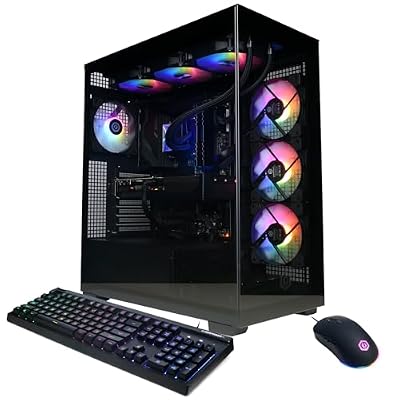
You need reliable hardware for modern titles. These are the best KOTIN gaming PCs, ranked by their published specifications. KOTIN offers compact black towers designed for gaming and streaming. The top pick is the KOTIN Ryzen 7 8700F RTX 5060 Ti Gaming PC, which leads because it balances 1440p performance with budget-friendly specs like DDR5 RAM and WiFi 7. We compared 3 models in this guide. Each ranking reflects the raw data on the listings, focusing on processors, graphics cards, and cooling systems to help you choose the right machine.
| # | Product | Best for | Price |
|---|---|---|---|
| 1 | KOTIN Ryzen 7 8700F RTX 5060 Ti Gaming PC Best overall | 1080p and 1440p gaming on a budget | |
| 2 | KOTIN RTX 5070 Ryzen 7 9700X Gaming PC Best budget | Users wanting an integrated system monitor | |
| 3 | KOTIN Ryzen 7 9800X3D RTX 5070 Ti Gaming PC Also great | high-FPS esports and 1440p gaming |
KOTIN Gaming PC Lineup Overview
The KOTIN Ryzen 7 8700F RTX 5060 Ti Gaming PC targets budget gamers seeking solid 1440p performance. It features 16GB of DDR5 RAM and a 1TB SSD. This model suits users who prioritize modern connectivity like WiFi 7 without paying for higher-end graphics cards. It offers clear system monitoring for those who value transparency in their build.
The KOTIN RTX 5070 Ryzen 7 9700X Gaming PC includes 32GB of DDR5 RAM and liquid cooling. It fits users who want an integrated system monitor and high-speed memory for creative tasks. The KOTIN Ryzen 7 9800X3D RTX 5070 Ti Gaming PC rounds out the list with a specialized processor and a built-in smart display. This option is ideal for high-FPS esports and sustained gaming sessions.

KOTIN Ryzen 7 8700F RTX 5060 Ti Gaming PC
Best for: 1080p and 1440p gaming on a budget
- Graphics Card
- GeForce RTX 5060 Ti 8GB
- Processor
- AMD Ryzen 7 8700F
- RAM Capacity
- 16GB
- RAM Type
- DDR5
- Storage Capacity
- 1TB PCIe Gen4 NVMe SSD
- Cooling Type
- Air cooler with 6 copper heat pipes
This KOTIN desktop pairs an AMD Ryzen 7 8700F processor with an NVIDIA GeForce RTX 5060 Ti 8GB graphics card. It includes 16GB of DDR5 RAM and a 1TB PCIe Gen4 NVMe SSD for fast storage. The system supports WiFi 7 and features a 650W 80 PLUS Gold power supply. It is designed for 1080p and 1440p gaming, streaming, and creative workloads.
- Ryzen 7 8700F processor with RTX 5060 Ti 8GB GPU
- 16GB DDR5 RAM and 1TB Gen4 NVMe SSD
- WiFi 7 connectivity and 650W 80 PLUS Gold PSU
- Digital temperature display and ARGB cooling fans
- 16GB RAM capacity is lower than the 32GB found in other KOTIN models on this list
- RTX 5060 Ti 8GB GPU offers less VRAM than the RTX 5070 Ti 16GB in competing options
- 1TB SSD storage is smaller than the 1TB+ capacity in higher-tier builds
- You want a prebuilt PC for 1080p and 1440p gaming
- You need WiFi 7 for low-latency online play
- You prefer a system with a digital temperature display
- You require 32GB of RAM for heavy multitasking
- You need an RTX 5070 Ti or higher for ray tracing
- You prefer a larger storage capacity than 1TB
Verdict: KOTIN Ryzen 7 8700F RTX 5060 Ti Gaming PC suits gamers who want solid 1440p performance without the cost of higher-end GPUs. It fits users who value modern connectivity like WiFi 7 and clear system monitoring.

KOTIN RTX 5070 Ryzen 7 9700X Gaming PC
Best for: Users wanting an integrated system monitor
- Graphics Card
- RTX 5070 12GB GDDR7
- Processor
- AMD Ryzen 7 9700X
- RAM Capacity
- 32GB
- RAM Type
- DDR5
- Storage Capacity
- 1TB PCIe 4.0 NVMe SSD
- Cooling Type
- 360mm AIO liquid cooler
This KOTIN desktop pairs an AMD Ryzen 7 9700X processor with an NVIDIA GeForce RTX 5070 12GB graphics card. It includes 32GB of DDR5 6000MHz memory and a 1TB NVMe SSD for fast load times. The system features a 360mm AIO liquid cooler and a built-in 11.3-inch smart display. It is designed for 1440p and 4K gaming, streaming, and creative workloads.
- RTX 5070 12GB GDDR7 graphics card
- AMD Ryzen 7 9700X processor
- 32GB DDR5 6000MHz memory
- 11.3-inch built-in smart display
- 360mm AIO liquid cooling system
- 12GB VRAM on the graphics card
- 1TB storage capacity
- 30-pound weight
- You want a built-in display for system monitoring
- You need 32GB of RAM for multitasking
- You prefer liquid cooling for lower temperatures
- You require 16GB of VRAM for the GPU
- You need more than 1TB of storage
- You prefer a lighter desktop under 25 pounds
Verdict: KOTIN RTX 5070 Ryzen 7 Gaming PC fits users who value the convenience of an integrated monitor and high-speed DDR5 memory for modern gaming and creative tasks.
KOTIN Ryzen 7 9800X3D RTX 5070 Ti Gaming PC
Best for: high-FPS esports and 1440p gaming
- Graphics Card
- RTX 5070 Ti 16GB
- Processor
- Ryzen 7 9800X3D
- RAM Capacity
- 32GB
- RAM Type
- DDR5
- Storage Capacity
- 1TB PCIe 4.0 NVMe SSD
- Cooling Type
- 360mm Liquid Cooler
This KOTIN desktop pairs the Ryzen 7 9800X3D processor with an RTX 5070 Ti 16GB graphics card. You get 32GB of DDR5 RAM and a 1TB SSD for fast performance. The 11.3-inch smart display shows real-time system stats. A 360mm liquid cooler keeps temperatures low. It includes WiFi 7 and Bluetooth for easy connectivity. This setup suits players seeking high frame rates and stable performance in modern titles.
- Ryzen 7 9800X3D with 96MB L3 cache for improved frame-rate stability
- RTX 5070 Ti 16GB supports DLSS 4 and ray tracing
- Built-in 11.3-inch smart display for real-time system monitoring
- 360mm ARGB sync liquid cooler for effective heat management
- 32GB DDR5 6000MHz RAM and 1TB PCIe 4.0 NVMe SSD
- 1TB storage capacity is smaller than the 1TB option in the other listings
- RTX 5070 Ti 16GB GPU has less VRAM than the RTX 5070 12GB in the other model
- 30-pound weight makes it bulkier to move than lighter desktops
- You want a prebuilt PC with a built-in system monitor display
- You need high-end CPU performance for esports and AAA gaming
- You prefer a fully assembled unit with WiFi 7 connectivity
- You require more than 1TB of internal storage
- You are looking for the highest possible GPU VRAM capacity
- You need a lightweight desktop for easy portability
Verdict: KOTIN Ryzen 7 9800X3D Gaming PC delivers strong gaming performance with its specialized processor and 16GB of GPU memory. It fits users who value the convenience of a built-in smart display and robust cooling for sustained high-FPS gameplay.
Specifications side by side
| Spec | KOTIN Ryzen 7 8700F RTX 5060 Ti Gaming PC | KOTIN RTX 5070 Ryzen 7 9700X Gaming PC | KOTIN Ryzen 7 9800X3D RTX 5070 Ti Gaming PC |
|---|---|---|---|
| Graphics Card | GeForce RTX 5060 Ti 8GB | RTX 5070 12GB GDDR7 | RTX 5070 Ti 16GB |
| Processor | AMD Ryzen 7 8700F | AMD Ryzen 7 9700X | Ryzen 7 9800X3D |
| RAM Capacity | 16GB | 32GB | 32GB |
| RAM Type | DDR5 | DDR5 | DDR5 |
| Storage Capacity | 1TB PCIe Gen4 NVMe SSD | 1TB PCIe 4.0 NVMe SSD | 1TB PCIe 4.0 NVMe SSD |
| Cooling Type | Air cooler with 6 copper heat pipes | 360mm AIO liquid cooler | 360mm Liquid Cooler |
| Wireless Standard | WiFi 7 | WiFi 7 | WiFi 7 |
| Operating System | Windows 11 Home | Windows 11 Home | Windows 11 Home |
| Color | Black | Black | Black |
| Resolution | 1440p QHD | 1440p QHD | – |
| Platform | PC | PC | PC |
| Storage | 1TB SSD | 1TB SSD | 1TB SSD |
| Use | Streaming, Gaming | Gaming | Gaming |
| Capture Resolution | 1080p | 4K | – |
| RAM | 16GB RAM | 32GB RAM | 32GB RAM |
| Cooling | – | Liquid Cooling | Liquid Cooling |
| Dimensions | 12.4 × 8.5 × 15.6 inches | 16.8 × 8.66 × 14.3 inches | 16.8 × 8.66 × 14.3 inches |
| Weight | – | 30 pounds | 30 pounds |
| Model | KTD32BA787F16G506T8G | KTG60BA797X3250712G | KTG60BA798X64507T16G |
Who KOTIN Gaming PCs Suit
KOTIN’s range covers distinct performance tiers. The top pick targets 1080p and 1440p gaming on a budget with 16GB of DDR5 RAM. The second model steps up with 32GB of RAM and an integrated system monitor for creative tasks. The third option uses a specialized Ryzen 7 processor for high-FPS esports. All units are compact black towers measuring roughly 8.5 by 15 inches. They share 1TB SSD storage and Windows 11. None of these models offer external displays or RGB lighting. You should choose based on whether you need basic connectivity, a built-in monitor, or maximum frame rates.
How to choose the right one
Match GPU to resolution
Your target display resolution dictates the necessary graphics power. For 1080p and 1440p gaming on a budget, the RTX 5060 Ti in the top pick provides solid performance. If you aim for higher frame rates in esports or 1440p titles, the RTX 5070 Ti in the third model offers more power. The second model uses the RTX 5070, which balances these needs. Check the GPU model to ensure it handles your preferred settings without bottlenecking.
Check processor capabilities
The CPU handles game logic and multitasking. The top pick uses a Ryzen 7 8700F, suitable for general gaming. The second model features a Ryzen 7 9700X, which supports modern creative tasks alongside gaming. The third model includes a Ryzen 7 9800X3D, specialized for high-FPS esports due to its cache architecture. Choose the processor that aligns with your primary use case, whether it is casual play, content creation, or competitive shooting.
Assess RAM requirements
System memory affects how many applications you can run simultaneously. The top pick includes 16GB of DDR5 RAM, which is standard for many modern games. The second and third models both offer 32GB of DDR5 RAM. This extra memory benefits users who stream while playing or run background services. If you multitask heavily, the 32GB options provide headroom. For pure gaming at lower settings, 16GB may suffice.
Evaluate cooling systems
Sustained performance relies on effective thermal management. The top pick does not specify a cooling type in its attributes, implying standard air cooling. The second and third models both utilize liquid cooling. This method typically allows for better heat dissipation during intense gaming sessions or creative workloads. If you plan to push your system hard for long periods, the liquid-cooled options in positions two and three offer robust thermal control.
Consider built-in displays
Some models include integrated hardware for system monitoring. The second model features an integrated system monitor, allowing you to check temperatures and performance without extra software. The third model includes a built-in smart display for similar convenience. These features reduce desktop clutter and provide immediate feedback. If you value quick access to hardware stats, prioritize models with these integrated screens over those that require external monitoring tools.
Frequently asked questions
Which KOTIN gaming PC is best for 1440p gaming?
The KOTIN Ryzen 7 8700F RTX 5060 Ti Gaming PC is the top choice for 1440p gaming. It includes an RTX 5060 Ti GPU and 16GB of DDR5 RAM. This setup handles 1440p QHD resolutions well. It also features a 1TB SSD for fast storage access.
Does the KOTIN RTX 5070 Ryzen 7 9700X include a monitor?
Yes, the KOTIN RTX 5070 Ryzen 7 9700X Gaming PC comes with an integrated system monitor. This feature allows you to view system stats without extra hardware. It also includes 32GB of DDR5 RAM and liquid cooling for sustained performance during gaming or creative tasks.
What is the best KOTIN PC for high-FPS esports?
The KOTIN Ryzen 7 9800X3D RTX 5070 Ti Gaming PC is ideal for high-FPS esports. It uses a specialized Ryzen 7 9800X3D processor for strong gaming performance. The RTX 5070 Ti GPU provides 16GB of VRAM. Liquid cooling ensures stable frame rates during intense sessions.
Which KOTIN model has the most RAM?
The KOTIN RTX 5070 Ryzen 7 9700X and the KOTIN Ryzen 7 9800X3D RTX 5070 Ti both feature 32GB of DDR5 RAM. The top pick has 16GB. The 32GB models support more demanding multitasking and modern gaming requirements compared to the entry-level option.
Do KOTIN gaming PCs use liquid cooling?
The KOTIN RTX 5070 Ryzen 7 9700X and the KOTIN Ryzen 7 9800X3D RTX 5070 Ti both use liquid cooling. The top pick, the KOTIN Ryzen 7 8700F RTX 5060 Ti, does not list liquid cooling in its specifications. Liquid cooling helps manage heat during sustained loads.
What operating system do KOTIN gaming PCs run?
All listed KOTIN gaming PCs run Windows 11. This operating system is included across the Ryzen 7 8700F, Ryzen 7 9700X, and Ryzen 7 9800X3D models. It provides a familiar interface for gaming and streaming applications right out of the box.