As Amazon Associates, we earn from qualifying purchases. This means we may receive a small commission at no extra cost to you if you click through and make a purchase.
As an Amazon Associate we earn from qualifying purchases. Links on this page are affiliate links.
Finding the best capture cards under $200 requires looking closely at published specifications. We compared 7 models to help you choose. The top pick is the AVMATRIX UC2018 SDI&HDMI Capture Card. It leads because it supports uncompressed 1080p60 video over SDI and HDMI. This guide helps you decide which card fits your streaming needs. You can compare resolution, connectivity, and platform support. Each selection relies strictly on the data provided by manufacturers. Read on to see how these specs impact your setup.
Choose based on input channels
Most cards here handle a single video source. The RGBlink Mini and CineTreak CT-4 support four HDMI inputs. This allows you to connect multiple consoles or cameras simultaneously. If you need only one feed, a single-input model like the AVMATRIX UC2018 is sufficient. Prioritize the channel count that matches your setup.
| # | Product | Best for | Price |
|---|---|---|---|
| 1 | AVMATRIX UC2018 SDI&HDMI Capture Card Best overall | SDI and HDMI 1080p60 uncompressed streaming | |
| 2 | RGBlink Mini 4-Channel HDMI Capture Best premium | multi-source 1080p streaming with audio mixing | |
| 3 | CineTreak CT-4 4K HDMI Capture Card Best budget | Multi-source 4K streaming setups | |
| 4 | ORIVISION 4 Channel HDMI Capture Card Best 4k60 | multi-camera 4K60 streaming and production | |
| 5 | Ezcap 4K144 Pro Video Capture Card Best xbox series x/s | Xbox Series X/S 4K144 streaming | |
| 6 | Guermok 4K144 HDMI USB Capture Card Also great | high-refresh-rate 4K144 passthrough and 1080p240 capture | |
| 7 | BlueAVS Hunter4K Pro Also great | High-refresh-rate PS5 streaming and recording |
The best fit for you
- You need SDI and HDMI 1080p60 uncompressed streaming – AVMATRIX UC2018 SDI&HDMI Capture Card – It supports SDI and HDMI inputs with 1080p60 uncompressed capture.
- You want multi-source 4K60 streaming and production – ORIVISION 4 Channel HDMI Capture Card – It captures four synchronized 4K60 inputs for multi-camera setups.
- You stream Xbox Series X/S at 4K144 – Ezcap 4K144 Pro Video Capture Card – It delivers 4K144 passthrough with HDMI 2.1 support.
- You record high frame rate 1080p240 video – Guermok 4K144 HDMI USB Capture Card – It captures 1080p240 with HDR10 passthrough for dual-PC setups.

AVMATRIX UC2018 SDI&HDMI Capture Card
Best for: SDI and HDMI 1080p60 uncompressed streaming
- Capture Resolution
- 1080p60
- Host Interface
- USB 3.1 Gen 1 Type-C
- Video Interface
- SDI, HDMI
- Platform
- PC, Mac
- Dimensions
- 3.62 × 2.28 × 0.75 inches
- Weight
- 7.23 ounces
The AVMATRIX UC2018 captures uncompressed 1080p60 video via SDI or HDMI inputs. It connects through a USB 3.1 Gen 1 Type-C port, delivering up to 200MB/s transfer speeds. This driver-free device works with Windows, macOS, and Linux systems. It fits users who need reliable, low-latency capture for streaming or conferencing. Its compact 92x58x19mm size makes it easy to carry for mobile setups.
- Captures uncompressed YUY2 video up to 1080p60
- Supports both SDI and HDMI input signals
- USB 3.1 Gen 1 Type-C interface for fast data transfer
- Driver-free plug-and-play compatibility with major streaming software
- Max capture resolution is 1080p60, lower than the 4K144 specs of other picks
- USB 3.1 Gen 1 speed limits throughput compared to higher bandwidth interfaces
- Heavier at 205g than typical lightweight USB capture dongles
- You need SDI input support alongside HDMI for professional gear
- You require uncompressed YUY2 video for higher quality streaming
- You want a compact, driver-free device for mobile broadcasting
- You need 4K resolution capture for high-end gaming streams
- You require HDMI 2.1 support for 144Hz gameplay
- You prefer a PCIe internal card for direct motherboard integration
Verdict: AVMATRIX UC2018 SDI HDMI USB 3.0 suits users who prioritize uncompressed video quality and SDI connectivity over 4K resolution. It is a solid choice for broadcasters who need reliable 1080p60 capture with flexible input options.

RGBlink Mini 4-Channel HDMI Capture
Best for: multi-source 1080p streaming with audio mixing
- Capture Resolution
- 1080p
- Host Interface
- USB 3.0
- Video Interface
- HDMI
- Channel Count
- 4
- Platform
- Xbox, PS5
- Compatible Platform
- PlayStation 5
The RGBlink Mini is a four-channel USB capture card designed for streaming and recording. It accepts HDMI input and delivers 1080p resolution. The device connects via USB 3.0 and functions as a webcam on platforms like OBS and Zoom. It includes dedicated MIC and LINE audio inputs for mixing sound. This compact unit is built for consoles like the PlayStation 5 and requires a 35W USB-C power adapter for stable operation.
- Four HDMI inputs for multi-source capture
- 1080p Full HD video resolution
- Dedicated MIC and LINE audio inputs
- Recognized as a webcam for instant streaming
- 1080p resolution is lower than the 4K144 capability of other cards on this list
- Requires a separate 35W USB-C power adapter for stable performance
- Host interface listed as PCIe in attributes despite USB 3.0 connectivity
- You need to capture video from four different HDMI sources simultaneously
- You require dedicated audio mixing inputs for your stream
- You want a compact device that works as a standard webcam
- You need 4K resolution capture for high-detail gaming
- You want a self-powered device without extra adapters
- You are looking for ultra-low latency 4K144 performance
Verdict: RGBlink Mini 4-Channel 1080p USB Capture offers multi-input flexibility for streamers who prioritize audio mixing and source variety over maximum resolution. It fits users who need four HDMI channels and do not require 4K output.
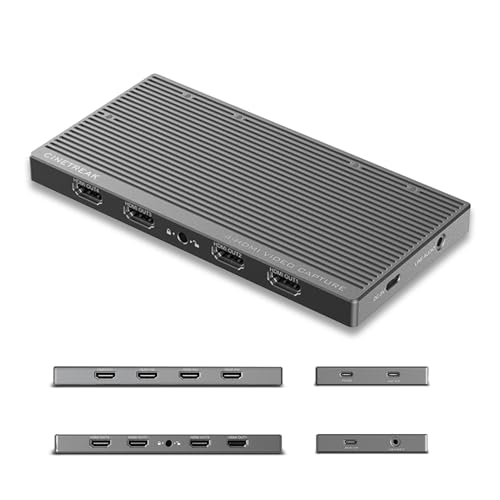
CineTreak CT-4 4K HDMI Capture Card
Best for: Multi-source 4K streaming setups
- Capture Resolution
- 4K60
- Host Interface
- USB 3.2 Type-C
- Video Interface
- HDMI
- Channel Count
- 4
- Use
- Streaming, Gaming
- Weight
- 14.1 ounces
The CineTreak CT-4 offers four simultaneous HDMI inputs for multi-source streaming. It supports 4K60 capture over USB 3.2 Type-C. You get 100W PD charging and stereo line-in audio. This card suits creators who need to mix multiple feeds without complex drivers. It is a practical solution for studio setups requiring high channel counts.
- Four simultaneous HDMI inputs for multi-source capture
- 4K60 resolution support via USB 3.2
- 100W PD charging through the UVC interface
- Stereo line-in for professional audio mixing
- 4K60 capture is limited to 30fps in some modes
- Heavier build at 14.1 ounces compared to lighter alternatives
- You need to capture from four HDMI sources simultaneously
- You want plug-and-play compatibility with OBS Studio
- You require 100W power delivery for your setup
- You only need a single HDMI input
- You require 4K144Hz refresh rate support
- You prefer a PCIe internal card over USB
Verdict: CineTreak CT-4 4K 4-Channel Capture fits users who need to manage multiple video feeds at once. It is ideal for streamers who prioritize channel count over maximum frame rates.

ORIVISION 4 Channel HDMI Capture Card
Best for: multi-camera 4K60 streaming and production
- Capture Resolution
- 4K60
- Passthrough Resolution
- 4K60
- Host Interface
- USB 3.2 Gen 2 Type-C
- Video Interface
- HDMI
- Channel Count
- 4
- Platform
- Xbox, PS5
This ORIVISION capture card handles four simultaneous HDMI inputs at 4K60 resolution. It connects via USB 3.2 Gen 2 Type-C and includes four loop-out ports for zero-latency monitoring. The device supports UVC plug-and-play operation with major streaming software and gaming consoles. Its compact metal chassis features a 1/4-inch tripod mount. You should choose this unit if you need multi-camera setups for streaming, conferences, or professional recording without complex driver installations.
- Captures 4K60 video from four independent HDMI channels simultaneously
- Includes four HDMI loop-out ports for zero-latency real-time preview
- Uses USB 3.2 Gen 2 Type-C for high-speed data transfer
- Supports MJPEG, NV12, and YUV422 video formats for quality control
- Features dual Type-C ports for PD charging and accessory power
- Supports only 4K@30Hz with YUV444 color depth, while competitors offer higher frame rates at full color sampling
- Weighs 7.84 ounces, which is heavier than single-channel USB capture cards in this price range
- Requires a PD power source for stable long-term operation on lower-power devices
- You need to stream or record from four cameras at once
- You require zero-latency monitoring via HDMI loop-out ports
- You want a compact unit with a tripod mount for mobile setups
- You only need to capture video from a single source
- You require 4K60 capture with YUV444 color sampling
- You prefer a lighter, more portable single-channel device
Verdict: ORIVISION 4-Channel 4K60 USB Capture Card is ideal for users building multi-camera streaming rigs who need simultaneous 4K60 inputs and real-time monitoring. It fits professional environments requiring four synchronized video sources.

Ezcap 4K144 Pro Video Capture Card
Best for: Xbox Series X/S 4K144 streaming
- Capture Resolution
- 4K144, 1080p240
- Passthrough Resolution
- 4K144, 1440p240, 1080p360
- Host Interface
- USB 3.2 Gen 2
- Video Interface
- HDMI 2.1
- HDR Support
- HDR10
- Features
- HDR10, VRR, Ultra-Low Latency
The Ezcap 4K144 Pro capture card supports 4K144 recording and passthrough via HDMI 2.1. It uses USB 3.2 Gen 2 for 10Gbps bandwidth and includes HDR10 and VRR. You get dedicated 3.5mm Line In and headset ports for audio mixing. This unit weighs 7.69 ounces and works with Windows, macOS, Xbox Series X/S, and PS5.
- 4K144 capture and passthrough resolution
- HDMI 2.1 interface with HDR10 and VRR
- USB 3.2 Gen 2 host interface
- Dedicated 3.5mm Line In and headset ports
- Heavier build at 7.69 ounces
- Limited to USB 3.2 Gen 1 speeds on some ports
- Fewer input options than multi-channel competitors
- You need 4K144 passthrough for Xbox Series X/S
- You want built-in audio mixing without extra gear
- You play at high refresh rates like 144Hz
- You require HDMI 2.1 support on a PCIe card
- You need more than one HDMI input
- You prefer a lighter device under 5 ounces
Verdict: Ezcap 4K144 Pro HDMI 2.1 Capture delivers high refresh rate passthrough for Xbox Series X/S users who need simple audio integration. It suits those prioritizing 4K144 performance over multi-input flexibility.

Guermok 4K144 HDMI USB Capture Card
Best for: high-refresh-rate 4K144 passthrough and 1080p240 capture
- Capture Resolution
- 4K144
- Passthrough Resolution
- 4K144
- Host Interface
- USB 3.2 Gen 2
- Video Interface
- HDMI 2.1
- HDR Support
- HDR10
- VRR Support
- Supported
The Guermok GM-73F captures video up to 4K at 144 FPS on Windows using MJPEG. It supports 1080p at 240 FPS and 1440p at 240 FPS. The HDMI 2.1 passthrough handles 4K at 144Hz with HDR10 and VRR. It connects via USB 3.2 Gen 2. This card suits streamers needing high refresh rates and flexible audio inputs for professional setups.
- Captures 4K at 144 FPS via MJPEG on Windows
- HDMI 2.1 passthrough supports 4K at 144Hz with HDR10 and VRR
- USB 3.2 Gen 2 host interface for stable transmission
- Multiple audio inputs including Mic In and Line In
- Windows capture limited to 4K at 50 FPS with YUY2 format
- macOS support capped at 4K at 60 FPS
- USB-C connection may require reconnection when PD power is toggled
- You need 4K144 passthrough for high-refresh-rate gaming
- You want to capture 1080p240 for smooth gameplay
- You require flexible audio monitoring and input options
- You rely on macOS for 4K144 capture workflows
- You prefer YUY2 format for 4K recording
- You want a simpler plug-and-play experience without USB-C power management
Verdict: The Guermok GM-73F 4K144 USB Capture Card fits streamers who need high frame rate capture and HDR10 passthrough. It is best for dual-PC setups requiring 1080p240 recording.

BlueAVS Hunter4K Pro
Best for: High-refresh-rate PS5 streaming and recording
- Capture Resolution
- 4K 144 FPS
- Passthrough Resolution
- 4K 144 FPS
- Host Interface
- USB 3.2 Gen 2
- Video Interface
- HDMI 2.1
- HDR Support
- HDR10
- VRR Support
- VRR passthrough
The BlueAVS Hunter4K Pro is a USB 3.2 Gen 2 capture card built for high-speed gaming. It supports 4K 144 FPS capture and passthrough via HDMI 2.1. You get VRR passthrough and HDR10 support for smoother visuals. It includes a 3.5mm cable for PS5 party chat audio. This unit suits streamers who need low latency and high frame rates on PC or console.
- 4K 144 FPS capture and passthrough resolution
- HDMI 2.1 interface with VRR passthrough
- USB 3.2 Gen 2 host connection
- HDR10 support for enhanced color depth
- Dedicated 3.5mm cable for PS5 party chat audio
- Heavier build at 1.76 pounds compared to lighter competitors
- Maximum recording limited to 1080p 24 FPS for some ultrawide formats
- Requires USB 3.0 connectivity which may limit port options
- You play competitive games at 144 FPS or higher
- You stream from a PlayStation 5 and want party chat audio
- You need VRR passthrough for smoother gameplay visuals
- You require PCIe internal installation for better system integration
- You need 4K passthrough at 240 FPS for ultrawide monitors
- You prefer a lighter device under 1 pound
Verdict: The BlueAVS Hunter4K Pro Capture Card fits high-refresh-rate gamers who need HDMI 2.1 VRR support and specific PS5 audio features. It is a solid choice for those prioritizing 4K 144 FPS capture over portability.
Specifications side by side
| Spec | AVMATRIX UC2018 SDI&HDMI Capture Card | RGBlink Mini 4-Channel HDMI Capture | CineTreak CT-4 4K HDMI Capture Card | ORIVISION 4 Channel HDMI Capture Card | Ezcap 4K144 Pro Video Capture Card | Guermok 4K144 HDMI USB Capture Card | BlueAVS Hunter4K Pro |
|---|---|---|---|---|---|---|---|
| Capture Resolution | 1080p60 | 1080p | 4K60 | 4K60 | 4K144, 1080p240 | 4K144 | 4K 144 FPS |
| Passthrough Resolution | – | – | – | 4K60 | 4K144, 1440p240, 1080p360 | 4K144 | 4K 144 FPS |
| Host Interface | USB 3.1 Gen 1 Type-C | USB 3.0 | USB 3.2 Type-C | USB 3.2 Gen 2 Type-C | USB 3.2 Gen 2 | USB 3.2 Gen 2 | USB 3.2 Gen 2 |
| Video Interface | SDI, HDMI | HDMI | HDMI | HDMI | HDMI 2.1 | HDMI 2.1 | HDMI 2.1 |
| Channel Count | – | 4 | 4 | 4 | – | – | – |
| HDR Support | – | – | – | – | HDR10 | HDR10 | HDR10 |
| VRR Support | – | – | – | – | – | Supported | VRR passthrough |
| Features | – | – | – | – | HDR10, VRR, Ultra-Low Latency | HDR10, VRR, Ultra-Low Latency | HDR10, VRR, Ultra-Low Latency |
| Color | SDI&HDMI input | Black-2k video capture | – | – | 4K144 Pro – 401 | Black | Black |
| Resolution | – | 1080p FHD | 4K UHD | – | 4K UHD | 4K UHD | – |
| Platform | PC, Mac | Xbox, PS5 | – | Xbox, PS5 | PC, Xbox, PS5, Mac, Xbox Series X/S | PC, PS5, Mac | PC, Xbox, PS5, Mac |
| Compatible Platform | – | PlayStation 5 | – | PlayStation 5, Nintendo Switch | PlayStation 5, Nintendo Switch | PlayStation 5, Nintendo Switch | PlayStation 5, Nintendo Switch |
| Use | – | Streaming | Streaming, Gaming | Streaming, Gaming | – | – | – |
| Connectivity | USB | USB | USB | USB | USB | USB | USB |
| Application | – | Recording | – | – | – | – | – |
| Dimensions | 3.62 × 2.28 × 0.75 inches | – | – | 6.5 × 3.2 × 0.5 inches | – | 5.03 × 2.91 × 0.83 inches | 2.95 × 0.91 × 5.12 inches |
| Weight | 7.23 ounces | – | 14.1 ounces | 7.84 ounces | 7.69 ounces | 5.94 ounces | 1.76 pounds |
| Size | SDI&HDMI | – | – | – | – | – | Small |
| Model | UC2018 | RGBlink Mini | CT-4 | ZY-UCH904 | ezcap401 | GM-73F | Hunter4K Pro |
Specs to Compare Before Buying
Check Capture Resolution
You must verify the maximum resolution the device can record. The CineTreak CT-4 and ORIVISION ZY-UCH904 both support 4K UHD capture. This allows you to record high-detail footage from modern consoles. If you only stream at 1080p, the AVMATRIX UC2018 is sufficient. It captures 1080p60 without needing 4K processing power. Choose 4K if you need future-proofing or high-bitrate archives. Stick to 1080p if your monitor or audience does not require it. Match the spec to your actual output needs.
Verify Frame Rate Support
Frame rate determines how smooth your video looks. The Ezcap 4K144 Pro and Guermok GM-73F both handle 4K at 144 FPS. This is essential for competitive gaming or high-refresh-rate displays. The AVMATRIX UC2018 caps at 60 FPS. If you play fast-paced shooters, 144 FPS is better. The Guermok also captures 1080p at 240 FPS. This extreme rate suits dual-PC setups with high-end GPUs. Check the spec sheet for the highest supported rate. Ensure your PC can handle that data load.
Count Your Input Channels
Most cards take one source, but some take four. The RGBlink Mini and CineTreak CT-4 have four HDMI inputs. This lets you switch between consoles or cameras without unplugging cables. The ORIVISION ZY-UCH904 also offers four synchronized 4K60 inputs. If you run a multi-console stream, these models save time. Single-input cards like the Ezcap are simpler to set up. You just plug one device in. Decide if you need simultaneous feeds or just one at a time. More inputs mean more cable management.
Check Video Interface Type
The connection type affects your setup flexibility. The AVMATRIX UC2018 supports SDI and HDMI. SDI is standard for broadcast gear and offers longer cable runs. HDMI is the consumer standard for consoles and PCs. The Guermok GM-73F and BlueAVS Hunter4K Pro use HDMI 2.1. This interface supports higher bandwidth for 4K144 and VRR. If you use broadcast cameras, look for SDI. For home streaming, HDMI 2.1 is usually enough. Verify your source devices have the matching ports before buying.
Review Host Interface Speed
The card connects to your PC via USB. Most models here use USB 3.2. This ensures enough bandwidth for 4K video. The AVMATRIX uses standard USB. This is fine for 1080p uncompressed streams. Higher resolutions need faster data transfer. USB 3.2 prevents dropped frames during recording. Check your PC has USB 3.2 ports available. Using an older USB 2.0 port will bottleneck performance. The interface speed is critical for stable capture. Always plug the card into a high-speed port on your motherboard.
Frequently asked questions
Does the AVMATRIX UC2018 support uncompressed video?
Yes, it handles uncompressed 1080p60 video. This model prioritizes uncompressed quality over 4K resolution. It connects via USB 3.0 to PC or Mac. You get reliable capture with flexible SDI and HDMI inputs for broadcast-style setups.
Which capture card offers four HDMI inputs?
The RGBlink Mini and CineTreak CT-4 both provide four HDMI channels. These units let you connect multiple consoles or cameras at once. The RGBlink Mini focuses on audio mixing, while the CineTreak CT-4 handles multi-source 4K streaming.
Can I capture 4K at 144 frames per second?
Yes, the Ezcap 4K144 Pro and Guermok GM-73F support 4K144 passthrough. The Ezcap unit is ideal for Xbox Series X/S users needing simple audio integration. The Guermok model also records 1080p240 for dual-PC setups requiring high frame rates.
Is there a capture card with SDI connectivity?
The AVMATRIX UC2018 includes SDI connectivity alongside HDMI. This makes it suitable for broadcasters needing reliable 1080p60 capture. It measures 2.28 inches wide and weighs 7.23 ounces. You get solid performance for users prioritizing video quality over 4K resolution.
Which model is best for multi-camera 4K60 streaming?
The ORIVISION ZY-UCH904 is designed for multi-camera 4K60 production. It captures four synchronized 4K60 inputs for professional environments. The unit weighs 7.84 ounces and connects via USB 3.2. It fits users who need simultaneous video sources with real-time monitoring.
Does the BlueAVS Hunter4K Pro support VRR?
Yes, it features HDMI 2.1 with VRR support. This card suits high-refresh-rate gamers using PS5 or Xbox. It measures 0.91 inches wide and weighs 1.76 pounds. You get specific PS5 audio features and 4K 144 FPS capture capabilities.
What is the difference between the Ezcap and Guermok cards?
The Ezcap 4K144 Pro focuses on simple audio integration for Xbox Series X/S. The Guermok GM-73F targets dual-PC setups with 1080p240 recording. Both support HDR10 and ultra-low latency. The Ezcap weighs 7.69 ounces, while the Guermok weighs 5.94 ounces.
Can the RGBlink Mini capture 4K video?
No, the RGBlink Mini captures up to 1080p FHD. It prioritizes multi-input flexibility and audio mixing over maximum resolution. You get four HDMI channels for varied source connections. It is ideal for streamers who do not require 4K output.

