As Amazon Associates, we earn from qualifying purchases. This means we may receive a small commission at no extra cost to you if you click through and make a purchase.
As an Amazon Associate we earn from qualifying purchases. Links on this page are affiliate links.
Choosing the best capture cards for gaming requires matching hardware specs to your streaming setup. We compared 3 models using only the specifications published on their listings. The ASUS TUF Gaming CU4K30 Capture Card leads because it supports 4K passthrough and 120 fps recording via USB 3.2. This guide helps you decide which device fits your resolution needs and platform compatibility.
Match Capture Resolution to Your Needs
Check the capture resolution first. The ASUS TUF Gaming CU4K30 records at 1080p but passes 4K through. The CineTreak CT-4 and ORIVISION models capture 4K directly. If you need high-resolution recordings, choose the 4K capture options. If you only need 1080p files, the 1080p model saves resources. Verify the host interface is USB 3.2 for stable performance.
| # | Product | Best for | Price |
|---|---|---|---|
| 1 | ASUS TUF Gaming CU4K30 Capture Card Best overall | 4K passthrough and 120 fps recording | |
| 2 | CineTreak CT-4 4K HDMI Capture Card Best budget | Multi-source 4K gaming and streaming setups | |
| 3 | ORIVISION 4 Channel HDMI Capture Card Best 4k60 | multi-angle gaming and streaming setups |
The best fit for you
- You want 4K passthrough and 120 fps recording – ASUS TUF Gaming CU4K30 Capture Card – It supports 2160p60 passthrough and records at 1080p via USB 3.2.
- You need simultaneous 4K60 inputs for multi-angle setups – ORIVISION 4 Channel HDMI Capture Card – It provides four HDMI inputs for 4K60 capture with loop-out monitoring.
- You want a compact device for multi-source streaming – CineTreak CT-4 4K HDMI Capture Card – It offers 4K capture resolution via USB 3.2 and HDMI.

ASUS TUF Gaming CU4K30 Capture Card
Best for: 4K passthrough and 120 fps recording
- Use
- Gaming
- Capture Resolution
- 4K30, 2K60, 1080p120
- Passthrough Resolution
- 4K60 HDR
- Host Interface
- USB 3.2 Type-C
- Video Interface
- HDMI 2.0
- HDR Support
- Supported
This capture card handles 4K passthrough at 60 Hz with HDR support, letting you play at high refresh rates while recording. It captures video up to 4K at 30 fps, 2K at 60 fps, and 1080p at 120 fps via USB 3.2 Type-C. The alloy shell provides durability for your setup. It works with PC, Xbox, and PS5. You get certified OBS Studio compatibility for straightforward streaming.
- 4K60 HDR passthrough preserves your display quality
- 1080p120 capture supports high-refresh-rate recording
- Plug-and-play USB 3.2 Type-C connection
- Certified OBS Studio compatibility
- Durable alloy outer shell
- 4K capture is limited to 30 fps
- Heavier build at 14.9 ounces
- Larger footprint than compact alternatives
- You want 4K passthrough at 60 Hz
- You stream in 1080p at 120 fps
- You use OBS Studio for broadcasting
- You need 4K capture at higher than 30 fps
- You prefer a lighter, smaller device
- You require HDMI 2.1 passthrough
Verdict: ASUS TUF Gaming CU4K30 Capture Card fits players who need high-fidelity 4K passthrough and 120 fps recording. It suits those prioritizing durable hardware and certified software integration over compact size.
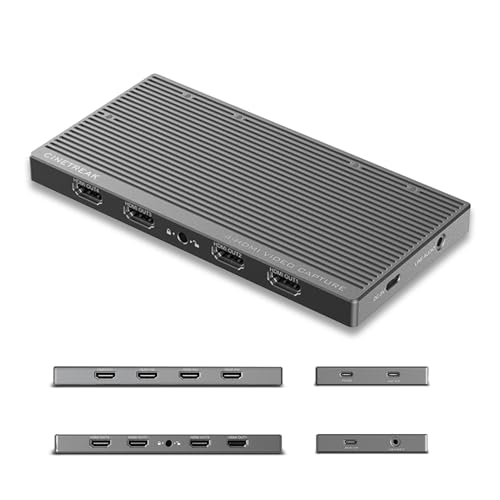
CineTreak CT-4 4K HDMI Capture Card
Best for: Multi-source 4K gaming and streaming setups
- Use
- Streaming, Gaming
- Capture Resolution
- 4K60
- Host Interface
- USB 3.2 Type-C
- Video Interface
- HDMI
- Channel Count
- 4
- Weight
- 14.1 ounces
This CineTreak CT-4 capture card offers four simultaneous HDMI inputs for multi-source streaming. It supports 4K60 resolution via USB 3.2 Type-C, ensuring smooth data transfer. The device includes stereo line-in for professional audio and features real-time LED indicators. You get plug-and-play compatibility with Windows, macOS, and Android. It is designed for gamers and streamers who need to manage multiple video feeds without complex driver setups.
- Supports 4K60 capture resolution for high-definition gameplay
- Four simultaneous HDMI inputs for multi-channel streaming
- USB 3.2 Type-C host interface with 10Gbps transfer speed
- Includes stereo line-in for external audio connections
- Heavier build at 14.1 ounces compared to lighter single-input cards
- Lower 4K30 simultaneous capture limit despite 4K60 single-channel support
- Requires 100W PD power supply for full operation
- You need to capture four separate video sources at once
- You want plug-and-play compatibility without installing drivers
- You require professional audio input via stereo line-in
- You only need to capture a single HDMI source
- You prefer a lighter, more portable device under 10 ounces
- You do not have access to a 100W power source
Verdict: CineTreak CT-4 4K Capture Card fits streamers managing multiple cameras or consoles who need simultaneous 4K60 input capability and professional audio integration.

ORIVISION 4 Channel HDMI Capture Card
Best for: multi-angle gaming and streaming setups
- Use
- Streaming, Gaming
- Capture Resolution
- 4K60
- Passthrough Resolution
- 4K60
- Host Interface
- USB 3.2 Gen 2 Type-C
- Video Interface
- HDMI
- Channel Count
- 4
This ORIVISION capture card handles four HDMI inputs simultaneously, delivering 4K60 resolution via USB 3.2 Gen 2 Type-C. You get zero-latency loop-out monitoring and support for multiple video formats like MJPEG and YUV422. The dual Type-C design allows for flexible power options, including PD fast charging. It fits your setup if you need multi-angle streaming for gaming consoles like PS5 or Switch without complex driver installations.
- Supports 4K60 capture across four independent HDMI channels
- Includes four HDMI loop-out ports for zero-latency monitoring
- USB 3.2 Gen 2 Type-C interface ensures high-speed data transfer
- Dual Type-C ports allow PD fast charging input and power output
- UVC plug-and-play compatibility with OBS Studio and major streaming software
- 4K@30Hz requires YUV444 format, which limits color depth compared to 4K60 MJPEG
- Weighs 7.84 ounces, making it heavier than single-channel competitors
- Dedicated 3.5mm audio input is only available for HDMI IN 1
- You need to stream or record four separate camera or console sources at once
- You want zero-latency monitoring via direct HDMI loop-out ports
- You require flexible power options for outdoor or mobile production setups
- You only need to capture a single HDMI source
- You prioritize lossless YUV444 color at 4K60 resolution
- You need a dedicated audio input for all four HDMI channels
Verdict: ORIVISION 4K60 4-Channel HDMI Capture Card suits users who need simultaneous multi-angle recording for gaming or streaming. It delivers four 4K60 inputs with loop-out monitoring, ideal for complex setups requiring multiple sources.
Specifications side by side
| Spec | ASUS TUF Gaming CU4K30 Capture Card | CineTreak CT-4 4K HDMI Capture Card | ORIVISION 4 Channel HDMI Capture Card |
|---|---|---|---|
| Capture Resolution | 4K30, 2K60, 1080p120 | 4K60 | 4K60 |
| Passthrough Resolution | 4K60 HDR | – | 4K60 |
| Host Interface | USB 3.2 Type-C | USB 3.2 Type-C | USB 3.2 Gen 2 Type-C |
| Video Interface | HDMI 2.0 | HDMI | HDMI |
| Channel Count | – | 4 | 4 |
| HDR Support | Supported | – | – |
| Features | HDR | – | – |
| Resolution | 1080p FHD | 4K UHD | – |
| Platform | PC, Xbox, PS5 | – | Xbox, PS5 |
| Compatible Platform | PlayStation 5, Nintendo Switch | – | PlayStation 5, Nintendo Switch |
| Use | Gaming | Streaming, Gaming | Streaming, Gaming |
| Connectivity | USB | USB | USB |
| Application | Recording | – | – |
| Dimensions | 6.4 × 5.5 × 2.5 inches | – | 6.5 × 3.2 × 0.5 inches |
| Weight | 14.9 ounces | 14.1 ounces | 7.84 ounces |
| Color | CU4K30|HDMI 2.0|2160p60 | – | – |
| Model | TUF GAMING CAPTURE BOX-CU4K30 | CT-4 | ZY-UCH904 |
How to Choose Your Capture Card
Check Passthrough Quality
You need to verify if the device supports high-resolution passthrough for your console. The ASUS TUF Gaming CU4K30 allows 2160p60 passthrough while recording. This means your TV displays the full signal without lag. If you prioritize low latency for competitive play, ensure the spec sheet lists high passthrough rates. This feature keeps your gaming experience smooth while you capture content in the background.
Match Recording Resolution
Select a card based on your desired output quality. The CineTreak CT-4 captures directly at 4K resolution. This suits streamers who want high-fidelity footage without upscaling. The ASUS model records at 1080p FHD. If you do not need 4K recordings, 1080p is sufficient for most platforms. Check the capture resolution spec to ensure it meets your streaming quality standards.
Evaluate Input Channels
Consider how many sources you need to record simultaneously. The ORIVISION model offers four HDMI inputs for 4K60 capture. This is ideal for multi-angle setups or recording multiple consoles at once. Most standard cards handle one input. If you manage a complex studio, prioritize multi-channel capabilities. Otherwise, a single high-quality input is sufficient for standard gaming streams.
Verify Connectivity Standards
Ensure your PC or host device supports the required interface. All listed models use USB 3.2 for data transfer. This high-speed connection prevents bottlenecks during recording. Check your computer ports to confirm compatibility. Using a slower USB version may cause dropped frames or lower quality. Always match the host interface spec to your available hardware ports for optimal performance.
Assess Physical Footprint
Measure your desk space before purchasing. The ORIVISION unit is notably compact at 0.5 inches in height. The ASUS model is larger at 2.5 inches high. If you have limited desk real estate, smaller dimensions matter. Check the length and width specs to ensure it fits your setup. A bulky device may obstruct other equipment or look cluttered in a small gaming area.
Frequently asked questions
Which capture card supports 120 fps recording?
The ASUS TUF Gaming CU4K30 Capture Card supports 120 fps recording. It connects via USB 3.2 and features HDMI 2.0 video interface. This model also offers 4K passthrough for compatible consoles like the PlayStation 5 and Nintendo Switch. It is designed for users prioritizing high frame rates and durable hardware integration.
What is the best capture card for multi-source streaming?
The ORIVISION 4 Channel HDMI Capture Card is ideal for multi-source setups. It provides four simultaneous 4K60 inputs with loop-out monitoring. This allows you to record from multiple consoles or cameras at once. It connects via USB 3.2 and supports platforms like Xbox and PlayStation 5.
Does the ASUS TUF Gaming CU4K30 support HDR?
Yes, the ASUS TUF Gaming CU4K30 Capture Card supports HDR. It records at 1080p resolution while passing 4K signals through to your display. The device uses a USB 3.2 host interface for stable data transfer. It is compatible with PC, Xbox, and PS5 systems.
How many HDMI inputs does the ORIVISION capture card have?
The ORIVISION 4 Channel HDMI Capture Card features four HDMI inputs. Each input supports 4K60 resolution capture. This setup enables simultaneous recording from multiple sources. It includes loop-out monitoring for real-time viewing. The device connects to your PC via USB 3.2.
Is the CineTreak CT-4 suitable for 4K gaming streams?
Yes, the CineTreak CT-4 4K HDMI Capture Card is suitable for 4K gaming streams. It captures 4K resolution directly via HDMI. The device uses a USB 3.2 interface for high-speed data transfer. It is designed for streamers managing multiple cameras or consoles with professional audio integration.
What resolution does the ASUS TUF Gaming CU4K30 record at?
The ASUS TUF Gaming CU4K30 Capture Card records at 1080p FHD resolution. It passes 4K signals through to your monitor or TV. The device connects via USB 3.2 and supports HDR. It is compatible with PlayStation 5 and Nintendo Switch for gaming and recording applications.
Can I use the ORIVISION card with Xbox and PS5?
Yes, the ORIVISION 4 Channel HDMI Capture Card works with Xbox and PlayStation 5. It supports 4K60 capture on each of its four HDMI inputs. The device connects via USB 3.2 to your PC. It is designed for streaming and gaming setups requiring multi-angle recording.

