As Amazon Associates, we earn from qualifying purchases. This means we may receive a small commission at no extra cost to you if you click through and make a purchase.
As an Amazon Associate we earn from qualifying purchases. Links on this page are affiliate links.
Finding the best ASUS IPS gaming monitors requires matching your display needs to specific technical data. This guide compares 12 models based strictly on the specifications published on their listings. The top pick is the ASUS ROG 27-Inch 1440p 180Hz Gaming Monitor because it combines a 1440p resolution with a 180Hz refresh rate and USB-C connectivity. These numbers define its balanced performance for modern gaming setups. You will use these spec-based comparisons to decide which monitor fits your desk space and frame rate requirements.
Match resolution to your GPU power
You must align your monitor resolution with your graphics card capabilities. The list includes 1080p, 1440p, and 4K models. Higher resolutions like 4K demand more processing power to maintain smooth frame rates. If you prioritize visual clarity over raw speed, choose a 4K option. For faster gameplay, stick to 1080p or 1440p displays.
| # | Product | Best for | Price |
|---|---|---|---|
| 1 | ASUS ROG 27-Inch 1440p 180Hz Gaming Monitor Best overall | gamers wanting balanced 1440p performance and USB-C | |
| 2 | ASUS TUF 27-Inch 1440p 180Hz Gaming Monitor Also great | gamers wanting 1440p 180Hz and color accuracy | |
| 3 | ASUS 27-Inch 165Hz IPS Gaming Monitor Also great | competitive esports and fast-paced gaming | |
| 4 | ASUS TUF 27-Inch 1440p 165Hz IPS Gaming Monitor Also great | Gamers wanting QHD ergonomics and G-SYNC support | |
| 5 | ASUS ROG Strix XG27ACMEG-G 27" 260Hz Best premium | High-refresh 1440p gaming with USB-C connectivity | |
| 6 | ASUS TUF 27-Inch 144Hz IPS Gaming Monitor Best budget | 1080p gamers prioritizing high refresh rates | |
| 7 | ASUS TUF 27-Inch 180Hz Gaming Monitor Also great | competitive 1080p gaming | |
| 8 | ASUS TUF 27-Inch 1440p Gaming Monitor Also great | 1440p gaming with G-SYNC Compatibility | |
| 9 | ASUS ROG XG32UCG 32-inch 4K Gaming Monitor Best 32 inch | Large screen gamers needing USB-C connectivity | |
| 10 | ASUS ROG Strix 27-Inch 4K 144Hz Gaming Monitor Best 4k uhd | PC gamers wanting 4K clarity and 144Hz smoothness | |
| 11 | ASUS ROG XG27UCGR-W 27-Inch 4K Gaming Monitor Best white | White 4K gaming with dual mode flexibility | |
| 12 | ASUS ROG Strix XG129C 12-Inch Touch Monitor Also great | secondary ultrawide touch display |
The best fit for you
- You want balanced 1440p performance with USB-C – ASUS ROG 27-Inch 1440p 180Hz Gaming Monitor – It offers 1440p resolution, 180Hz refresh rate, and a USB-C charging port.
- You need a large screen with USB-C connectivity – ASUS ROG XG32UCG 32-inch 4K Gaming Monitor – This 32-inch model provides 4K resolution and a USB-C charging port.
- You want high refresh rates for 1080p gaming – ASUS TUF 27-Inch 144Hz IPS Gaming Monitor – It delivers 144Hz refresh rate and 1080p resolution for smooth motion clarity.
- You need a secondary touch display for stats – ASUS ROG Strix XG129C 12-Inch Touch Monitor – This 12-inch touch monitor connects via USB-C and HDMI for system stats.

ASUS ROG 27-Inch 1440p 180Hz Gaming Monitor
Best for: gamers wanting balanced 1440p performance and USB-C
- Panel Type
- IPS
- Screen Size
- 27 Inch
- Resolution
- 2560 x 1440
- Refresh Rate
- 180Hz
- Response Time
- 1ms (GTG)
- Sync Technology
- G-SYNC, Free Sync
The ASUS ROG XG27ACS is a 27-inch Fast IPS gaming monitor with a 2560 x 1440 resolution and 180Hz refresh rate. It features a 1ms response time and G-SYNC compatibility for smooth visuals. The USB-C port allows for video and data connectivity. This display suits gamers who want high refresh rates and color accuracy in a compact 27-inch form factor.
- Fast IPS panel with 1ms response time
- 180Hz refresh rate for smooth gameplay
- USB-C connectivity for video and data
- G-SYNC and FreeSync support
- DisplayHDR 400 certification
- 180Hz refresh rate is lower than the 240Hz and 260Hz options on this list
- 14.6-pound weight is heavier than many 27-inch competitors
- DisplayHDR 400 is a lower brightness tier than HDR600 or HDR1000 standards
- You want a 27-inch monitor with a 1440p resolution
- You need USB-C connectivity for your setup
- You play competitive games at high frame rates
- You require a refresh rate of 240Hz or higher
- You prefer a lighter monitor under 12 pounds
- You need higher HDR brightness than 400 nits
Verdict: ASUS ROG XG27ACS 27-inch 1440p 180Hz is a solid choice for gamers who prioritize color accuracy and USB-C convenience over the highest possible refresh rates. It fits players who want a balanced 1440p experience without the bulk of larger screens.

ASUS TUF 27-Inch 1440p 180Hz Gaming Monitor
Best for: gamers wanting 1440p 180Hz and color accuracy
- Panel Type
- IPS
- Screen Size
- 27"
- Resolution
- 2560 x 1440
- Refresh Rate
- 180Hz
- Response Time
- 1ms
- Sync Technology
- FreeSync Premium, G-Sync, AdaptiveSync
The ASUS VG27AQ3A is a 27-inch Fast IPS gaming monitor with a 1440p resolution and 180Hz refresh rate. It supports G-Sync and FreeSync Premium for tear-free visuals. The panel covers 130% sRGB and includes ELMB Sync to reduce motion blur. Built-in speakers add convenience. This display suits competitive gamers who want high refresh rates and color accuracy without external audio gear.
- 180Hz refresh rate on a 27-inch 1440p Fast IPS panel
- 130% sRGB color gamut for wide color coverage
- ELMB Sync reduces motion blur while maintaining VRR
- Built-in speakers for basic audio output
- 10.1 pounds weight is heavier than lighter 1080p TUF models
- 130% sRGB coverage is lower than the 1440p 260Hz ROG Strix option
- Standard HDR10 support lacks the higher brightness and contrast of premium HDR displays
- You want a 1440p display with a high 180Hz refresh rate for smooth gameplay
- You need built-in speakers to simplify your desk setup
- You prioritize color accuracy with 130% sRGB coverage for creative work
- You require a 4K resolution for maximum image clarity
- You need a refresh rate higher than 180Hz for elite competitive play
- You prefer a lighter monitor under 10 pounds for easy mounting
Verdict: The ASUS VG27AQ3A 27-Inch 180Hz Monitor delivers solid 1440p performance with ELMB Sync and built-in speakers. It fits gamers who value color accuracy and motion clarity over raw speed or 4K resolution.

ASUS 27-Inch 165Hz IPS Gaming Monitor
Best for: competitive esports and fast-paced gaming
- Panel Type
- IPS
- Screen Size
- 27"
- Resolution
- 1920 x 1080
- Refresh Rate
- 165Hz
- Response Time
- 1ms
- Sync Technology
- G-SYNC Compatible
The ASUS TUF VG279QR is a 27-inch IPS gaming monitor with Full HD resolution. It features a 165Hz refresh rate and 1ms response time. G-SYNC Compatible technology ensures smooth visuals. This model suits players who prioritize high refresh rates and motion clarity over pixel density. The ergonomic stand allows for height, tilt, swivel, and pivot adjustments. It includes ELMB technology to reduce ghosting during fast-paced gameplay.
- 165Hz refresh rate for smooth motion
- 1ms MPRT response time with ELMB
- G-SYNC Compatible variable refresh rate
- Height-adjustable ergonomic stand
- Full HD resolution on a 27-inch screen limits pixel density
- 12.4-pound weight is heavier than lighter 1080p competitors
- You want a high-refresh-rate display for competitive gaming
- You need an ergonomic stand with height adjustment
- You prefer G-SYNC Compatible monitors for tear-free play
- You require 1440p or 4K resolution for sharper images
- You need USB-C connectivity for single-cable docking
- You want a lighter monitor for easy desk mobility
Verdict: ASUS TUF VG279QR 27-Inch 1080p 165Hz fits budget-conscious gamers who value speed and ergonomics over screen sharpness. It delivers reliable motion clarity without the bulk of higher-resolution panels.

ASUS TUF 27-Inch 1440p 165Hz IPS Gaming Monitor
Best for: Gamers wanting QHD ergonomics and G-SYNC support
- Panel Type
- IPS
- Screen Size
- 27"
- Resolution
- 2560×1440
- Refresh Rate
- 165Hz
- Response Time
- 1ms MPRT
- Sync Technology
- G-SYNC Compatible
The ASUS TUF VG27AQ is a 27-inch IPS gaming monitor with a 2560×1440 resolution and a 165Hz refresh rate. It features G-SYNC compatibility and a 1ms MPRT response time for smooth visuals. The stand offers height, tilt, swivel, and pivot adjustments. It includes HDR10 support and ELMB Sync technology. This model suits players who want solid QHD performance with ergonomic flexibility.
- 27-inch IPS panel with 2560×1440 resolution
- 165Hz overclocked refresh rate
- G-SYNC compatibility for tear-free gaming
- Ergonomic stand with height, tilt, swivel, and pivot adjustments
- 165Hz refresh rate is lower than the 260Hz or 300Hz options on this list
- 1ms MPRT response time relies on Extreme Low Motion Blur Sync technology
- 27-inch size is smaller than the 32-inch 4K option available
- You want a 27-inch QHD monitor with height-adjustable ergonomics
- You prioritize G-SYNC compatibility over the highest possible refresh rate
- You need a reliable 165Hz IPS panel for competitive gaming
- You require a 4K resolution for higher pixel density
- You need a refresh rate of 240Hz or higher for extreme speed
- You prefer a 32-inch screen for a larger viewing area
Verdict: ASUS TUF VG27AQ 27-inch 165Hz IPS Monitor is a well-rounded QHD option for gamers who value ergonomic adjustability and G-SYNC support over maximum refresh rates. It fits those who want a balanced 27-inch display without chasing the highest specs.
ASUS ROG Strix XG27ACMEG-G 27" 260Hz
Best for: High-refresh 1440p gaming with USB-C connectivity
- Panel Type
- IPS
- Screen Size
- 27"
- Resolution
- 2560 x 1440
- Refresh Rate
- 260Hz
- Response Time
- 0.3ms (min.)
- Sync Technology
- G-SYNC Compatible, ELMB Sync
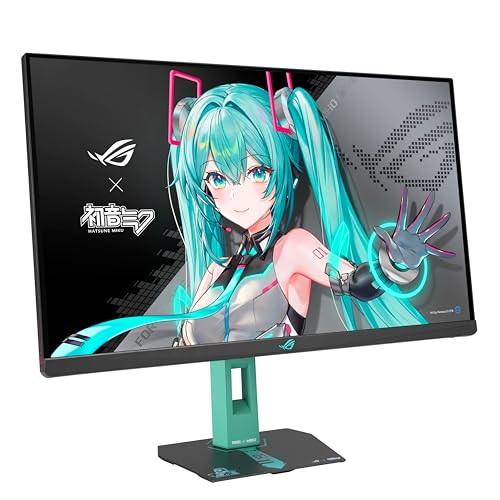
This 27-inch Fast IPS monitor delivers a 1440p resolution with a 260Hz refresh rate and 0.3ms response time. It supports G-SYNC Compatible and ELMB Sync for smooth visuals. The USB-C connection simplifies setup. This Miku Edition adds a unique aesthetic to your gaming space.
- 260Hz overclocked refresh rate for high frame rates
- 0.3ms minimum response time on Fast IPS panel
- USB-C connectivity with DisplayPort Alt mode
- ELMB Sync reduces motion blur while using variable refresh rate
- 260Hz refresh rate is lower than the 540Hz option in the same product line
- 12.8-pound weight is heavier than standard 27-inch models
- Standard HDR support without higher-tier HDR1000 certification data
- You want a 1440p display with a refresh rate above 165Hz
- You need USB-C connectivity for a single-cable setup
- You prefer a unique Hatsune Miku themed design
- You require a 4K resolution for maximum detail
- You need a refresh rate of 240Hz or higher without overclocking
- You prefer a standard black aesthetic without special edition branding
Verdict: ASUS ROG Strix XG27ACMEG-G 27" 260Hz is a high-speed 1440p monitor for players who value fast response times and unique aesthetics. It suits those who want USB-C convenience and a refresh rate that exceeds standard 165Hz limits.

ASUS TUF 27-Inch 144Hz IPS Gaming Monitor
Best for: 1080p gamers prioritizing high refresh rates
- Panel Type
- IPS
- Screen Size
- 27"
- Resolution
- 1920×1080
- Refresh Rate
- 100Hz, 144Hz
- Response Time
- 1ms
- Color
- Black
This 27-inch Fast IPS monitor delivers 1080p resolution with a base 100Hz refresh rate that overclocks to 144Hz. It features a 1ms response time and ELMB Sync to reduce motion blur. The display includes Shadow Boost for better visibility in dark scenes. It is a practical option for gamers who prioritize high refresh rates and motion clarity over high pixel density on a 27-inch screen.
- Fast IPS panel with 1ms response time
- Overclockable refresh rate up to 144Hz
- ELMB Sync reduces ghosting and tearing
- Shadow Boost enhances dark area details
- 1080p resolution is lower than the 1440p and 4K options on this list
- 100Hz base refresh rate is lower than the 165Hz or 180Hz base rates of other models
- 27-inch screen size has lower pixel density at 1080p compared to smaller monitors with the same resolution
- You want a 144Hz Fast IPS monitor for 1080p gaming
- You need ELMB Sync for clearer motion handling
- You prefer a 27-inch display size
- You require 1440p or 4K resolution for sharper images
- You need a base refresh rate of 165Hz or higher without overclocking
- You prefer a smaller 24-inch or larger 32-inch screen
Verdict: ASUS TUF VG279QE5A 27-inch 1080p Monitor suits players who value high refresh rates and motion clarity over pixel density. It is ideal for 1080p gaming setups where smooth performance matters more than screen sharpness.

ASUS TUF 27-Inch 180Hz Gaming Monitor
Best for: competitive 1080p gaming
- Panel Type
- IPS
- Screen Size
- 27"
- Resolution
- 1920 x 1080
- Refresh Rate
- 180Hz
- Response Time
- 1ms (GTG)
- Sync Technology
- FreeSync Premium, G-SYNC Compatible
The ASUS TUF VG279QL3A is a 27-inch Fast IPS monitor with 1920 x 1080 resolution and 180Hz refresh rate. It features 1ms GTG response time and supports FreeSync Premium and G-SYNC Compatible. Shadow Boost enhances dark areas. It includes height adjustability and built-in speakers. This monitor suits gamers who prioritize high refresh rates and motion clarity over high resolution.
- 180Hz refresh rate for smooth motion
- 1ms GTG response time reduces blur
- Fast IPS panel for accurate colors
- Height adjustable stand for ergonomic setup
- Built-in speakers for basic audio
- 1080p resolution is lower than the 1440p and 4K options on this list
- 27-inch screen size with 1080p results in lower pixel density
- Heavier at 13 pounds compared to lighter 24-inch alternatives
- You want a high refresh rate for competitive gaming
- You prefer a larger 27-inch viewing area
- You need height adjustability for your desk setup
- You require 1440p or 4K resolution for sharp images
- You need a lightweight monitor for frequent transport
- You want a curved screen for immersion
Verdict: ASUS TUF VG279QL3A 27-inch 1080p 180Hz delivers smooth gameplay for competitive titles. It fits players who value speed and size over pixel count.

ASUS TUF 27-Inch 1440p Gaming Monitor
Best for: 1440p gaming with G-SYNC Compatibility
- Panel Type
- IPS
- Screen Size
- 27-inch
- Resolution
- 2560 x 1440
- Refresh Rate
- 170Hz
- Response Time
- 1ms (MPRT)
- Sync Technology
- G-SYNC Compatible
This ASUS TUF Gaming VG27AQL1A is a 27-inch IPS monitor with a 1440p resolution and a 170Hz refresh rate. It features G-SYNC Compatibility and DisplayHDR 400 support for smooth, colorful visuals. The 1ms MPRT response time reduces motion blur. Weighing 14.6 pounds, it offers a sturdy build for desktop gaming setups that prioritize clarity and fluid motion.
- 27-inch IPS panel with 2560 x 1440 resolution
- 170Hz overclocked refresh rate with 144Hz support
- 1ms MPRT response time for reduced ghosting
- NVIDIA G-SYNC Compatibility eliminates screen tearing
- DisplayHDR 400 certification for improved contrast
- 170Hz refresh rate is lower than the 260Hz option on the list
- 14.6 pounds weight is heavier than lighter 1080p models in the guide
- DisplayHDR 400 rating is less robust than higher HDR tiers
- You want a 27-inch screen with 1440p clarity
- You need G-SYNC Compatibility for smooth NVIDIA gameplay
- You prefer a sturdy monitor with height adjustment
- You require 4K resolution for maximum detail
- You need a refresh rate above 170Hz
- You want a lighter monitor under 10 pounds
Verdict: ASUS TUF VG27AQL1A 27-inch 1440p Monitor suits gamers who value balanced 1440p performance and G-SYNC support over extreme speed or 4K resolution. It is a solid choice for desktop setups where image clarity and motion smoothness are priorities.

ASUS ROG XG32UCG 32-inch 4K Gaming Monitor
Best for: Large screen gamers needing USB-C connectivity
- Panel Type
- IPS
- Screen Size
- 32"
- Resolution
- 3840 x 2160
- Refresh Rate
- 320Hz
- Response Time
- 0.3ms
- Sync Technology
- G-SYNC
This 32-inch Fast IPS monitor delivers 4K resolution at 160Hz, or drops to FHD for 320Hz refresh rates. It features a 0.3ms response time and G-SYNC compatibility. The USB-C port supports video and data. You get 95% DCI-P3 color coverage and DisplayHDR 400 certification. It suits gamers who want high clarity or extreme speed on a large screen.
- Dual mode allows 4K at 160Hz or FHD at 320Hz
- 0.3ms response time with Fast IPS panel
- USB-C connectivity with DP Alt mode
- 95% DCI-P3 color gamut coverage
- G-SYNC compatible with ELMB Sync
- 60Hz base refresh rate is lower than other 27-inch picks
- 21.8-pound weight is heavier than most competitors
- DisplayHDR 400 rating is modest compared to higher-end options
- You want a large 32-inch screen for immersive gaming
- You need USB-C connectivity for a single-cable setup
- You prefer the flexibility of switching between 4K and FHD modes
- You require a 27-inch form factor for your desk
- You prioritize higher brightness levels for HDR content
- You want a lighter monitor for easy mounting
Verdict: ASUS ROG XG32UCG 32-Inch 4K Gaming Monitor fits players who value screen real estate and USB-C convenience over the higher refresh rates found in smaller 27-inch models.

ASUS ROG Strix 27-Inch 4K 144Hz Gaming Monitor
Best for: PC gamers wanting 4K clarity and 144Hz smoothness
- Panel Type
- IPS
- Screen Size
- 27"
- Resolution
- 3840 x 2160
- Refresh Rate
- 144Hz
- Response Time
- 1ms
- Sync Technology
- G-SYNC Compatible
The ASUS ROG Strix XG27UQR is a 27-inch IPS monitor with 4K UHD resolution and a 144Hz refresh rate. It uses Display Stream Compression to maintain visual quality at high speeds. The panel supports DisplayHDR 400 and covers 90% of the DCI-P3 color gamut. G-SYNC Compatible technology ensures tear-free gameplay. This monitor is designed for gamers who want high resolution and smooth motion on a 27-inch screen.
- 27-inch IPS panel with 3840 x 2160 resolution
- 144Hz refresh rate with 1ms response time
- DisplayHDR 400 certification and 90% DCI-P3 color gamut
- G-SYNC Compatible for tear-free gaming
- Ergonomic stand with tilt, swivel, and height adjustment
- 60Hz native refresh rate on PS5 and Xbox Series X/S for 4K output
- HDMI ports are version 2.0, limiting bandwidth compared to newer standards
- Heavier build at 17.6 pounds compared to lighter 1080p or 1440p options
- You want 4K resolution with high refresh rates for PC gaming
- You need a 27-inch screen with strong color accuracy for creative work
- You prefer an ergonomic stand with height adjustment for comfort
- You require a 120Hz refresh rate for 4K gaming on consoles
- You prefer a lighter monitor under 15 pounds for easy desk setup
- You need HDMI 2.1 ports for future-proofing with next-gen consoles
Verdict: ASUS ROG Strix 27-inch 4K 144Hz Gaming Monitor suits PC gamers seeking 4K clarity and smooth motion, though console players may find the 60Hz limit restrictive.

ASUS ROG XG27UCGR-W 27-Inch 4K Gaming Monitor
Best for: White 4K gaming with dual mode flexibility
- Panel Type
- IPS
- Screen Size
- 27 Inch
- Resolution
- 3840 x 2160
- Refresh Rate
- 162Hz (485Hz FHD)
- Response Time
- 0.3ms
- Sync Technology
- G-SYNC
This 27-inch white monitor uses a Fast IPS panel for 4K resolution at 162Hz. It supports a dual mode that switches to 1080p for 485Hz. The display includes G-SYNC and 0.3ms response time. USB-C connectivity simplifies setup. It suits gamers who want high refresh rates in a distinctive white finish.
- Fast IPS panel with 0.3ms response time
- Dual mode: 4K at 162Hz or FHD at 485Hz
- G-SYNC compatibility for smooth visuals
- USB-C connection with DP Alt mode
- 95% DCI-P3 color gamut coverage
- 162Hz refresh rate is lower than the 180Hz and 260Hz options on this list
- 27-inch size is smaller than the 32-inch 4K model in the guide
- 15-pound weight is heavier than the 1080p TUF monitors
- You want a 27-inch 4K monitor with a white design
- You need high frame rates for competitive gaming at 1080p
- You prefer G-SYNC synchronization over FreeSync
- You require a 32-inch screen for larger immersion
- You need a refresh rate above 260Hz for esports
- You prefer a black monitor over a white one
Verdict: ASUS ROG XG27UCGR-W 27 Inch White Gaming Monitor offers a unique white aesthetic with versatile dual-mode performance. It fits players who prioritize 4K clarity or high-speed 1080p gaming in a compact 27-inch form factor.

ASUS ROG Strix XG129C 12-Inch Touch Monitor
Best for: secondary ultrawide touch display
- Panel Type
- IPS
- Screen Size
- 12.3 Inch
- Resolution
- 1920 x 720
- Refresh Rate
- 75Hz
- Color
- Black
- Use
- Gaming
This 12.3-inch ultrawide display uses a 1920 x 720 IPS panel with a 24:9 aspect ratio. It runs at 75Hz and features 10-point touch control for direct interaction. The screen delivers 125% sRGB color coverage and connects via USB-C with 20W power delivery. It is designed to sit under a primary monitor for system stats or quick app access.
- 12.3-inch 1920 x 720 IPS panel with 24:9 aspect ratio
- 10-point multi-touch input for OSD and app control
- 125% sRGB and 90% DCI P3 color gamut
- Dual USB-C ports with 20W Power Delivery
- 1920 x 720 resolution is lower than the 1440p and 4K options on this list
- 75Hz refresh rate is slower than the 165Hz to 260Hz rates of other picks
- 12.3-inch screen size is smaller than the 27-inch and 32-inch alternatives
- You need a secondary ultrawide screen for system monitoring or chat apps
- You want direct touch control for adjusting settings or launching tools
- You have limited desk space and need a compact 12-inch display
- You require a high refresh rate above 75Hz for competitive gaming
- You need a primary large-format display for immersive gaming
- You want a standard 16:9 or 21:9 ultrawide resolution like 1440p
Verdict: ASUS ROG Strix XG129C 12-Inch Touch Monitor is a compact secondary display for users who want touch interaction and system stats under their main screen. It fits those with limited desk space who do not need high refresh rates.
Specifications side by side
| Spec | ASUS ROG 27-Inch 1440p 180Hz Gaming Monitor | ASUS TUF 27-Inch 1440p 180Hz Gaming Monitor | ASUS 27-Inch 165Hz IPS Gaming Monitor | ASUS TUF 27-Inch 1440p 165Hz IPS Gaming Monitor | ASUS ROG Strix XG27ACMEG-G 27" 260Hz | ASUS TUF 27-Inch 144Hz IPS Gaming Monitor | ASUS TUF 27-Inch 180Hz Gaming Monitor | ASUS TUF 27-Inch 1440p Gaming Monitor | ASUS ROG XG32UCG 32-inch 4K Gaming Monitor | ASUS ROG Strix 27-Inch 4K 144Hz Gaming Monitor | ASUS ROG XG27UCGR-W 27-Inch 4K Gaming Monitor | ASUS ROG Strix XG129C 12-Inch Touch Monitor |
|---|---|---|---|---|---|---|---|---|---|---|---|---|
| Screen Size | 27 Inch | 27" | 27" | 27" | 27" | 27" | 27" | 27-inch | 32" | 27" | 27 Inch | 12.3 Inch |
| Resolution | 2560 x 1440 | 2560 x 1440 | 1920 x 1080 | 2560×1440 | 2560 x 1440 | 1920×1080 | 1920 x 1080 | 2560 x 1440 | 3840 x 2160 | 3840 x 2160 | 3840 x 2160 | 1920 x 720 |
| Refresh Rate | 180Hz | 180Hz | 165Hz | 165Hz | 260Hz | 100Hz, 144Hz | 180Hz | 170Hz | 320Hz | 144Hz | 162Hz (485Hz FHD) | 75Hz |
| Response Time | 1ms (GTG) | 1ms | 1ms | 1ms MPRT | 0.3ms (min.) | 1ms | 1ms (GTG) | 1ms (MPRT) | 0.3ms | 1ms | 0.3ms | – |
| Panel Type | Fast IPS | Fast IPS | IPS | IPS | Fast IPS | Fast IPS | Fast IPS | IPS | Fast IPS | IPS | Fast IPS | IPS |
| Sync Technology | G-SYNC, Free Sync | FreeSync Premium, G-Sync, AdaptiveSync | G-SYNC Compatible | G-SYNC Compatible | G-SYNC Compatible, ELMB Sync | – | FreeSync Premium, G-SYNC Compatible | G-SYNC Compatible | G-SYNC | G-SYNC Compatible | G-SYNC | – |
| HDR Support | DisplayHDR 400 | HDR10 | – | HDR10 | HDR | – | – | DisplayHDR 400 | DisplayHDR 400 | DisplayHDR 400 | HDR | – |
| Features | HDR | Built-in Speakers, HDR10 | – | Built-in Speakers, HDR10 | – | – | Built-in Speakers | HDR | – | HDR | HDR | – |
| Color | Black | Black | Black | Black | Black | Black | Black | Black | Black | Black | White | Black |
| Platform | Xbox, PS5 | Xbox, PS5 | – | – | Xbox, PS5 | – | – | – | Xbox, PS5 | – | Xbox, PS5 | – |
| Compatible Platform | PlayStation 5 | PlayStation 5 | – | – | PlayStation 5 | – | – | – | PlayStation 5 | – | PlayStation 5 | – |
| Height Adjustability | – | – | Height Adjustable | Height Adjustable | – | – | Height Adjustable | – | – | – | – | – |
| Use | Gaming | Gaming | Gaming | Gaming | Gaming | Gaming | Gaming | Gaming | Gaming | Gaming | Gaming | Gaming |
| Connectivity | USB | – | – | – | USB | – | – | – | USB | USB | USB | USB |
| Charging Port | USB-C | – | – | – | USB-C | – | – | – | USB-C | – | USB-C | USB-C |
| Capture Resolution | – | – | 1080p | – | – | 1080p | 1080p | – | 4K | 4K | 4K | – |
| Video Interface | – | – | HDMI | – | – | – | – | HDMI | – | HDMI | – | HDMI |
| Dimensions | 8.6 × 25.3 × 15.5 inches | 24.2 × 8.4 × 17.9 inches | 14.8 × 24.4 × 8.31 inches | 20 × 24.4 × 8.31 inches | 24.2 × 7.4 × 19.8 inches | 7.6 × 24.2 × 17.8 inches | 24.2 × 8.4 × 14.5 inches | 14.5 × 24.2 × 2 inches | 9.7 × 28.2 × 22.6 inches | 9.82 × 6.55 × 3.94 inches | 7.4 × 24.2 × 19.8 inches | 6.97 × 12 × 5.12 inches |
| Weight | 14.6 pounds | 10.1 pounds | 12.4 pounds | 12.8 pounds | 12.8 pounds | 9.7 pounds | 13 pounds | 14.6 pounds | 21.8 pounds | 17.6 pounds | 15 pounds | 1.23 pounds |
| Model | XG27ACS | VG27AQ3A | VG279QR | VG27AQ | XG27ACMEG-G | VG279QE5A | VG279QL3A | VG27AQL1A | XG32UCG | XG27UQR | XG27UCGR-W | XG129C |
| Size | – | 14.4" x 24.2" x 2.1" | – | 27” 2K WQHD IPS | – | – | – | – | – | 15"x24.9"x3.7" | 14.4" x 24.2" x 3.4" | – |
If you need screens for general productivity, review the best ASUS IPS monitors to compare standard panel specifications.
How to choose the right ASUS IPS gaming monitor
Match resolution to your GPU
Your graphics card determines which resolution you can play at smoothly. The ASUS ROG 27-Inch 1440p 180Hz Gaming Monitor offers a balanced 1440p QHD experience that suits most modern GPUs. If your hardware is less powerful, consider the ASUS TUF 27-Inch 144Hz IPS Gaming Monitor, which uses 1080p FHD resolution. This lower pixel count is easier for weaker cards to drive at high frame rates. Conversely, if you have a high-end GPU, the ASUS ROG Strix 27-Inch 4K 144Hz Gaming Monitor delivers 4K UHD clarity. Choose the resolution that matches your system’s processing strength to avoid bottlenecking.
Prioritize refresh rate for speed
Refresh rate measures how many times the screen updates per second. Higher numbers mean smoother motion, which is critical for competitive shooters. The ASUS ROG Strix XG27ACMEG-G 27" 260Hz provides 260Hz, the highest speed on this list. It suits players who need every frame to count. For a more moderate option, the ASUS ROG 27-Inch 1440p 180Hz Gaming Monitor offers 180Hz. This rate is sufficient for most gamers seeking fluid gameplay without chasing extreme numbers. The ASUS TUF 27-Inch 180Hz Gaming Monitor also delivers 180Hz at 1080p. Select the refresh rate that aligns with your competitive needs.
Check sync technology compatibility
Sync technology prevents screen tearing by matching the monitor’s refresh rate to your GPU’s frame output. Most ASUS IPS monitors support G-SYNC. The ASUS ROG 27-Inch 1440p 180Hz Gaming Monitor features G-SYNC for seamless performance. Some models, like the ASUS TUF 27-Inch 1440p 180Hz Gaming Monitor, include both FreeSync and G-SYNC support. This dual compatibility ensures smooth visuals regardless of whether you use an NVIDIA or AMD graphics card. Verify that your graphics card supports the specific sync technology listed. Matching these technologies ensures a tear-free gaming experience.
Evaluate ergonomic adjustability
Ergonomic features allow you to position the screen for comfort during long sessions. The ASUS TUF 27-Inch 1440p 165Hz IPS Gaming Monitor includes height adjustability. You can raise or lower the display to match your eye level. This feature is also present in the ASUS TUF 27-Inch 180Hz Gaming Monitor. If you prefer a fixed stand, the ASUS ROG 27-Inch 1440p 180Hz Gaming Monitor has a standard base. Adjustable stands reduce neck strain by letting you customize the viewing angle. Check the specifications for height adjustability if you spend many hours at your desk.
Consider USB-C connectivity
USB-C ports offer data transfer and video signal delivery through a single cable. The ASUS ROG 27-Inch 1440p 180Hz Gaming Monitor includes a USB-C charging port. This simplifies setups by connecting laptops or devices with one cable. The ASUS ROG Strix XG27ACMEG-G 27" 260Hz also provides USB-C connectivity for similar convenience. For users with multiple devices, this feature reduces cable clutter on your desk. If you do not use USB-C devices, this spec is less critical. However, for laptop gamers, a monitor with USB-C charging is a significant practical advantage.
Frequently asked questions
Which ASUS IPS monitor has the highest refresh rate?
The ASUS ROG Strix XG27ACMEG-G features a 260Hz refresh rate. This is the highest speed among the listed 27-inch models. It suits players who prioritize extreme motion clarity over other features. Other high-speed options include the 180Hz ASUS ROG XG27ACS and the 180Hz ASUS TUF VG279QL3A.
Do these monitors support G-SYNC?
Yes, most models in this list support G-SYNC technology. This includes the ASUS ROG 27-Inch 1440p 180Hz Gaming Monitor and the ASUS TUF 27-Inch 1440p 165Hz IPS Gaming Monitor. The ASUS TUF 27-Inch 180Hz Gaming Monitor supports both FreeSync and G-SYNC. This sync technology helps reduce screen tearing during gameplay.
Which ASUS monitor is best for 4K gaming?
The ASUS ROG Strix 27-Inch 4K 144Hz Gaming Monitor offers 4K UHD resolution with a 144Hz refresh rate. The ASUS ROG XG32UCG provides a larger 32-inch 4K display. The ASUS ROG XG27UCGR-W also delivers 4K clarity in a white aesthetic. These models suit users who prioritize image sharpness.
Are there any ASUS IPS monitors with USB-C ports?
Several models include USB-C connectivity. The ASUS ROG 27-Inch 1440p 180Hz Gaming Monitor features a USB-C charging port. The ASUS ROG Strix XG27ACMEG-G also includes USB-C. The 32-inch ASUS ROG XG32UCG and the white ASUS ROG XG27UCGR-W both offer this convenience for charging devices or connecting laptops.
What is the difference between 1080p and 1440p on these monitors?
1080p models like the ASUS TUF 27-Inch 144Hz IPS Gaming Monitor offer high refresh rates for smooth motion. 1440p models like the ASUS TUF 27-Inch 1440p 165Hz IPS Gaming Monitor provide sharper images. Higher resolution demands more GPU power. Choose 1080p for speed and 1440p for visual detail.
Which monitor is the smallest in this list?
The ASUS ROG Strix XG129C is the smallest at 12 inches. It is designed as a secondary ultrawide touch display. It measures 12 inches in width and weighs 1.23 pounds. This compact size fits users with limited desk space who need system stats under their main screen.
Do these monitors have built-in speakers?
Some models include built-in audio. The ASUS TUF 27-Inch 1440p 180Hz Gaming Monitor has built-in speakers. The ASUS TUF 27-Inch 1440p 165Hz IPS Gaming Monitor also includes them. The ASUS TUF 27-Inch 180Hz Gaming Monitor features built-in speakers as well. Other models do not list this feature in their specifications.


