As Amazon Associates, we earn from qualifying purchases. This means we may receive a small commission at no extra cost to you if you click through and make a purchase.
As an Amazon Associate we earn from qualifying purchases. Links on this page are affiliate links.
Finding the best 4K60 capture cards requires looking strictly at published specifications. We compared 7 models to help you choose based on hard data, not opinions. The Elgato 4K Pro Internal Capture Card leads because it supports 8K60 passthrough alongside 4K60 capture. This internal PCIe card handles HDR10 and VRR for modern consoles. Other picks offer USB 3.2 connectivity or multi-source inputs for different setups. Use this guide to decide which interface and resolution features fit your system.
Choose PCIe for consoles or USB for PC
Most top picks use internal PCIe slots, connecting directly to your desktop motherboard. This suits dedicated streaming PCs. External USB 3.2 options offer flexibility for laptops or multi-camera setups. Check your available ports. Internal cards like the Elgato 4K Pro provide 8K passthrough. External units like the ASUS box allow easy plug-and-play without opening your case. Match the interface to your hardware.
| # | Product | Best for | Price |
|---|---|---|---|
| 1 | Elgato 4K Pro Internal Capture Card Best overall | 4K60 HDR capture with 8K passthrough | |
| 2 | Blackmagic DeckLink Quad HDMI 4K60 Best premium | Multi-source 4K60 capture setups | |
| 3 | AVMATRIX VC12-4K PCIe Capture Card Also great | multi-card 4K60 streaming setups | |
| 4 | AVerMedia HDMI 2.1 Internal PCIe Capture Card Best budget | internal console capture at 4K60 | |
| 5 | Elgato 4K Pro Internal Capture Card Also great | 4K60 HDR10 capture with 8K60 passthrough | |
| 6 | ORIVISION 4 Channel HDMI Capture Card Best usb 3.2 | multi-camera gaming and conference streaming | |
| 7 | ASUS TUF GAMING CAPTURE BOX-4KPRO Best 1080p fhd | External 4K60 capture with high refresh passthrough |
The best fit for you
- You need 4K60 HDR10 capture with 8K passthrough – Elgato 4K Pro Internal Capture Card – It supports HDR10 capture and 8K60 passthrough via HDMI 2.1.
- You require four simultaneous HDMI 2.0b inputs – Blackmagic DeckLink Quad HDMI 4K60 – This card provides four HDMI 2.0b inputs for multi-source setups.
- You want uncompressed 4K60 with live loop-out – AVMATRIX VC12-4K PCIe Capture Card – It delivers uncompressed 4K60 and includes a loop-out for monitoring.
- You prefer external USB convenience for console gaming – Elgato 4K Pro Internal Capture Card – This external unit offers 4K60 capture with HDMI 2.1 support.

Elgato 4K Pro Internal Capture Card
Best for: 4K60 HDR capture with 8K passthrough
- Capture Resolution
- 4K60
- Passthrough Resolution
- 8K60
- Host Interface
- PCIe x4
- Video Interface
- HDMI 2.1
- HDR Support
- HDR10
- Features
- HDR, HDR10, VRR
The Elgato 4K Pro is an internal PCIe x4 capture card designed for Windows desktop PCs. It captures up to 4K60 with HDR10 support. The card allows 8K60 passthrough via HDMI 2.1. It also supports VRR and ALLM for compatible consoles. This makes it suitable for users needing high-resolution capture with advanced display features.
- Captures up to 4K60 with HDR10
- Supports 8K60 passthrough over HDMI 2.1
- Includes VRR and ALLM passthrough
- Internal PCIe x4 form factor
- Max capture resolution is 4K60, lower than competitors offering higher frame rates
- Internal PCIe design limits use to desktop PCs only
- You need 4K60 capture with HDR10 support
- You require 8K60 passthrough for future-proofing
- You use a Windows desktop PC with available PCIe slots
- You need capture resolutions higher than 4K60
- You are using a laptop or console without PCIe expansion
- You require external USB connectivity instead of internal installation
Verdict: Elgato 4K Pro PCIe Capture Card fits users who prioritize HDR10 capture and 8K60 passthrough on Windows desktops. It suits those needing VRR support for PS5 or Xbox Series X.
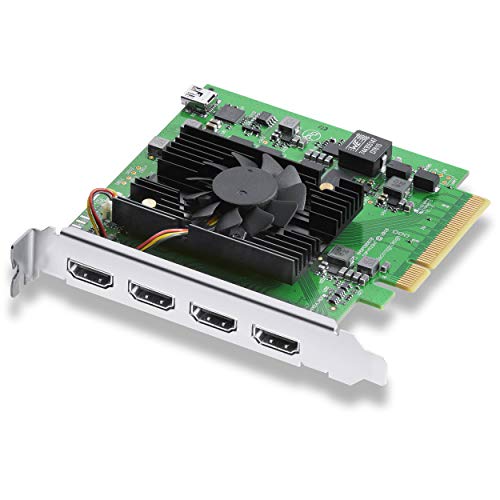
Blackmagic DeckLink Quad HDMI 4K60
Best for: Multi-source 4K60 capture setups
- Capture Resolution
- 4K60
- Host Interface
- PCI Express 8 lane generation 3
- Video Interface
- HDMI 2.0b
- Channel Count
- 4
- Dimensions
- 6 × 6 × 1 inches
- Weight
- 4.52 ounces
This card offers four HDMI 2.0b inputs for simultaneous capture up to 4K60. It uses a PCIe 8-lane Gen 3 interface for low-latency transfer. You get support for HDR, Rec. 2020 color spaces, and 8 channels of embedded audio. It works with Media Express, OBS, and vMix. This setup suits users needing multiple video sources in one system.
- Four HDMI 2.0b inputs for multi-source capture
- Supports 4K60 resolution with HDR and Rec. 2020
- PCIe 8-lane Gen 3 interface for reliable data transfer
- Compatible with major streaming software like OBS and vMix
- Only supports HDMI 2.0b, lacking HDMI 2.1 bandwidth
- Cannot capture from copy-protected HDMI sources
- Requires a PCIe 8-lane slot, limiting compatibility
- You need to capture four separate HDMI sources simultaneously
- You require HDR and Rec. 2020 color support
- You use professional software like vMix or Wirecast
- You need HDMI 2.1 for higher refresh rates
- You must capture copy-protected content
- You only need a single HDMI input
Verdict: Blackmagic Design DeckLink Quad HDMI PCIe is a multi-input solution for users needing four simultaneous HDMI 2.0b sources. It fits professionals requiring HDR support and software flexibility, but not those needing HDMI 2.1 or copy-protected capture.

AVMATRIX VC12-4K PCIe Capture Card
Best for: multi-card 4K60 streaming setups
- Capture Resolution
- 4K60
- Host Interface
- PCIe 2.0 x4
- Video Interface
- HDMI 2.0
- Features
- Ultra-Low Latency
- Color
- Black
- Platform
- Xbox, PS5, Xbox Series X/S, Xbox One
The AVMATRIX VC12-4K is an internal PCIe capture card designed for uncompressed 4K60 video. It uses a PCIe 2.0 x4 interface to deliver low-latency feeds to OBS or vMix. The HDMI 2.0 loop-out lets you monitor your source live while recording. It supports Windows and Linux without extra drivers. This card suits streamers and professionals who need reliable, multi-card setups with unique DIP switch codes.
- Captures true uncompressed 4K60 video via HDMI 2.0
- HDMI loop-out port for live source monitoring
- PCIe 2.0 x4 interface with 2.5GB/s bandwidth
- Supports multiple cards on one PC with DIP switches
- Plug-and-play on Windows 7/10/11 and Linux
- PCIe 2.0 interface is slower than PCIe 3.0 or 4.0 options
- HDMI 2.0 input limits bandwidth compared to HDMI 2.1 cards
- Larger physical dimensions at 4.73 inches long
- You need uncompressed 4K60 capture for PS5 or Xbox
- You plan to use multiple capture cards in one system
- You want a loop-out for live monitoring while streaming
- You require HDMI 2.1 input for higher bandwidth
- You need PCIe 3.0 or 4.0 for maximum throughput
- You prefer a compact form factor under 4 inches
Verdict: AVMATRIX VC12-4K PCIe Capture Card fits streamers who need uncompressed 4K60 and multi-card setups. It is ideal for users who value live monitoring via loop-out and cross-platform compatibility.

AVerMedia HDMI 2.1 Internal PCIe Capture Card
Best for: internal console capture at 4K60
- Capture Resolution
- 4K60
- Host Interface
- PCIe
- Video Interface
- HDMI 2.1
- Features
- Ultra-Low Latency
- Platform
- Xbox, PS5, Xbox Series X/S, Xbox One
- Compatible Platform
- PlayStation 5, Nintendo Switch, PS4
The AVerMedia GC575 is an internal PCIe capture card designed for recording and streaming. It supports 4K60 capture resolution via an HDMI 2.1 interface. The device handles refresh rates up to 240Hz for compatible sources. It features ultra-low latency to keep gameplay responsive. This card fits players using PlayStation 5, Xbox Series X/S, or Nintendo Switch who want high-quality internal capture without external hardware.
- Supports 4K60 capture resolution for high-quality recording
- HDMI 2.1 interface ensures high bandwidth connectivity
- Handles input refresh rates up to 240Hz
- Features ultra-low latency for responsive gameplay
- Captures only up to 4K60, while other list options support 8K60 or 4K144
- Weighs 5.31 ounces, which is heavier than many compact alternatives
- You need an internal PCIe card for your desktop PC
- You play on PS5, Xbox Series X/S, or Nintendo Switch
- You prioritize ultra-low latency during recording
- You require passthrough support higher than 4K60
- You prefer an external USB capture device
- You need support for 8K resolution input
Verdict: AVerMedia GC575 HDMI 2.1 PCIe is a solid internal option for console gamers who need reliable 4K60 capture. It suits those who value low latency and have an available PCIe slot in their system.

Elgato 4K Pro Internal Capture Card
Best for: 4K60 HDR10 capture with 8K60 passthrough
- Capture Resolution
- 4K60
- Passthrough Resolution
- 8K60
- Video Interface
- HDMI 2.1
- HDR Support
- HDR10
- Features
- HDR10, VRR, Ultra-Low Latency
- Platform
- PC
This internal PCIe card captures 4K60 video with HDR10 support. It passes through 8K60 signals via HDMI 2.1. You can record up to 1080p240. The device supports VRR for smooth visuals. It connects to streaming apps like OBS. The unit weighs 3.88 ounces. It fits PCs requiring internal capture solutions.
- Captures 4K60 video with HDR10
- Passes through 8K60 signals
- Records up to 1080p240
- Supports VRR passthrough
- Lower capture resolution than 8K60 passthrough
- Heavier than some compact alternatives
- Limited to 1080p240 recording speed
- You need 4K60 HDR10 capture
- You want 8K60 passthrough
- You require VRR support
- You need external USB connectivity
- You require 4K144 recording
- You prefer lighter hardware
Verdict: Elgato 4K Pro Internal Capture Card suits streamers needing 4K60 HDR10 capture with 8K60 passthrough. It fits users who value VRR and high frame rate recording at 1080p.

ORIVISION 4 Channel HDMI Capture Card
Best for: multi-camera gaming and conference streaming
- Capture Resolution
- 4K60
- Passthrough Resolution
- 4K60
- Host Interface
- USB 3.2 Gen 2 Type-C
- Video Interface
- HDMI
- Channel Count
- 4
- Platform
- Xbox, PS5
The ORIVISION ZY-UCH904 is a 4-channel HDMI capture card with USB 3.2 Gen 2 connectivity. It supports 4K60 capture and passthrough. The device includes four HDMI inputs and loop-out ports for zero-latency monitoring. It uses UVC plug-and-play technology for major streaming software. The compact 165mm length fits mobile setups. This card suits users needing multi-camera switching for gaming or conferences.
- Four independent 4K60 HDMI inputs
- Zero-latency loop-out for real-time preview
- USB 3.2 Gen 2 Type-C interface
- Supports MJPEG and YUV422 formats
- Compact 6.5-inch length with tripod mount
- Single channel capture limit compared to quad PCIe cards
- Heavier 7.84-ounce build than internal PCIe cards
- Requires external PD power for stable multi-channel operation
- You need four simultaneous camera inputs for multi-angle streaming
- You require zero-latency monitoring via HDMI loop-out
- You use UVC-compatible software like OBS or vMix
- You need 8K60 HDR passthrough capabilities
- You prefer internal PCIe installation over USB
- You want single-cable power without external PD source
Verdict: ORIVISION 4-Channel USB 3.2 Capture Card fits multi-camera streamers needing four inputs. It offers flexible format support and loop-out monitoring for professional setups.

ASUS TUF GAMING CAPTURE BOX-4KPRO
Best for: External 4K60 capture with high refresh passthrough
- Capture Resolution
- 4K60
- Passthrough Resolution
- 4K144
- Host Interface
- USB Type-C 3.2 Gen 2
- Video Interface
- HDMI 2.1
- HDR Support
- HDR
- VRR Support
- Supported
This external capture card handles 4K60 capture with 4K144 passthrough via HDMI 2.1. It uses a USB 3.2 Gen 2 Type-C connection for plug-and-play setup. The device supports HDR and VRR for smoother gameplay. It includes two 3.5mm jacks for audio. The aluminum shell aids heat dissipation. It is a solid option for gamers who need high refresh rate passthrough alongside standard 4K60 recording.
- 4K144 passthrough resolution via HDMI 2.1
- 4K60 capture resolution support
- USB 3.2 Gen 2 Type-C connectivity
- VRR and HDR passthrough support
- Two 3.5mm audio jacks for party mode
- Capture resolution limited to 4K60 while competitors offer higher passthrough or capture rates
- External unit weighs 15.9 ounces, adding bulk compared to internal PCIe cards
- Only two audio jacks available for peripheral connections
- You need 4K144 passthrough for high-refresh monitors
- You prefer an external USB connection over PCIe installation
- You require HDR and VRR support for next-gen consoles
- You need an internal PCIe card for space saving
- You require capture resolutions higher than 4K60
- You want a lighter, more portable device
Verdict: ASUS TUF GAMING CAPTURE BOX-4KPRO suits users who prioritize high-refresh passthrough and external USB convenience. It fits gamers who want HDR and VRR support without installing internal hardware.
Specifications side by side
| Spec | Elgato 4K Pro Internal Capture Card | Blackmagic DeckLink Quad HDMI 4K60 | AVMATRIX VC12-4K PCIe Capture Card | AVerMedia HDMI 2.1 Internal PCIe Capture Card | Elgato 4K Pro Internal Capture Card | ORIVISION 4 Channel HDMI Capture Card | ASUS TUF GAMING CAPTURE BOX-4KPRO |
|---|---|---|---|---|---|---|---|
| Capture Resolution | 4K60 | Up to 4K60 | 4K60 | 4K60 | 4K60 | 4K60 | 4K60 |
| Passthrough Resolution | 8K60 | – | – | – | 8K60 | 4K60 | 4K144 |
| Host Interface | PCIe x4 | PCI Express 8 lane generation 3 | PCIe 2.0 x4 | PCIe | – | USB 3.2 Gen 2 Type-C | USB Type-C 3.2 Gen 2 |
| Video Interface | HDMI 2.1 | HDMI 2.0b | HDMI 2.0 | HDMI 2.1 | HDMI 2.1 | HDMI | HDMI 2.1 |
| Channel Count | – | 4 | – | – | – | 4 | – |
| HDR Support | HDR10 | – | – | – | HDR10 | – | HDR |
| VRR Support | – | – | – | – | – | – | Supported |
| Features | HDR, HDR10, VRR | – | Ultra-Low Latency | Ultra-Low Latency | HDR10, VRR, Ultra-Low Latency | – | HDR, VRR |
| Color | Black | ブラック | Black | Multicolor | – | – | 4KPRO|HDMI 2.1|2160p144 |
| Resolution | – | – | 4K UHD | 4K UHD | – | – | 1080p FHD |
| Platform | PC, Xbox, PS5, Xbox Series X/S | – | Xbox, PS5, Xbox Series X/S, Xbox One | Xbox, PS5, Xbox Series X/S, Xbox One | PC | Xbox, PS5 | – |
| Compatible Platform | PlayStation 5, Nintendo Switch | – | PlayStation 5, PS4 | PlayStation 5, Nintendo Switch, PS4 | – | PlayStation 5, Nintendo Switch | – |
| Use | – | – | – | Streaming | – | Streaming, Gaming | Gaming |
| Connectivity | – | – | – | – | – | USB | USB |
| Application | – | – | Recording | Recording | Recording | – | – |
| Dimensions | 5 × 2 × 1 inches | 6 × 6 × 1 inches | 4.73 × 3.77 × 0.85 inches | 4.76 × 6.32 × 0.83 inches | 2.2 × 4.76 × 0.75 inches | 6.5 × 3.2 × 0.5 inches | – |
| Weight | 4 ounces | 4.52 ounces | – | 5.31 ounces | 3.88 ounces | 7.84 ounces | 15.9 ounces |
| Model | 10GBK9901 | BM-BDLKDVQDHDMI4K | VC12-4K | GC575 | 20GBK9901 | ZY-UCH904 | TUF GAMING CAPTURE BOX-4KPRO |
| Size | – | – | 120.1*95.7*21.6mm | HDMI 2.1 – GC575 | 4K Pro | – | – |
How to Choose the Right 4K60 Capture Card
Check Host Interface Type
Most top picks use internal PCIe slots, connecting directly to your desktop motherboard. This suits dedicated streaming PCs with available expansion slots. External USB 3.2 options offer flexibility for laptops or multi-camera setups. Check your available ports before buying. Internal cards like the Elgato 4K Pro provide stable bandwidth. The ORIVISION model uses USB 3.2 for external connection. Ensure your system matches the required interface to avoid compatibility issues or performance bottlenecks during high-resolution capture sessions.
Verify HDMI Version Support
HDMI 2.1 is critical for modern consoles like PS5 and Xbox Series X. It enables 4K60 capture with high bandwidth. The Elgato 4K Pro and AVerMedia GC575 both feature HDMI 2.1 ports. Older models may only support HDMI 2.0b, limiting future upgrades. Blackmagic Design uses HDMI 2.0b inputs. If you plan to upgrade consoles later, prioritize HDMI 2.1. This ensures you can capture the highest possible resolution and frame rates without signal degradation or downscaling artifacts during gameplay.
Look for HDR10 Capability
HDR10 support preserves color depth and brightness in your recordings. The Elgato 4K Pro captures HDR10 video directly. The ASUS TUF GAMING model also supports HDR. Without this feature, your streams may look flat compared to the source. Check the attributes list for HDR10 mentions. This spec is vital for gamers using HDR-enabled displays. It ensures your audience sees the same visual fidelity you experience on your monitor. Always confirm HDR support if you want professional-looking video output.
Consider Multi-Input Needs
Some users need to capture from multiple sources simultaneously. The Blackmagic Design DeckLink Quad offers four HDMI inputs. This suits professionals requiring multi-source setups. Most other cards have a single input. If you only capture from one console, a single-input card is sufficient. The ORIVISION model also supports four channels via USB. Evaluate your workflow carefully. Multiple inputs increase complexity and cost. Single inputs are simpler for standard console streaming. Choose based on the number of devices you plan to record at once.
Check Passthrough Resolution
Passthrough resolution determines the maximum output to your TV or monitor while capturing. The Elgato 4K Pro supports 8K60 passthrough. This allows you to play at higher resolutions than you capture. The ASUS TUF GAMING model supports high-refresh passthrough. This is useful if you want to play at 144Hz while streaming at 60FPS. Ensure your display supports the passthrough resolution. High passthrough values do not improve capture quality but enhance your gaming experience. Check the specs to ensure your setup remains smooth during recording sessions.
Frequently asked questions
Does the Elgato 4K Pro support VRR?
Yes, it supports Variable Refresh Rate. This feature benefits PS5 and Xbox Series X users by reducing screen tearing. The card also handles HDR10 capture and 8K60 passthrough. It connects via PCIe for stable performance on Windows desktops.
Which capture card offers four HDMI inputs?
The Blackmagic DeckLink Quad HDMI 4K60 provides four simultaneous HDMI 2.0b inputs. This design suits professionals needing multi-source capture setups. It supports HDR and offers software flexibility. However, it does not include HDMI 2.1 or copy-protected capture capabilities.
Is there a USB 3.2 option for multi-camera streams?
The ORIVISION 4 Channel HDMI Capture Card uses USB 3.2 connectivity. It supports four inputs, making it ideal for multi-camera gaming and conference streaming. The device offers flexible format support and includes loop-out monitoring for professional workflow management.
Can I get uncompressed 4K60 with this card?
The AVMATRIX VC12-4K PCIe Capture Card delivers uncompressed 4K60 video. It is ideal for streamers who value live monitoring via loop-out. The card supports cross-platform compatibility with Xbox and PlayStation consoles. It also features ultra-low latency for responsive gameplay recording.
Does the ASUS capture box support 1080p passthrough?
Yes, the ASUS TUF GAMING CAPTURE BOX-4KPRO supports high-refresh passthrough. It allows you to play at 1080p FHD while capturing 4K60. The external USB design offers convenience without internal installation. It also includes HDR and VRR support for compatible consoles.
Which card is best for internal console capture?
The AVerMedia GC575 HDMI 2.1 PCIe is a solid internal option for console gamers. It provides reliable 4K60 capture with ultra-low latency. The card requires an available PCIe slot in your system. It works with PlayStation 5, Nintendo Switch, and Xbox platforms.

