As Amazon Associates, we earn from qualifying purchases. This means we may receive a small commission at no extra cost to you if you click through and make a purchase.
As an Amazon Associate we earn from qualifying purchases. Links on this page are affiliate links.
Choosing the best 4K UHD capture cards requires looking at raw specifications rather than marketing claims. We compared 7 models to help you find the right hardware for your setup. The Blackmagic Design DeckLink Mini Recorder 4K leads this list because it offers PCIe connectivity and professional SDI audio inputs. These specs suit studio environments where input flexibility matters more than portable USB convenience. Each pick here is based strictly on the published specifications on the product listings. This guide helps you decide which capture card matches your resolution, interface, and audio needs without guessing.
Choose PCIe for stability
Most top picks use PCIe slots for internal installation. This interface provides stable, low-latency performance for 4K60 capture. USB models offer portability but may lack the bandwidth for uncompressed streams. Select PCIe if you need reliable studio-grade output. Choose USB if you require external convenience for single-source setups.
| # | Product | Best for | Price |
|---|---|---|---|
| 1 | Blackmagic Design DeckLink Mini Recorder 4K Best overall | professional studio setups needing SDI audio | |
| 2 | ACASIS 4-Channel HDMI PCIe Capture Card Best premium | multi-source 1080p60 streaming setups | |
| 3 | AVMATRIX VC12-4K PCIe Capture Card Also great | Professional 4K60 uncompressed capture with live monitoring | |
| 4 | AVerMedia HDMI 2.1 Internal PCIe Capture Card Best budget | 4K60 internal PCIe streaming | |
| 5 | CineTreak CT-4 4K HDMI Capture Card Best gaming | Multi-source 4K streaming and production | |
| 6 | Ezcap 4K144 Pro Video Capture Card Also great | high refresh rate streaming with audio control | |
| 7 | Guermok 4K144 HDMI USB Capture Card Also great | high-refresh-rate 1080p240 and 4K144 streaming |
The best fit for you
- You need professional studio setups with SDI audio – Blackmagic Design DeckLink Mini Recorder 4K – It offers 16-channel audio and SDI connectivity for studio flexibility.
- You want to stream multiple consoles simultaneously – ACASIS 4-Channel HDMI PCIe Capture Card – It provides four HDMI inputs to manage multiple 1080p60 sources.
- You require uncompressed 4K60 capture with live monitoring – AVMATRIX VC12-4K PCIe Capture Card – It delivers reliable internal PCIe 4K60 capture for professional studios.
- You prioritize high frame rates for competitive gaming – AVerMedia HDMI 2.1 Internal PCIe Capture Card – It supports 4K60 capture with low latency via HDMI 2.1.
- You need high refresh rates with dedicated audio control – Ezcap 4K144 Pro Video Capture Card – It connects via USB 3.2 to deliver smooth 4K144 visuals.
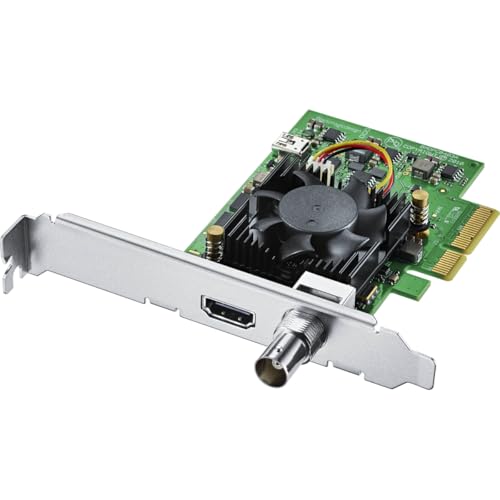
Blackmagic Design DeckLink Mini Recorder 4K
Best for: professional studio setups needing SDI audio
- Resolution
- 4K UHD
- Host Interface
- Gen 2 PCIe Express 4 lane
- Video Interface
- HDMI 2.0a, SDI
- Color
- Black
- Dimensions
- 6 × 6 × 6 inches
- Weight
- 5.64 ounces
This Blackmagic Design capture card supports 4K UHD resolution via HDMI 2.0a and SDI inputs. It connects through a Gen 2 PCIe Express 4-lane interface, ensuring stable data transfer for professional workflows. The unit includes 16-channel embedded SDI audio input and measures 6 inches on each side. It suits users who need reliable 10-bit color depth and switchable SD/HD/Ultra HD compatibility for high-quality video production.
- Supports 4K UHD capture resolution
- Includes HDMI 2.0a and SDI video inputs
- Provides 16-channel embedded SDI audio input
- Uses Gen 2 PCIe Express 4-lane interface
- Handles 10-bit SD/HD/Ultra HD video
- Heavier build at 5.64 ounces compared to lighter USB alternatives
- Larger physical footprint with 6-inch dimensions
- Requires PCIe slot connection rather than USB
- You need professional SDI input for studio gear
- You require 16-channel embedded audio capture
- You have available PCIe slots in your PC
- You only have USB ports available
- You prefer a compact external USB device
- You need HDMI 2.1 support for 4K144
Verdict: Blackmagic Design DeckLink Mini Recorder 4K offers professional-grade SDI connectivity and 16-channel audio for studio setups. It fits users who prioritize input flexibility and audio channels over portable USB convenience.

ACASIS 4-Channel HDMI PCIe Capture Card
Best for: multi-source 1080p60 streaming setups
- Resolution
- 4K UHD
- Capture Resolution
- 1080p60
- Host Interface
- PCIe x4
- Video Interface
- HDMI
- Channel Count
- 4
- Features
- Ultra-Low Latency
This internal PCIe capture card handles four simultaneous HDMI inputs. It records at 1080p60 with ultra-low latency, making it suitable for multi-source streaming. The unit features a built-in turbo fan for heat dissipation. It fits into PCIe x4, x8, or x16 slots. You can use it for live broadcasts or recording across multiple platforms. The design prioritizes stable, long-term operation without compression artifacts.
- Supports four simultaneous HDMI inputs
- Captures video at 1080p60 resolution
- Built-in turbo fan for cooling
- Ultra-low latency performance
- Compatible with major streaming software
- Maximum capture resolution is 1080p60, not 4K
- Weight is 5.29 ounces, heavier than single-channel cards
- Requires PCIe x4 slot, limiting slot flexibility
- You need to capture four separate HDMI sources at once
- You prioritize low latency over 4K resolution
- You have an available PCIe x4 slot in your PC
- You require native 4K UHD capture
- You only need to capture one HDMI signal
- You prefer USB connectivity over internal PCIe installation
Verdict: ACASIS 4-Channel PCIe Capture Card suits streamers managing multiple game consoles or PCs simultaneously. It delivers stable 1080p60 feeds with efficient cooling for long sessions.

AVMATRIX VC12-4K PCIe Capture Card
Best for: Professional 4K60 uncompressed capture with live monitoring
- Resolution
- 4K UHD
- Capture Resolution
- 4K60
- Host Interface
- PCIe 2.0 x4
- Video Interface
- HDMI 2.0
- Features
- Ultra-Low Latency
- Color
- Black
The AVMATRIX VC12-4K is an internal PCIe capture card designed for 4K60 UHD video. It uses a PCIe 2.0 x4 interface to deliver uncompressed video with ultra-low latency. The card includes an HDMI 2.0 loop-out port for live monitoring. It supports Windows and Linux without additional drivers. This unit is built for professional 24/7 use in studios or live events.
- Captures uncompressed 4K60 video via HDMI 2.0 input
- HDMI loop-out port allows live source monitoring
- Plug-and-play support for Windows and Linux
- Supports multi-card setups with unique DIP switch codes
- Industrial-grade components for 24/7 operation
- Uses PCIe 2.0 interface instead of newer generations
- HDMI 2.0 input limits bandwidth compared to HDMI 2.1
- Requires internal PCIe slot installation
- You need uncompressed 4K60 video for professional streaming
- You want to monitor your source via HDMI loop-out
- You are setting up a multi-card internal capture system
- You require HDMI 2.1 input support
- You prefer a portable external USB device
- You need a card with a built-in display
Verdict: The AVMATRIX VC12-4K Internal PCIe Capture Card fits users who need reliable 4K60 uncompressed capture with live monitoring. It is ideal for professional studios or multi-camera setups that require internal installation and stable 24/7 performance.

AVerMedia HDMI 2.1 Internal PCIe Capture Card
Best for: 4K60 internal PCIe streaming
- Resolution
- 4K UHD
- Capture Resolution
- 4K60
- Host Interface
- PCIe
- Video Interface
- HDMI 2.1
- Features
- Ultra-Low Latency
- Platform
- Xbox, PS5, Xbox Series X/S, Xbox One
The AVerMedia GC575 is an internal PCIe capture card designed for high-performance streaming and recording. It supports HDMI 2.1 inputs and captures video at 4K resolution with 60fps refresh rates. The device also handles refresh rates up to 240Hz for compatible sources. Its compact internal design fits directly into your PC. This card suits gamers who need low latency and high frame rates for console or PC gaming.
- Supports HDMI 2.1 video interface
- Captures 4K resolution at 60fps
- Handles refresh rates up to 240Hz
- Features ultra-low latency technology
- Internal PCIe host interface
- Captures only 60fps at 4K resolution
- Heavier build at 5.31 ounces
- You play games at 60fps or higher
- You need an internal PCIe solution
- You stream from HDMI 2.1 sources
- You require 4K capture at 120fps
- You prefer external USB devices
- You need multiple video inputs
Verdict: The AVerMedia GC575 PCIe 4K60 Capture Card fits players who prioritize high frame rates and internal installation. It delivers stable 4K60 capture with low latency for competitive gaming.
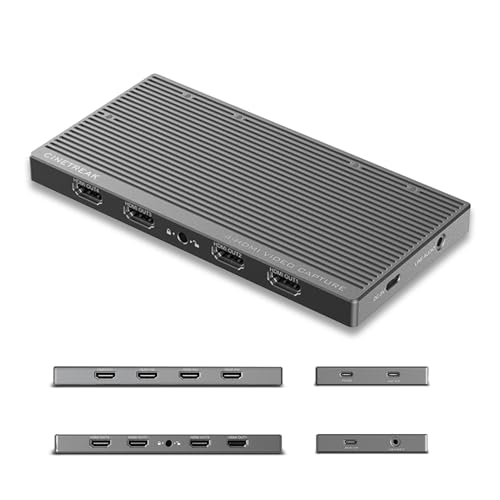
CineTreak CT-4 4K HDMI Capture Card
Best for: Multi-source 4K streaming and production
- Resolution
- 4K UHD
- Capture Resolution
- 4K60
- Host Interface
- USB 3.2 Type-C
- Video Interface
- HDMI
- Channel Count
- 4
- Use
- Streaming, Gaming
The CineTreak CT-4 supports simultaneous 4-channel capture via four HDMI inputs. It handles 4K60 resolution over a USB 3.2 Type-C connection. This device allows you to stream multiple sources at once. It includes a stereo line-in for audio. The unit weighs 14.1 ounces. It is suitable for gamers who need multi-source setup flexibility.
- Captures 4K60 video from four HDMI inputs simultaneously
- USB 3.2 Type-C interface for 10Gbps data transfer
- Includes stereo line-in for professional audio mixing
- Plug-and-play compatibility with Windows, macOS, and Android
- Heavier build at 14.1 ounces compared to lighter alternatives
- Lower 4K30 channel count limit for simultaneous 4K streams
- Requires 100W power supply for full operation
- You need to capture four independent video sources at once
- You require a USB connection for easy setup
- You want to mix professional audio via line-in
- You prefer a PCIe internal card for lower latency
- You only need a single HDMI input source
- You want a lighter and more portable device
Verdict: The CineTreak CT-4 4K HDMI Capture Card fits users who need to manage four simultaneous video feeds for complex streaming setups.

Ezcap 4K144 Pro Video Capture Card
Best for: high refresh rate streaming with audio control
- Resolution
- 4K UHD
- Capture Resolution
- 4K144, 1080p240
- Passthrough Resolution
- 4K144, 1440p240, 1080p360
- Host Interface
- USB 3.2 Gen 2
- Video Interface
- HDMI 2.1
- HDR Support
- HDR10
The Ezcap 4K144 Pro is a USB 3.2 capture card designed for high-refresh-rate gaming. It supports 4K144 passthrough and 4K144 capture with HDR10 and VRR. You get 1080p240 recording capability and ultra-low latency via 10Gbps bandwidth. It includes dedicated 3.5mm audio ports for party chat. This unit suits streamers needing smooth visuals on Windows or macOS.
- Supports 4K144 passthrough and capture resolution
- Includes HDR10 and VRR support
- Offers 1080p240 recording capability
- Features dedicated 3.5mm Line In and headset ports
- Uses USB 3.2 Gen 2 for 10Gbps bandwidth
- Weighs 7.69 ounces, adding bulk to your setup
- Limited to USB connectivity rather than PCIe integration
- You need 4K144 passthrough for tear-free visuals
- You want to capture 1080p240 for high-speed gameplay
- You require dedicated audio inputs for party chat
- You prefer internal PCIe cards for lower latency
- You need 4K60 HDR passthrough only
- You want a lighter device under 5 ounces
Verdict: Ezcap 4K144 Pro USB Capture Card fits streamers who prioritize high refresh rates and dedicated audio inputs. It delivers smooth 4K144 visuals for those using USB 3.2 connections.

Guermok 4K144 HDMI USB Capture Card
Best for: high-refresh-rate 1080p240 and 4K144 streaming
- Resolution
- 4K UHD
- Capture Resolution
- 4K144
- Passthrough Resolution
- 4K144
- Host Interface
- USB 3.2 Gen 2
- Video Interface
- HDMI 2.1
- HDR Support
- HDR10
The Guermok GM-73F is a USB-C capture card supporting 4K at 144 FPS and 1080p at 240 FPS. It features HDMI 2.1 passthrough with HDR10 and VRR. You get flexible audio inputs and PD 3.0 charging for host devices. It works with OBS on Windows and macOS. This card suits streamers who need high frame rates and low latency for competitive gaming.
- Captures 4K at 144 FPS and 1080p at 240 FPS
- HDMI 2.1 passthrough supports 4K at 144Hz with VRR
- HDR10 support for enhanced color and contrast
- PD 3.0 input powers compatible laptops during streaming
- Heavier build at 5.94 ounces compared to lighter competitors
- Larger dimensions of 5.03 by 2.91 by 0.83 inches
- USB-C mode switching may cause temporary detection issues
- You need 1080p240 or 4K144 capture for high-refresh-rate gaming
- You want to charge your laptop while streaming via PD 3.0
- You require HDR10 and VRR passthrough for your console
- You prefer a PCIe card for direct motherboard integration
- You need 4K passthrough above 144Hz for ultra-high refresh rates
- You want a smaller, lighter device for portable setups
Verdict: The Guermok 4K144 USB-C Capture Card fits streamers who prioritize high frame rates like 1080p240 and need PD charging for their host device. It is a solid choice for dual-PC streaming where USB-C connectivity and HDR passthrough are essential.
Specifications side by side
| Spec | Blackmagic Design DeckLink Mini Recorder 4K | ACASIS 4-Channel HDMI PCIe Capture Card | AVMATRIX VC12-4K PCIe Capture Card | AVerMedia HDMI 2.1 Internal PCIe Capture Card | CineTreak CT-4 4K HDMI Capture Card | Ezcap 4K144 Pro Video Capture Card | Guermok 4K144 HDMI USB Capture Card |
|---|---|---|---|---|---|---|---|
| Capture Resolution | – | 1080p60 | 4K60 | 4K60 | 4K60 | 4K144, 1080p240 | 4K144 |
| Passthrough Resolution | – | – | – | – | – | 4K144, 1440p240, 1080p360 | 4K144 |
| Host Interface | Gen 2 PCIe Express 4 lane | PCIe x4 | PCIe 2.0 x4 | PCIe | USB 3.2 Type-C | USB 3.2 Gen 2 | USB 3.2 Gen 2 |
| Video Interface | HDMI 2.0a, SDI | HDMI | HDMI 2.0 | HDMI 2.1 | HDMI | HDMI 2.1 | HDMI 2.1 |
| Channel Count | – | 4 | – | – | 4 | – | – |
| HDR Support | – | – | – | – | – | HDR10 | HDR10 |
| VRR Support | – | – | – | – | – | – | Supported |
| Features | – | Ultra-Low Latency | Ultra-Low Latency | Ultra-Low Latency | – | HDR10, VRR, Ultra-Low Latency | HDR10, VRR, Ultra-Low Latency |
| Color | Black | – | Black | Multicolor | – | 4K144 Pro – 401 | Black |
| Resolution | 4K UHD | 4K UHD | 4K UHD | 4K UHD | 4K UHD | 4K UHD | 4K UHD |
| Platform | – | PC | Xbox, PS5, Xbox Series X/S, Xbox One | Xbox, PS5, Xbox Series X/S, Xbox One | – | PC, Xbox, PS5, Mac, Xbox Series X/S | PC, PS5, Mac |
| Compatible Platform | – | – | PlayStation 5, PS4 | PlayStation 5, Nintendo Switch, PS4 | – | PlayStation 5, Nintendo Switch | PlayStation 5, Nintendo Switch |
| Use | – | Streaming | – | Streaming | Streaming, Gaming | – | – |
| Connectivity | – | – | – | – | USB | USB | USB |
| Application | – | Recording | Recording | Recording | – | – | – |
| Dimensions | 6 × 6 × 6 inches | 3.94 × 3.94 × 1.18 inches | 4.73 × 3.77 × 0.85 inches | 4.76 × 6.32 × 0.83 inches | – | – | 5.03 × 2.91 × 0.83 inches |
| Weight | 5.64 ounces | 5.29 ounces | – | 5.31 ounces | 14.1 ounces | 7.69 ounces | 5.94 ounces |
| Model | BDLKMINIREC4K | AC-4HDMI | VC12-4K | GC575 | CT-4 | ezcap401 | GM-73F |
| Size | – | 4HDMI | 120.1*95.7*21.6mm | HDMI 2.1 – GC575 | – | – | – |
How to choose the right one
Check host interface type
You must match the capture card’s host interface to your computer’s available slots. Most top picks use PCIe for internal installation, which provides stable, low-latency performance for 4K60 capture. The Blackmagic Design DeckLink Mini Recorder 4K uses this method. USB models like the CineTreak CT-4 offer portability but may lack the bandwidth for uncompressed streams. Choose PCIe if you need reliable studio-grade output. Select USB if you prioritize flexibility and external connectivity over raw internal throughput.
Verify capture resolution limits
Ensure the card supports your desired output resolution. The AVMATRIX VC12-4K and AVerMedia GC575 both deliver 4K60 capture, which is ideal for high-fidelity recording. In contrast, the ACASIS 4-Channel HDMI PCIe Capture Card caps at 1080p60 across its four channels. If you need uncompressed 4K60 with live monitoring, the AVMATRIX fits professional studios. For multi-source 1080p60 streaming, the ACASIS model is more suitable. Match the spec to your content creation needs.
Assess audio channel needs
Professional studio setups often require more than standard stereo audio. The Blackmagic Design DeckLink Mini Recorder 4K offers 16-channel audio, making it the best overall pick for users prioritizing input flexibility. Most other cards in this list focus on video passthrough without specifying extensive audio channel counts. If you are building a broadcast environment, check for SDI connectivity and high channel counts. Casual streamers may find standard HDMI audio sufficient for their needs.
Evaluate multi-source requirements
Determine if you need to capture from multiple devices simultaneously. The ACASIS 4-Channel HDMI PCIe Capture Card and CineTreak CT-4 both support four inputs, allowing you to manage multiple game consoles or PCs. The ACASIS model handles 1080p60 feeds efficiently. The CineTreak CT-4 supports 4K streaming. If you only need one source, a single-input card like the AVerMedia GC575 is sufficient. Choose a multi-channel card only if your workflow demands simultaneous feeds.
Consider high refresh rates
Streamers prioritizing smooth visuals should look for high refresh rate support. The Ezcap 4K144 Pro and Guermok 4K144 models support 4K144 visuals. The Guermok model also supports 1080p240, which is useful for high-frame-rate competitive gaming. Both cards feature HDR10 and VRR for enhanced image quality. If you play fast-paced games, these specs reduce motion blur. Ensure your monitor and source device also support these high rates to fully utilize the capture card’s capabilities.
Frequently asked questions
Which 4K capture card is best for professional studio setups?
The Blackmagic Design DeckLink Mini Recorder 4K is the top choice for professional environments. It features PCIe connectivity for stable internal installation. The device supports 16-channel audio and SDI inputs, which suits users needing high-end studio flexibility over portable USB convenience.
Can I use a PCIe capture card for streaming multiple consoles?
Yes, the ACASIS 4-Channel HDMI PCIe Capture Card handles multiple sources efficiently. It provides four HDMI inputs to manage simultaneous 1080p60 feeds from different consoles or PCs. The internal PCIe design ensures stable performance with efficient cooling for long streaming sessions.
What is the best internal card for uncompressed 4K60 capture?
The AVMATRIX VC12-4K PCIe Capture Card is ideal for uncompressed 4K60 workflows. It offers ultra-low latency and live monitoring capabilities. This internal card fits users who require reliable 24/7 performance for professional studios or multi-camera setups without the limitations of external USB connections.
Which capture card supports HDMI 2.1 for 4K60 streaming?
The AVerMedia GC575 Internal PCIe Capture Card supports HDMI 2.1 for 4K60 capture. It delivers low latency suitable for competitive gaming on platforms like PS5 and Xbox Series X. The internal PCIe interface provides a stable connection for high-frame-rate streaming without external bandwidth bottlenecks.
Is there a USB capture card for multi-source 4K streaming?
The CineTreak CT-4 4K HDMI Capture Card supports USB 3.2 connectivity for multi-source setups. It allows you to manage four simultaneous video feeds for complex streaming production. This USB model offers portability while maintaining 4K capture resolution for users who need flexible input management.
Which USB capture card handles high refresh rates like 4K144?
The Ezcap 4K144 Pro USB Capture Card supports high refresh rates for smooth visuals. It connects via USB 3.2 and features HDR10 and VRR for enhanced video quality. This model suits streamers who prioritize high frame rates and dedicated audio inputs for their PC or console setups.
Does the Guermok capture card support PD charging for host devices?
Yes, the Guermok 4K144 HDMI USB Capture Card includes Power Delivery charging for your host device. It supports HDMI 2.1 and HDR10 for high-quality 4K144 streaming. This USB-C model is ideal for dual-PC setups where you need reliable connectivity and device power management simultaneously.

