As Amazon Associates, we earn from qualifying purchases. This means we may receive a small commission at no extra cost to you if you click through and make a purchase.
As an Amazon Associate we earn from qualifying purchases. Links on this page are affiliate links.
You need reliable hardware to capture high-resolution gameplay. This list of the best 4K capture cards helps you find the right tool for your setup. We compared 5 models based strictly on the specifications published on their listings. The Blackmagic Design DeckLink Mini Recorder 4K leads because it offers a PCIe interface for professional studios needing SDI inputs. This connection type ensures stable data transfer for high-bandwidth video. You should choose based on your specific input needs and host interface compatibility. This guide helps you decide which card fits your production workflow.
Choose Your Connection Interface First
Your computer’s available ports determine which card you can actually use. The Blackmagic Design DeckLink Mini Recorder 4K requires a PCIe slot, fitting desktop studios with SDI infrastructure. Most other options, like the Ezcap 4K144 Pro, use USB 3.2 connections for easier plug-and-play setups on laptops or consoles. Check your hardware before buying.
| # | Product | Best for | Price |
|---|---|---|---|
| 1 | Blackmagic Design DeckLink Mini Recorder 4K Best overall | professional studios needing SDI inputs | |
| 2 | EVGA XR1 Pro Capture Card Best budget | 1440p streaming with audio mixing | |
| 3 | CineTreak CT-4 4K HDMI Capture Card Best premium | Multi-source 4K streaming setups | |
| 4 | Ezcap 4K144 Pro Video Capture Card Also great | High refresh rate 4K streaming | |
| 5 | Guermok 4K144 HDMI USB Capture Card Also great | Windows streaming with high-refresh passthrough |
The best fit for you
- You need SDI inputs for professional studio work – Blackmagic Design DeckLink Mini Recorder 4K – It features PCIe connectivity and SDI inputs for professional infrastructure.
- You want to combine four video sources into one stream – CineTreak CT-4 4K HDMI Capture Card – It offers four USB 3.2 channels to merge multiple feeds.
- You need high refresh rate capture with dedicated audio inputs – Ezcap 4K144 Pro Video Capture Card – It delivers 4K144 performance via USB 3.2 Gen 2.
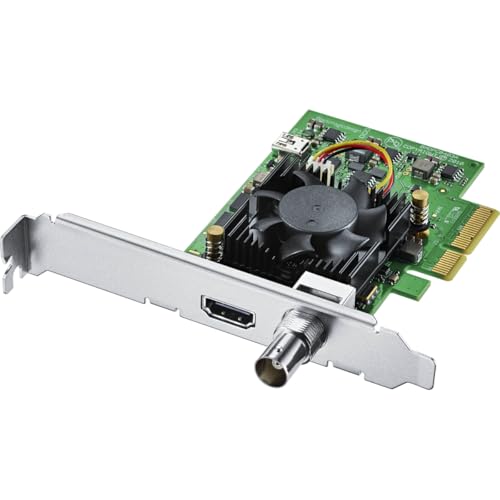
Blackmagic Design DeckLink Mini Recorder 4K
Best for: professional studios needing SDI inputs
- Capture Resolution
- 4K
- Host Interface
- Gen 2 PCIe Express 4 lane
- Video Interface
- HDMI 2.0a, SDI
- Color
- Black
- Dimensions
- 6 × 6 × 6 inches
- Weight
- 5.64 ounces
This is a Blackmagic Design DeckLink Mini Recorder 4K PCIe capture card. It supports 4K UHD capture resolution via HDMI 2.0a and SDI inputs. The device connects to your computer using a Gen 2 PCIe Express 4 lane interface. It handles 10-bit video and 16 channels of embedded SDI audio. You should choose this if you need professional SDI connectivity and high-quality 10-bit color depth for your recording setup.
- Supports 4K UHD capture resolution
- Includes HDMI 2.0a and SDI video inputs
- Provides 16 channels of embedded SDI audio
- Handles 10-bit SD/HD/Ultra HD video
- Uses Gen 2 PCIe Express 4 lane interface
- Requires a PCIe slot instead of USB
- Includes only one HDMI input
- Weighs 5.64 ounces
- You need professional SDI connectivity
- You require 10-bit color depth
- Your PC has an available PCIe slot
- You only have USB ports available
- You need multiple HDMI inputs
- You prefer portable USB devices
Verdict: Blackmagic DeckLink Mini Recorder 4K PCIe is a professional-grade solution for users who need SDI inputs and 10-bit video quality. It fits studios that already have PCIe slots and SDI infrastructure.
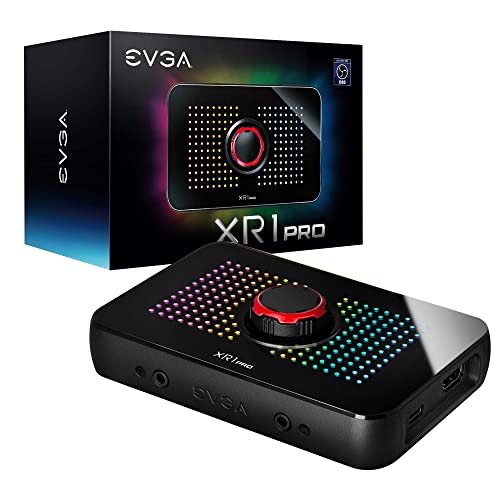
EVGA XR1 Pro Capture Card
Best for: 1440p streaming with audio mixing
- Capture Resolution
- 4K
- Passthrough Resolution
- 1440p144 HDR, 4K60 HDR
- Host Interface
- USB 3.1
- Platform
- PC, Xbox, PS5, Xbox Series X/S, Xbox One
- Compatible Platform
- PlayStation 5, Nintendo Switch, PS4
- Dimensions
- 10 × 8 × 6 inches
The EVGA XR1 Pro is a USB 3.1 capture card designed for PC and console gaming. It records video at 1440p 60fps or 4K 30fps. You get true 1440p 144Hz or 4K 60Hz HDR pass-through for smooth gameplay. It features built-in audio mixer controls and customizable RGB LEDs. This unit is certified for OBS and requires no driver installation for simple setup.
- Records 1440p at 60fps or 4K at 30fps
- Passes through 1440p 144Hz or 4K 60Hz HDR
- Certified for OBS software compatibility
- Includes built-in audio mixer and control dial
- Plug-and-play USB 3.1 connection
- Max capture resolution is 4K at 30fps
- Physical dimensions are 8 x 6 x 10 inches
- Weight is 15.8 ounces
- You need 1440p 144Hz pass-through for low latency
- You want built-in audio mixing controls
- You prefer a certified OBS solution
- You require 4K capture at 60fps
- You need a PCIe internal card
- You want HDMI 2.1 support
Verdict: The EVGA XR1 Pro USB Capture Card suits streamers who prioritize high-refresh pass-through and audio controls over maximum capture resolution. It fits users who value certified OBS compatibility and easy USB setup.
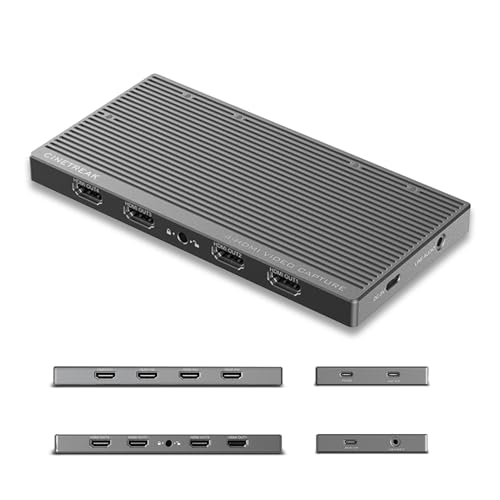
CineTreak CT-4 4K HDMI Capture Card
Best for: Multi-source 4K streaming setups
- Capture Resolution
- 4K
- Host Interface
- USB 3.2 Type-C
- Video Interface
- HDMI
- Channel Count
- 4
- Use
- Streaming, Gaming
- Weight
- 14.1 ounces
The CineTreak CT-4 is a multi-source capture device designed for complex streaming setups. It supports 4K60 resolution across four simultaneous HDMI inputs. The unit connects via USB 3.2 Type-C with 10Gbps transfer speeds. It includes a stereo line-in for professional audio mixing. This card suits creators who need to manage multiple video feeds at high frame rates without driver installation.
- Supports 4K60 capture resolution
- Handles 4 simultaneous HDMI inputs
- Uses USB 3.2 Type-C for 10Gbps data transfer
- Includes stereo line-in audio input
- Heavier build at 14.1 ounces
- Lower frame rate of 4K60 compared to 4K144 competitors
- You need to capture four separate video sources at once
- You require professional audio mixing via a line-in port
- You want plug-and-play compatibility with OBS Studio
- You need 144Hz frame rates for competitive gaming
- You prefer a PCIe internal card over USB
- You want a lighter and more portable device
Verdict: CineTreak CT-4 4K 4-Channel USB Capture is ideal for multi-source production where channel count matters more than extreme refresh rates. It fits users who need to combine four feeds into one stream.

Ezcap 4K144 Pro Video Capture Card
Best for: High refresh rate 4K streaming
- Capture Resolution
- 4K
- Passthrough Resolution
- 4K144, 1440p240, 1080p360
- Host Interface
- USB 3.2 Gen 2
- Video Interface
- HDMI 2.1
- HDR Support
- HDR10
- Features
- HDR10, VRR, Ultra-Low Latency
The Ezcap 4K144 Pro capture card delivers native 4K144 recording and passthrough via HDMI 2.1. It supports HDR10 and VRR for smooth visuals. The USB 3.2 Gen 2 interface provides 10Gbps bandwidth to minimize latency. You get dedicated audio ports for party chat and game sound. This model suits streamers who need high refresh rates and low delay.
- Native 4K144 capture resolution
- HDMI 2.1 passthrough up to 4K144
- HDR10 and VRR support
- USB 3.2 Gen 2 10Gbps interface
- Dedicated 3.5mm Line In and headset ports
- 7.69 ounces weight is heavier than lighter alternatives
- Limited to HDR10 rather than broader HDR formats
- You require 4K144 capture and passthrough
- You want built-in audio mixing for party chat
- You stream on Windows or macOS
- You need PCIe installation for lower latency
- You prefer a lighter portable device
- You require broader HDR format support
Verdict: Ezcap 4K144 Pro Capture Card fits streamers who need high refresh rate capture and dedicated audio inputs. It delivers 4K144 performance via USB 3.2 Gen 2 for synchronized gameplay.

Guermok 4K144 HDMI USB Capture Card
Best for: Windows streaming with high-refresh passthrough
- Capture Resolution
- 4K
- Passthrough Resolution
- 4K144
- Host Interface
- USB 3.2 Gen 2
- Video Interface
- HDMI 2.1
- HDR Support
- HDR10
- VRR Support
- Supported
The Guermok GM-73F is a USB 3.2 Gen 2 capture card featuring HDMI 2.1 support. It handles 4K144 passthrough with HDR10 and VRR. Capture limits vary by format, reaching 4K@144FPS in MJPEG or 1080p@240FPS in NV12. It includes PD 3.0 charging for host devices. This unit suits streamers needing high refresh rates and flexible audio inputs for OBS.
- HDMI 2.1 passthrough up to 4K@144Hz with HDR10 and VRR support
- USB 3.2 Gen 2 interface with built-in PD 3.0 charging
- Supports 4K@144FPS capture in MJPEG and 1080p@240FPS in NV12
- Multiple audio inputs including Mic In, Line In, and Line Out
- Capture resolution drops to 4K@60FPS on macOS
- Weight of 5.94 ounces is heavier than typical compact adapters
- YUY2 format limits capture to 4K@50FPS
- You need HDMI 2.1 passthrough with VRR for high-refresh gaming
- You stream on Windows using OBS with MJPEG or NV12 formats
- You want PD 3.0 charging for your host laptop or tablet
- You require full 4K@144FPS capture on macOS
- You prefer a lighter, more compact USB capture device
- You need YUY2 support at higher than 50FPS
Verdict: Guermok 4K144 HDMI 2.1 USB Capture Card fits Windows-based streamers who prioritize high-refresh passthrough and flexible audio routing. It delivers strong 4K144 passthrough but requires format adjustments for maximum capture speeds.
Specifications side by side
| Spec | Blackmagic Design DeckLink Mini Recorder 4K | EVGA XR1 Pro Capture Card | CineTreak CT-4 4K HDMI Capture Card | Ezcap 4K144 Pro Video Capture Card | Guermok 4K144 HDMI USB Capture Card |
|---|---|---|---|---|---|
| Capture Resolution | – | 1440p60, 4K30 | 4K60 | 4K144, 1080p240 | 4K144 |
| Passthrough Resolution | – | 1440p144 HDR, 4K60 HDR | – | 4K144, 1440p240, 1080p360 | 4K144 |
| Host Interface | Gen 2 PCIe Express 4 lane | USB 3.1 | USB 3.2 Type-C | USB 3.2 Gen 2 | USB 3.2 Gen 2 |
| Video Interface | HDMI 2.0a, SDI | – | HDMI | HDMI 2.1 | HDMI 2.1 |
| Channel Count | – | – | 4 | – | – |
| HDR Support | – | – | – | HDR10 | HDR10 |
| VRR Support | – | – | – | – | Supported |
| Features | – | HDR | – | HDR10, VRR, Ultra-Low Latency | HDR10, VRR, Ultra-Low Latency |
| Color | Black | – | – | 4K144 Pro – 401 | Black |
| Resolution | 4K UHD | 1440p QHD | 4K UHD | 4K UHD | 4K UHD |
| Platform | – | PC, Xbox, PS5, Xbox Series X/S, Xbox One | – | PC, Xbox, PS5, Mac, Xbox Series X/S | PC, PS5, Mac |
| Compatible Platform | – | PlayStation 5, Nintendo Switch, PS4 | – | PlayStation 5, Nintendo Switch | PlayStation 5, Nintendo Switch |
| Use | – | – | Streaming, Gaming | – | – |
| Connectivity | – | USB | USB | USB | USB |
| Dimensions | 6 × 6 × 6 inches | 10 × 8 × 6 inches | – | – | 5.03 × 2.91 × 0.83 inches |
| Weight | 5.64 ounces | 15.8 ounces | 14.1 ounces | 7.69 ounces | 5.94 ounces |
| Model | BDLKMINIREC4K | 144-U1-CB21-LR | CT-4 | ezcap401 | GM-73F |
| Size | – | XR1 Pro | – | – | – |
How to Choose Your 4K Capture Card
Check Connection Type First
Your computer’s available ports dictate which card you can actually install. The Blackmagic Design DeckLink Mini Recorder 4K uses a PCIe interface, requiring an open slot inside a desktop tower. Most other options, such as the Ezcap 4K144 Pro, connect via USB 3.2. USB cards work with laptops and consoles, while PCIe cards offer direct motherboard access. Verify your hardware has the correct slot before purchasing.
Match Refresh Rate Needs
High refresh rates ensure smooth gameplay footage. The Ezcap 4K144 Pro supports 4K at 144Hz, ideal for competitive gamers who need fluid motion. The Guermok 4K144 HDMI 2.1 card also offers high-refresh passthrough, though it may require format adjustments for maximum capture speeds. If you stream slower-paced games, standard 60Hz support is sufficient. Check the specifications for the maximum frame rate the card can handle.
Consider Channel Count
Multi-source setups require cards with multiple inputs. The CineTreak CT-4 4K HDMI Capture Card features four USB 3.2 channels, allowing you to combine several feeds into one stream. This is useful for production studios or complex gaming setups. Most other cards, like the EVGA XR1 Pro, focus on single-source capture. Count your video sources first. If you need more than one input, prioritize cards with multiple channels in their specifications.
Verify Audio Inputs
Built-in microphone or external audio mixing capabilities vary by model. The Ezcap 4K144 Pro includes dedicated audio inputs for synchronized gameplay recording. The EVGA XR1 Pro offers audio mixing controls for streamers who want to blend voices with game sound. If you rely on external audio sources, check the attributes list for audio features. Cards without explicit audio specs may require separate recording solutions for your voice.
Assess Physical Size
Dimensions matter for portable or tight setups. The Guermok 4K144 is compact, measuring 2.91 by 0.83 by 5.03 inches, making it easy to place near a console. The Ezcap 4K144 Pro weighs 7.69 ounces, balancing portability with stability. Larger cards like the Blackmagic Design model are stationary PCIe units. Measure your desk space or check your console’s port accessibility. Smaller form factors offer flexibility for temporary or travel-based streaming.
Frequently asked questions
Can I use a PCIe capture card on a laptop?
No, you cannot directly install a PCIe card in most laptops. The Blackmagic Design DeckLink Mini Recorder 4K requires an internal PCIe slot found in desktop towers. Laptops typically lack these internal expansion slots. You must choose a USB-based model for portable systems. USB cards connect via external ports, making them compatible with standard laptop designs without internal hardware changes.
Which capture card supports four video inputs simultaneously?
The CineTreak CT-4 4K HDMI Capture Card supports four channels. It uses USB 3.2 connectivity to merge multiple feeds into one stream. This makes it ideal for multi-source production setups. Other models like the Ezcap 4K144 Pro focus on single-channel high-refresh performance. If you need to combine several video sources, this four-channel unit is the specific choice for that requirement.
Do these cards support HDR and VRR?
Yes, several models support HDR and VRR features. The Ezcap 4K144 Pro and Guermok 4K144 HDMI 2.1 USB Capture Card both include HDR10 and VRR support. These features help maintain visual fidelity and smooth motion during capture. The EVGA XR1 Pro also lists HDR capabilities. Check the attributes for each model to confirm if these specific video features are included for your console or PC setup.
What is the difference between HDMI 2.0 and 2.1 inputs?
HDMI 2.1 provides higher bandwidth for 4K resolution at high refresh rates. The Guermok 4K144 and Ezcap 4K144 Pro utilize HDMI 2.1 interfaces. This allows for 4K144 passthrough and capture with lower latency. Standard HDMI 2.0 may limit refresh rates at 4K resolution. If you play at high frame rates, the HDMI 2.1 specification ensures your hardware can handle the increased data throughput without bottlenecks.
Which card is best for professional SDI workflows?
The Blackmagic Design DeckLink Mini Recorder 4K is built for professional SDI workflows. It features PCIe connectivity and SDI inputs for studio infrastructure. This model is not designed for casual USB streaming. It fits users who already have SDI equipment and need 10-bit video quality. If you require professional broadcast standards, this PCIe card is the dedicated solution for those specific input requirements.
How much space does a capture card take up?
Size varies significantly by connection type and model. The EVGA XR1 Pro is larger, measuring 10 inches in length and weighing 15.8 ounces. The Guermok 4K144 is compact, at 5.03 inches long and 5.94 ounces. The Blackmagic Design unit is a 6-inch cube. Consider your desk space or case interior when choosing. USB cards often come in small dongles or small boxes, while PCIe cards include larger external enclosures.

