As Amazon Associates, we earn from qualifying purchases. This means we may receive a small commission at no extra cost to you if you click through and make a purchase.
As an Amazon Associate we earn from qualifying purchases. Links on this page are affiliate links.
The AVerMedia Live Gamer Duo Dual HDMI handles dual 1080p60 capture with zero-lag pass-through up to 4K HDR. It supports both console and PC gaming while processing video signals internally. You might look for avermedia live gamer duo dual alternatives if you need higher resolution recording, external USB connectivity, or more input channels. The original card requires an internal PCIe slot, which limits your installation options. Some users prefer external boxes for easier setup or different form factors.
The alternatives listed here were chosen because their specs overlap with the original device. This list includes options for 4K60 capture, 8K passthrough, and multi-source streaming. You can find cards that support 1080p120fps or 1440p passthrough. Each option targets specific needs like VRR support or ultra-low latency. You can compare capture resolutions, host interfaces, and video interfaces to find the right fit for your streaming setup.
How each alternative compares
Elgato 4K Pro Internal Capture Card
The Elgato 4K Pro Internal Capture Card supports 8K passthrough with VRR, which the AVerMedia Live Gamer Duo Dual does not offer. While the Duo captures at 1080p60, this Elgato unit records at 4K60. It uses HDMI 2.1 for higher bandwidth. The Duo provides dual inputs for simultaneous streaming and recording. This Elgato card has only one HDMI port. It is better for single-console setups requiring high refresh rates. You should choose it if you prioritize 4K recording over multi-source capture. The Duo remains the choice for managing two video feeds at once.
AVMATRIX 4-Channel HDMI PCIe Capture Card
The AVMATRIX 4-Channel HDMI PCIe Capture Card handles four simultaneous 1080p60 inputs. The AVerMedia Live Gamer Duo Dual only supports two. This makes the AVMATRIX ideal for complex multi-source streams. Both cards use PCIe interfaces. The AVMATRIX does not list high-resolution passthrough specs in the data. The Duo offers up to 4K HDR pass-through. You should pick the AVMATRIX if you need more than two video sources. It sacrifices high-resolution passthrough for increased channel count. The Duo is better for users who need high-quality passthrough alongside dual capture.
ASUS TUF Gaming CU4K30 Capture Card
The ASUS TUF Gaming CU4K30 Capture Card captures 1080p at 120 fps. The AVerMedia Live Gamer Duo Dual captures at 60 fps. This ASUS unit connects via USB 3.2, while the Duo uses PCIe. The ASUS card does not support dual inputs. The Duo allows simultaneous recording from two HDMI sources. You should choose the ASUS if you need higher frame rates for a single source. It is better for external setups without available PCIe slots. The Duo is superior for multi-camera productions or console-plus-PC streams. It offers dual capture capability that the single-input ASUS lacks.
AVerMedia HDMI 2.1 Internal PCIe Capture Card
The AVerMedia HDMI 2.1 Internal PCIe Capture Card records at 4K60. The Live Gamer Duo Dual records at 1080p60. This newer AVerMedia model uses HDMI 2.1 for higher bandwidth. The Duo uses standard HDMI. Both are internal PCIe cards. The Duo provides dual inputs for simultaneous capture. This single-input card focuses on higher resolution for one source. You should pick it if you need 4K recording quality. It is better for single-console streaming at high resolutions. The Duo remains the better option for multi-source workflows. It balances dual capture with 1080p resolution rather than single 4K.
EVGA XR1 Pro Capture Card
The EVGA XR1 Pro Capture Card supports 1440p144 passthrough. The AVerMedia Live Gamer Duo Dual supports up to 4K60 passthrough. The EVGA unit connects via USB, while the Duo uses PCIe. The EVGA does not list dual capture capabilities. The Duo handles two simultaneous 1080p60 inputs. You should choose the EVGA if you prefer external USB connectivity. It is better for setups without available PCIe slots. The Duo is superior for multi-source streaming. It offers dedicated dual HDMI inputs. The EVGA is a single-input solution focused on high-refresh passthrough rather than multi-camera production.
AVerMedia Live Gamer Ultra 2.1
The AVerMedia Live Gamer Ultra 2.1 supports 4K144 passthrough with VRR. The Live Gamer Duo Dual supports 4K60 HDR passthrough. This Ultra 2.1 model connects via USB, while the Duo uses PCIe. The Ultra 2.1 has a single HDMI input. The Duo provides dual inputs for simultaneous capture. You should pick the Ultra 2.1 if you need higher passthrough refresh rates. It is better for single-console streaming with VRR support. The Duo remains the choice for multi-source setups. It offers dual capture capability that the single-input Ultra 2.1 lacks. The Duo is better for producers managing multiple video feeds.
| # | Product | Best for | Price |
|---|---|---|---|
| 1 | AVerMedia Live Gamer Duo Dual HDMI Capture Card Best overall | Dual source 1080p streaming and recording | |
| 2 | Elgato 4K Pro Internal Capture Card Also great | Desktop streamers needing 8K passthrough and VRR | |
| 3 | AVMATRIX 4-Channel HDMI PCIe Capture Card Best premium | multi-source 1080p60 streaming | |
| 4 | ASUS TUF Gaming CU4K30 Capture Card Best budget | streamers needing 1080p 120 fps capture | |
| 5 | AVerMedia HDMI 2.1 Internal PCIe Capture Card Best 4k uhd | 4K60 console streaming and recording | |
| 6 | EVGA XR1 Pro Capture Card Best 1440p qhd | 1440p passthrough and external USB setup | |
| 7 | AVerMedia Live Gamer Ultra 2.1 Best rgb lighting | High-refresh 4K passthrough and audio inputs |
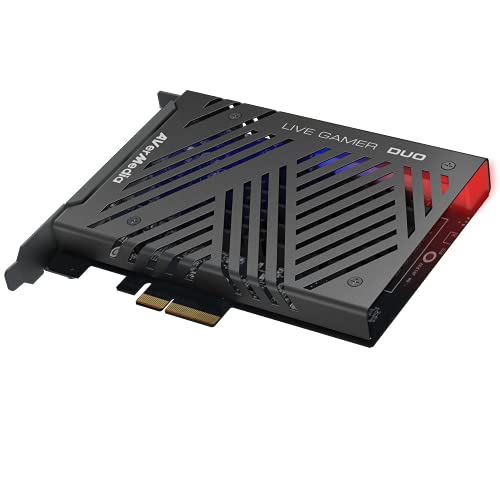
AVerMedia Live Gamer Duo Dual HDMI Capture Card
Best for: Dual source 1080p streaming and recording
- Capture Resolution
- 1080p60
- Passthrough Resolution
- 4K60 HDR, FHD 240fps
- Host Interface
- PCIe
- Video Interface
- HDMI
- Platform
- Xbox, PS5, Xbox Series X/S
- Compatible Platform
- PlayStation 5, Nintendo Switch
The AVerMedia Live Gamer Duo is a PCIe capture card with dual HDMI inputs. It records 1080p60 video while passing through 4K60 HDR or 1080p240 signals. This allows you to stream at 1080p while maintaining high frame rates on your monitor. The onboard processing handles tone mapping and downscaling. It suits creators who need to record two sources simultaneously without lag.
- Dual HDMI inputs for simultaneous recording
- Zero lag pass-through up to 4K60 HDR
- Supports 1080p240 pass-through for high refresh rates
- Onboard video processing for HDR and downscaling
- Capture resolution limited to 1080p60
- Heavier build at 7.37 ounces
- You need to record two video sources at once
- You want high frame rate pass-through for gaming
- You prefer onboard processing for signal conversion
- You require 4K capture resolution
- You need a USB connection instead of PCIe
- You prioritize the lightest possible hardware
Verdict: AVerMedia Live Gamer Duo Dual HDMI delivers dual 1080p60 capture with high-quality pass-through. It fits creators who need to manage multiple inputs and maintain high refresh rates for their gameplay.

Elgato 4K Pro Internal Capture Card
Best for: Desktop streamers needing 8K passthrough and VRR
- Capture Resolution
- 4K60
- Passthrough Resolution
- 8K60
- Host Interface
- PCIe x4
- Video Interface
- HDMI 2.1
- HDR Support
- HDR10
- Features
- HDR, HDR10, VRR
This Elgato PCIe card captures 4K at 60 Hz with HDR10 support. It passes through video up to 8K at 60 Hz over HDMI 2.1. You get VRR and ALLM passthrough for modern consoles. The internal card fits Windows desktops. It works with Elgato Studio and OBS. This setup suits streamers who need high-resolution passthrough and reliable 4K recording.
- Passes through 8K60 HDR video
- Captures 4K60 with HDR10
- Supports VRR and ALLM
- Internal PCIe x4 design
- Capture resolution caps at 4K60, lower than the 4K144 passthrough of competitors
- Requires internal PCIe slot, limiting use to desktop PCs
- You need 8K passthrough for your display
- You stream from a desktop PC with open PCIe slots
- You want VRR support for console gaming
- You use a laptop without PCIe expansion
- You need capture resolution higher than 4K60
- You require USB connectivity for plug-and-play simplicity
Verdict: Elgato 4K Pro PCIe Capture Card delivers high-end passthrough for desktop users who prioritize 8K display support and VRR. It fits gamers who want seamless console integration and reliable 4K recording on Windows.

AVMATRIX 4-Channel HDMI PCIe Capture Card
Best for: multi-source 1080p60 streaming
- Capture Resolution
- 1080p60
- Host Interface
- PCIe Gen 2
- Video Interface
- HDMI 1.4
- Channel Count
- 4
- Features
- Ultra-Low Latency
- Platform
- Xbox, PS5, Xbox Series X/S, Xbox One
This AVMATRIX PCIe card handles four simultaneous HDMI 1.4 inputs. It records 1080p60 video at bit rates up to 200 Mbps. The PCIe Gen 2 interface offers 2.5 GB/s bandwidth for low latency. You get portrait and landscape mode support. It fits systems running Windows 7 or Linux 18.04. This card suits streamers who need multiple sources on one PC.
- Supports four simultaneous HDMI inputs
- Records 1080p60 video at 200 Mbps
- PCIe Gen 2 interface provides 2.5 GB/s bandwidth
- Supports portrait and landscape orientation modes
- Compatible with OBS, Twitch, and YouTube
- Limited to 1080p60 resolution
- Uses older HDMI 1.4 standard
- No 4K or HDR passthrough capability
- You need to capture four separate HDMI sources at once
- You stream in 1080p60 rather than 4K
- You use a desktop PC with available PCIe slots
- You require 4K or 8K resolution capture
- You need HDR passthrough support
- You rely on USB connection instead of PCIe
Verdict: AVMATRIX 4-Channel PCIe Capture Card is a specialized tool for multi-source streaming. It fits users who prioritize channel count over high resolution. This card is ideal for setups requiring four simultaneous 1080p inputs.

ASUS TUF Gaming CU4K30 Capture Card
Best for: streamers needing 1080p 120 fps capture
- Capture Resolution
- 4K30, 2K60, 1080p120
- Passthrough Resolution
- 4K60 HDR
- Host Interface
- USB 3.2 Type-C
- Video Interface
- HDMI 2.0
- HDR Support
- Supported
- Platform
- PC, Xbox, PS5
The ASUS TUF Gaming CU4K30 is a USB 3.2 capture card designed for gamers who need reliable streaming hardware. It supports 4K passthrough at 60 Hz with HDR, while capturing video at up to 4K 30 fps, 2K 60 fps, or 1080p 120 fps. This device connects via USB 3.2 Type-C and works with OBS Studio. It suits streamers who want high-quality pass-through visuals without complex driver setups.
- Supports 4K 60 Hz HDR passthrough for low-latency viewing.
- Captures video at up to 1080p 120 fps for smooth gameplay.
- Uses USB 3.2 Type-C for plug-and-play connection without extra drivers.
- Certified for OBS Studio compatibility to ensure stable streaming performance.
- Capture resolution is limited to 4K 30 fps, which is lower than the 1080p 120 or 4K 60 capture rates of some competitors.
- Uses HDMI 2.0 video interface instead of HDMI 2.1, limiting bandwidth compared to newer standards.
- Weighs 14.9 ounces, making it bulkier and heavier than many internal PCIe alternatives.
- You want high-quality passthrough for your console while streaming.
- You stream at 1080p 120 fps for smoother motion.
- You prefer a durable alloy shell for your capture device.
- You need to capture video at 4K 60 fps or higher.
- You require HDMI 2.1 connectivity for maximum bandwidth.
- You want an internal PCIe card to save desk space.
Verdict: ASUS TUF Gaming CU4K30 Capture Card is a solid choice for streamers who prioritize high-fidelity passthrough and 1080p 120 fps capture over internal installation. It fits those who value durable build quality and simple USB connectivity for their streaming setup.

AVerMedia HDMI 2.1 Internal PCIe Capture Card
Best for: 4K60 console streaming and recording
- Capture Resolution
- 4K60
- Host Interface
- PCIe
- Video Interface
- HDMI 2.1
- Features
- Ultra-Low Latency
- Platform
- Xbox, PS5, Xbox Series X/S, Xbox One
- Compatible Platform
- PlayStation 5, Nintendo Switch, PS4
This AVerMedia internal PCIe card captures 4K60 video via HDMI 2.1. It supports refresh rates up to 240Hz for compatible sources. The unit features ultra-low latency, making it suitable for real-time monitoring. It weighs 5.31 ounces and measures 6.32 by 4.76 inches. You should use it if you need high-resolution recording for consoles like PS5 or Xbox Series X/S.
- Captures 4K60 resolution
- HDMI 2.1 interface
- Supports up to 240Hz refresh rates
- Ultra-low latency performance
- Heavier build at 5.31 ounces compared to lighter competitors
- Larger dimensions at 6.32 inches in length
- Limited to 4K60 capture while rivals offer higher frame rates
- You want 4K60 capture via PCIe
- You stream from PS5 or Xbox Series X/S
- You need ultra-low latency monitoring
- You require 8K pass-through support
- You need a USB connection instead of PCIe
- You want 1080p60 capture only
Verdict: AVerMedia GC575 PCIe 4K60 Capture fits users who prioritize 4K60 recording and ultra-low latency for console gaming. It is a solid internal option for those with available PCIe slots.
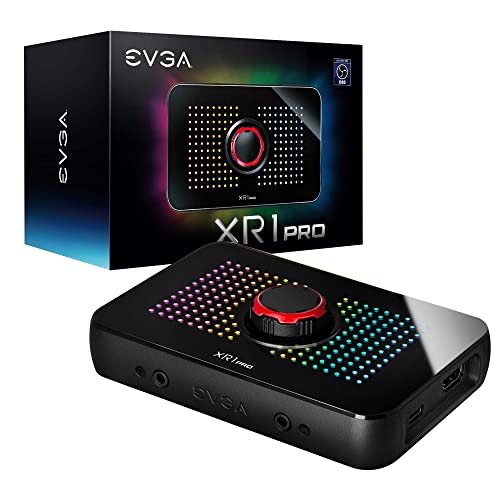
EVGA XR1 Pro Capture Card
Best for: 1440p passthrough and external USB setup
- Capture Resolution
- 1440p60, 4K30
- Passthrough Resolution
- 1440p144 HDR, 4K60 HDR
- Host Interface
- USB 3.1
- Platform
- PC, Xbox, PS5, Xbox Series X/S, Xbox One
- Compatible Platform
- PlayStation 5, Nintendo Switch, PS4
- Dimensions
- 10 × 8 × 6 inches
The EVGA XR1 Pro is a USB 3.1 capture card designed for 1440p and 4K workflows. It records at 1440p60 or 4K30. It passes through 1440p144 HDR or 4K60 HDR. You get certified OBS support and built-in audio mixer controls. This unit suits players who need high refresh rate passthrough without internal PCIe slots.
- Records video at 1440p60 or 4K30
- Passes through 1440p144 HDR and 4K60 HDR
- Certified for OBS software compatibility
- Includes built-in audio mixer controls
- Plug-and-play USB 3.1 connection
- Capture resolution caps at 4K30, lower than 4K144 options
- Requires USB connection, not PCIe internal slot
- Bulky 10-inch length compared to internal cards
- You need 1440p144 HDR passthrough for high refresh gaming
- You want simple plug-and-play setup without drivers
- You require built-in audio mixer controls
- You need internal PCIe installation
- You require 4K144 capture resolution
- You prefer a compact internal form factor
Verdict: EVGA XR1 Pro USB Capture Card delivers reliable 1440p144 passthrough for gamers who need external USB connectivity and built-in audio mixing.

AVerMedia Live Gamer Ultra 2.1
Best for: High-refresh 4K passthrough and audio inputs
- Capture Resolution
- 4K144
- Passthrough Resolution
- 4K144, 1440p240, 1080p360
- Host Interface
- USB 3.2 Gen 2 Type-C
- Video Interface
- HDMI 2.1
- HDR Support
- HDR10
- VRR Support
- Supported
This USB capture card supports 4K144 MJPEG recording on Windows and 4K60 on macOS. It passes through 4K144 HDR with VRR, or 1440p240 and 1080p360. The device features RGB lighting and dual 3.5mm audio ports. It connects via USB-C to consoles and PCs. You should choose this if you need high-refresh passthrough and specific audio inputs for streaming.
- Supports 4K144 passthrough with VRR and HDR10
- Records 4K144 MJPEG on Windows
- Includes dual 3.5mm ports for 5.1 audio
- Features RGB lighting with Windows Dynamic Lighting
- Requires USB 3.2 Gen 2 Type-C connection
- Limited to 4K120 passthrough on monitors using DSC
- You need 4K144 passthrough with VRR support
- You require dedicated headset and gamepad audio inputs
- You want RGB lighting for your setup
- You need PCIe internal installation
- You require 8K resolution support
- You want a smaller form factor
Verdict: AVerMedia Live Gamer Ultra 2.1 fits users who need high-refresh 4K144 passthrough and specific audio inputs. It is ideal for those prioritizing VRR and RGB lighting over internal connectivity.
Specifications side by side
| Spec | AVerMedia Live Gamer Duo Dual HDMI Capture Card | Elgato 4K Pro Internal Capture Card | AVMATRIX 4-Channel HDMI PCIe Capture Card | ASUS TUF Gaming CU4K30 Capture Card | AVerMedia HDMI 2.1 Internal PCIe Capture Card | EVGA XR1 Pro Capture Card | AVerMedia Live Gamer Ultra 2.1 |
|---|---|---|---|---|---|---|---|
| Capture Resolution | 1080p60 | 4K60 | 1080p60 | 4K30, 2K60, 1080p120 | 4K60 | 1440p60, 4K30 | 4K144 |
| Passthrough Resolution | 4K60 HDR, FHD 240fps | 8K60 | – | 4K60 HDR | – | 1440p144 HDR, 4K60 HDR | 4K144, 1440p240, 1080p360 |
| Host Interface | PCIe | PCIe x4 | PCIe Gen 2 | USB 3.2 Type-C | PCIe | USB 3.1 | USB 3.2 Gen 2 Type-C |
| Video Interface | HDMI | HDMI 2.1 | HDMI 1.4 | HDMI 2.0 | HDMI 2.1 | – | HDMI 2.1 |
| Channel Count | – | – | 4 | – | – | – | – |
| HDR Support | – | HDR10 | – | Supported | – | – | HDR10 |
| VRR Support | – | – | – | – | – | – | Supported |
| Features | HDR | HDR, HDR10, VRR | Ultra-Low Latency | HDR | Ultra-Low Latency | HDR | RGB Lighting, HDR10, VRR |
| Color | – | Black | PCIE-4CH HDMI | CU4K30|HDMI 2.0|2160p60 | Multicolor | – | Black |
| Resolution | 1080p FHD | – | – | 1080p FHD | 4K UHD | 1440p QHD | – |
| Platform | Xbox, PS5, Xbox Series X/S | PC, Xbox, PS5, Xbox Series X/S | Xbox, PS5, Xbox Series X/S, Xbox One | PC, Xbox, PS5 | Xbox, PS5, Xbox Series X/S, Xbox One | PC, Xbox, PS5, Xbox Series X/S, Xbox One | PC, Xbox, PS5, Mac, Xbox Series X/S |
| Compatible Platform | PlayStation 5, Nintendo Switch | PlayStation 5, Nintendo Switch | PlayStation 5, Nintendo Switch, PS4 | PlayStation 5, Nintendo Switch | PlayStation 5, Nintendo Switch, PS4 | PlayStation 5, Nintendo Switch, PS4 | PlayStation 5, Nintendo Switch |
| Use | – | – | – | Gaming | Streaming | – | – |
| Connectivity | – | – | – | USB | – | USB | USB |
| Lighting | – | – | – | – | – | – | RGB |
| Application | – | – | Recording | Recording | Recording | – | – |
| Operating System | Windows 11 | – | – | – | – | – | – |
| Dimensions | 9 × 8 × 3 inches | 5 × 2 × 1 inches | 4.73 × 3.48 × 0.85 inches | 6.4 × 5.5 × 2.5 inches | 4.76 × 6.32 × 0.83 inches | 10 × 8 × 6 inches | 2.7 × 7.3 × 6.3 inches |
| Weight | 7.37 ounces | 4 ounces | – | 14.9 ounces | 5.31 ounces | 15.8 ounces | 4.06 ounces |
| Size | 1080p60 – GC570D Live Gamer DUO | – | VC42 | – | HDMI 2.1 – GC575 | XR1 Pro | HDMI 2.1 – GC553G2 (Black) |
| Model | GC570D | 10GBK9901 | VC42 | TUF GAMING CAPTURE BOX-CU4K30 | GC575 | 144-U1-CB21-LR | Live Gamer ULTRA 2.1 |
Frequently asked questions
Which capture card supports 8K passthrough for next-gen consoles?
The Elgato 4K Pro Internal Capture Card is the only option listed that supports 8K passthrough. It also includes Variable Refresh Rate (VRR) and HDR10 features. This makes it suitable for desktop streamers who prioritize high-end display support. The card records at 4K60 resolution via a PCIe interface.
Can I capture from four different sources simultaneously?
Yes, the AVMATRIX 4-Channel HDMI PCIe Capture Card handles four simultaneous inputs. It captures each channel at 1080p60 resolution. This specialized tool is ideal for users who prioritize channel count over higher resolution. It connects via PCIe and supports platforms like PS5 and Xbox Series X/S.
Is there an external USB option for 1080p 120fps capture?
The ASUS TUF Gaming CU4K30 Capture Card offers USB connectivity for external setups. It captures video at 1080p resolution and supports high-fidelity passthrough. This model is designed for streamers who value durable build quality and simple USB 3.2 connection over internal installation. It also supports HDR.
Which card provides 1440p passthrough with built-in audio mixing?
The EVGA XR1 Pro USB Capture Card delivers reliable 1440p144 passthrough. It includes built-in audio mixing capabilities for your stream. This external USB device supports 4K capture resolution and HDR features. It is a solid choice for gamers needing external connectivity and high-refresh-rate display support.
Do any alternatives offer RGB lighting for desk setups?
The AVerMedia Live Gamer Ultra 2.1 features RGB lighting. It provides high-refresh 4K144 passthrough and specific audio inputs. This external USB card supports HDMI 2.1 and VRR. It is ideal for users who prioritize aesthetic lighting and high-resolution passthrough over internal PCIe connectivity.
Which internal card is best for 4K60 console recording?
The AVerMedia GC575 Internal PCIe Capture Card is designed for 4K60 recording. It offers ultra-low latency for console gaming. This card connects via PCIe and supports HDMI 2.1 interfaces. It fits users with available internal slots who need high-resolution capture for PlayStation 5 and Xbox Series X/S.

