As Amazon Associates, we earn from qualifying purchases. This means we may receive a small commission at no extra cost to you if you click through and make a purchase.
As an Amazon Associate we earn from qualifying purchases. Links on this page are affiliate links.
You are looking for avermedia hdmi 2 1 internal pcie alternatives because the AVerMedia GC575 sets a specific standard for single-source 4K60 capture. This card delivers ultra-low latency and supports refresh rates up to 240Hz for your console. It fits players who want high-resolution internal streaming without USB overhead. The PCIe connection ensures direct communication with your motherboard.
However, you might need different specifications. Some users require multiple HDMI inputs for simultaneous recording. Others prefer USB connectivity to avoid opening their PC case. Some prioritize 1440p passthrough or specific audio mixing features. The 6 picks in this guide were chosen because their specs overlap with the original. You can compare capture resolutions, host interfaces, and passthrough capabilities to find the right fit for your setup.
How alternatives compare to AVerMedia
AVMATRIX 4-Channel HDMI PCIe Capture Card
The AVMATRIX VC42 shifts focus from resolution to channel count. While the AVerMedia GC575 captures a single 4K60 stream, this card handles four simultaneous 1080p60 inputs. You gain multi-source flexibility but lose high-resolution capture capability. The PCIe interface remains consistent, ensuring low latency for each feed. This design suits creators managing multiple consoles or devices rather than single-console streamers. You trade the GC575’s 4K UHD quality for the ability to record four separate HDMI sources at once. If your workflow requires switching between multiple cameras or game consoles without external hardware, this card offers the necessary channel density. It is less suitable if you prioritize 4K output over input variety.
Elgato 4K Pro Internal Capture Card
The Elgato 4K Pro matches the GC575 in capture resolution, offering 4K60 internal recording. However, it distinguishes itself with HDR10 support and Variable Refresh Rate passthrough. These features benefit gamers using consoles that rely on dynamic frame rates for smoother visuals. The Elgato model is slightly smaller, measuring five inches in length compared to the AVerMedia’s 4.76 inches, with a compact two-inch width. You retain the PCIe connection for stable performance. If you play titles with variable refresh rates or require HDR10 capture for color accuracy, this card provides superior visual fidelity. It is ideal for Windows users who need high-end passthrough specs alongside internal recording capabilities.
Ezcap 4K144 Pro Video Capture Card
The Ezcap 4K144 Pro changes the connection type from PCIe to USB 3.2. This allows you to use the card without opening your PC case. It supports 4K capture with 144Hz passthrough, exceeding the GC575’s 240Hz refresh rate support for display output. You gain ease of setup and high refresh rate visuals but lose the internal installation stability. The card includes HDR10 and VRR support for enhanced compatibility. It is a solid choice for streamers who prioritize high-resolution visuals and easy audio mixing over internal hardware integration. If you cannot or prefer not to install a PCIe card, this USB alternative delivers comparable 4K performance with added flexibility for external use.
AVerMedia Live Gamer Duo Dual HDMI Capture Card
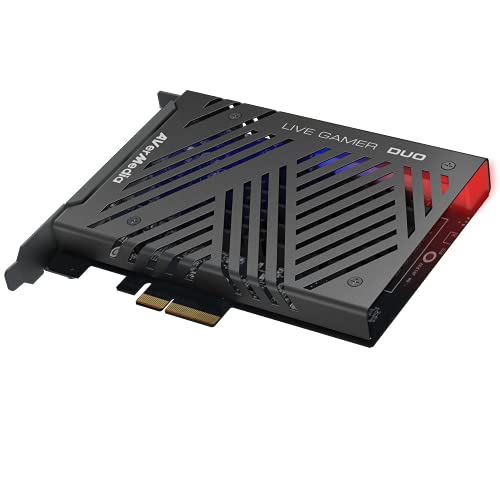
The AVerMedia Live Gamer Duo offers dual 1080p60 capture capabilities on a single PCIe card. While the GC575 focuses on single-source 4K60 recording, this model prioritizes simultaneous multi-source input. It includes 4K pass-through, allowing high-fidelity display output while recording two 1080p feeds. The card is larger, measuring nine inches in length, compared to the GC575’s 4.76 inches. You gain the ability to record two consoles or devices at once but sacrifice 4K capture resolution. This card suits streamers who need to record gameplay from multiple sources simultaneously. It is less ideal if you require 4K60 recording quality for a single console.
EVGA XR1 Pro Capture Card
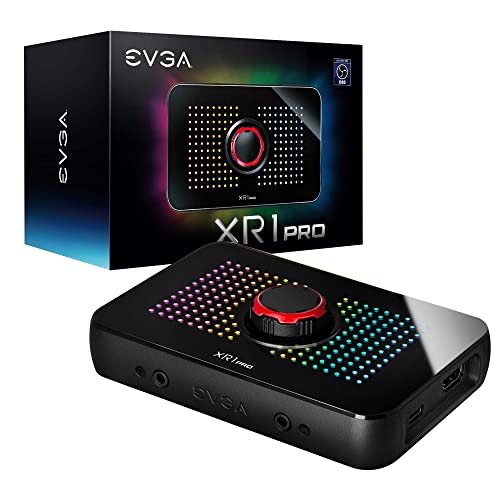
The EVGA XR1 Pro connects via USB rather than PCIe, eliminating the need for internal installation. It supports 1440p passthrough and 4K capture resolution, differing from the GC575’s 4K60 capture focus. The card includes HDR support and local audio mixing controls, which the GC575 does not explicitly list. Its dimensions are significantly larger, measuring ten inches in length, compared to the internal card’s compact form factor. You gain ease of use and audio control but lose the internal stability and direct PCIe bandwidth. This card is ideal for 1440p gamers who do not have available PCIe slots or prefer external hardware solutions for their streaming setup.
AVerMedia Live Gamer Ultra 2.1
The AVerMedia Live Gamer Ultra 2.1 is a USB-connected card with RGB lighting and 4K144 passthrough. Unlike the internal GC575, it does not require PCIe slot installation. It supports HDR10 and Variable Refresh Rate for enhanced visual performance. The card includes RGB lighting for visual customization, a feature absent in the GC575. You gain high-refresh passthrough and aesthetic appeal but lose the internal connection stability. The card measures 2.7 inches in height, making it a desktop accessory rather than an internal component. It suits users who prioritize visual customization and 4K144 performance on Windows without modifying their PC hardware. It is less suitable if you prefer a clean, internal installation.
| # | Product | Best for | Price |
|---|---|---|---|
| 1 | AVerMedia HDMI 2.1 Internal PCIe Capture Card Best overall | Single-source 4K60 internal streaming | |
| 2 | AVMATRIX 4-Channel HDMI PCIe Capture Card Best premium | multi-source 1080p60 streaming setups | |
| 3 | Elgato 4K Pro Internal Capture Card Also great | High passthrough resolution and console VRR | |
| 4 | Ezcap 4K144 Pro Video Capture Card Best budget | high refresh rate passthrough without opening PC | |
| 5 | AVerMedia Live Gamer Duo Dual HDMI Capture Card Best 1080p fhd | Dual 1080p60 capture with 4K pass-through | |
| 6 | EVGA XR1 Pro Capture Card Best 1440p qhd | 1440p passthrough and audio mixing | |
| 7 | AVerMedia Live Gamer Ultra 2.1 Best rgb lighting | RGB lighting and 4K144 passthrough |

AVerMedia HDMI 2.1 Internal PCIe Capture Card
Best for: Single-source 4K60 internal streaming
- Capture Resolution
- 4K60
- Host Interface
- PCIe
- Video Interface
- HDMI 2.1
- Features
- Ultra-Low Latency
- Platform
- Xbox, PS5, Xbox Series X/S, Xbox One
- Compatible Platform
- PlayStation 5, Nintendo Switch, PS4
This internal PCIe capture card supports HDMI 2.1 input and delivers 4K60 capture resolution. It handles refresh rates up to 240Hz and features ultra-low latency for real-time streaming. The card weighs 5.31 ounces and measures 6.32 by 4.76 inches. It works with PlayStation 5, Xbox Series X/S, and Nintendo Switch. You get a direct internal connection for stable performance.
- HDMI 2.1 interface for high-bandwidth input
- 4K60 capture resolution for detailed recording
- Supports refresh rates up to 240Hz
- Ultra-low latency for responsive streaming
- Single HDMI 2.1 input limits simultaneous sources
- Internal PCIe design requires open motherboard slot
- 5.31 ounces weight adds to internal system load
- You need 4K60 capture with ultra-low latency
- You prefer internal PCIe connection over USB
- You stream from a single console source
- You require dual HDMI inputs for multi-source setup
- You need external USB connectivity for portability
- You want 8K60 HDR pass-through capability
Verdict: AVerMedia GC575 PCIe HDMI 2.1 Capture Card fits players who want high-resolution internal capture without USB overhead. It suits single-console streamers who prioritize low latency and 4K60 quality over multi-input flexibility.

AVMATRIX 4-Channel HDMI PCIe Capture Card
Best for: multi-source 1080p60 streaming setups
- Capture Resolution
- 1080p60
- Host Interface
- PCIe Gen 2
- Video Interface
- HDMI 1.4
- Channel Count
- 4
- Features
- Ultra-Low Latency
- Platform
- Xbox, PS5, Xbox Series X/S, Xbox One
This AVMATRIX card handles four HDMI 1.4 inputs simultaneously via a PCIe Gen 2 slot. It records 1080p60 video at bit rates up to 200 Mbps with ultra-low latency. The design supports portrait and landscape modes for flexible setups. It fits users who need to stream multiple consoles or cameras to one PC without switching sources.
- Supports 4 simultaneous HDMI 1.4 inputs
- Records 1080p60 video at 200 Mbps
- PCIe Gen 2 interface for low latency
- Supports portrait and landscape modes
- Limited to HDMI 1.4 video interface
- Maximum capture resolution is 1080p60
- Requires PCIe Gen 2 slot
- You need to capture four HDMI sources at once
- You stream in 1080p60 rather than 4K
- You want ultra-low latency for live gameplay
- You require 4K or 8K capture resolution
- You need HDMI 2.1 bandwidth for high refresh rates
- You only have one HDMI device to record
Verdict: AVMATRIX 4-Channel PCIe Capture Card suits creators who must manage multiple 1080p60 HDMI sources simultaneously on a single PC. It is the right pick when channel count matters more than resolution.

Elgato 4K Pro Internal Capture Card
Best for: High passthrough resolution and console VRR
- Capture Resolution
- 4K60
- Passthrough Resolution
- 8K60
- Host Interface
- PCIe x4
- Video Interface
- HDMI 2.1
- HDR Support
- HDR10
- Features
- HDR, HDR10, VRR
This Elgato internal PCIe card handles high-resolution gaming streams. It captures up to 4K60 with HDR10 support. The device passes through 8K60 and 4K144 signals. It supports VRR and ALLM for compatible consoles. You get a Windows desktop card that weighs 4 ounces. It fits well if you need strong passthrough performance alongside solid capture capabilities.
- Captures up to 4K60 with HDR10
- Passes through 8K60 and 4K144 signals
- Supports VRR and ALLM passthrough
- Compact PCIe x4 internal design
- Capture resolution limited to 4K60
- Weighs 4 ounces, heavier than some alternatives
- You need 8K60 passthrough for future-proofing
- You play on consoles supporting VRR
- You use a Windows desktop PC
- You require capture above 4K60
- You use a Mac or laptop
- You need a USB connection
Verdict: Elgato 4K Pro Internal Capture Card suits gamers who prioritize high-end passthrough specs and console compatibility. It is a solid pick for Windows users wanting HDR10 capture.

Ezcap 4K144 Pro Video Capture Card
Best for: high refresh rate passthrough without opening PC
- Capture Resolution
- 4K144, 1080p240
- Passthrough Resolution
- 4K144, 1440p240, 1080p360
- Host Interface
- USB 3.2 Gen 2
- Video Interface
- HDMI 2.1
- HDR Support
- HDR10
- Features
- HDR10, VRR, Ultra-Low Latency
The Ezcap 401 uses a USB 3.2 Gen 2 connection to deliver 4K144 capture and passthrough. It supports HDR10 and VRR for smooth visuals. You get dedicated audio ports for party chat and commentary. This USB-based card offers a practical alternative to internal PCIe cards. It suits streamers who need high refresh rates without opening their PC case.
- Native 4K144 capture resolution
- HDMI 2.1 passthrough up to 4K144
- USB 3.2 Gen 2 interface for low latency
- Supports HDR10 and VRR
- USB connection limits bandwidth compared to internal PCIe
- Heavier build at 7.69 ounces
- You want 4K144 passthrough without opening your PC
- You need dedicated audio inputs for party chat
- You stream on Windows or macOS
- You require internal PCIe installation for maximum bandwidth
- You need 8K60 HDR pass-through support
- You prefer a lighter portable device
Verdict: Ezcap 4K144 HDMI 2.1 Capture Card fits users who need high refresh rate passthrough without internal installation. It is a solid choice for streamers prioritizing 4K144 visuals and easy audio mixing.
AVerMedia Live Gamer Duo Dual HDMI Capture Card
Best for: Dual 1080p60 capture with 4K pass-through
- Capture Resolution
- 1080p60
- Passthrough Resolution
- 4K60 HDR, FHD 240fps
- Host Interface
- PCIe
- Video Interface
- HDMI
- Platform
- Xbox, PS5, Xbox Series X/S
- Compatible Platform
- PlayStation 5, Nintendo Switch
The AVerMedia Live Gamer Duo is a dual HDMI PCIe capture card designed for 1080p60 uncompressed video. It supports zero-lag pass-through at 4K60 HDR or FHD 240fps. This model processes video inputs onboard, handling tone mapping and frame rate conversion. It is ideal for creators who need simultaneous recording from two sources while maintaining high-quality gameplay visibility on their monitor.
- Dual HDMI inputs for simultaneous 1080p60 capture
- Zero-lag pass-through up to 4K60 HDR
- Onboard video processing for tone mapping
- Compatible with RECentral 4 and OBS
- Capture resolution limited to 1080p60
- Heavier build at 7.37 ounces
- Larger physical dimensions than single-input cards
- You need to record from two HDMI sources simultaneously
- You want 1080p60 capture with high-quality pass-through
- You use professional streaming software like OBS
- You require 4K capture resolution
- You prefer a single HDMI input design
- You need a lighter or more compact card
Verdict: AVerMedia Live Gamer Duo 1080p60 PCIe suits streamers who need dual 1080p60 inputs with high-fidelity pass-through. It fits users prioritizing simultaneous multi-source recording over 4K capture resolution.
EVGA XR1 Pro Capture Card
Best for: 1440p passthrough and audio mixing
- Capture Resolution
- 1440p60, 4K30
- Passthrough Resolution
- 1440p144 HDR, 4K60 HDR
- Host Interface
- USB 3.1
- Platform
- PC, Xbox, PS5, Xbox Series X/S, Xbox One
- Compatible Platform
- PlayStation 5, Nintendo Switch, PS4
- Dimensions
- 10 × 8 × 6 inches
The EVGA XR1 Pro handles 1440p capture at 60fps and 4K at 30fps. It offers 1440p144 HDR and 4K60 HDR passthrough for your display. This USB 3.1 device requires no drivers and features built-in audio mixer controls. It is certified for OBS and supports consoles like PS5 and Xbox Series X/S. You get a solid option for 1440p gaming setups.
- Captures 1440p at 60fps
- Passes through 1440p144 HDR
- Built-in audio mixer controls
- Certified for OBS software
- USB 3.1 plug-and-play setup
- 4K capture limited to 30fps
- Heavier build at 15.8 ounces
- 2-year warranty period
- You game at 1440p resolution
- You need 144Hz passthrough for your monitor
- You want built-in audio mixing
- You require 4K capture at 60fps
- You need an internal PCIe connection
- You want a warranty longer than 2 years
Verdict: The EVGA XR1 Pro Capture Card fits users prioritizing high-refresh 1440p passthrough and local audio control. It is ideal for 1440p gamers who do not need internal PCIe slots.

AVerMedia Live Gamer Ultra 2.1
Best for: RGB lighting and 4K144 passthrough
- Capture Resolution
- 4K144
- Passthrough Resolution
- 4K144, 1440p240, 1080p360
- Host Interface
- USB 3.2 Gen 2 Type-C
- Video Interface
- HDMI 2.1
- HDR Support
- HDR10
- VRR Support
- Supported
This USB capture card handles HDMI 2.1 input for 4K144 MJPEG recording on Windows and 4K60 on macOS. You get high-refresh passthrough up to 4K144 HDR with VRR support. It connects via USB-C 10Gbps to PCs, consoles, or iPads. The device includes RGB lighting and dual 3.5mm audio ports. It suits streamers needing high frame rates and visual customization.
- Supports 4K144 capture resolution on Windows
- Offers 4K144 HDR and VRR passthrough
- Includes RGB lighting with Windows Dynamic Lighting
- Features dual 3.5mm ports for 5.1 audio
- USB connection limits macOS capture to 4K60
- DSC monitors may reduce passthrough to 4K120
- You need 4K144 passthrough for high-refresh displays
- You want RGB lighting on your capture gear
- You stream from consoles via USB-C
- You require a PCIe internal slot
- You need 4K144 capture on macOS
- You prefer a smaller form factor
Verdict: AVerMedia Live Gamer Ultra 2.1 4K144 delivers high-refresh passthrough and RGB lighting for users prioritizing visual customization and 4K144 performance on Windows.
Specifications side by side
| Spec | AVerMedia HDMI 2.1 Internal PCIe Capture Card | AVMATRIX 4-Channel HDMI PCIe Capture Card | Elgato 4K Pro Internal Capture Card | Ezcap 4K144 Pro Video Capture Card | AVerMedia Live Gamer Duo Dual HDMI Capture Card | EVGA XR1 Pro Capture Card | AVerMedia Live Gamer Ultra 2.1 |
|---|---|---|---|---|---|---|---|
| Capture Resolution | 4K60 | 1080p60 | 4K60 | 4K144, 1080p240 | 1080p60 | 1440p60, 4K30 | 4K144 |
| Passthrough Resolution | – | – | 8K60 | 4K144, 1440p240, 1080p360 | 4K60 HDR, FHD 240fps | 1440p144 HDR, 4K60 HDR | 4K144, 1440p240, 1080p360 |
| Host Interface | PCIe | PCIe Gen 2 | PCIe x4 | USB 3.2 Gen 2 | PCIe | USB 3.1 | USB 3.2 Gen 2 Type-C |
| Video Interface | HDMI 2.1 | HDMI 1.4 | HDMI 2.1 | HDMI 2.1 | HDMI | – | HDMI 2.1 |
| Channel Count | – | 4 | – | – | – | – | – |
| HDR Support | – | – | HDR10 | HDR10 | – | – | HDR10 |
| VRR Support | – | – | – | – | – | – | Supported |
| Features | Ultra-Low Latency | Ultra-Low Latency | HDR, HDR10, VRR | HDR10, VRR, Ultra-Low Latency | HDR | HDR | RGB Lighting, HDR10, VRR |
| Color | Multicolor | PCIE-4CH HDMI | Black | 4K144 Pro – 401 | – | – | Black |
| Resolution | 4K UHD | – | – | 4K UHD | 1080p FHD | 1440p QHD | – |
| Platform | Xbox, PS5, Xbox Series X/S, Xbox One | Xbox, PS5, Xbox Series X/S, Xbox One | PC, Xbox, PS5, Xbox Series X/S | PC, Xbox, PS5, Mac, Xbox Series X/S | Xbox, PS5, Xbox Series X/S | PC, Xbox, PS5, Xbox Series X/S, Xbox One | PC, Xbox, PS5, Mac, Xbox Series X/S |
| Compatible Platform | PlayStation 5, Nintendo Switch, PS4 | PlayStation 5, Nintendo Switch, PS4 | PlayStation 5, Nintendo Switch | PlayStation 5, Nintendo Switch | PlayStation 5, Nintendo Switch | PlayStation 5, Nintendo Switch, PS4 | PlayStation 5, Nintendo Switch |
| Use | Streaming | – | – | – | – | – | – |
| Connectivity | – | – | – | USB | – | USB | USB |
| Lighting | – | – | – | – | – | – | RGB |
| Application | Recording | Recording | – | – | – | – | – |
| Operating System | – | – | – | – | Windows 11 | – | – |
| Dimensions | 4.76 × 6.32 × 0.83 inches | 4.73 × 3.48 × 0.85 inches | 5 × 2 × 1 inches | – | 9 × 8 × 3 inches | 10 × 8 × 6 inches | 2.7 × 7.3 × 6.3 inches |
| Weight | 5.31 ounces | – | 4 ounces | 7.69 ounces | 7.37 ounces | 15.8 ounces | 4.06 ounces |
| Size | HDMI 2.1 – GC575 | VC42 | – | – | 1080p60 – GC570D Live Gamer DUO | XR1 Pro | HDMI 2.1 – GC553G2 (Black) |
| Model | GC575 | VC42 | 10GBK9901 | ezcap401 | GC570D | 144-U1-CB21-LR | Live Gamer ULTRA 2.1 |
Frequently asked questions
Which internal PCIe capture card supports 4K60 capture?
The AVerMedia GC575 and the Elgato 4K Pro Internal Capture Card both support 4K60 capture. The AVerMedia model uses an HDMI 2.1 interface for ultra-low latency. The Elgato option adds HDR10 support and VRR compatibility for enhanced visual fidelity on Windows systems.
Can I use a PCIe card for multi-source streaming?
Yes, the AVMATRIX VC42 is designed for multi-source streaming. It features four HDMI channels that allow simultaneous 1080p60 capture. This PCIe card suits creators who need to manage multiple inputs rather than focusing on single-source 4K resolution.
Which capture card offers 4K144 passthrough?
The AVerMedia Live Gamer Ultra 2.1 provides 4K144 passthrough capability. It connects via USB 2.1 and includes RGB lighting for visual customization. This external device is ideal if you prioritize high refresh rate passthrough over internal installation.
Do internal PCIe cards support VRR?
The Elgato 4K Pro Internal Capture Card supports Variable Refresh Rate. It also handles HDR10 for improved color and contrast. These features make it suitable for gamers who want console compatibility and high-end passthrough specs on their PC.
Which card is best for dual 1080p60 inputs?
The AVerMedia Live Gamer Duo (GC570D) is built for dual 1080p60 capture. It uses a PCIe interface to handle two simultaneous HDMI inputs. This card fits users who prioritize simultaneous multi-source recording over 4K capture resolution.
Is there a PCIe option for 1440p passthrough?
No listed PCIe card specifically highlights 1440p passthrough as its primary feature. The EVGA XR1 Pro supports 1440p QHD but connects via USB. For internal PCIe needs, the AVerMedia GC575 focuses on 4K60 capture with ultra-low latency.
Which card has the smallest form factor?
The Elgato 4K Pro Internal Capture Card has a compact design measuring 2 inches in width and 5 inches in length. It weighs 4 ounces. This small footprint makes it easy to fit into standard PC cases without taking up excessive space.

