As Amazon Associates, we earn from qualifying purchases. This means we may receive a small commission at no extra cost to you if you click through and make a purchase.
As an Amazon Associate we earn from qualifying purchases. Links on this page are affiliate links.
The ASUS vs GravaStar gaming keyboard debate centers on layout and build philosophy. Both brands offer tri-mode connectivity, hot-swappable switches, and gasket-mounted acoustics for a refined typing feel. The main difference lies in their form factors. The ASUS ROG Strix Scope II 96 provides a compact full-size layout with a number pad. The GravaStar Mercury K1 Pro uses a smaller 75% design with a control knob. Your choice depends on whether you prioritize numeric input or a minimalist desk footprint.
Form Factor
96% Full-Size
75%
Switch Type
ROG NX Snow linear
Kailh Speedy Mint linear
Keycap Material
PBT
not listed
Lighting System
Per-key RGB
Dual RGB
Control Knob
Multi-function wheel
Dedicated control knob
Battery Life (Wireless)
Up to 1,500 hours
Up to 470 hours
Choose the first if
- You need a number pad for data entry or spreadsheets.
- You prefer PBT keycaps for durability and texture.
- You want the longest possible battery life in wireless mode.
Choose the second if
- You want more mouse space with a compact 75% layout.
- You prefer a dedicated physical knob for volume control.
- You like a premium aluminum alloy frame design.
Verdict
Choose the ASUS ROG Strix Scope II 96 if you require a number pad and longer wireless battery life. Pick the GravaStar Mercury K1 Pro if you value a compact footprint, a metal build, and a physical volume knob.
Layout, Build, and Sound Comparison
Layout and Keys
Edge: Tie
The ASUS ROG Strix Scope II 96 Wireless uses a 96% full-size layout. It retains a number pad in a compact space only 1 cm wider than an 80 percent keyboard. This design offers full functionality without taking up excessive desk space. In contrast, the GravaStar Mercury K1 Pro features a 75% layout with 79 keys. It removes the number pad to free up room for mouse movement. The GravaStar model also includes a dedicated control knob for volume adjustments. You should choose the ASUS model if you need numeric input for work or gaming. The GravaStar option is better for gamers who prioritize mouse space.
Build Material
Edge: GravaStar Mercury 75% Wireless Mechanical Keyboard
Build construction differs significantly between these two keyboards. The GravaStar Mercury K1 Pro is built with a premium aluminum alloy exoskeleton. This skeletal frame provides structural stability and a solid, steady feel during use. The metal construction adds a refined mechanical aesthetic to your desk. The data for the ASUS ROG Strix Scope II 96 Wireless does not specify its primary build material. It lists dimensions and weight but omits details about the chassis composition. Therefore, the GravaStar model offers a clear advantage in terms of known premium materials and sturdy metal construction. You get a verified aluminum frame with the GravaStar device.
Acoustic Profile
Edge: GravaStar Mercury 75% Wireless Mechanical Keyboard
Both keyboards focus on refined sound profiles through dampening structures. The ASUS ROG Strix Scope II 96 Wireless integrates sound-dampening foam and switch-dampening pads. These components absorb pinging noises and echoes to improve keystroke acoustics. The GravaStar Mercury K1 Pro utilizes a gasket-mounted FR4 plate combined with a 5-layer foam structure. This setup creates a deeper, satisfying thock at moderate volumes. The GravaStar design aims for a creamy typing experience with crisp feedback. While both offer enhanced acoustics, the GravaStar model provides a more detailed description of its multi-layer dampening approach. The ASUS model relies on standard foam and pads. This gives the GravaStar a slight edge in acoustic engineering specificity.
Switch Specifications
Edge: GravaStar Mercury 75% Wireless Mechanical Keyboard
Switch performance varies between the two brands. The ASUS ROG Strix Scope II 96 Wireless comes with factory-lubricated ROG NX Snow linear switches. These are designed for smooth, thocky keystrokes and optimized acoustics. The GravaStar Mercury K1 Pro features GravaStar x Kailh Speedy Mint linear switches. These switches have a 45gf actuation force and a 1.2mm pre-travel for responsive feedback. The GravaStar switches are rated for 70,000,000 keystrokes, indicating high durability for extended use. The ASUS data does not list a specific keystroke lifespan rating. The GravaStar model provides clearer technical specifications regarding actuation force and durability. You get more precise switch data with the GravaStar option.
Battery Life
Edge: ASUS ROG Strix Scope II 96 Wireless
Wireless endurance is a key factor for mobile setups. The ASUS ROG Strix Scope II 96 Wireless boasts an exceptional battery life of up to 1,500 hours in 2.4GHz wireless mode. This allows for extended periods of use without frequent charging. The GravaStar Mercury K1 Pro offers up to 470 hours of use with lighting off. With lighting on, the battery lasts up to 40 hours. The ASUS model significantly outperforms the GravaStar model in terms of maximum battery duration. If you prioritize long battery life for gaming or work, the ASUS keyboard is the superior choice. The GravaStar battery life is adequate but much shorter than the ASUS offering.
Choose the Right Keyboard for Your Desk
You need a number pad and media controls
Our pick: ASUS ROG Strix Scope II 96 Wireless
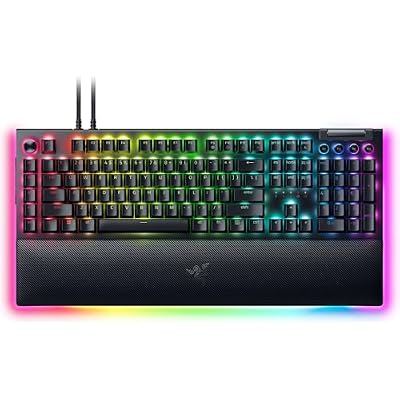
The ASUS ROG Strix Scope II 96 keeps the number pad in a compact 96% layout. It includes a dedicated multi-function wheel for volume and lighting adjustments. You get PBT keycaps and tri-mode connectivity. The detachable wrist rest supports long work sessions. This model fits users who want full functionality without taking up extra desk space.
You want a compact layout with a knob
Our pick: GravaStar Mercury 75% Wireless Mechanical Keyboard
The GravaStar Mercury K1 Pro uses a 75% layout with 79 keys. It includes a dedicated control knob for quick volume adjustments. The aluminum alloy exoskeleton adds structural stability. You get up to 470 hours of battery life with lighting off. This keyboard suits users who prefer a minimalist setup with more room for mouse movement.
You prefer a premium metal build aesthetic
Our pick: GravaStar Mercury 75% Wireless Mechanical Keyboard
GravaStar features a distinctive skeletal frame with a premium aluminum alloy exoskeleton. The cyberpunk-inspired design creates a refined mechanical aesthetic for your desk. The gasket-mounted FR4 plate and five-layer foam structure shape a deep acoustic profile. You get dual RGB lighting systems with 16.8 million colors. This build appeals to users who value visual impact and solid construction.

ASUS ROG Strix Scope II 96 Wireless
Best for: compact 96% layouts with hot-swap switches
- Form Factor
- 96% Full-Size
- Switch Type
- ROG NX Snow linear mechanical
- Connectivity
- Bluetooth, 2.4 GHz, USB wired
- Keycap Material
- PBT
- Lighting
- Per-key RGB
- Features
- RGB Lighting, Hot-Swappable
The ASUS ROG Strix Scope II 96 offers a compact 96% layout with full-size functionality. It features tri-mode connectivity via Bluetooth, 2.4GHz wireless, or USB wired. The keyboard includes hot-swappable ROG NX Snow linear switches and PBT keycaps. Integrated sound-dampening foam improves acoustics. It suits users who want a space-saving design with robust wireless options and customizable switches.
- Tri-mode connectivity including Bluetooth, 2.4GHz, and USB wired
- Hot-swappable ROG NX Snow linear mechanical switches
- Integrated sound-dampening foam for improved acoustics
- PBT keycap material for durability
- Detachable wrist rest and adjustable tilt positions
- Heavier build at 2.78 pounds compared to lighter alternatives
- Larger footprint than a standard TKL due to the 96% layout
- You need a compact keyboard that retains a number pad
- You prefer hot-swappable switches for customization
- You want reliable wireless connectivity with long battery life
- You require a smaller 75% or 60% form factor
- You prioritize a lightweight keyboard under 2 pounds
- You only need wired connectivity without wireless options
Verdict: ASUS ROG Strix Scope II 96 Wireless fits users who want a compact 96% layout with full functionality and hot-swappable switches. It is ideal for those who value tri-mode connectivity and sound-dampening features in a durable build.

GravaStar Mercury 75% Wireless Mechanical Keyboard
Best for: compact setups requiring aluminum durability
- Form Factor
- 75%
- Switch Type
- Kailh Speedy Mint linear
- Connectivity
- 2.4 GHz, Bluetooth, USB-C
- Lighting
- Dual RGB
- Features
- RGB Lighting, Hot-Swappable, Gasket Mount
- Platform
- Mac
The GravaStar Mercury K1 Pro is a 75% wireless mechanical keyboard with a 79-key layout and a dedicated control knob. It uses Kailh Speedy Mint linear switches rated for 70 million keystrokes. The aluminum alloy frame supports tri-mode connectivity and offers up to 470 hours of battery life with lighting off. It suits gamers who want a compact, sturdy build with customizable RGB lighting.
- Tri-mode connectivity with 2.4GHz, Bluetooth, and wired USB-C options
- Kailh Speedy Mint linear switches rated for 70 million keystrokes
- Premium aluminum alloy exoskeleton for structural stability
- Gasket-mounted design with 5-layer foam for a refined acoustic profile
- Up to 470 hours of battery life with lighting disabled
- Heavier build at 2.6 pounds compared to lighter plastic alternatives
- Smaller 75% layout with 79 keys limits dedicated macro rows
- Web-based driver required for RGB customization instead of onboard memory
- You need a compact 75% layout with a control knob for volume adjustments
- You prefer a sturdy aluminum frame over standard plastic construction
- You want tri-mode connectivity for switching between multiple devices
- You require a full-size keyboard with a dedicated numpad
- You prefer tactile or clicky switches over linear feedback
- You want onboard memory for lighting profiles without software
Verdict: GravaStar Mercury K1 Pro 75% Wireless is a solid choice for users who value a heavy aluminum build and tri-mode flexibility in a compact form factor.
Specifications side by side
| Spec | ASUS ROG Strix Scope II 96 Wireless | GravaStar Mercury 75% Wireless Mechanical Keyboard |
|---|---|---|
| Form Factor | 96% Full-Size | 75% |
| Switch Type | ROG NX Snow linear mechanical | Kailh Speedy Mint linear |
| Connectivity | Bluetooth, 2.4 GHz, USB wired | 2.4 GHz, Bluetooth, USB-C |
| Keycap Material | PBT | – |
| Lighting | Per-key RGB | Dual RGB |
| Features | RGB Lighting, Hot-Swappable | RGB Lighting, Hot-Swappable, Gasket Mount |
| Size | Full-Size | – |
| Color | Black | Cyberpunk |
| Platform | PC, Mac | Mac |
| Compatible Platform | – | Nintendo Switch |
| Use | Gaming | Gaming |
| Dimensions | 14.8 × 5.16 × 1.57 inches | 16.3 × 7.03 × 2.27 inches |
| Weight | 2.78 pounds | 2.6 pounds |
| Model | X901 STRIX SCOPE II 96 WL/NXSW/CA/PBT | K1 PRO |
Frequently asked questions
Which keyboard is better for small desks?
The GravaStar Mercury 75% Wireless is the better choice for tight spaces. It measures 16.3 inches in length and 7.03 inches in width. This compact form factor leaves more room for mouse movement. The ASUS ROG Strix Scope II 96 is wider at 14.8 inches but includes a number pad, which takes up more desk real estate.
Do both keyboards support Mac computers?
Yes, both models work with Mac operating systems. The ASUS ROG Strix Scope II 96 Wireless lists PC and Mac as compatible platforms. The GravaStar Mercury 75% also explicitly supports Mac. You can use either keyboard with your Apple computer without needing special drivers or adapters for basic functionality.
Are the switches hot-swappable on these boards?
Yes, both keyboards feature hot-swappable switch sockets. This allows you to change switches without soldering. The ASUS ROG Strix Scope II 96 highlights this feature in its attributes. The GravaStar Mercury 75% also includes hot-swap capability. You can customize the typing feel by installing different mechanical switches easily.
Which keyboard has a heavier build?
The ASUS ROG Strix Scope II 96 is slightly heavier. It weighs 2.78 pounds, while the GravaStar Mercury 75% weighs 2.6 pounds. The ASUS model uses a full-size layout that adds material. The GravaStar uses an aluminum build for durability, but the overall mass is lower due to the smaller 75% footprint.
Do both keyboards use PBT keycaps?
The data confirms the ASUS ROG Strix Scope II 96 uses PBT keycaps. This material is durable and resists shine over time. The specifications for the GravaStar Mercury 75% do not list the keycap material. You should check the product details for GravaStar if keycap texture is a priority for your setup.
Is tri-mode connectivity available on both?
Yes, both keyboards offer tri-mode connectivity. This means they support wired, 2.4GHz wireless, and Bluetooth connections. The ASUS ROG Strix Scope II 96 explicitly lists tri-mode support. The GravaStar Mercury 75% also provides wireless flexibility. You can switch between devices or use a cable for low-latency gaming easily.