As Amazon Associates, we earn from qualifying purchases. This means we may receive a small commission at no extra cost to you if you click through and make a purchase.
As an Amazon Associate we earn from qualifying purchases. Links on this page are affiliate links.
This AOC vs sceptre gaming monitor comparison looks at two distinct approaches to high-performance displays. Both models target gamers with fast refresh rates and sharp 1440p resolutions. The main difference lies in their form factor and panel technology. One offers a compact, flat Mini-LED screen with superior HDR capabilities. The other provides a wide, curved ultrawide experience with built-in audio. You need to decide which shape and feature set fits your setup.
Screen Size
27 inches
34 inches
Resolution
2560×1440
3440 x 1440
Panel Type
VA Mini-LED
VA Curved (1500R)
Refresh Rate
180Hz
240Hz
HDR Standard
DisplayHDR 1000
not listed
Built-in Speakers
not listed
Yes
Choose the first if
- You want a compact 27-inch screen that fits standard desks.
- You prioritize high contrast and deep blacks from Mini-LED backlighting.
- You need VESA DisplayHDR 1000 certification for brighter highlights.
Choose the second if
- You prefer an immersive 34-inch ultrawide field of view.
- You want a smoother 240Hz refresh rate for competitive play.
- You need built-in speakers to reduce desk clutter.
Verdict
The AOC model suits those who value compact size, superior HDR performance, and high color accuracy on a flat panel. The Sceptre monitor is better for users who want a wider ultrawide display, higher refresh rates, and integrated audio without extra cables.
Specs: Size, Speed, and Panel Tech
Screen size and shape
Edge: Tie
The AOC model features a 27-inch flat display, offering a compact footprint that fits easily on most desks. In contrast, the Sceptre model provides a 34-inch ultrawide screen with a 1500R curvature. This larger surface area gives you more horizontal space for multitasking or immersive gaming. The Sceptre’s curved design also helps keep edges at a consistent viewing distance. The AOC’s flat panel is standard for competitive shooters where distortion is undesirable. Your choice depends on whether you prefer a focused, central view or a wider, enveloping experience.
Refresh rate and speed
Edge: Sceptre 34-Inch Curved 240Hz Ultrawide Monitor
Both monitors deliver high refresh rates suitable for fast-paced gaming. The AOC model runs at 180Hz via DisplayPort 1.4. The Sceptre model pushes higher, supporting up to 240Hz. This 60Hz difference can provide smoother motion in competitive titles where every frame counts. Both units share a 1ms response time, which minimizes ghosting and blur during rapid movements. The Sceptre’s higher ceiling makes it better for users prioritizing maximum fluidity. The AOC’s 180Hz is still very fast for most gamers. If peak speed is your primary metric, the Sceptre holds the advantage.
Panel technology and HDR
Edge: AOC 27-Inch Mini-LED 1440p Gaming Monitor
The AOC uses a VA Mini-LED panel with 336 dimming zones and supports VESA DisplayHDR 1000. This technology delivers deep blacks and bright highlights, enhancing visual contrast significantly. The Sceptre model uses a standard VA panel without Mini-LED backlighting or specific HDR certification listed. It offers 100% sRGB coverage for accurate colors. The AOC’s Mini-LED setup provides superior dynamic range and local dimming control. This results in better performance in dark scenes and high-contrast environments. For visual fidelity and HDR impact, the AOC’s panel technology is clearly superior.
Connectivity and ports
Edge: Tie
The AOC model includes HDMI 2.1 ports and USB 3.2 connectivity, supporting modern console and PC setups. The Sceptre model offers two HDMI ports and two DisplayPort inputs. This dual DisplayPort configuration is useful for daisy-chaining or connecting multiple high-bandwidth sources. The Sceptre also includes built-in speakers, which the AOC data does not list. This adds convenience for users who want basic audio without extra hardware. The AOC’s HDMI 2.1 support is better for next-gen console features like 4K high refresh rates. Both offer versatile connections, but for different use cases.
Ergonomics and features
Edge: AOC 27-Inch Mini-LED 1440p Gaming Monitor
The AOC model is height adjustable, allowing you to raise or lower the screen for better posture. The Sceptre model’s adjustability is not listed in the provided data. The Sceptre includes Blue-Light Shift technology to reduce eye strain during long sessions. The AOC does not list this specific feature, though it has calibrated colors. The AOC’s stand flexibility gives it an edge for physical comfort. The Sceptre’s software-based eye care is a nice addition. If you need physical height adjustment, the AOC is the better choice. Otherwise, both offer standard viewing options.
Choose Your Ideal Gaming Monitor
You want high contrast and HDR visuals
Our pick: AOC 27-Inch Mini-LED 1440p Gaming Monitor
The AOC model uses Mini-LED technology with 336 dimming zones. This creates true blacks and brighter whites for better contrast. It also carries a VESA DisplayHDR 1000 certification. This ensures rich details in bright scenes. The 134% sRGB color gamut provides vibrant images. You get sharp 1440p resolution on a compact 27-inch screen.
You need an immersive ultrawide experience
Our pick: Sceptre 34-Inch Curved 240Hz Ultrawide Monitor
The Sceptre monitor offers a 34-inch ultrawide display. Its 1500R curvature wraps around your field of view for immersion. It reaches a 240Hz refresh rate for smooth motion. The 1ms response time reduces blur during fast action. You also get built-in speakers to save desk space. The 100% sRGB coverage ensures accurate color reproduction for daily tasks.
You prefer a compact desk setup
Our pick: AOC 27-Inch Mini-LED 1440p Gaming Monitor
The AOC 27-inch size fits smaller desks easily. It weighs 15.6 pounds and has a frameless design. The height-adjustable stand lets you customize your viewing angle. You get Adaptive-Sync for tear-free gameplay. The HDMI 2.1 and USB 3.2 ports offer versatile connectivity. This model keeps your workspace organized while delivering high performance.
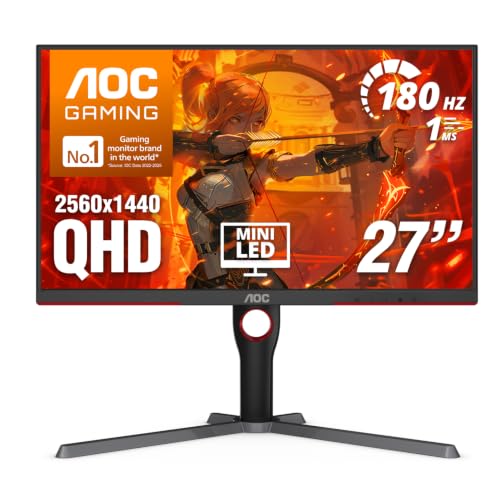
AOC 27-Inch Mini-LED 1440p Gaming Monitor
Best for: High-contrast gaming with HDR1000 support
- Screen Size
- 27"
- Resolution
- 2560×1440
- Refresh Rate
- 180Hz
- Response Time
- 1ms GtG
- Panel Type
- VA Mini-LED
- Sync Technology
- Adaptive-Sync
This AOC 27-inch monitor uses a VA Mini-LED panel with 336 dimming zones for high contrast. It offers QHD resolution and a 180Hz refresh rate for smooth gameplay. The VESA DisplayHDR 1000 certification ensures bright highlights. You get adaptive sync to prevent tearing. It fits well if you want strong local dimming and sharp images in a mid-size frame.
- Mini-LED backlight with 336 dimming zones
- VESA DisplayHDR 1000 certification
- 180Hz refresh rate via DisplayPort
- 1ms GtG response time
- 134% sRGB color gamut
- 15.6 pounds weight is heavier than lighter alternatives
- 180Hz refresh rate is lower than the 240Hz option on the list
- VA panel may have slower pixel transitions than IPS
- You want high contrast and deep blacks from Mini-LED
- You play fast-paced games and need adaptive sync
- You prefer a 27-inch QHD display
- You need a 240Hz or higher refresh rate
- You require an IPS panel for faster pixel response
- You want a lighter monitor under 12 pounds
Verdict: AOC 27-inch 180Hz Mini-LED Monitor delivers strong HDR performance and sharp QHD visuals. It suits gamers who prioritize contrast and color accuracy over maximum refresh rates.

Sceptre 34-Inch Curved 240Hz Ultrawide Monitor
Best for: Fast-paced gaming on a wide curved screen
- Screen Size
- 34"
- Resolution
- 3440 x 1440
- Refresh Rate
- 240Hz
- Response Time
- 1ms
- Screen Curvature
- 1500R
- Features
- Built-in Speakers
This Sceptre monitor features a 34-inch curved screen with a 1500R radius. It delivers a 3440 x 1440 resolution and supports a 240Hz refresh rate with a 1ms response time. The panel covers 100% of the sRGB color gamut. Built-in speakers and blue-light shift technology add convenience. It suits gamers who want high speed and a wide, immersive view.
- 240Hz refresh rate for smooth visuals
- 100% sRGB color gamut accuracy
- 1500R curved screen design
- Built-in speakers reduce desk clutter
- 1ms response time with blur reduction
- 1500R curvature is less aggressive than the 3440R curve on the competing AOC Mini-LED model
- Standard LED panel lacks the HDR1000 peak brightness of the Mini-LED competitor
- 14-pound weight is heavier than typical 27-inch flat monitors
- You want a 240Hz refresh rate for competitive gaming
- You prefer a curved display for immersion
- You need built-in speakers for casual use
- You require HDR1000 brightness levels
- You prefer a flat screen over a curved one
- You want a smaller 27-inch footprint
Verdict: Sceptre 34-inch Curved Gaming Monitor is a high-speed option for players who prioritize the 240Hz refresh rate and immersive 1500R curve over HDR brightness.
Specifications side by side
| Spec | AOC 27-Inch Mini-LED 1440p Gaming Monitor | Sceptre 34-Inch Curved 240Hz Ultrawide Monitor |
|---|---|---|
| Screen Size | 27" | 34" |
| Resolution | 2560×1440 | 3440 x 1440 |
| Refresh Rate | 180Hz | 240Hz |
| Response Time | 1ms GtG | 1ms |
| Panel Type | VA Mini-LED | – |
| Sync Technology | Adaptive-Sync | – |
| HDR Support | DisplayHDR 1000 | – |
| Screen Curvature | – | 1500R |
| Features | LED Lights | Built-in Speakers |
| Color | Black | Machine Black |
| Height Adjustability | Height Adjustable | – |
| Use | Gaming | Gaming |
| Connectivity | USB | – |
| Host Interface | USB 3.2 | – |
| Video Interface | HDMI, HDMI 2.1 | HDMI |
| Dimensions | 10.2 × 23.8 × 20.9 inches | 8.5 × 31.8 × 18 inches |
| Weight | 15.6 pounds | 14 pounds |
| Size | 27" 180Hz Mini-LED | 34 inches |
| Model | Q27G3XMN | C345B-QU240T |
Frequently asked questions
Is the AOC monitor better for HDR gaming?
Yes, if you prioritize visual fidelity. The AOC 27-inch model features DisplayHDR 1000 support. This certification indicates it can reach high brightness levels for a more dynamic range. The Mini-LED panel also enhances contrast. This makes dark scenes look deeper and highlights pop. It suits players who want accurate colors and strong HDR performance in their games.
Which monitor has a higher refresh rate?
The Sceptre ultrawide monitor offers a faster refresh rate. It runs at 240Hz, which provides smoother motion for fast-paced titles. The AOC model operates at 180Hz. While still very fast, the Sceptre gives you an edge in speed. This difference matters most for competitive shooters where every frame counts.
Does the Sceptre monitor have built-in speakers?
Yes, the Sceptre 34-inch ultrawide includes built-in speakers. This feature saves desk space by removing the need for external audio. The AOC model does not list this attribute. If you prefer a cleaner setup without extra peripherals, the Sceptre offers convenient audio integration directly through the display.
Can I adjust the height of the AOC monitor?
Yes, the AOC 27-inch Mini-LED monitor is height adjustable. This allows you to position the screen at a comfortable eye level. Proper ergonomics reduce neck strain during long gaming sessions. The Sceptre model does not mention height adjustability in its specifications. If vertical positioning is a priority, the AOC provides that flexibility.
Which monitor is better for immersive gaming?
The Sceptre 34-inch curved model is ideal for immersion. Its ultrawide aspect ratio fills more of your peripheral vision. The 1500R curve wraps around your view for a more engaging experience. The AOC uses a standard 27-inch flat panel. While sharp, it does not offer the same expansive field of view as the curved Sceptre.
What connectivity options does the AOC monitor have?
The AOC monitor supports HDMI 2.1 and USB 3.2 interfaces. HDMI 2.1 allows for high-bandwidth video transmission. The USB 3.2 host interface enables data transfer and device charging. These ports provide versatile connections for modern consoles and PCs. You get reliable input options for high-speed gaming setups.
How heavy is the Sceptre ultrawide monitor?
The Sceptre 34-inch model weighs 14 pounds. This weight is slightly lighter than the AOC alternative. The AOC 27-inch Mini-LED monitor weighs 15.6 pounds. Both units are substantial enough to stay stable on a desk. The Sceptre offers a lighter footprint, which might matter if you move your setup frequently.
Is the Sceptre monitor curved?
Yes, the Sceptre 34-inch ultrawide monitor features a curved screen. The curvature is specified as 1500R. This curve matches the natural field of view of your eyes. It reduces eye strain and enhances immersion. The AOC model is a flat display. If you prefer a wrapped visual experience, the Sceptre curvature is a key advantage.


