As Amazon Associates, we earn from qualifying purchases. This means we may receive a small commission at no extra cost to you if you click through and make a purchase.
As an Amazon Associate we earn from qualifying purchases. Links on this page are affiliate links.
When comparing AOC vs msi gaming monitor options, you find two 27-inch 1440p displays built for high performance. Both support Adaptive-Sync to reduce screen tearing. The main difference lies in their panel technology. AOC uses a VA Mini-LED design with 336 dimming zones. MSI relies on QD-OLED self-emitting pixels. This choice affects contrast, response speed, and color accuracy. You need to decide which technology fits your visual preferences.
Panel Type
VA Mini-LED
QD-OLED
Refresh Rate
180Hz
240Hz
Response Time
1ms GtG
0.03ms GtG
HDR Standard
DisplayHDR 1000
400 nits peak brightness
Color Gamut
134% sRGB
99% DCI-P3
Weight
15.6 pounds
19.9 pounds
Choose the first if
- You prefer a higher peak brightness rating for HDR content.
- You want a lighter monitor that is easier to mount.
- You prioritize a larger color gamut coverage in sRGB.
Choose the second if
- You need the fastest possible response time for competitive gaming.
- You want deeper black levels and infinite contrast.
- You desire a higher refresh rate for smoother motion.
Verdict
Choose the AOC if you value higher HDR brightness and a lighter build. Pick the MSI if you need faster response times and superior contrast from its OLED panel. Both monitors deliver sharp 1440p visuals for gaming.
AOC vs MSI Monitor Specs
Panel technology
Edge: MSI 27-Inch 240Hz QD-OLED Monitor
AOC uses a VA Mini-LED panel with 336 individual dimming zones to manage contrast and brightness. This setup aims for true blacks and brighter whites while maintaining the wide viewing angles typical of VA screens. MSI chooses a QD-OLED panel, which combines Quantum Dot color conversion with self-emitting OLED pixels. This technology delivers unrivaled dark levels and a 1,000,000:1 native contrast ratio. The QD-OLED also offers 10-bit color depth, displaying 1.07 billion colors with extreme accuracy. While AOC relies on backlight zoning for contrast, MSI’s self-emitting pixels provide perfect blacks without the risk of blooming around bright objects in dark scenes.
Refresh rate
Edge: MSI 27-Inch 240Hz QD-OLED Monitor
The AOC monitor offers a 180Hz refresh rate, which is overclocked via DisplayPort 1.4. This speed helps render fast-moving action smoothly and reduces ghosting for competitive gaming. MSI provides a higher 240Hz refresh rate. This faster update frequency allows for even smoother motion clarity, which is critical in fast-paced shooters. Both monitors support Adaptive-Sync to prevent screen tearing, ensuring fluid visuals regardless of frame rate fluctuations. However, the MSI panel’s 240Hz capability gives you a tangible advantage in responsiveness. If your GPU can push high frame rates, the MSI display will show more frames per second, reducing input lag and making tracking moving targets easier.
Response time
Edge: MSI 27-Inch 240Hz QD-OLED Monitor
Response time measures how quickly a pixel changes color, affecting motion clarity. AOC lists a 1ms GtG (Gray-to-Gray) response time. This is standard for high-end gaming monitors and helps minimize trailing artifacts during rapid movements. MSI boasts a significantly faster 0.03ms GtG response time. This near-instantaneous transition is a direct benefit of the OLED panel technology, where pixels can switch on and off much quicker than LCD-based panels. The MSI monitor also achieves a VESA ClearMR 13000 rating, indicating exceptional motion resolution. For gamers sensitive to motion blur or ghosting, the MSI panel’s superior speed ensures sharper images during high-speed gameplay compared to the AOC’s standard 1ms specification.
HDR performance
Edge: AOC 27-Inch Mini-LED 1440p Gaming Monitor
AOC supports VESA DisplayHDR 1000, which allows for higher peak brightness levels. This specification helps bright highlights pop and provides better contrast in HDR content. The Mini-LED backlight with 336 zones helps localize dimming for deeper blacks. MSI’s QD-OLED panel reaches up to 400 nits peak brightness. While the absolute peak brightness is lower than the AOC’s HDR1000 rating, OLED panels offer infinite contrast because each pixel can turn off completely. This results in perfect black levels that LCDs cannot match. The QD-OLED also features 99% DCI-P3 color gamut coverage. For HDR viewing, the AOC offers higher peak brightness, but MSI provides superior contrast and color volume due to its panel type.
Connectivity
Edge: Tie
Both monitors offer modern connectivity options for various devices. AOC includes HDMI 2.1 ports, which are essential for next-gen console gaming at high refresh rates and resolutions. It also features USB 3.2 connectivity for peripherals. MSI also provides HDMI 2.1 CEC ports, ensuring compatibility with current gaming consoles and PCs. Additionally, MSI includes DisplayPort 1.4a for PC connections. Both models support WQHD resolution at their respective high refresh rates over these connections. The AOC’s USB 3.2 hub adds convenience for connecting mice or keyboards directly to the monitor. MSI’s inclusion of CEC in its HDMI ports allows for simplified control integration. Both provide the necessary bandwidth for 1440p high-refresh gaming.
Choose your monitor based on specs
Competitive shooter players
Our pick: MSI 27-Inch 240Hz QD-OLED Monitor
The MSI MAG 272QP QD-OLED X24 offers a 240Hz refresh rate and an ultra-fast 0.03ms response time. This combination ensures minimal input lag and smooth motion clarity. The graphene heatsink helps maintain panel durability during intense sessions. You gain a technical edge in fast-paced environments where every millisecond matters for targeting opponents.
Immersive single-player gamers
Our pick: AOC 27-Inch Mini-LED 1440p Gaming Monitor
The AOC Q27G3XMN features VESA DisplayHDR 1000 certification and Mini-LED backlighting with 336 dimming zones. This setup delivers high contrast and bright highlights, enhancing visual depth. The 180Hz refresh rate provides smooth gameplay. You benefit from rich imagery and true blacks, making it ideal for story-driven games where atmospheric lighting and detailed environments are paramount.
Color-accurate content creators
Our pick: MSI 27-Inch 240Hz QD-OLED Monitor
MSI’s QD-OLED panel covers 99% of the DCI-P3 color gamut with 10-bit color depth. It displays 1.07 billion colors with extreme Delta E ≤2 accuracy. This ensures precise color reproduction for professional work. The 1500000:1 native contrast ratio further aids in viewing details in shadows. You get reliable color fidelity for editing tasks alongside gaming performance.
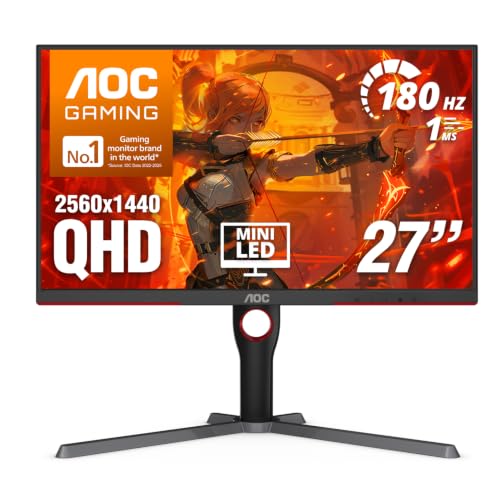
AOC 27-Inch Mini-LED 1440p Gaming Monitor
Best for: contrast-focused QHD gaming
- Screen Size
- 27"
- Resolution
- 2560×1440
- Refresh Rate
- 180Hz
- Response Time
- 1ms GtG
- Panel Type
- VA Mini-LED
- Sync Technology
- Adaptive-Sync
This AOC 27-inch monitor uses a VA Mini-LED panel with 336 dimming zones for high contrast. It delivers 2560×1440 resolution and a 180Hz refresh rate via DisplayPort. The 1ms GtG response time helps reduce ghosting. VESA DisplayHDR 1000 certification supports bright highlights. The stand offers height adjustability. You get a frameless design with 134% sRGB coverage for vivid colors.
- 336 Mini-LED dimming zones for deep blacks
- VESA DisplayHDR 1000 certification
- 180Hz refresh rate and 1ms GtG response
- Height adjustable stand
- VA panel type may have slower pixel transitions than IPS
- 15.6 pounds weight is bulkier than lighter alternatives
- 180Hz is lower than the 240Hz+ options available in variations
- You want high contrast from Mini-LED backlighting
- You need height adjustability for ergonomic setup
- You prefer a 27-inch QHD screen for detailed visuals
- You require the fastest possible 300Hz+ refresh rates
- You prefer IPS panels for wider viewing angles
- You need a lighter monitor under 10 pounds
Verdict: AOC 27" Mini-LED QHD Gaming Monitor offers strong contrast and solid speed for competitive play. It fits gamers who value HDR brightness and ergonomic stand adjustments over ultra-high refresh rates.

MSI 27-Inch 240Hz QD-OLED Monitor
Best for: 1440p competitive gaming with OLED speed
- Screen Size
- 27-Inch
- Resolution
- 2560 x 1440
- Refresh Rate
- 240Hz
- Response Time
- 0.03ms (GtG)
- Panel Type
- QD-OLED
- Sync Technology
- Adaptive-Sync
This 27-inch WQHD monitor uses a QD-OLED panel to deliver 10-bit color and extreme contrast. You get a 240Hz refresh rate paired with a 0.03ms response time for fast motion clarity. The display covers 99% of the DCI-P3 color gamut with accurate Delta E values. It includes a 4-way adjustable stand and HDMI 2.1 ports for modern console and PC gaming.
- 240Hz refresh rate for smooth gameplay
- 0.03ms GtG response time reduces motion blur
- QD-OLED panel offers 1,070,000,000 colors and 1,500,000:1 contrast
- 4-way adjustable stand for ergonomic positioning
- HDMI 2.1 connectivity for high-bandwidth signals
- 2560 x 1440 resolution is lower than the 3440p option on this list
- 400 nits peak brightness is lower than the Mini-LED competitor
- 19.9 pounds weight is heavier than typical IPS monitors
- You want OLED contrast and fast response times
- You play competitive shooters at 1440p
- You need a 4-way adjustable stand
- You prefer higher resolution than 1440p
- You need peak brightness above 400 nits
- You want a lighter monitor for your desk
Verdict: MSI 27-inch QD-OLED Gaming Monitor delivers elite motion clarity and deep blacks for 1440p gamers. It suits players who prioritize response speed and color accuracy over maximum resolution or brightness.
Specifications side by side
| Spec | AOC 27-Inch Mini-LED 1440p Gaming Monitor | MSI 27-Inch 240Hz QD-OLED Monitor |
|---|---|---|
| Screen Size | 27" | 27-Inch |
| Resolution | 2560×1440 | 2560 x 1440 |
| Refresh Rate | 180Hz | 240Hz |
| Response Time | 1ms GtG | 0.03ms (GtG) |
| Panel Type | VA Mini-LED | QD-OLED |
| Sync Technology | Adaptive-Sync | Adaptive-Sync |
| HDR Support | DisplayHDR 1000 | – |
| Features | LED Lights | – |
| Color | Black | Black |
| Height Adjustability | Height Adjustable | Height Adjustable |
| Use | Gaming | Gaming |
| Connectivity | USB | – |
| Host Interface | USB 3.2 | – |
| Video Interface | HDMI, HDMI 2.1 | HDMI 2.1 |
| Dimensions | 10.2 × 23.8 × 20.9 inches | 24 × 9.5 × 20.9 inches |
| Weight | 15.6 pounds | 19.9 pounds |
| Size | 27" 180Hz Mini-LED | 24.1" x 24.1" x 2.2" |
| Model | Q27G3XMN | MAG 272QP QD-OLED X24 |
Frequently asked questions
Which AOC vs MSI monitor has the highest refresh rate?
The MSI MAG 272QP QD-OLED X24 features a 240Hz refresh rate. This is higher than the AOC 27-inch Mini-LED monitor, which operates at 180Hz. The MSI panel provides smoother motion for fast-paced competitive shooters. You should choose the MSI model if frame rate consistency is your top priority for gaming performance.
Does the AOC 27-inch Mini-LED monitor support HDMI 2.1?
Yes, the AOC Q27G3XMN includes HDMI 2.1 connectivity. This port allows for higher bandwidth transmission compared to standard HDMI versions. It supports the monitor's 180Hz refresh rate and 1440p resolution effectively. You can connect modern consoles or PCs to utilize these high-speed video signals without bottlenecking the display capabilities.
Which monitor offers better contrast for dark room gaming?
The AOC 27-inch Mini-LED monitor is better for contrast-focused gaming. It uses a VA panel with 336 dimming zones to manage light and dark areas. This setup delivers deep blacks and strong HDR brightness. The MSI OLED panel also offers deep blacks, but the AOC design specifically targets contrast performance for immersive visual experiences in low-light environments.
What is the response time on the MSI QD-OLED monitor?
The MSI MAG 272QP QD-OLED X24 has a 0.03ms response time. This ultra-fast speed minimizes ghosting and motion blur during intense gameplay. It is significantly faster than typical LCD panels. You will notice clearer movement in fast action scenes, making it ideal for players who require instant visual feedback from their inputs.
Can you adjust the height of both monitors?
Yes, both the AOC and MSI monitors feature height-adjustable stands. This allows you to raise or lower the screen to match your eye level. Proper ergonomic positioning reduces neck strain during long gaming sessions. You can customize the viewing angle and distance to create a comfortable setup that fits your desk space and personal preferences.
Which monitor is lighter for easier desk placement?
The AOC 27-inch Mini-LED monitor is lighter at 15.6 pounds. The MSI MAG 272QP QD-OLED X24 weighs 19.9 pounds. The AOC model is easier to lift and reposition on your desk. You might prefer the lighter unit if you frequently move your monitor or need to save space on a smaller desk surface.
Does the AOC monitor have USB connectivity options?
The AOC Q27G3XMN includes USB 3.2 connectivity. This feature allows you to connect peripherals like keyboards or mice directly to the monitor. You can use the USB ports for data transfer or charging devices while gaming. This adds convenience by reducing cable clutter on your desk and keeping essential accessories within easy reach.
What resolution do both AOC and MSI monitors use?
Both monitors use a 1440p QHD resolution. This provides a sharp image with more pixel density than 1080p. You get a balanced mix of clarity and performance for gaming. The 27-inch screen size pairs well with this resolution, offering detailed visuals without requiring excessive GPU power to maintain high frame rates during gameplay.


