As Amazon Associates, we earn from qualifying purchases. This means we may receive a small commission at no extra cost to you if you click through and make a purchase.
As an Amazon Associate we earn from qualifying purchases. Links on this page are affiliate links.
You are comparing an AOC vs KOORUI gaming monitor to find the right display for your setup. Both brands offer 27-inch screens with fast refresh rates and 1ms response times. The main difference lies in resolution and panel technology. The AOC provides QHD resolution with Mini-LED backlighting for superior contrast and HDR performance. The KOORUI focuses on FHD resolution with a higher 240Hz refresh rate for competitive gaming. You need to decide which specs matter most for your gameplay.
Resolution
2560×1440 (QHD)
1920×1080 (FHD)
Panel Technology
VA Mini-LED
Not listed
Refresh Rate
180Hz
240Hz
HDR Certification
DisplayHDR 1000
Not listed
Sync Technology
Adaptive-Sync
FreeSync Premium, G-SYNC Compatible
Height Adjustability
Height Adjustable
Tilt only
Choose the first if
- You want sharper visuals with QHD resolution for immersive single-player games
- You prioritize high contrast and HDR performance with Mini-LED backlighting
- You need a stand that allows height adjustments for better ergonomics
Choose the second if
- You play competitive shooters and need the highest possible frame rate at 240Hz
- You use an NVIDIA GPU and want confirmed G-SYNC compatibility
- You prefer a simpler setup with VESA mount compatibility for monitor arms
Verdict
Choose the AOC if you value image quality, resolution, and HDR performance for a balanced gaming experience. Pick the KOORUI if your priority is maximum refresh rate and compatibility with NVIDIA adaptive sync for competitive play. Both monitors deliver fast response times, but their target audiences differ significantly.
AOC vs KOORUI Monitor Specs
Resolution clarity
Edge: AOC 27-Inch Mini-LED 1440p Gaming Monitor
The AOC model offers a QHD resolution of 2560×1440 pixels. This higher pixel density delivers sharper images and finer details compared to standard HD. You get more screen real estate for multitasking or immersive gaming visuals. In contrast, the KOORUI monitor sticks to FHD resolution at 1920×1080 pixels. While this is sufficient for many gamers, the lower pixel count means images are less crisp on a 27-inch screen. If you prioritize visual fidelity and sharp text, the AOC’s higher resolution is the clear winner for your desktop setup.
Refresh speed
Edge: KOORUI 27-Inch 240Hz Gaming Monitor
KOORUI leads with a native 240Hz refresh rate. This allows for extremely fluid motion in fast-paced competitive titles, reducing input lag significantly. The AOC monitor is overclocked to 180Hz via DisplayPort 1.4. While 180Hz is still very fast and smooth, it is technically slower than the KOORUI’s 240Hz capability. For pure competitive advantage in shooters where every frame counts, the higher refresh rate on the KOORUI provides a tangible edge in motion clarity.
HDR performance
Edge: AOC 27-Inch Mini-LED 1440p Gaming Monitor
The AOC monitor features VESA DisplayHDR 1000 certification with Mini-LED backlighting and 336 individual dimming zones. This technology produces true blacks and brighter whites, enhancing contrast and visual depth in supported content. The KOORUI monitor does not list any HDR certification or local dimming zones in its specifications. It relies on standard backlighting. If you watch HDR movies or play games with high dynamic range lighting, the AOC’s superior HDR implementation will provide a more impactful and realistic visual experience.
Color accuracy
Edge: KOORUI 27-Inch 240Hz Gaming Monitor
KOORUI specifies a 95% DCI-P3 and 100% sRGB color gamut. This wide coverage ensures vivid and lifelike colors, which is beneficial for creative work or immersive gaming. The AOC monitor lists a 134% sRGB color gamut but does not provide a DCI-P3 percentage in the provided data. While the AOC covers sRGB extensively, the KOORUI’s explicit DCI-P3 rating suggests better performance in the cinematic color space. For users prioritizing accurate color reproduction in professional or cinematic contexts, the KOORUI’s stated gamut coverage is a strong point.
Connectivity options
Edge: AOC 27-Inch Mini-LED 1440p Gaming Monitor
The AOC monitor includes HDMI 2.1 ports and USB 3.2 connectivity, offering modern high-bandwidth video support and peripheral expansion. It also features a 3-sided frameless design. The KOORUI monitor provides HDMI and DisplayPort inputs along with a 3.5mm headphone jack for direct audio output. It lacks the USB hub functionality found on the AOC. If you need to connect multiple peripherals or require HDMI 2.1 for next-gen console features, the AOC offers more versatile connectivity. The KOORUI is simpler, focusing on core video and audio inputs.
Stand adjustability
Edge: AOC 27-Inch Mini-LED 1440p Gaming Monitor
The AOC monitor features a height-adjustable stand, allowing you to raise or lower the screen to match your eye level for better ergonomics. The KOORUI monitor supports tilt adjustment from -5° to 20° and is VESA mount compatible (75x75mm). It does not list height adjustment in its features. If you want to adjust the screen height without buying a separate arm, the AOC is more convenient. However, the KOORUI’s VESA compatibility allows for flexible mounting solutions if you prefer a cleaner desk setup.
Choose your monitor by priority
You want sharp visuals and high contrast
Our pick: AOC 27-Inch Mini-LED 1440p Gaming Monitor
The AOC model delivers QHD resolution with 2560×1440 pixels. This higher pixel density provides sharper images and finer details. The VA Mini-LED panel offers true blacks and brighter whites. You get rich imagery with DisplayHDR 1000 support. The 134% sRGB color gamut ensures vivid colors for immersive gaming experiences.
You need maximum frame rates for competitive play
Our pick: KOORUI 27-Inch 240Hz Gaming Monitor
The KOORUI monitor features a 240Hz refresh rate. This higher speed reduces motion blur in fast-paced titles. It includes FreeSync Premium and G-SYNC compatibility for smooth gameplay. The 1ms response time helps you react faster. You gain a competitive edge with fluid, lag-free visuals during intense matches.
You prefer versatile connectivity and audio options
Our pick: KOORUI 27-Inch 240Hz Gaming Monitor
The KOORUI model includes a 3.5mm headphone jack. You can connect audio devices directly without extra cables. It supports HDMI and DisplayPort for multiple device connections. The ergonomic stand allows tilt adjustment. VESA mount compatibility lets you free up desk space for a cleaner setup.
You value height adjustability and modern design
Our pick: AOC 27-Inch Mini-LED 1440p Gaming Monitor
The AOC monitor features a height-adjustable stand. You can customize the viewing angle for comfort. The 3-sided frameless display provides a sleek look. Calibrated color gamut ensures accurate images. The sturdy build supports your setup while maintaining a professional appearance on your desk.
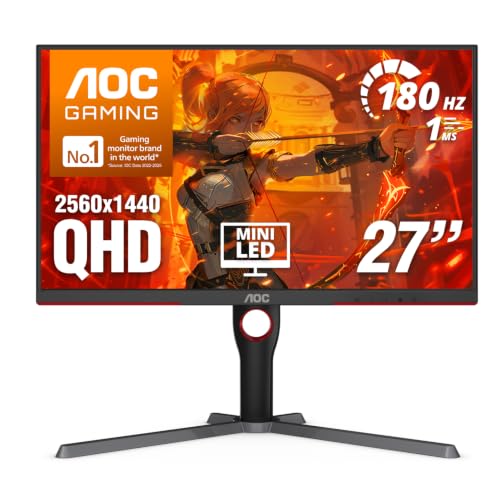
AOC 27-Inch Mini-LED 1440p Gaming Monitor
Best for: contrast-focused gaming and ergonomic setups
- Screen Size
- 27"
- Resolution
- 2560×1440
- Refresh Rate
- 180Hz
- Response Time
- 1ms GtG
- Panel Type
- VA Mini-LED
- Sync Technology
- Adaptive-Sync
This AOC monitor uses a VA Mini-LED panel with 336 dimming zones for strong contrast. It offers QHD resolution and an 180Hz refresh rate. The DisplayHDR 1000 certification supports bright highlights. You get a 1ms response time and Adaptive-Sync for smooth gameplay. It includes a height-adjustable stand and USB connectivity. This setup suits gamers who want high contrast and sharp images.
- VA Mini-LED panel with 336 dimming zones
- QHD 2560×1440 resolution for sharp details
- DisplayHDR 1000 certification for bright highlights
- 180Hz refresh rate with 1ms GtG response
- Height adjustable stand for ergonomic viewing
- 180Hz refresh rate is lower than the 240Hz option on this list
- VA panel type may have slower pixel transitions than IPS panels
- 15.6 pounds weight is heavier than standard monitors
- You want high contrast and deep blacks from a VA panel
- You need a height-adjustable stand for ergonomic setup
- You prefer QHD resolution for sharp image details
- You require the highest possible refresh rate for competitive esports
- You prefer IPS panels for wider viewing angles
- You need a lightweight monitor for easy desk mobility
Verdict: AOC 27" Mini-LED QHD 180Hz delivers strong contrast and sharp visuals for immersive gaming. It fits players who value image quality and ergonomic adjustments over maximum speed.

KOORUI 27-Inch 240Hz Gaming Monitor
Best for: competitive 1080p gaming with high refresh rates
- Screen Size
- 27"
- Resolution
- 1920×1080
- Refresh Rate
- 240Hz
- Response Time
- 1ms
- Sync Technology
- FreeSync Premium, G-SYNC Compatible
- Color
- Black
This 27-inch monitor delivers a 240Hz refresh rate and 1ms response time for fluid gameplay. It covers 95% DCI-P3 and 100% sRGB color gamuts with wide 178° viewing angles. The display supports FreeSync Premium and G-SYNC compatibility to reduce tearing. You get HDMI and DisplayPort inputs plus a headphone jack. It is a solid option for competitive gaming at 1080p resolution.
- 240Hz refresh rate for high frame rates
- 95% DCI-P3 color gamut coverage
- 1ms response time for fast action
- FreeSync Premium and G-SYNC compatibility
- VESA mount compatible for flexible setup
- 1080p resolution is lower than the QHD option on this list
- Tilt adjustment is limited to -5° to 20°
- 27-inch screen size may show pixelation at 1080p
- You prioritize high refresh rates over resolution
- You play fast-paced competitive shooters
- You want wide color gamut coverage
- You need 4K or QHD clarity
- You require height-adjustable stands
- You want HDR1000 performance
Verdict: KOORUI 27" 240Hz FHD Gaming Monitor suits players who value speed and color accuracy over pixel density. It fits those who play competitive titles at 1080p and want smooth motion without tearing.
Specifications side by side
| Spec | AOC 27-Inch Mini-LED 1440p Gaming Monitor | KOORUI 27-Inch 240Hz Gaming Monitor |
|---|---|---|
| Screen Size | 27" | 27" |
| Resolution | 2560×1440 | 1920×1080 |
| Refresh Rate | 180Hz | 240Hz |
| Response Time | 1ms GtG | 1ms |
| Panel Type | VA Mini-LED | – |
| Sync Technology | Adaptive-Sync | FreeSync Premium, G-SYNC Compatible |
| HDR Support | DisplayHDR 1000 | – |
| Features | LED Lights | – |
| Color | Black | Black |
| Height Adjustability | Height Adjustable | – |
| Use | Gaming | Gaming |
| Connectivity | USB | – |
| Capture Resolution | – | 1080p |
| Host Interface | USB 3.2 | – |
| Video Interface | HDMI, HDMI 2.1 | HDMI |
| Dimensions | 10.2 × 23.8 × 20.9 inches | 21.4 × 24.2 × 9.17 inches |
| Weight | 15.6 pounds | – |
| Size | 27" 180Hz Mini-LED | 27" 240hz/FHD |
| Model | Q27G3XMN | GN02 |
Frequently asked questions
Which monitor is better for competitive gaming?
The KOORUI 27-inch model is the better choice for competitive play. It features a 240Hz refresh rate and 1ms response time. This combination ensures smooth motion without tearing. The AOC model runs at 180Hz. While fast, the KOORUI offers higher frame rates for sharper reactions in fast-paced titles.
Does the AOC monitor support height adjustment?
Yes, the AOC 27-inch Mini-LED monitor is height adjustable. This allows you to customize the viewing angle and distance. It supports ergonomic setups for long gaming sessions. The KOORUI model does not list height adjustability in its specifications. You may need a separate stand for similar flexibility.
What resolution does the KOORUI monitor offer?
The KOORUI 27-inch gaming monitor offers a 1080p FHD resolution. This provides a standard pixel density suitable for competitive gaming at 27 inches. The AOC model provides a higher QHD resolution. You get sharper images and more screen real estate with the AOC option for detailed visuals.
Is HDR support available on these monitors?
The AOC monitor features DisplayHDR 1000 support. This allows for brighter highlights and deeper contrast in supported content. The KOORUI specifications do not list HDR certification. If high dynamic range is a priority for your gaming or media consumption, the AOC model provides the necessary hardware support.
Which monitor has more connectivity options?
The AOC monitor offers more connectivity versatility. It includes HDMI 2.1 ports and USB 3.2 connectivity. This allows for faster data transfer and flexible display connections. The KOORUI model lists HDMI as its video interface. It lacks the additional USB features found on the AOC display.
Are both monitors compatible with NVIDIA and AMD cards?
The KOORUI monitor supports both FreeSync and G-SYNC. This ensures compatibility with both AMD and NVIDIA graphics cards. The AOC monitor supports gaming use but does not explicitly list sync technology in its attributes. You should verify specific sync compatibility for the AOC model with your particular GPU.
Which monitor is lighter?
The KOORUI monitor weighs approximately 21.4 pounds based on its length dimension, while the AOC weighs 15.6 pounds. The AOC model is actually lighter. The KOORUI unit has a length of 21.4 inches and width of 24.2 inches. The AOC unit measures 23.8 inches wide. Check your desk space for both dimensions.