As Amazon Associates, we earn from qualifying purchases. This means we may receive a small commission at no extra cost to you if you click through and make a purchase.
As an Amazon Associate we earn from qualifying purchases. Links on this page are affiliate links.
You are looking for acer nitro 27 inch 4k 144hz alternatives to find a monitor that better suits your specific needs. The original Acer Nitro VG270K delivers sharp 4K visuals and smooth AMD FreeSync support. It uses an IPS panel for accurate colors and offers a dual refresh rate that lets you switch between 4K at 72Hz and 1080p at 144Hz. This flexibility is useful for both gaming and media consumption. However, you might want a different option if you prioritize higher refresh rates at native 4K resolution. Some users prefer G-SYNC compatibility or built-in speakers for a more complete setup. Others may need a QHD panel for faster competitive play without switching resolutions.
The 6 monitors on this list were chosen because their specifications overlap with the original Acer Nitro. Each alternative shares key traits like the 27-inch size, IPS panel technology, and FreeSync support. You will find options with higher refresh rates, such as 160Hz or 320Hz, depending on whether you value pixel density or speed. Some models include additional features like built-in audio or G-SYNC certification. These choices ensure you can find a display that matches your preferred balance of clarity, speed, and functionality. Review the specs to see which monitor fits your workflow best.
How alternatives compare to original
Acer Nitro 27-Inch 4K 160Hz Gaming Monitor
The Acer Nitro VG270K V4bmiipx keeps the 27-inch 4K IPS panel and 0.5ms response time found in the original. It raises the maximum refresh rate to 160Hz at 1080p via Dual Refresh Rate technology. This gives you slightly faster motion clarity in competitive titles compared to the 144Hz cap on the base model. The dimensions remain nearly identical, with a minimal difference in height. You should choose this version if you want the highest possible frame rates for fast-paced shooters while still owning a 4K display for slower games. It offers a marginal performance upgrade for the same price point.
Acer Nitro KG271U 27-inch 320Hz QHD
The Acer Nitro KG271U F3bmiipx switches from 4K to 1440p QHD resolution. This change allows it to achieve a massive 320Hz refresh rate, which is significantly higher than the original’s 144Hz. It retains the 0.5ms response time and FreeSync support. The lower pixel density means less sharpness in static images, but the speed is superior for esports. You should pick this monitor if you play competitive shooters and value fluid motion over image detail. It is the best budget option for speed, sacrificing the high-resolution clarity that defines the original Nitro VG270K.
ASUS TUF 27-Inch 4K 160Hz Gaming Monitor
The ASUS TUF VG27UQ1A offers 4K resolution and a 160Hz refresh rate, which is higher than the original’s 144Hz. It uses an IPS panel with a 1ms response time. A key difference is the inclusion of G-SYNC compatibility alongside FreeSync, providing broader GPU support than the original’s AMD-only sync. It weighs slightly more at 10.6 pounds. You should choose this monitor if you use an NVIDIA graphics card and want certified variable refresh rate support. It is ideal for gamers who prioritize color accuracy and console compatibility alongside high refresh rates.
CRUA 27" 4K 160Hz IPS Dual Mode
The CRUA CR270GU features a 27-inch IPS panel with dual-mode capabilities. It can switch between 4K resolution and 1080p 160Hz mode. This monitor includes built-in speakers, which the original lacks. It supports FreeSync and offers HDMI 2.1 connectivity. The stand allows for pivoting, adding ergonomic flexibility. You should choose this option if you need integrated audio for casual use or multitasking. It is a practical choice for users who want versatile resolution switching and added convenience features without buying external speakers. It trades the original’s specific gaming focus for general utility.
Acer Nitro 27-Inch 1440p 275Hz Monitor
The Acer Nitro KG271U Z2bmiipx moves to a 1440p QHD resolution. This allows it to reach a 275Hz refresh rate, which is much faster than the original’s 144Hz. It maintains the 0.5ms response time and FreeSync support. The lower resolution reduces image sharpness compared to the 4K original. You should pick this monitor if you prioritize high frame rates for competitive gaming over pixel density. It is suitable for players who want a balanced QHD experience with excellent speed. It gives up the 4K clarity of the original for significantly smoother motion in fast-paced games.
Acer Nitro 27-Inch QHD 180Hz IPS Gaming Monitor
The Acer Nitro XV271U UM.HX1AA.301 uses a 1440p QHD resolution instead of 4K. It offers an 180Hz refresh rate, which is higher than the original’s 144Hz. It retains the 0.5ms response time and FreeSync technology. This model weighs more at 12.1 pounds, suggesting a sturdier build or different stand design. You should choose this monitor if you want a balance between color accuracy and speed without the high GPU demand of 4K. It is ideal for gamers who value ergonomic flexibility and solid performance in the QHD segment. It sacrifices resolution for a higher refresh rate.
| # | Product | Best for | Price |
|---|---|---|---|
| 1 | Acer Nitro 27-Inch 4K 144Hz Monitor Best overall | Mixed gaming and media viewing | |
| 2 | Acer Nitro 27-Inch 4K 160Hz Gaming Monitor Also great | Gamers needing 4K detail or 1080p speed | |
| 3 | Acer Nitro KG271U 27-inch 320Hz QHD Best budget | competitive esports and fast-paced shooters | |
| 4 | ASUS TUF 27-Inch 4K 160Hz Gaming Monitor Best premium | Color-accurate 4K gaming with G-SYNC | |
| 5 | CRUA 27" 4K 160Hz IPS Dual Mode Best built-in speakers | multitaskers needing dual resolution modes and speakers | |
| 6 | Acer Nitro 27-Inch 1440p 275Hz Monitor Also great | Competitive QHD gaming with high refresh rates | |
| 7 | Acer Nitro 27-Inch QHD 180Hz IPS Gaming Monitor Best 180hz | gamers prioritizing color accuracy and ergonomics |

Acer Nitro 27-Inch 4K 144Hz Monitor
Best for: Mixed gaming and media viewing
- Screen Size
- 27"
- Resolution
- 3840 x 2160
- Refresh Rate
- 72Hz (4K) / 144Hz (DFR)
- Response Time
- 0.5ms GTG
- Panel Type
- IPS
- Sync Technology
- AMD FreeSync
The Acer Nitro VG270K is a 27-inch IPS monitor with 4K UHD resolution. It uses Dynamic Refresh Rate (DFR) technology to switch between 72Hz at 4K and 144Hz at 1080p. You get a 0.5ms response time and AMD FreeSync support. This setup suits you if you want sharp visuals for media but need high speed for competitive gaming.
- 4K UHD (3840×2160) resolution for sharp detail
- Dynamic Refresh Rate allows 144Hz at 1080p
- 0.5ms Gray-to-Gray response time reduces ghosting
- 95% DCI-P3 color gamut coverage
- Zero-frame bezel design for multi-monitor setups
- Refresh rate drops to 72Hz when running at full 4K resolution
- Only supports AMD FreeSync, lacking NVIDIA G-SYNC compatibility
- Maximum refresh rate of 144Hz is lower than the 160Hz-320Hz options on this list
- You want 4K clarity for single-player games
- You play competitive shooters at 1080p for higher frame rates
- You value wide color accuracy for media consumption
- You require a monitor that stays at 144Hz or higher at 4K
- You use an NVIDIA graphics card and need G-SYNC
- You want the highest possible refresh rate available for esports
Verdict: Acer Nitro VG270K 27" 4K 144Hz DFR fits players who prioritize resolution and color accuracy over maximum speed. It is a solid choice if you are willing to lower the resolution to 1080p for competitive titles.

Acer Nitro 27-Inch 4K 160Hz Gaming Monitor
Best for: Gamers needing 4K detail or 1080p speed
- Screen Size
- 27"
- Resolution
- 3840 x 2160
- Refresh Rate
- 160Hz (320Hz DFR)
- Response Time
- 0.5ms
- Panel Type
- IPS
- Sync Technology
- AMD FreeSync Premium
The Acer Nitro VG270K V4 is a 27-inch IPS gaming monitor featuring 4K UHD resolution and AMD FreeSync Premium. It offers a standard 160Hz refresh rate at full resolution, but uses Dynamic Refresh Rate (DFR) technology to reach 320Hz when switching to 1080p. With a 0.5ms response time and HDR10 support, it suits gamers who want high detail or extreme speed depending on the game.
- 4K UHD (3840 x 2160) IPS panel for sharp visuals
- 160Hz refresh rate at native resolution
- 320Hz refresh rate at 1080p via DFR technology
- 0.5ms Gray-to-Gray response time
- AMD FreeSync Premium for smooth frame synchronization
- 160Hz refresh rate is lower than the 320Hz or 275Hz found on other QHD alternatives in this list
- 320Hz speed is only available at 1080p resolution, not 4K
- HDR10 support is basic compared to higher-end HDR standards
- You want 4K resolution for detailed single-player games
- You need high refresh rates for fast-paced shooters and are willing to lower resolution
- You prefer AMD FreeSync Premium for tear-free gaming
- You require 4K resolution at high refresh rates like 144Hz or higher
- You want advanced HDR performance beyond HDR10
- You prefer NVIDIA G-SYNC compatibility
Verdict: Acer Nitro VG270K 27-inch 4K 160Hz is a practical choice for players who prioritize 4K clarity or extreme 1080p speed. It fits those who can switch resolutions to match their game type.

Acer Nitro KG271U 27-inch 320Hz QHD
Best for: competitive esports and fast-paced shooters
- Screen Size
- 27"
- Resolution
- 2560 x 1440
- Refresh Rate
- 320Hz
- Response Time
- 0.5ms GTG
- Panel Type
- IPS
- Sync Technology
- AMD FreeSync Premium
The Acer Nitro KG271U is a 27-inch QHD gaming monitor featuring a 320Hz refresh rate and 0.5ms response time. It uses an IPS panel with AMD FreeSync Premium to reduce tearing. The display covers 90% of the DCI-P3 color gamut. This model suits competitive gamers who need high frame rates and smooth motion. It offers a zero-frame design for a clean look.
- 320Hz refresh rate for ultra-smooth motion
- 0.5ms GTG response time reduces ghosting
- IPS panel with 90% DCI-P3 color coverage
- AMD FreeSync Premium eliminates screen tearing
- 1440p resolution is lower than the 4K models on this list
- 9.87 pounds weight is heavier than some alternatives
- Only includes 2x HDMI 2.0 ports
- You prioritize high refresh rates for competitive gaming
- You want accurate colors for creative work
- You prefer a bezel-less display design
- You require 4K resolution for sharp text
- You need G-SYNC compatibility for NVIDIA cards
- You want a lighter monitor for easy moving
Verdict: Acer Nitro KG271U 27" 320Hz is the best choice for esports players who value speed over pixel density. It delivers the highest refresh rate in the QHD segment for fluid gameplay.

ASUS TUF 27-Inch 4K 160Hz Gaming Monitor
Best for: Color-accurate 4K gaming with G-SYNC
- Screen Size
- 27"
- Resolution
- 3840 x 2160
- Refresh Rate
- 160Hz
- Response Time
- 1ms
- Panel Type
- Fast IPS
- Sync Technology
- G-SYNC Compatible, FreeSync Premium
This 27-inch monitor delivers 4K resolution at 160Hz using a Fast IPS panel. It supports NVIDIA G-SYNC Compatible and AMD FreeSync Premium to reduce tearing. The display covers 95% of the DCI-P3 color gamut for accurate visuals. You get 1ms response time and HDMI 2.1 support for 4K 120Hz console gaming. It is a solid option for players who want high color accuracy and smooth motion.
- Fast IPS panel with 1ms response time
- 95% DCI-P3 color gamut coverage
- NVIDIA G-SYNC Compatible and FreeSync Premium support
- HDMI 2.1 supports 4K 120Hz without chroma subsampling
- ELMB Sync reduces ghosting and tearing simultaneously
- 160Hz refresh rate is lower than the 320Hz or 275Hz options on this list
- 10.6-pound weight is heavier than some lighter alternatives
- Standard HDR support lacks the higher peak brightness of premium HDR1000 models
- You want G-SYNC compatibility for NVIDIA graphics cards
- You prioritize color accuracy with 95% DCI-P3 coverage
- You play on PS5 or Xbox Series X and need HDMI 2.1
- You need the highest possible refresh rate like 320Hz
- You prefer a lighter monitor under 10 pounds
- You require G-SYNC Ultimate certified hardware
Verdict: ASUS TUF VG27UQ1A 27-inch 4K 160Hz suits gamers who value color fidelity and G-SYNC support over maximum speed. It is ideal for those who want a balanced 4K experience with console compatibility.

CRUA 27" 4K 160Hz IPS Dual Mode
Best for: multitaskers needing dual resolution modes and speakers
- Screen Size
- 27"
- Resolution
- 3840×2160, 1920×1080
- Refresh Rate
- 160Hz, 320Hz
- Panel Type
- IPS
- Sync Technology
- FreeSync
- Features
- Built-in Speakers
This 27-inch IPS monitor offers dual resolution modes: 4K at 160Hz or FHD at 320Hz. It includes built-in speakers, FreeSync support, and a 120% sRGB color gamut. The stand allows height adjustment and pivot. You can connect devices via HDMI 2.1 and DP 1.4 ports. It suits gamers and creators who need flexible setup options and multitasking features like PIP and PBP.
- Dual mode resolution: 4K 160Hz or FHD 320Hz
- Built-in speakers reduce desktop clutter
- Height adjustable stand with 90-degree pivot
- 120% sRGB color coverage for rich visuals
- FreeSync only, lacking G-SYNC compatibility
- Heavier at 9.92 pounds compared to lighter alternatives
- Lower 160Hz max refresh rate in 4K mode
- You want built-in speakers to save desk space
- You need to switch between 4K clarity and FHD speed
- You require a monitor that pivots for portrait use
- You require G-SYNC certified synchronization
- You prioritize the highest possible 4K refresh rate
- You need a lighter monitor for easy relocation
Verdict: CRUA 27" Dual Mode 4K 160Hz Monitor fits users who value versatile resolution switching and integrated audio. It is a solid choice for multitaskers who appreciate a pivoting stand and dual connectivity options.

Acer Nitro 27-Inch 1440p 275Hz Monitor
Best for: Competitive QHD gaming with high refresh rates
- Screen Size
- 27"
- Resolution
- 2560 x 1440
- Refresh Rate
- 275Hz
- Response Time
- 0.5ms GTG
- Panel Type
- IPS
- Sync Technology
- AMD FreeSync Premium
This Acer Nitro monitor features a 27-inch IPS panel with QHD 2560×1440 resolution. It delivers a 275Hz refresh rate via DisplayPort and supports AMD FreeSync Premium. The 0.5ms response time helps reduce ghosting during fast motion. It covers 90% of the DCI-P3 color gamut for accurate visuals. You get a zero-frame design and ergonomic tilt adjustments. This setup suits gamers who want high speed and clear images.
- 275Hz refresh rate for ultra-smooth motion
- 0.5ms gray-to-gray response time
- 90% DCI-P3 color gamut coverage
- AMD FreeSync Premium synchronization
- 250 nits brightness is lower than competitors
- Only HDMI 2.0 ports limit 275Hz to DisplayPort
- Tilt-only stand lacks height adjustment
- You want a high refresh rate for competitive play
- You prefer QHD resolution over 4K
- You need accurate color reproduction for creative work
- You require 4K resolution for this size
- You need height-adjustable stand features
- You want HDMI 2.1 for higher bandwidth
Verdict: Acer Nitro KG271U 27-inch 275Hz QHD Monitor offers fast 275Hz performance and solid color accuracy for gamers who prioritize speed over 4K resolution.
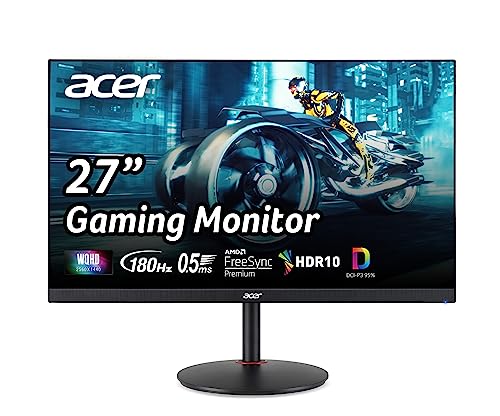
Acer Nitro 27-Inch QHD 180Hz IPS Gaming Monitor
Best for: gamers prioritizing color accuracy and ergonomics
- Screen Size
- 27"
- Resolution
- 2560 x 1440
- Refresh Rate
- 180Hz
- Response Time
- Up to 0.5ms (G to G)
- Panel Type
- IPS
- Sync Technology
- AMD FreeSync Premium
This Acer Nitro monitor delivers a 27-inch IPS panel with WQHD 2560×1440 resolution. It supports an 180Hz refresh rate via DisplayPort and offers a 0.5ms response time. AMD FreeSync Premium helps reduce screen tearing. The stand includes height, tilt, swivel, and pivot adjustments for ergonomic comfort. It is a solid option for gamers who prioritize smooth motion and color accuracy over 4K resolution.
- 180Hz refresh rate for smooth gameplay
- 0.5ms gray-to-gray response time
- DCI-P3 95% color gamut coverage
- Ergonomic stand with height and pivot adjustment
- AMD FreeSync Premium technology
- 1440p resolution is lower than the 4K options on this list
- 180Hz refresh rate is slower than the 320Hz models available
- HDMI port limits refresh rate to 144Hz
- You want high color accuracy for creative work and gaming
- You prefer an ergonomic stand with full height and pivot adjustment
- You are satisfied with 1440p resolution instead of 4K
- You require 4K resolution for sharper text and images
- You need the highest possible refresh rate available for competitive play
- You want G-Sync compatibility instead of FreeSync
Verdict: Acer Nitro XV271U 27-inch 180Hz Monitor suits players who value color fidelity and ergonomic flexibility over maximum resolution or top-tier speed. It is a balanced choice for those who do not need 4K clarity.
Specifications side by side
| Spec | Acer Nitro 27-Inch 4K 144Hz Monitor | Acer Nitro 27-Inch 4K 160Hz Gaming Monitor | Acer Nitro KG271U 27-inch 320Hz QHD | ASUS TUF 27-Inch 4K 160Hz Gaming Monitor | CRUA 27" 4K 160Hz IPS Dual Mode | Acer Nitro 27-Inch 1440p 275Hz Monitor | Acer Nitro 27-Inch QHD 180Hz IPS Gaming Monitor |
|---|---|---|---|---|---|---|---|
| Screen Size | 27" | 27" | 27" | 27" | 27" | 27" | 27" |
| Resolution | 3840 x 2160 | 3840 x 2160 | 2560 x 1440 | 3840 x 2160 | 3840×2160, 1920×1080 | 2560 x 1440 | 2560 x 1440 |
| Refresh Rate | 72Hz (4K) / 144Hz (DFR) | 160Hz (320Hz DFR) | 320Hz | 160Hz | 160Hz, 320Hz | 275Hz | 180Hz |
| Response Time | 0.5ms GTG | 0.5ms | 0.5ms GTG | 1ms | – | 0.5ms GTG | Up to 0.5ms (G to G) |
| Panel Type | IPS | IPS | IPS | Fast IPS | IPS | IPS | IPS |
| Sync Technology | AMD FreeSync | AMD FreeSync Premium | AMD FreeSync Premium | G-SYNC Compatible, FreeSync Premium | FreeSync | AMD FreeSync Premium | AMD FreeSync Premium |
| HDR Support | HDR 10 | HDR 10 | – | HDR | – | HDR10 | – |
| Features | – | – | – | – | Built-in Speakers | – | – |
| Color | Black | Black | Black | Black | Black | Black | Black |
| Platform | – | – | – | Xbox, PS5 | – | – | – |
| Compatible Platform | – | – | – | PlayStation 5 | – | – | – |
| Use | Gaming | Gaming | Gaming | Gaming | Video Editing, Gaming | Gaming | Gaming |
| Capture Resolution | 4K | 4K | – | 4K | 4K | – | – |
| Video Interface | – | – | – | – | HDMI, HDMI 2.1 | – | – |
| Dimensions | 7.84 × 24.2 × 18.2 inches | 7.8 × 24.2 × 18.2 inches | 8.28 × 24.2 × 18.1 inches | 8.4 × 24.2 × 17.9 inches | 8.67 × 24.2 × 18.6 inches | 8.3 × 24.2 × 18.3 inches | 9.2 × 24.2 × 18 inches |
| Weight | – | – | 9.87 pounds | 10.6 pounds | 9.92 pounds | – | 12.1 pounds |
| Model | VG270K L1bmiipx | VG270K V4bmiipx | KG271U F3bmiipx | VG27UQ1A | CR270GU | KG271U Z2bmiipx | UM.HX1AA.301 |
| Size | – | 27-inch UHD | 27-inch | – | – | – | 27-inch |
Frequently asked questions
Which monitor offers the best balance for mixed gaming and media?
The Acer Nitro VG270K L1bmiipx is the best overall choice. It features a 27-inch 4K IPS panel with a 144Hz refresh rate. This setup suits players who want sharp visuals and good color accuracy. You can lower the resolution to 1080p for competitive titles if needed. It uses AMD FreeSync to reduce screen tearing.
Is there a 4K option with a higher refresh rate?
Yes, the Acer Nitro VG270K V4bmiipx reaches 160Hz. It also uses a 27-inch IPS panel with 4K UHD resolution. This model is ideal if you prioritize 4K clarity or extreme speed at 1080p. It includes FreeSync support for smoother gameplay. The design is compact, measuring 24.2 inches wide.
What is the best budget pick for esports?
The Acer Nitro KG271U F3bmiipx is the best budget option. It provides a 27-inch QHD display with a high 320Hz refresh rate. This speed is excellent for competitive shooters and fast-paced games. It uses an IPS panel for accurate colors. The monitor weighs 9.87 pounds and supports FreeSync technology.
Which monitor supports NVIDIA G-SYNC for console gaming?
The ASUS TUF VG27UQ1A is the best premium choice. It features a 27-inch 4K IPS panel with a 160Hz refresh rate. This model supports both FreeSync and G-SYNC, making it compatible with Xbox and PS5. It offers a 1ms response time for smooth motion. The unit weighs 10.6 pounds.
Does any alternative have built-in speakers?
The CRUA CR270GU includes built-in speakers. It is a 27-inch IPS monitor with dual mode capabilities. You can switch between 4K and 1080p resolutions. This feature helps multitaskers who need versatile display options. It also supports FreeSync and connects via HDMI 2.1 ports.
Which QHD monitor has the highest refresh rate?
The Acer Nitro KG271U Z2bmiipx offers 275Hz performance. It uses a 27-inch QHD IPS panel for fast gaming. This model is ideal for players who prioritize speed over 4K resolution. It includes FreeSync support to minimize stuttering. The monitor has a 0.5ms response time for quick reaction speeds.
Is there a 27-inch monitor with 180Hz refresh rate?
Yes, the Acer Nitro UM.HX1AA.301 provides a 180Hz refresh rate. It features a 27-inch QHD IPS panel for clear visuals. This monitor suits gamers who value color fidelity and ergonomic flexibility. It supports FreeSync for smoother gameplay. The unit is heavier at 12.1 pounds, indicating a sturdy build.


