As Amazon Associates, we earn from qualifying purchases. This means we may receive a small commission at no extra cost to you if you click through and make a purchase.
As an Amazon Associate we earn from qualifying purchases. Links on this page are affiliate links.
This guide compares the Blackmagic Design DeckLink Mini Recorder 4K and the Elgato 4K Pro Capture Card. Both devices capture 4K video for PC streaming and recording. The main difference lies in their frame rate capabilities and input interfaces. You are choosing between a 4K 30Hz SDI/HDMI solution and a 4K60 HDMI 2.1 option with HDR support. Understanding these specs helps you pick the right 4K vs 4K60 capture card for your specific hardware setup.
Capture Resolution
4K
4K60
Video Interface
HDMI 2.0a, SDI
HDMI 2.1
HDR Support
not listed
HDR10
Passthrough Resolution
not listed
8K60
Weight
5.64 ounces
4 ounces
Choose the first if
- You need professional SDI connectivity for studio workflows
- You require 16-channel embedded audio input
- You are using equipment that outputs standard 4K 30Hz
Choose the second if
- You want to capture 4K video at 60 frames per second
- You need HDR10 support for your content
- You want VRR and ALLM passthrough for modern consoles
Verdict
Choose the Blackmagic Design DeckLink Mini Recorder 4K if you require SDI inputs and professional audio features for studio-grade production. Pick the Elgato 4K Pro if you prioritize high frame rate capture, HDR support, and compatibility with modern gaming consoles via HDMI 2.1.
4K vs 4K60 Capture Card Specs
Capture Resolution
Edge: Elgato 4K Pro Internal Capture Card
The Blackmagic Design DeckLink Mini Recorder 4K captures video at a maximum resolution of 4K UHD. This covers standard Ultra HD formats for clear, detailed recordings. The Elgato 4K Pro Capture Card also captures at 4K, but it supports higher frame rates, specifically up to 4K60. This means the Elgato can handle smoother motion for fast-paced gaming or high-refresh-rate monitors. If you need 4K resolution, both options deliver. However, the Elgato adds frame rate flexibility that the Blackmagic unit does not list.
Video Interface
Edge: Elgato 4K Pro Internal Capture Card
Input connectivity differs significantly between the two cards. The Elgato 4K Pro uses an HDMI 2.1 interface. This modern standard supports higher bandwidth, enabling features like Variable Refresh Rate and All-Mode Low Latency passthrough for consoles like the PS5 and Xbox Series X. The Blackmagic Design DeckLink Mini Recorder 4K offers both SDI and HDMI 2.0a inputs. The SDI port is professional-grade, suitable for studio environments. The HDMI 2.0a is standard for home gaming. For typical gamers, HDMI 2.1 on the Elgato is more versatile.
Host Interface
Edge: Tie
Both capture cards connect to your PC via a PCIe slot. The Blackmagic Design card requires a Gen 2 PCIe Express 4-lane slot. It is compatible with 4, 8, and 16-lane slots, offering flexibility for older or specific motherboard configurations. The Elgato 4K Pro also uses a PCIe x4 internal card design for Windows desktop PCs. Since both utilize the same lane count for their primary data transfer, there is no performance difference in connectivity bandwidth between the two. You can install either in a standard desktop PC without issues.
HDR Support
Edge: Elgato 4K Pro Internal Capture Card
High Dynamic Range support is a key differentiator for visual quality. The Elgato 4K Pro Capture Card explicitly supports HDR10 passthrough and capture. This allows you to record vibrant colors and contrast ratios from compatible sources. The product data for the Blackmagic Design DeckLink Mini Recorder 4K does not mention HDR support. It focuses on 10-bit SD/HD/Ultra HD video input. If you play HDR games or record HDR content, the Elgato provides necessary features that the Blackmagic unit lacks in its specifications.
Physical Size
Edge: Elgato 4K Pro Internal Capture Card
The physical dimensions of the cards vary. The Elgato 4K Pro is compact, measuring 5 inches in length, 2 inches in width, and 1 inch in height. It weighs 4 ounces. The Blackmagic Design DeckLink Mini Recorder 4K is larger, with dimensions of 6 inches by 6 inches by 6 inches. It weighs 5.64 ounces. The Elgato takes up less space inside your PC case. This makes it easier to fit into smaller builds or cases with limited clearance. The Blackmagic unit is bulkier, which may matter if you have a tight chassis.
Which capture card fits your needs
Studio professionals needing SDI inputs
Our pick: Blackmagic Design DeckLink Mini Recorder 4K
The Blackmagic Design DeckLink Mini Recorder 4K offers a dedicated SDI video input alongside HDMI. It supports 16 channels of embedded audio. This makes it ideal for broadcast-style workflows. You get switchable SD, HD, and Ultra HD support. The PCIe interface ensures stable data transfer for professional recording tasks without frame drops.
Gamers wanting high frame rates
Our pick: Elgato 4K Pro Internal Capture Card
The Elgato 4K Pro Capture Card captures up to 4K60 and supports 1440p144. It also handles 1080p240 for smooth gameplay. You benefit from HDR10 support and VRR passthrough. This ensures compatibility with PS5 and Xbox Series X. The HDMI 2.1 interface provides the bandwidth needed for high-refresh-rate gaming sessions.
Users seeking HDR and VRR support
Our pick: Elgato 4K Pro Internal Capture Card
This card features HDR10 and VRR passthrough for modern consoles. You can play with Variable Refresh Rate enabled. It supports 8K60 passthrough for future-proofing. The device works with Elgato Studio and OBS. This combination allows for high-quality recordings with advanced visual features that standard 4K cards often lack.
| # | Product | Best for | Price |
|---|---|---|---|
| 1 | Blackmagic Design DeckLink Mini Recorder 4K | SDI-based 4K video capture workflows | |
| 2 | Elgato 4K Pro Internal Capture Card | 4K60 HDR capture with VRR |
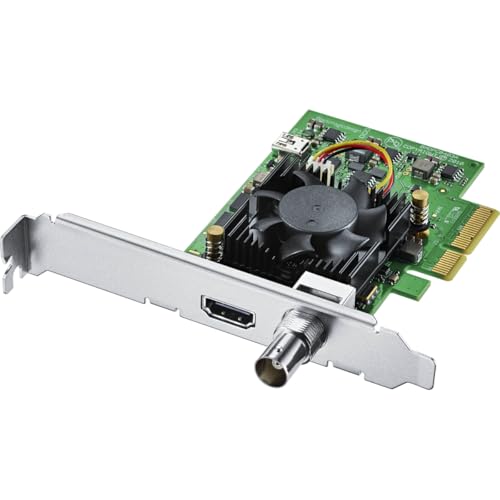
Blackmagic Design DeckLink Mini Recorder 4K
Best for: SDI-based 4K video capture workflows
- Capture Resolution
- 4K
- Host Interface
- Gen 2 PCIe Express 4 lane
- Video Interface
- HDMI 2.0a, SDI
- Color
- Black
- Dimensions
- 6 × 6 × 6 inches
- Weight
- 5.64 ounces
This PCIe capture card supports 4K UHD resolution via HDMI 2.0a and SDI inputs. It features a Gen 2 PCIe Express 4 lane interface and includes 16 channels of embedded SDI audio. The unit measures 6 inches on each side and weighs 5.64 ounces. It suits users who need professional SDI connectivity and high-bitrate 10-bit video capture for studio workflows.
- Supports 4K UHD capture resolution
- Includes 1x HDMI 2.0a connector
- Provides 16 channels of embedded SDI audio
- Compatible with 4, 8, and 16 lane PCIe slots
- Heavier build at 5.64 ounces compared to lighter alternatives
- Larger physical footprint with 6-inch dimensions
- Limited to 4K capture without 8K pass-through support
- You require SDI input for professional video sources
- You need 16 channels of embedded audio
- You are using a desktop PC with available PCIe slots
- You need 8K60 HDR pass-through capabilities
- You prefer HDMI-only connectivity without SDI
- You require a compact form factor smaller than 6 inches
Verdict: Blackmagic Design DeckLink Mini Recorder 4K PCIe is a robust solution for users who prioritize SDI connectivity and multi-channel audio over compact size or 8K support.

Elgato 4K Pro Internal Capture Card
Best for: 4K60 HDR capture with VRR
- Capture Resolution
- 4K60
- Passthrough Resolution
- 8K60
- Host Interface
- PCIe x4
- Video Interface
- HDMI 2.1
- HDR Support
- HDR10
- Features
- HDR, HDR10, VRR
This internal PCIe card captures 4K60 video with HDR10 support. It passes through 8K60 signals over HDMI 2.1, including VRR and ALLM for modern consoles. The compact design fits standard desktop towers. It works with Elgato Studio, 4K Capture Utility, and OBS. You get an 8K HDMI cable included. This unit suits Windows users needing high-resolution recording.
- Captures up to 4K60 with HDR10
- Passes through 8K60 and 4K144 signals
- Supports VRR and ALLM for consoles
- Includes 8K HDMI cable
- Limited to 4K60 capture resolution
- Requires internal PCIe x4 slot
- You need 4K60 capture with HDR10
- You want VRR passthrough for gaming
- You have an open PCIe slot
- You require external USB connectivity
- You need 4K120 or higher capture
- You use a laptop without expansion slots
Verdict: Elgato 4K Pro Capture Card delivers solid 4K60 recording with HDR10 and VRR support. It is a strong option for desktop gamers who need internal connectivity and high-quality passthrough.
Specifications side by side
| Spec | Blackmagic Design DeckLink Mini Recorder 4K | Elgato 4K Pro Internal Capture Card |
|---|---|---|
| Capture Resolution | – | 4K60 |
| Passthrough Resolution | – | 8K60 |
| Host Interface | Gen 2 PCIe Express 4 lane | PCIe x4 |
| Video Interface | HDMI 2.0a, SDI | HDMI 2.1 |
| HDR Support | – | HDR10 |
| Features | – | HDR, HDR10, VRR |
| Color | Black | Black |
| Resolution | 4K UHD | – |
| Platform | – | PC, Xbox, PS5, Xbox Series X/S |
| Compatible Platform | – | PlayStation 5, Nintendo Switch |
| Dimensions | 6 × 6 × 6 inches | 5 × 2 × 1 inches |
| Weight | 5.64 ounces | 4 ounces |
| Model | BDLKMINIREC4K | 10GBK9901 |
Frequently asked questions
What is the main difference between a 4K and a 4K60 capture card?
The primary difference is the maximum frame rate the device can record. A standard 4K capture card typically handles lower frame rates, while a 4K60 model records at 60 frames per second. This higher frame rate results in smoother motion for fast-paced gaming. You should choose a 4K60 card if you want fluid video for competitive titles.
Does the Blackmagic Design DeckLink Mini Recorder 4K support 4K60 capture?
No, this device is listed with a capture resolution of 4K, not 4K60. It is designed for standard 4K UHD workflows rather than high-frame-rate recording. It focuses on robust connectivity for professional setups. If you require 60 frames per second, this specific model may not meet your technical needs.
Is the Elgato 4K Pro Internal Capture Card suitable for PS5 recording?
Yes, the Elgato 4K Pro is compatible with the PlayStation 5. It supports 4K60 capture with HDR10 and VRR, which aligns with the console's output capabilities. The card connects via an internal PCIe interface. This setup allows you to capture high-quality gameplay directly from your console without external hardware bottlenecks.
What input types does the Blackmagic Design DeckLink Mini Recorder 4K use?
This capture card utilizes a PCIe host interface for connection to your computer. It features SDI connectivity, which is preferred for professional broadcast workflows. The device also includes HDMI support. This combination allows for flexible integration into studio environments that rely on SDI signals for video input.
Can the Elgato 4K Pro capture card handle Variable Refresh Rate?
Yes, the Elgato 4K Pro supports Variable Refresh Rate (VRR). This feature helps reduce screen tearing and stuttering during capture. It also includes HDR10 support for better color and contrast. These attributes make it a strong option for desktop gamers who want high-fidelity passthrough and recording from modern consoles.
Which capture card is better for SDI-based video workflows?
The Blackmagic Design DeckLink Mini Recorder 4K is the better choice for SDI workflows. It is explicitly designed for SDI-based video capture. This device supports multi-channel audio and offers robust connectivity for professional environments. It prioritizes stable, high-quality video input over compact size or 8K support.
What are the physical dimensions of the Elgato 4K Pro Internal Capture Card?
The Elgato 4K Pro measures 5 inches in length, 2 inches in width, and 1 inch in height. It weighs 4 ounces. These compact dimensions allow it to fit easily inside standard desktop computer cases. The internal PCIe design keeps your desk clutter-free compared to external USB solutions.
Does the Blackmagic Design DeckLink Mini Recorder 4K support 8K resolution?
No, the specifications for this device list a capture resolution of 4K UHD. It does not support 8K resolution. The device is optimized for 4K workflows with SDI connectivity. If you need to capture 8K video, you will need to look for a different model that explicitly lists 8K support.

